
The landscape of app software development continues to evolve rapidly, driven by changing user expectations, emerging technologies, and increasingly sophisticated security threats. Organizations today require applications that not only deliver exceptional functionality but also maintain robust security, scalability, and performance standards. Understanding the fundamental principles and best practices of app software development has become essential for businesses seeking to create competitive, reliable solutions that serve their users effectively while protecting sensitive data and maintaining operational integrity.
Understanding Modern App Software Development
App software encompasses a broad range of digital solutions designed to perform specific tasks or solve particular problems for users. These applications can run on various platforms, including desktop computers, mobile devices, web browsers, and cloud environments. The complexity of modern app software has increased dramatically, requiring developers to master multiple programming languages, frameworks, and architectural patterns.
Modern app software development emphasizes agility, collaboration, and continuous improvement. Development teams now leverage methodologies that prioritize iterative progress, rapid feedback loops, and seamless integration between different system components. The modern app development approach focuses on continuous integration and deployment practices that accelerate delivery timelines while maintaining quality standards.
The distinction between different types of app software has become increasingly blurred. Web applications now offer offline capabilities previously exclusive to native mobile apps, while desktop applications incorporate cloud connectivity that enables real-time synchronization across devices. This convergence demands that developers possess versatile skill sets and comprehensive understanding of multiple development paradigms.

Essential Architecture Considerations
The foundation of successful app software lies in thoughtful architectural decisions made during the planning phase. Architecture determines how different components interact, how data flows through the system, and how the application scales to accommodate growing user demands. Poor architectural choices early in development can create technical debt that becomes exponentially more expensive to address later.
Several architectural patterns have emerged as standards for different application types:
- Microservices Architecture – Divides applications into small, independent services that communicate through well-defined APIs, enabling teams to develop, deploy, and scale components independently
- Monolithic Architecture – Maintains all functionality within a single codebase, simplifying development for smaller applications but potentially creating scaling challenges
- Serverless Architecture – Leverages cloud provider infrastructure to execute code on-demand without managing servers, reducing operational overhead
- Event-Driven Architecture – Structures applications around events and asynchronous message passing, enhancing responsiveness and decoupling system components
- Layered Architecture – Organizes code into distinct layers (presentation, business logic, data access) that separate concerns and improve maintainability
The Twelve-Factor App methodology provides valuable guidance for building portable, resilient applications. This approach emphasizes declarative formats for setup automation, clean contracts with underlying operating systems, and suitability for deployment on modern cloud platforms. Following these principles helps development teams create app software that adapts gracefully to changing requirements and scales efficiently.
Selecting the appropriate architecture requires careful analysis of project requirements, team capabilities, and long-term maintenance considerations. Organizations must balance immediate development speed against future flexibility, considering factors like expected user load, data complexity, integration requirements, and available infrastructure resources.
Development Best Practices and Standards
Implementing consistent development practices throughout the software lifecycle significantly impacts application quality, maintainability, and team productivity. Established coding standards create a common language among team members, reducing cognitive overhead when reviewing or modifying code written by colleagues. Comprehensive development guidelines address coding standards, error handling, and maintainability requirements essential for professional app software.
Version control systems form the backbone of collaborative development efforts. Every code change should be tracked, attributed to specific developers, and associated with clear commit messages explaining the rationale behind modifications. Branching strategies enable parallel development streams, allowing teams to work on features, bug fixes, and experimental changes without disrupting stable code.
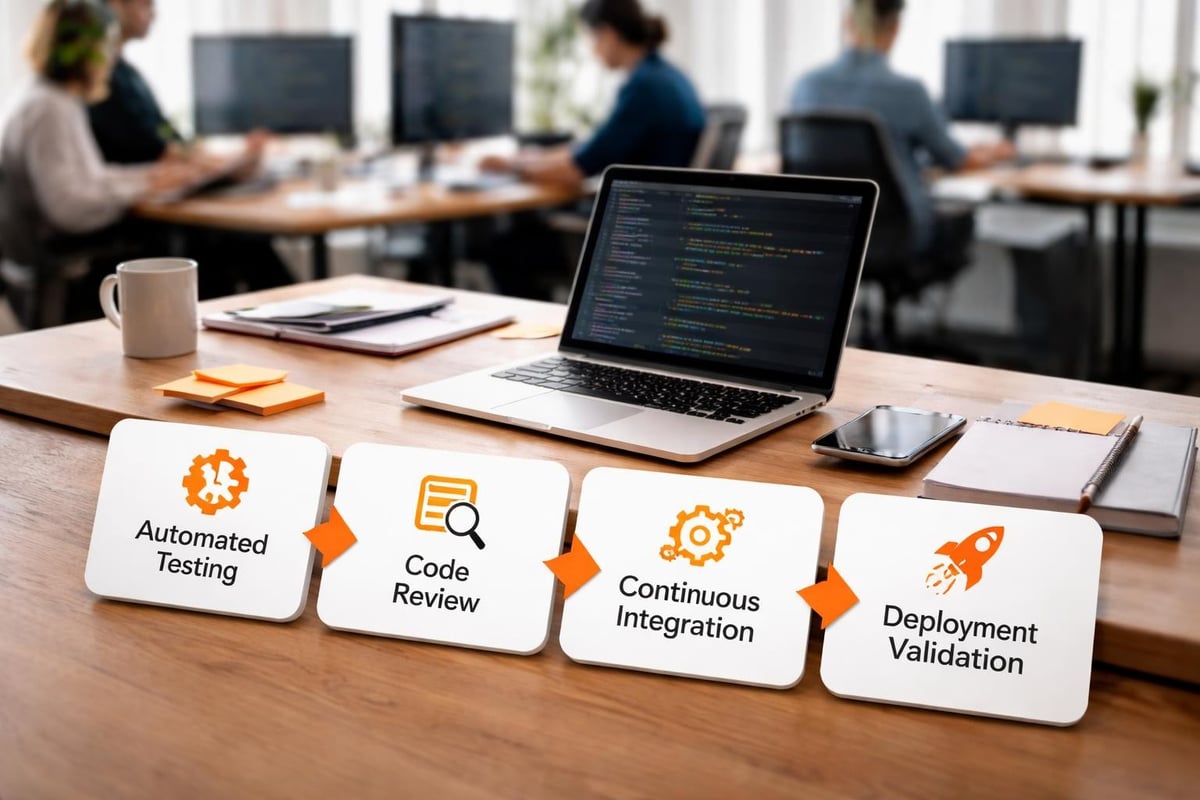
Code review processes catch defects early, spread knowledge across teams, and ensure adherence to established standards. Effective reviews focus on logic errors, security vulnerabilities, performance concerns, and architectural consistency rather than merely stylistic preferences. Automated code analysis tools supplement human review by identifying common issues, security patterns, and complexity metrics.
Testing represents a critical dimension of quality assurance:
- Unit Testing – Validates individual functions or methods in isolation, confirming they produce expected outputs for given inputs
- Integration Testing – Verifies that different modules work correctly when combined, catching interface mismatches and interaction errors
- System Testing – Evaluates complete application behavior against requirements, ensuring all components function cohesively
- Performance Testing – Measures application responsiveness, throughput, and resource utilization under various load conditions
- Security Testing – Identifies vulnerabilities, validates authentication mechanisms, and confirms data protection measures
- User Acceptance Testing – Confirms the application meets business requirements and satisfies end-user needs
- Regression Testing – Ensures new changes haven't inadvertently broken existing functionality
Documentation serves developers, maintainers, and end-users throughout the application lifecycle. Technical documentation explains architectural decisions, API specifications, database schemas, and deployment procedures. User documentation provides guides, tutorials, and reference materials that help people understand and effectively use the software.
Security Fundamentals for App Software
Security considerations must be integrated into every phase of app software development rather than treated as an afterthought. The expanding threat landscape, stringent regulatory requirements, and severe consequences of data breaches demand proactive security measures. Application security best practices encompass secure coding methods, API security, and comprehensive incident response planning.
Input validation represents the first line of defense against many common vulnerabilities. Applications must treat all user-supplied data as potentially malicious, applying strict validation rules before processing or storing information. Validation should occur on both client and server sides, as client-side checks can be bypassed by determined attackers.
Authentication and authorization mechanisms control who can access the application and what actions they can perform. Strong authentication requires multiple factors combining something users know (passwords), something they have (tokens or devices), and something they are (biometric data). Authorization logic must enforce the principle of least privilege, granting users only the minimum permissions necessary to accomplish their legitimate tasks.
Data protection extends beyond transmission security to encompass storage encryption, secure key management, and appropriate data retention policies:
| Security Layer | Implementation Approach | Primary Benefit |
|---|---|---|
| Transport Security | TLS/SSL encryption | Protects data during transmission |
| Storage Encryption | Database and file encryption | Secures data at rest |
| Application Security | Input validation, secure coding | Prevents code-level vulnerabilities |
| Network Security | Firewalls, segmentation | Controls access to resources |
| Identity Security | Multi-factor authentication | Verifies user legitimacy |
The secure mobile app development guidelines emphasize architecture considerations, secure data storage, and network communication requirements specific to mobile platforms. Mobile applications face unique challenges including device loss, insecure network connections, and malicious apps sharing device resources.
Regular security audits and penetration testing identify vulnerabilities before attackers can exploit them. Third-party security assessments provide objective evaluation of application defenses, while bug bounty programs leverage the broader security community to discover and responsibly disclose issues. Organizations should establish clear processes for receiving, triaging, and addressing security reports.
Dependency management has emerged as a critical security concern as modern app software relies heavily on third-party libraries and frameworks. Each dependency represents a potential attack vector, particularly when vulnerabilities are discovered in popular packages. Automated tools scan dependencies for known vulnerabilities, alerting teams to update affected components promptly.
Mobile Development Considerations
Mobile app software introduces distinct challenges related to diverse device capabilities, operating system fragmentation, limited screen real estate, and variable network conditions. Developers must optimize applications for touch interfaces, accommodate different screen sizes and resolutions, and manage battery consumption efficiently.
Platform-specific development allows applications to leverage native capabilities and deliver optimal performance. iOS development using Swift or Objective-C provides access to Apple's extensive frameworks and ensures consistent behavior across Apple devices. Android development using Kotlin or Java enables applications to reach the vast Android ecosystem while accommodating manufacturer-specific customizations.
Cross-platform frameworks offer the ability to share code across multiple platforms, reducing development time and maintenance burden. Technologies like React Native, Flutter, and Xamarin enable developers to write application logic once while delivering native-like experiences on both iOS and Android. However, these frameworks sometimes require platform-specific code for advanced features or optimal performance.
Mobile DevOps practices extend traditional DevOps principles to address mobile-specific challenges including app store distribution, device testing complexity, and over-the-air updates. Continuous integration pipelines for mobile apps must accommodate longer build times, extensive device testing matrices, and platform-specific approval processes.
Offline functionality has become increasingly important for mobile app software. Users expect applications to remain functional without constant network connectivity, requiring developers to implement local data storage, background synchronization, and conflict resolution strategies. Progressive enhancement approaches ensure core functionality works offline while advanced features activate when connectivity allows.
Push notifications enable applications to engage users even when not actively running, but must be implemented thoughtfully to avoid overwhelming or annoying users. Effective notification strategies provide genuine value, respect user preferences, and comply with platform guidelines governing notification content and frequency.
Performance Optimization Strategies
Application performance directly impacts user satisfaction, conversion rates, and operational costs. Even minor delays in response times can significantly reduce user engagement and revenue. Performance optimization requires attention throughout development rather than being relegated to the final stages of a project.
Frontend performance focuses on minimizing load times and ensuring responsive interfaces:
- Asset Optimization – Compress images, minify JavaScript and CSS files, and use appropriate file formats to reduce transfer sizes
- Lazy Loading – Defer loading non-critical resources until needed, prioritizing content visible to users
- Caching Strategies – Implement browser caching, service workers, and content delivery networks to reduce redundant data transfers
- Code Splitting – Divide application code into smaller bundles loaded on-demand rather than requiring users to download the entire application upfront
- Rendering Optimization – Minimize expensive DOM operations, use virtual scrolling for long lists, and optimize animation performance
Backend performance optimization addresses server-side processing, database queries, and API response times. Efficient database indexing dramatically improves query performance, while connection pooling reduces overhead associated with establishing database connections. Caching frequently accessed data at various levels (application cache, distributed cache, database query cache) prevents redundant computation and database queries.
Monitoring and profiling tools identify performance bottlenecks by measuring actual application behavior under real-world conditions. Application Performance Monitoring (APM) solutions track metrics like response times, error rates, and resource utilization across different application components. Profiling tools reveal which code paths consume the most CPU time or memory, directing optimization efforts toward areas with the greatest impact.
Load testing validates that applications perform acceptably under expected user volumes and identifies breaking points before they impact production users. Stress testing pushes applications beyond normal operating conditions to understand failure modes and recovery behavior. Performance baselines established early in development enable teams to detect regressions as new features are added.
Deployment and DevOps Integration
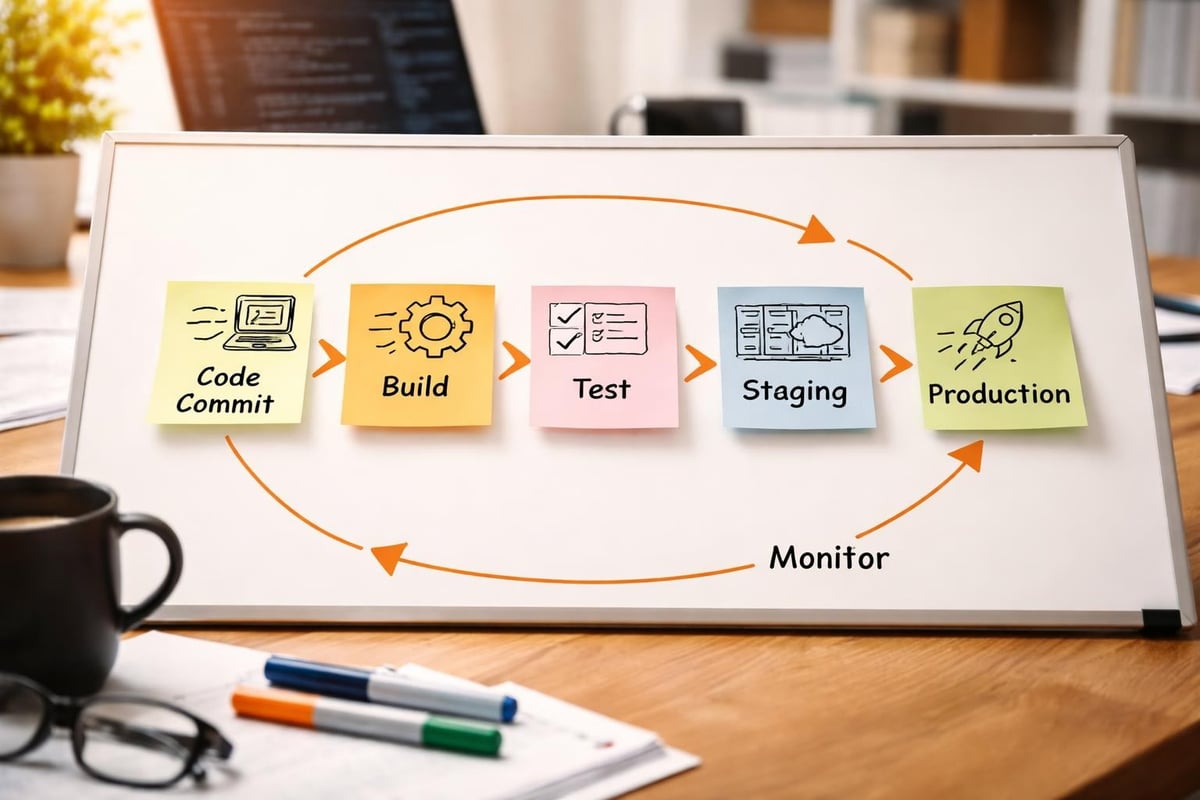
Modern app software deployment practices emphasize automation, reliability, and rapid delivery cycles. Continuous Integration and Continuous Deployment (CI/CD) pipelines automatically build, test, and deploy applications whenever code changes are committed. This automation reduces human error, accelerates delivery, and ensures consistent deployment processes.
Containerization technologies like Docker package applications with all their dependencies, creating portable units that run consistently across different environments. Container orchestration platforms like Kubernetes manage deployment, scaling, and operation of containerized applications across clusters of machines. These tools abstract away infrastructure complexity, enabling developers to focus on application logic rather than deployment mechanics.
Environment management requires maintaining separate development, testing, staging, and production environments that mirror each other as closely as possible. Configuration management tools ensure consistent environment setup, while infrastructure-as-code approaches define infrastructure through version-controlled files rather than manual processes.
Blue-green deployment strategies maintain two identical production environments, routing traffic to one while the other receives updates. After validating the updated environment, traffic switches over, providing instant rollback capability if issues arise. Canary deployments gradually shift traffic to new versions, monitoring for problems before completing the rollout.
Team Collaboration and Project Management
Successful app software development depends on effective collaboration among developers, designers, product managers, quality assurance specialists, and other stakeholders. Agile methodologies facilitate collaboration through regular communication, iterative development, and frequent feedback incorporation.
Sprint planning sessions define specific goals for upcoming development cycles, breaking down larger features into manageable tasks. Daily standup meetings keep team members synchronized on progress, blockers, and upcoming work. Retrospectives create opportunities to reflect on what worked well and identify process improvements.
Project management tools track work items, dependencies, and progress toward goals. Issue tracking systems maintain detailed records of bugs, feature requests, and technical debt. Documentation wikis centralize knowledge, reducing reliance on specific individuals and onboarding new team members more efficiently.
For organizations seeking to streamline service management alongside development workflows, comprehensive tools can make a significant difference. Managing equipment, scheduling maintenance, and documenting work with accuracy becomes far more efficient with structured systems. The Brytend Service Module enables teams to track assets through their complete lifecycle, monitoring service history, condition, warranty details, and upcoming maintenance tasks with clarity and precision.

Maintenance and Long-Term Support
Application maintenance consumes significant resources throughout the software lifecycle, often exceeding initial development costs over time. Proactive maintenance prevents small issues from escalating into major problems, while reactive maintenance addresses urgent bugs and security vulnerabilities as they arise.
Technical debt accumulates when expedient solutions are chosen over more sustainable approaches. Some technical debt is acceptable when delivering features quickly provides strategic advantages, but unchecked debt eventually slows development and increases defect rates. Regular refactoring sessions address technical debt systematically, improving code quality without adding new features.
Monitoring production applications provides visibility into real-world performance, error rates, and usage patterns. Log aggregation systems collect and analyze application logs, helping teams diagnose issues and understand user behavior. Error tracking tools automatically capture and group exceptions, prioritizing fixes based on impact and frequency.
Update strategies balance delivering new features against maintaining stability for existing users. Semantic versioning communicates the nature of changes (major breaking changes, minor feature additions, patch bug fixes) through version numbers. Deprecation policies give users advance notice before removing features or APIs, allowing time for migration.
Frequently Asked Questions
What is the difference between native and cross-platform app software?
Native app software is developed specifically for a single platform using platform-specific programming languages and tools, such as Swift for iOS or Kotlin for Android. This approach provides optimal performance and full access to device capabilities but requires separate codebases for each platform. Cross-platform app software uses frameworks that enable code sharing across multiple platforms, reducing development time and maintenance costs but sometimes requiring compromises on performance or platform-specific features.
How long does it typically take to develop custom app software?
Development timelines for app software vary significantly based on complexity, features, team size, and project scope. Simple applications with basic functionality might be completed in 2-3 months, while complex enterprise applications with extensive integrations, sophisticated features, and rigorous security requirements can take 6-12 months or longer. Agile development approaches enable teams to deliver functional increments earlier, allowing users to benefit from partial functionality while development continues.
What are the most important security considerations for app software in 2026?
Application security in 2026 requires comprehensive attention to data protection, authentication mechanisms, API security, and supply chain vulnerabilities. Organizations must implement encryption for data in transit and at rest, enforce strong multi-factor authentication, validate and sanitize all inputs, maintain secure coding practices, regularly update dependencies to address known vulnerabilities, and establish incident response procedures. Compliance with regulations like GDPR, CCPA, and industry-specific standards adds additional requirements that must be addressed throughout development.
How can businesses ensure their app software remains competitive over time?
Maintaining competitive app software requires ongoing investment in features, performance, security, and user experience improvements. Organizations should establish regular feedback channels with users, monitor industry trends and emerging technologies, maintain technical infrastructure through updates and refactoring, analyze usage data to identify optimization opportunities, and iterate based on changing user needs. Regular competitive analysis helps identify gaps and opportunities, while staying current with platform updates ensures applications continue functioning optimally.
What role does user experience play in app software success?
User experience fundamentally determines whether people continue using app software or abandon it for alternatives. Even applications with powerful functionality fail if users find them confusing, slow, or frustrating. Successful applications prioritize intuitive navigation, responsive performance, clear visual hierarchy, accessible design that accommodates users with disabilities, and helpful error messages. User research, usability testing, and iterative design refinement based on actual user feedback create applications that people genuinely enjoy using.
Should businesses build custom app software or use commercial solutions?
This decision depends on specific business requirements, available resources, and strategic priorities. Commercial off-the-shelf software offers faster deployment, lower upfront costs, and proven functionality but may require business process adaptation and provide limited customization. Custom app software provides tailored functionality, competitive differentiation, and complete control but requires larger initial investment and ongoing maintenance. Hybrid approaches combining commercial platforms with custom extensions often balance these tradeoffs effectively.
How does cloud computing impact app software development?
Cloud platforms have transformed app software development by providing scalable infrastructure, managed services, and global distribution capabilities without significant capital investment. Developers can leverage cloud databases, authentication services, storage solutions, and computing resources on-demand, focusing on application logic rather than infrastructure management. Cloud platforms enable rapid scaling to accommodate usage spikes, geographic distribution for improved performance, and built-in redundancy for higher availability. However, cloud adoption requires attention to cost management, vendor lock-in considerations, and data sovereignty requirements.
Building robust, secure, and performant app software requires careful attention to architecture, development practices, security fundamentals, and ongoing maintenance throughout the application lifecycle. Organizations that invest in quality development processes, comprehensive testing, and proactive security measures create applications that serve users effectively while protecting sensitive data and maintaining competitive advantages. When you need custom software solutions tailored specifically to your business requirements, Brytend brings experienced developers and comprehensive expertise across web, mobile, and cloud technologies to transform your vision into reliable, scalable applications that drive business success.