Business leaders face a common dilemma when existing software products fail to address their unique operational needs. Generic solutions often force companies to adapt their processes to fit predefined templates, limiting efficiency and competitive advantage. Custom software applications emerge as the strategic answer, offering businesses the flexibility to build systems that align precisely with their workflows, data structures, and growth objectives. Understanding the value proposition, development lifecycle, and long-term implications of tailored software becomes essential for organizations seeking sustainable digital transformation.
Understanding the Foundation of Custom Software Applications
Custom software applications represent purpose-built digital solutions designed specifically for an organization's unique requirements. Unlike commercial off-the-shelf (COTS) software that serves broad market segments, these applications address specific business challenges, workflows, and integration needs that generic products cannot accommodate. The fundamental nature of custom software revolves around creating tools that fit the business rather than forcing the business to conform to existing software constraints.
Organizations typically pursue custom development when they encounter several key indicators. 1. Existing solutions require extensive workarounds that reduce productivity and increase error rates. 2. Business processes contain proprietary methodologies that provide competitive differentiation. 3. Integration requirements between multiple systems exceed the capabilities of standard connectors. 4. Data security, compliance, or regulatory demands necessitate specialized handling mechanisms. 5. Scalability needs project growth patterns that commercial solutions cannot support cost-effectively.
The decision to invest in custom software applications stems from recognizing that technology should serve business strategy, not constrain it. When companies build their own solutions, they gain complete control over features, user experience, data management, and future enhancements. This autonomy proves particularly valuable in industries with specialized workflows or companies operating in niche markets where suitable commercial alternatives simply do not exist.
Mapping Business Needs to Technical Requirements
Translating business objectives into technical specifications represents the critical first phase of any custom software project. Stakeholders must articulate their pain points, desired outcomes, and success metrics with clarity and precision. This discovery process involves documenting current workflows, identifying inefficiencies, gathering user feedback, and establishing measurable goals that the new application must achieve.

Effective requirements documentation creates the blueprint for successful development. The process typically includes functional requirements that describe what the system must do, non-functional requirements that define performance standards and constraints, user stories that capture how different roles will interact with the application, technical constraints that acknowledge existing infrastructure limitations, and integration specifications that outline how the new system will communicate with current tools.
| Requirement Category | Focus Area | Example Criteria |
|---|---|---|
| Functional | Core features | Order processing, inventory tracking, reporting |
| Non-functional | Performance metrics | Response time under 2 seconds, 99.9% uptime |
| User Experience | Interface design | Mobile-responsive, accessibility compliance |
| Integration | System connectivity | Real-time data sync with ERP, CRM platforms |
| Security | Data protection | Role-based access, encryption, audit trails |
Many organizations partner with specialized development teams who bring technical expertise and industry experience to this planning phase. At Brytend, developers work closely with clients to ensure requirements capture both immediate needs and future scalability considerations, preventing costly redesigns as business demands evolve.
Development Approaches and Technology Selection
Choosing the right development methodology and technology stack significantly influences project success, timeline, and long-term maintainability. Custom software applications can be built using various approaches, each offering distinct advantages depending on project scope, budget, and urgency. The agile methodology has become predominant in custom development, emphasizing iterative progress, continuous feedback, and adaptive planning over rigid sequential phases.
Modern development teams typically evaluate technologies across several dimensions. 1. Programming languages and frameworks that match the application's performance requirements and development team expertise. 2. Database systems that support expected data volumes, query complexity, and scaling patterns. 3. Cloud platforms versus on-premise infrastructure based on security policies, cost models, and operational preferences. 4. Third-party services and APIs that can accelerate development by providing pre-built functionality for common features. 5. Development tools and environments that enhance team productivity and code quality.
The technology selection process must balance current capabilities with future flexibility. Emerging technologies like artificial intelligence, machine learning, and advanced analytics increasingly integrate into custom software applications, enabling predictive insights and automation that drive substantial business value. However, adopting cutting-edge technologies requires careful assessment of organizational readiness, data availability, and realistic return-on-investment projections.
Architecture Patterns That Enable Scale
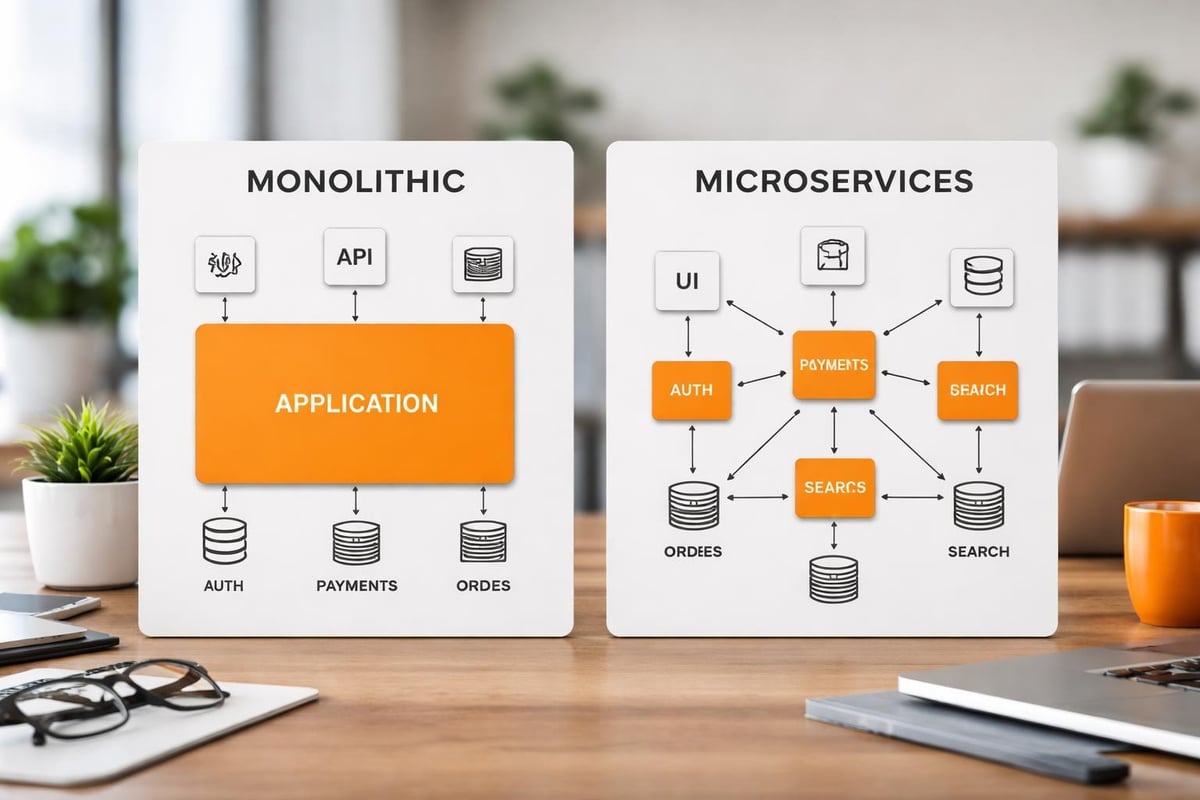
Software architecture defines how components interact, data flows through systems, and applications respond to increasing demand. Well-designed custom software applications employ proven architectural patterns that support maintainability, testability, and scalability. Microservices architecture has gained prominence for complex enterprise applications, breaking functionality into independent services that can be developed, deployed, and scaled separately.
Alternative architectural approaches serve different use cases effectively. Monolithic architecture consolidates all functionality into a single deployable unit, simplifying development for smaller applications with limited complexity. Service-oriented architecture (SOA) structures applications as collections of discrete services that communicate through standardized protocols. Event-driven architecture responds to real-time triggers, enabling responsive systems that react immediately to business events. Serverless computing eliminates infrastructure management, allowing developers to focus purely on application logic while cloud providers handle scaling automatically.
The choice between these patterns depends heavily on the specific requirements of your custom software applications. A customer relationship management system might benefit from microservices to independently scale marketing automation versus sales pipeline features, while a specialized calculation engine might perform optimally as a streamlined monolithic application with minimal external dependencies.
Integration Strategies for Enterprise Environments
Modern businesses operate using diverse software ecosystems where custom software applications must coexist and communicate with existing systems. Integration requirements frequently determine project complexity and development timelines. Organizations need their new applications to exchange data seamlessly with ERP systems, accounting software, marketing platforms, customer databases, and numerous other tools that support daily operations.
Enterprise integration presents several technical challenges that development teams must address. 1. Data format inconsistencies between systems requiring transformation and mapping logic. 2. Authentication and authorization mechanisms that vary across platforms. 3. Real-time synchronization needs versus batch processing capabilities. 4. Error handling and retry logic when external systems experience downtime. 5. Performance optimization to prevent integration bottlenecks from degrading user experience.
Building custom connector frameworks addresses many of these challenges by creating standardized interfaces that abstract the complexity of individual system connections. Application programming interfaces (APIs) have emerged as the preferred integration mechanism, offering structured methods for applications to request data, trigger actions, and receive responses in consistent formats.
API Design and Management Considerations
Creating robust APIs requires thoughtful design decisions that balance functionality, security, and developer experience. RESTful APIs dominate custom software applications due to their simplicity and widespread adoption, though GraphQL and other alternatives offer advantages for specific scenarios. Effective API design follows consistent naming conventions, provides comprehensive documentation, implements proper versioning to support backward compatibility, and includes rate limiting to prevent abuse.
Security considerations must permeate every aspect of API implementation. Authentication verifies the identity of systems or users making requests, authorization determines what actions authenticated parties can perform, encryption protects data during transmission, input validation prevents injection attacks and malformed requests, and audit logging tracks all API interactions for compliance and troubleshooting purposes.
Organizations developing custom software applications with extensive integration needs often implement API management platforms that provide centralized governance, monitoring, and analytics. These platforms track usage patterns, detect anomalies, enforce security policies, and provide developers with testing environments that facilitate faster integration without risking production systems.
User Experience Design for Custom Solutions
The success of custom software applications hinges not only on technical capabilities but equally on how effectively users can accomplish their tasks. User experience (UX) design transforms functional requirements into intuitive interfaces that minimize training requirements and maximize productivity. Unlike commercial software that targets broad audiences, custom applications can optimize every interaction for the specific workflows and preferences of their intended users.
Comprehensive UX design encompasses multiple interconnected disciplines. 1. User research that identifies pain points, mental models, and usage contexts through interviews and observation. 2. Information architecture that organizes content and features logically based on user priorities. 3. Interaction design that defines how users navigate, input data, and receive feedback. 4. Visual design that creates aesthetically pleasing interfaces aligned with brand guidelines. 5. Usability testing that validates design decisions with actual users before full implementation.
| UX Design Phase | Key Activities | Deliverables |
|---|---|---|
| Research | User interviews, workflow analysis | Personas, journey maps |
| Strategy | Information architecture, feature prioritization | Site maps, wireframes |
| Design | Interface mockups, interaction patterns | High-fidelity prototypes |
| Validation | Usability testing, feedback collection | Test reports, refinements |
| Implementation | Developer handoff, design system creation | Style guides, components |
Custom software applications excel when they eliminate unnecessary complexity and present only relevant options for each user role. Role-based interfaces display different dashboards, menus, and capabilities depending on whether someone works in sales, operations, finance, or management. This targeted approach reduces cognitive load and accelerates task completion compared to generic software cluttered with features most users never need.
Security and Compliance in Custom Development
Security vulnerabilities in custom software applications can expose organizations to data breaches, regulatory penalties, and reputational damage. Unlike commercial products that face continuous scrutiny from security researchers worldwide, custom applications require deliberate security practices throughout development and ongoing operations. The unique nature of each custom system means generic security tools may not provide adequate protection without customization.
Implementing comprehensive security requires addressing multiple layers of potential vulnerabilities. Application-level security prevents common attacks like SQL injection, cross-site scripting, and cross-site request forgery through input validation and output encoding. Network security restricts access using firewalls, virtual private networks, and intrusion detection systems. Data security employs encryption for data at rest and in transit, along with secure key management practices. Infrastructure security hardens servers, applies timely patches, and implements least-privilege access controls. Operational security establishes processes for incident response, security monitoring, and regular vulnerability assessments.
Compliance requirements vary dramatically across industries and jurisdictions, influencing how custom software applications handle data collection, storage, processing, and retention. Healthcare organizations must satisfy HIPAA regulations, financial institutions face stringent requirements under various banking laws, and companies operating in Europe must comply with GDPR provisions. Custom development allows precise implementation of compliance controls rather than relying on commercial software that may include unnecessary data collection or lack required audit capabilities.
Building Security Into the Development Lifecycle
Security cannot be an afterthought addressed only before deployment. DevSecOps practices integrate security considerations throughout the entire development process, from initial design through ongoing maintenance. Threat modeling during the planning phase identifies potential attack vectors and security requirements. Secure coding standards prevent common vulnerabilities from entering the codebase. Automated security testing catches issues during continuous integration pipelines. Penetration testing before launch validates that security controls function as intended.

Organizations developing sensitive custom software applications should implement several ongoing security practices. 1. Regular security audits conducted by independent experts who assess architecture and implementation. 2. Dependency management that monitors third-party libraries for known vulnerabilities and applies updates promptly. 3. Access reviews that verify user permissions remain appropriate as roles change. 4. Security awareness training for development teams covering emerging threats and secure coding techniques. 5. Incident response planning that defines procedures for detecting, containing, and recovering from security events.
For businesses requiring sophisticated data management with built-in security controls, specialized modules can provide pre-built compliance features. The Brytend CRM offers customer relationship management with configurable security settings, role-based access controls, and audit trails that support compliance requirements while maintaining the flexibility of custom software.

Testing Strategies That Ensure Quality
Quality assurance separates functional custom software applications from unreliable systems that frustrate users and disrupt operations. Comprehensive testing validates that applications perform correctly under normal conditions, handle edge cases gracefully, and recover from errors without data loss. Testing strategies must cover functional correctness, performance under load, security vulnerabilities, usability for intended audiences, and compatibility across devices and browsers.
Effective testing programs employ multiple complementary approaches. Unit testing verifies individual components in isolation, catching logic errors early when they cost least to fix. Integration testing confirms that components work together correctly as data flows between modules. System testing validates complete workflows end-to-end from the user perspective. Performance testing measures response times, throughput, and resource consumption under realistic and peak load conditions. Acceptance testing involves actual users confirming the application meets their requirements before deployment.
| Testing Type | Purpose | Typical Responsibility |
|---|---|---|
| Unit Testing | Verify individual functions | Development team |
| Integration Testing | Validate component interactions | Development team |
| System Testing | Check complete workflows | QA team |
| Performance Testing | Measure speed and scalability | QA/DevOps team |
| User Acceptance | Confirm business requirements | Business stakeholders |
| Security Testing | Identify vulnerabilities | Security specialists |
Automated testing frameworks allow teams to execute thousands of test cases rapidly, providing immediate feedback when code changes introduce regressions. Continuous integration systems run automated tests on every code commit, preventing defects from accumulating. However, automated testing cannot completely replace manual testing, particularly for evaluating user experience, visual design, and scenarios that require human judgment.
Deployment and DevOps Practices
Transitioning custom software applications from development environments to production requires careful planning and execution. Deployment strategies determine how updates reach users, how quickly teams can respond to issues, and what risks the organization accepts during releases. Modern DevOps practices automate deployment pipelines, reducing manual errors and enabling faster iteration cycles that keep applications aligned with evolving business needs.
Organizations employ various deployment patterns depending on their risk tolerance and technical capabilities. 1. Blue-green deployment maintains two identical production environments, switching traffic instantly while keeping the previous version available for quick rollback. 2. Canary releases gradually direct increasing traffic percentages to new versions, monitoring for issues before full rollout. 3. Rolling deployments update servers incrementally, maintaining partial availability throughout the process. 4. Feature flags enable deploying code to production while keeping new functionality disabled until teams activate it selectively. 5. Scheduled maintenance windows coordinate deployment during low-usage periods, accepting brief downtime to simplify processes.
Infrastructure as code (IaC) treats server configurations, network settings, and deployment scripts as version-controlled code rather than manual procedures. This approach ensures consistency across environments, enables rapid environment replication for testing, and provides complete audit trails of infrastructure changes. Cloud platforms particularly benefit from IaC, allowing teams to provision complete application stacks through automated scripts.
Monitoring and Maintenance for Long-Term Success
Deployment marks the beginning rather than the end of the custom software applications lifecycle. Ongoing monitoring detects performance degradation, identifies usage patterns, and alerts teams to errors before they impact significant user populations. Application performance monitoring (APM) tools track response times, database query performance, external API latencies, and resource utilization across infrastructure components.
Proactive maintenance prevents small issues from escalating into major problems. 1. Log aggregation centralizes error messages, user actions, and system events for analysis and troubleshooting. 2. Automated alerts notify teams immediately when critical metrics exceed thresholds or errors spike. 3. Performance optimization addresses bottlenecks identified through monitoring data. 4. Security patching applies updates to frameworks, libraries, and operating systems. 5. Capacity planning analyzes growth trends to ensure infrastructure scales ahead of demand.
User feedback collection through in-application surveys, support tickets, and usage analytics guides ongoing improvements. Custom software applications should evolve continuously based on how users actually work rather than initial assumptions made during development. Regular enhancement releases keep applications competitive and aligned with changing business processes, extending the investment value over many years.
Cost Considerations and ROI Analysis
Financial planning for custom software applications extends beyond initial development costs to encompass ongoing maintenance, hosting, support, and eventual modernization. Organizations must evaluate total cost of ownership (TCO) over the application's expected lifespan, comparing custom development against alternatives like commercial software licensing, low-code platforms, or continuing with manual processes. Accurate cost estimation requires understanding both obvious expenses and hidden factors that frequently exceed budget projections.
Development costs vary based on numerous project characteristics. 1. Application complexity measured by number of features, integrations, and business rules. 2. User interface sophistication including custom design versus template usage. 3. Platform requirements such as web-only versus native mobile applications. 4. Team composition balancing senior expertise against junior developers. 5. Project timeline with accelerated schedules increasing costs through expanded teams or overtime.
| Cost Category | Typical Range (Percentage of Total) | Key Drivers |
|---|---|---|
| Initial Development | 40-60% | Feature scope, complexity |
| Infrastructure | 10-20% | Hosting, databases, services |
| Maintenance | 15-25% | Bug fixes, minor enhancements |
| Major Updates | 10-20% | Feature additions, modernization |
| Training & Support | 5-10% | User onboarding, documentation |
Return on investment calculations must account for both cost savings and revenue opportunities that custom software applications enable. Efficiency gains from automating manual processes, reducing error rates, and accelerating workflows translate directly to labor cost reduction. Enhanced capabilities may support new service offerings, improved customer experiences that increase retention, or data insights that optimize business decisions. Intangible benefits like competitive differentiation and employee satisfaction also contribute value despite challenging quantification.
Choosing Between Build, Buy, and Hybrid Approaches
Not every business challenge requires fully custom software applications. Organizations should evaluate alternatives including purchasing commercial software, adopting software-as-a-service platforms, using low-code development tools, or implementing hybrid solutions that combine custom components with existing products. The optimal approach balances specific requirements, available budget, timeline constraints, and internal technical capabilities.
Commercial software makes sense when specific conditions exist. 1. Industry-standard processes where competitive advantage comes from execution rather than unique workflows. 2. Limited budget or timeline preventing custom development investment. 3. Rapidly evolving requirements where commercial vendors absorb the cost of continuous innovation. 4. Small user populations where per-seat licensing remains cost-effective compared to custom development. 5. Minimal integration needs allowing standalone operation without extensive connectivity.
Hybrid approaches increasingly offer practical middle ground, addressing unique requirements through custom development while leveraging commercial products for commodity functions. Organizations might build custom order management reflecting proprietary business rules while integrating commercial accounting software for general ledger and financial reporting. This strategy concentrates development investment where it delivers maximum differentiation while avoiding reinventing capabilities that commercial products handle adequately.
Low-code and no-code platforms democratize application development, enabling business users to create solutions without traditional programming. These tools excel for straightforward data collection, workflow automation, and reporting applications but struggle with complex business logic, sophisticated integrations, or high-performance requirements. Organizations should view low-code platforms as complementary to rather than replacing professional custom development, using each approach where it provides optimal value.
Custom software applications transform how organizations operate when thoughtfully designed, professionally developed, and continuously refined based on user needs and business evolution. The investment delivers lasting competitive advantages through precisely tailored functionality that commercial products cannot match. Brytend brings deep expertise across web development, mobile applications, cloud architecture, and ongoing support to guide businesses through every phase of custom software creation. Contact Brytend today to discuss how custom solutions can address your specific operational challenges and growth objectives.
FAQ
What is the typical timeline for developing custom software applications?
Development timelines vary significantly based on project scope and complexity. Simple applications with limited features might require three to six months from initial planning through deployment. Medium-complexity business applications typically need six to twelve months for complete development, testing, and launch. Large enterprise systems with extensive integrations and sophisticated functionality often require twelve to twenty-four months or more. Agile methodologies allow delivering functional releases incrementally rather than waiting for complete project completion, enabling businesses to begin realizing value sooner while development continues on additional features.
How do maintenance costs compare to initial development investment?
Annual maintenance costs typically range from fifteen to twenty-five percent of initial development expenses. These costs cover bug fixes, security updates, minor feature enhancements, infrastructure hosting, and technical support. Organizations should budget for occasional major updates every three to five years representing twenty to forty percent of original development costs to modernize technology stacks, redesign user interfaces, or add substantial new capabilities. Partnering with the original development team often reduces maintenance costs compared to transitioning to new vendors who must invest time understanding existing code and architecture.
Can custom software applications integrate with our existing business systems?
Modern development practices prioritize integration capabilities, enabling custom software to communicate with virtually any existing system through APIs, database connections, file exchanges, or middleware platforms. Integration complexity depends on the capabilities of existing systems, with modern cloud applications offering straightforward API access while legacy systems may require custom connector development. Successful integration projects begin with thorough discovery of existing system capabilities, data structures, and authentication requirements. Experienced development teams assess integration feasibility during planning phases and architect solutions that maximize data consistency while minimizing maintenance overhead.
How do we protect our investment if our development team becomes unavailable?
Professional development teams implement several practices that protect client investments beyond the engagement relationship. Comprehensive documentation covering architecture decisions, code structure, API specifications, and deployment procedures enables new teams to understand systems efficiently. Source code ownership transfers to clients along with repository access containing complete version history. Standardized technology choices using popular frameworks and languages maximize the available talent pool for future maintenance. Escrow arrangements can store critical code and documentation with third parties, accessible if the original development team ceases operations. Clear intellectual property agreements ensure clients retain full rights to developed applications.
What happens when our business processes change after deployment?
Custom software applications excel at adapting to evolving business requirements through planned enhancement cycles. Organizations should establish ongoing relationships with development teams who understand the application architecture and can efficiently implement changes. Modular design principles and well-documented code significantly reduce the cost and risk of modifications. Many businesses schedule quarterly or semi-annual enhancement releases to address accumulated change requests, balance new features against stability, and coordinate updates with business cycles. For urgent changes, experienced teams can deploy focused updates within days or weeks depending on complexity, ensuring software remains aligned with operational realities.
How do we ensure custom software remains secure as new threats emerge?
Ongoing security requires continuous monitoring, regular updates, and proactive threat assessment rather than one-time implementation efforts. Development teams should apply security patches to underlying frameworks, libraries, and infrastructure components as vendors release them, typically monthly or quarterly. Annual security audits by independent specialists identify new vulnerabilities introduced through feature additions or emerging attack techniques. Security monitoring tools detect unusual access patterns, failed authentication attempts, and suspicious activities that may indicate compromise. Maintaining relationships with development teams ensures expertise remains available to address security issues quickly when identified, minimizing exposure windows.
What differentiates professional custom development from freelance or offshore options?
Professional development teams provide structured processes, diverse expertise, and accountability that individual freelancers or unvetted offshore firms may lack. Established teams employ specialists across design, frontend development, backend engineering, database architecture, testing, and DevOps rather than generalists covering all areas with varying skill levels. Project management disciplines ensure consistent communication, milestone tracking, and quality standards throughout development. Legal protections through formal contracts, professional liability insurance, and intellectual property agreements reduce client risk. Long-term viability of established firms provides confidence they will remain available for maintenance and future enhancements, whereas individual contractors may become unavailable unexpectedly due to other commitments or personal circumstances.