
The tools you choose to build software determine far more than just how quickly your team writes code. Development software influences everything from security vulnerabilities that expose customer data to collaboration breakdowns that waste thousands of hours. Yet most organizations still piece together disconnected tools without understanding the compounding costs of poor integration, manual workarounds, and the constant context switching that destroys developer productivity. When teams rely on outdated or mismatched development software, they don't just slow down-they create technical debt that multiplies with every sprint, introduces compliance risks that put entire projects at risk, and lose visibility into what's actually happening across their codebase.
The Real Cost of Fragmented Development Tools
When teams cobble together multiple development software platforms without a cohesive strategy, they create invisible friction that compounds daily. Developers spend an average of three to four hours each week simply switching between tools, updating status in multiple systems, and manually synchronizing information that should flow automatically. This isn't just an inconvenience-it's a strategic liability that erodes your competitive advantage.
The financial impact extends well beyond wasted time. Each additional tool in your stack introduces new security vulnerabilities, requires separate licensing and maintenance, and demands ongoing training. Organizations frequently discover they're paying for overlapping features across five or six platforms when a more integrated development software approach would cost less and deliver better outcomes. The hidden expenses appear in bug tracking that doesn't connect to version control, deployment pipelines that can't trigger automated tests, and monitoring systems that operate in isolation from your incident response workflow.

Integration failures create cascading problems that most teams don't recognize until they're already losing customers. When your development software doesn't communicate effectively, critical information falls through the gaps. A security patch might get deployed to staging but never make it to production because the deployment pipeline doesn't sync with your task management system. A performance regression might persist for weeks because your monitoring tools don't automatically create tickets in your bug tracker. These aren't hypothetical scenarios-they represent the daily reality for teams using poorly integrated development software.
Version Control Systems That Create More Problems Than They Solve
Many organizations treat version control as a solved problem, assuming any development software that tracks code changes is sufficient. This perspective ignores the sophisticated ways that modern version control systems should support code review, branch management, and collaborative development. Teams using basic or outdated version control often struggle with merge conflicts that consume entire afternoons, unclear commit histories that make debugging impossible, and branching strategies that create more confusion than clarity.
The risk escalates when version control becomes a bottleneck rather than an enabler. Developers waiting for code reviews that get lost in notification overload, pull requests that languish for days without feedback, and merge conflicts that require senior developers to untangle-these patterns signal that your development software isn't supporting the collaborative workflows that modern software development requires. According to research on software development expertise, the ability to navigate complex codebases and collaborate effectively represents a critical skill that your tools should enhance, not hinder.
Poor version control practices also expose organizations to serious compliance and audit risks. When you can't reliably trace which code changes went into each release, demonstrate who reviewed critical security updates, or prove that your deployment process follows required approval workflows, you're not just creating technical problems-you're opening legal and regulatory vulnerabilities that could threaten entire projects.
Testing Gaps That Silently Destroy Quality
Development software for testing represents one of the most commonly neglected aspects of the toolchain, yet inadequate test coverage creates the most expensive failures. Organizations frequently invest heavily in development environments and deployment automation while treating testing as an afterthought. This imbalance produces predictable consequences: bugs that reach production, customer-facing failures that damage reputation, and emergency fixes that disrupt planned work and force teams into reactive firefighting mode.
The challenge extends beyond simply running tests. Modern development software needs to make testing integral to the development workflow, not a separate phase that happens after coding is "complete." When testing tools operate in isolation, developers write code without immediate feedback about whether it works correctly, how it performs under load, or whether it introduces security vulnerabilities. By the time problems surface, the original context has evaporated, making fixes exponentially more difficult and time-consuming.
Manual testing compounds these problems in ways that aren't immediately obvious. When quality assurance requires human effort to execute the same test scenarios repeatedly, you're not just wasting time-you're guaranteeing inconsistent results. Human testers miss edge cases, skip steps when rushed, and struggle to replicate complex scenarios involving multiple systems. Your development software should eliminate these variables through comprehensive automation, but many organizations still rely on manual processes that introduce unpredictability into every release.
| Testing Approach | Time per Release | Defects Caught | Coverage Consistency | Compliance Documentation |
|---|---|---|---|---|
| Manual Testing Only | 8-12 hours | 60-70% | Highly Variable | Incomplete |
| Basic Automation | 2-4 hours | 75-85% | Moderately Consistent | Partial |
| Integrated Test Suite | 15-30 minutes | 90-95% | Highly Consistent | Complete |
| Continuous Testing | Real-time | 95%+ | Fully Consistent | Automated |
The consequences of inadequate testing surface in production incidents that could have been prevented. When customers discover bugs before your team does, you've already lost credibility that's difficult to rebuild. The financial impact includes not just the direct cost of emergency fixes and customer support, but also the opportunity cost of development time diverted from planned features to urgent repairs.
Deployment Risks That Multiply Without the Right Development Software
Deployment represents the moment when all previous development work either delivers value or creates chaos. Yet many teams still treat deployment as a manual, high-risk event rather than an automated, predictable process. Development software that doesn't support reliable, repeatable deployments forces organizations into a position where every release carries significant risk-the kind of risk that makes teams hesitant to deploy necessary security patches or critical bug fixes because the deployment process itself might cause more problems than it solves.
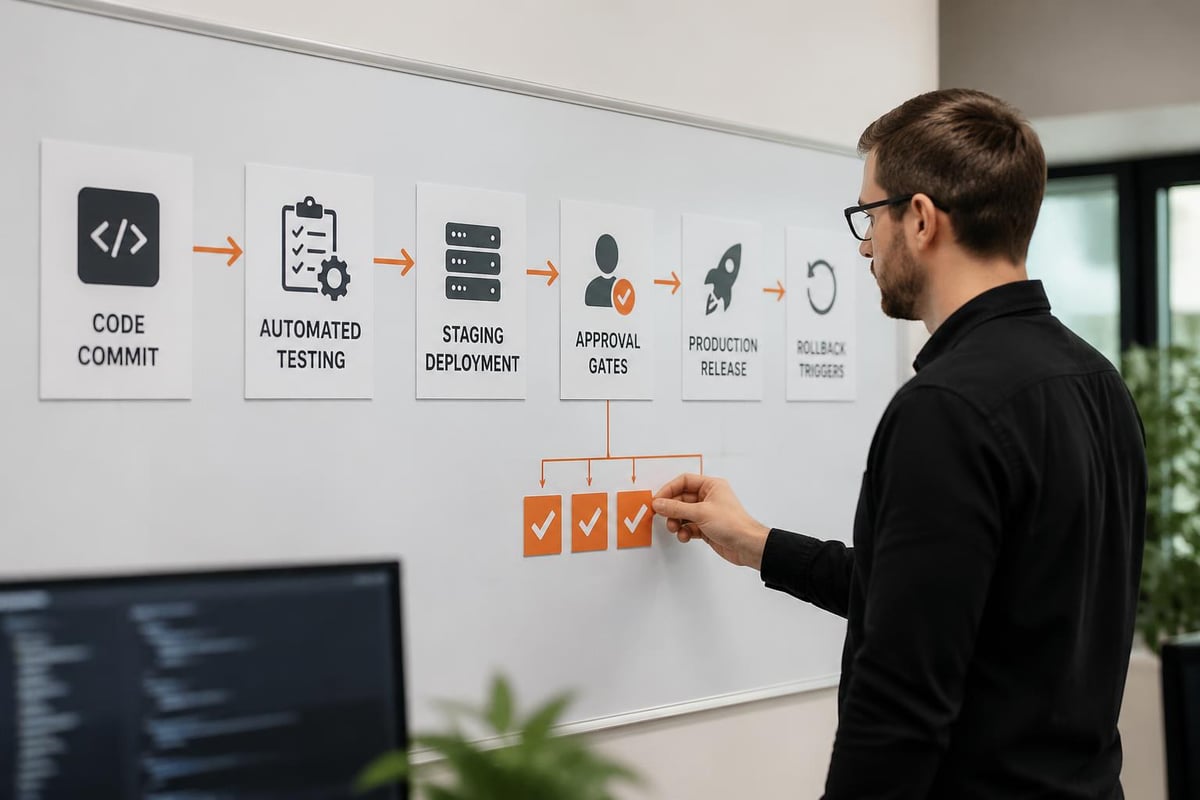
The manual deployment trap creates several compounding problems simultaneously. First, deployments become infrequent because they're painful, which means each release contains more changes and carries more risk. Second, the manual steps required create opportunities for human error-configuration mistakes, forgotten environment variables, incorrect deployment sequences-that can take entire systems offline. Third, when deployments fail, teams lack the automated rollback mechanisms that would quickly restore service, extending downtime and multiplying customer impact.
Organizations often discover too late that their deployment approach violates compliance requirements. Secure development practices emphasize the importance of documented, repeatable processes that can demonstrate appropriate controls and separation of duties. When your development software doesn't automatically log who deployed what code, when they deployed it, and what approvals were obtained, you're creating compliance gaps that auditors will eventually discover.
Environment Configuration That Creates Unpredictable Behavior
The classic "works on my machine" problem stems directly from development software that doesn't enforce environment consistency. When local development environments diverge from staging and production, teams waste extraordinary amounts of time debugging issues that only occur in specific contexts. Developers make assumptions based on their local setup, write code that depends on specific libraries or configurations, and then watch as that same code fails mysteriously when deployed to other environments.
Configuration drift represents a particularly insidious form of this problem. Even when environments start identical, they gradually diverge as developers install packages, modify settings, and make undocumented changes. Your development software should prevent this drift through infrastructure as code, containerization, and automated environment provisioning-but many teams still manage environments through manual processes and tribal knowledge that exists only in the heads of senior developers.
The security implications of inconsistent environments extend far beyond deployment failures. When you can't reliably replicate production environments for security testing, you can't accurately assess vulnerability risks. When development databases contain production data because your development software doesn't provide realistic test data generation, you're exposing sensitive information inappropriately. When configuration secrets get committed to version control because your environment management doesn't support proper secrets handling, you're creating security breaches waiting to happen.
Monitoring Blind Spots That Hide Critical Issues
Even organizations with sophisticated development software often overlook the importance of comprehensive monitoring and observability. The gap between deployment and incident detection represents lost revenue, damaged customer relationships, and unnecessary support burden. When your first notification of a production problem comes from an angry customer rather than your monitoring system, you've already failed in ways that are difficult to recover from.
The challenge isn't just detecting that something went wrong-it's understanding why it went wrong and how to fix it. Development software for monitoring needs to provide context that connects symptoms to root causes, shows the relationship between different system components, and enables developers to quickly identify whether a problem stems from recent code changes, infrastructure issues, or external dependencies. Without this context, teams resort to time-consuming trial and error, deploying speculative fixes that might address symptoms without solving underlying problems.
Inadequate monitoring also prevents teams from learning and improving. When you can't measure performance over time, identify patterns in system behavior, or correlate code changes with performance impacts, you're flying blind. Your development software should capture detailed telemetry that enables data-driven decisions about optimization priorities, capacity planning, and architectural evolution. Teams that lack this visibility make decisions based on hunches and assumptions rather than evidence.
| Monitoring Capability | Detection Time | Root Cause Clarity | Prevention Insight | Historical Analysis |
|---|---|---|---|---|
| Basic Uptime Checks | 5-15 minutes | Poor | None | Limited |
| Application Monitoring | 1-5 minutes | Moderate | Basic | Moderate |
| Full Observability | Real-time | High | Comprehensive | Detailed |
| Predictive Analytics | Pre-failure | Very High | Proactive | Deep |
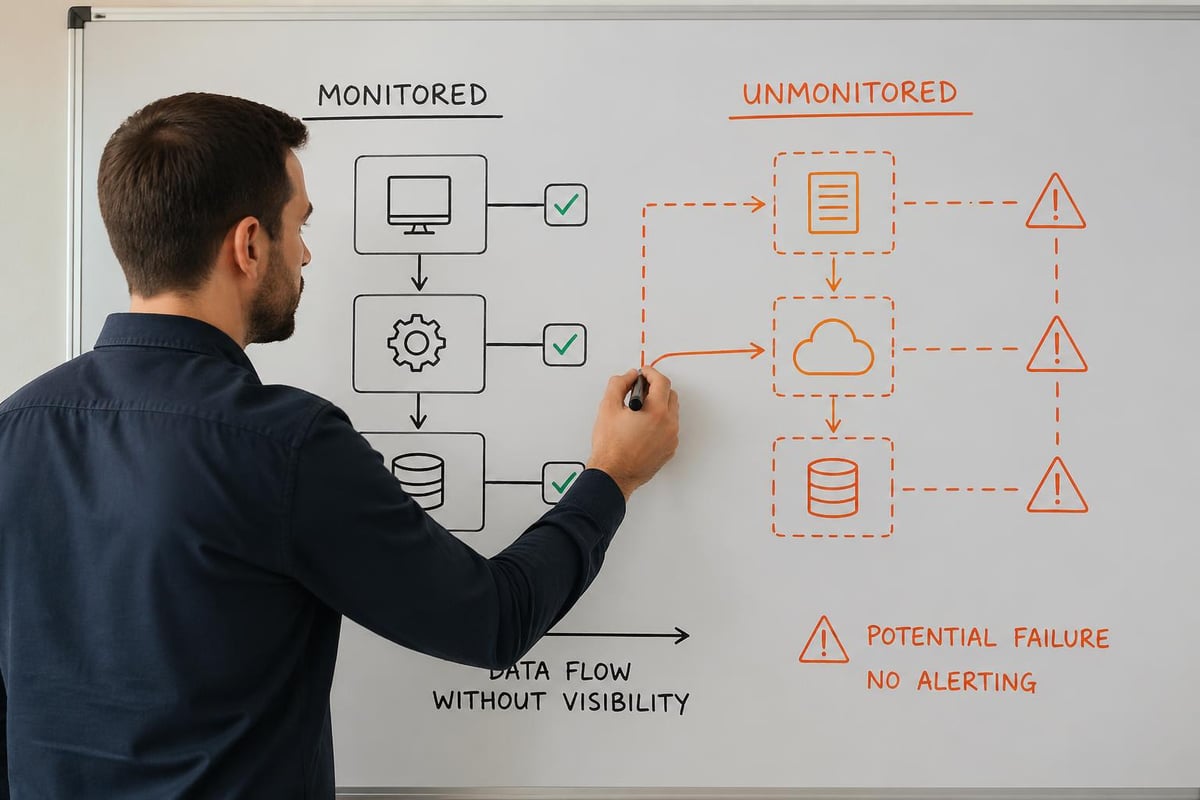
Performance degradation often happens gradually enough that teams don't notice until customer complaints force investigation. Response times that slowly creep upward, database queries that incrementally slow down, memory leaks that accumulate over days-these patterns remain invisible without proper monitoring integrated into your development software. By the time the problem becomes obvious, you're already losing customers to competitors with more responsive systems.
Collaboration Breakdowns That Development Software Should Prevent
Modern software development requires constant collaboration between developers, designers, product managers, quality assurance teams, and operations staff. When development software doesn't facilitate this collaboration, organizations create artificial barriers that slow decision-making, duplicate effort, and produce misaligned results. The developer who doesn't understand the business context behind a feature request, the designer whose mockups don't account for technical constraints, the product manager who can't track implementation progress-these disconnects stem directly from inadequate collaboration support in development software.
Communication gaps create particularly expensive mistakes when they involve architectural decisions. Research on how developers search for architectural information reveals that developers often struggle to obtain relevant context about system design, leading to implementations that conflict with established patterns or introduce unnecessary complexity. Your development software should make architectural knowledge accessible and current, not buried in outdated documentation or available only through lengthy meetings with senior architects.
The transition to distributed teams amplifies collaboration challenges that inadequate development software creates. When team members work across different time zones, asynchronous communication becomes essential. Development software that requires real-time interaction for code reviews, deployment approvals, or design discussions creates bottlenecks that delay projects unnecessarily. Tools that support asynchronous workflows while maintaining clear context and decision trails enable distributed teams to move quickly without sacrificing quality or alignment.
Documentation Debt That Compounds Over Time
Documentation represents one of the most commonly neglected aspects of development software workflows, yet the absence of current, accurate documentation creates mounting costs. Developers spend hours deciphering undocumented code, onboarding new team members takes weeks instead of days, and critical system knowledge exists only in the memories of individual developers who might leave the organization at any time. This knowledge management failure doesn't result from developer laziness-it stems from development software that treats documentation as separate from the coding workflow.
When documentation lives outside your development software, it immediately becomes outdated. Code changes, but the corresponding documentation remains static because updating it requires separate effort in a different tool. This divergence means teams quickly stop trusting documentation entirely, defaulting to reading code directly or asking questions that interrupt other developers. The solution requires development software that makes documentation intrinsic to development, automatically updating certain types of documentation based on code changes and integrating documentation review into the same workflows used for code review.
The compliance implications of poor documentation create serious risks that many organizations underestimate. When auditors or regulators ask you to demonstrate how your software handles sensitive data, complies with specific requirements, or implements security controls, you need comprehensive documentation that accurately reflects your current implementation. Development software that doesn't support this documentation creates gaps that can result in failed audits, regulatory penalties, or lost certifications that your business depends on.
Security Vulnerabilities Hidden in Plain Sight
Development software plays a critical role in preventing security vulnerabilities from reaching production, yet many tools provide inadequate security analysis. Dependency vulnerabilities represent a particularly common problem-when your code relies on third-party libraries with known security flaws, you've introduced risk that could expose customer data or enable system compromise. Without development software that continuously monitors dependencies and alerts teams to new vulnerabilities, these risks accumulate silently until they're exploited.
The challenge extends beyond known vulnerabilities to include coding patterns that create security weaknesses. SQL injection vulnerabilities, cross-site scripting flaws, insecure authentication implementations-these problems result from developers making mistakes that security-aware development software should catch automatically. Static analysis tools that review code for security anti-patterns, dynamic testing that attempts common attacks, and security-focused code review processes should all integrate seamlessly into your development software workflow.
Open-source software development introduces specific security considerations that organizations often overlook. While open-source components offer tremendous value, they also require careful vetting and ongoing monitoring. Your development software should help teams assess the security posture of open-source dependencies, track which components are used where, and respond quickly when vulnerabilities are disclosed. Teams that treat open-source components as black boxes that "just work" create security exposures that attackers actively exploit.
For organizations looking to create more structured inspection and compliance processes around their development workflows, purpose-built tools can help formalize what might otherwise remain informal or inconsistent. Brytend Survey Module enables teams to design customized forms and checklists for code reviews, security assessments, and compliance verification, ensuring that critical validation steps happen consistently across every release cycle.

Security testing that happens only before major releases misses the continuous stream of code changes flowing through modern development pipelines. Development software needs to integrate security analysis into every commit, every pull request, and every deployment. This continuous security validation catches problems early when they're cheap to fix, rather than discovering them after they've been in production for months and affected thousands of customers.
The Integration Challenge That Nobody Talks About
Organizations rarely use just one piece of development software-most teams work with ten, fifteen, or twenty different tools that each serve specific purposes. The integration between these tools determines whether you have a cohesive development platform or a fragmented collection of disconnected systems. Poor integration manifests in developers manually copying information between systems, status updates that require checking multiple dashboards, and critical alerts that get lost because notification systems don't connect properly.
API availability doesn't guarantee effective integration. Even when tools offer APIs that theoretically enable connection, the practical work of building and maintaining these integrations often falls to already-overworked developers who create fragile, custom solutions that break whenever either system updates. Your development software selection should prioritize platforms that offer native integration with the other tools in your stack, reducing the maintenance burden and improving reliability.
The data synchronization challenges created by poor integration lead to decisions based on incomplete or outdated information. When your project management system doesn't reflect the actual state of code in version control, product managers make promises based on obsolete assumptions. When your monitoring system doesn't connect to your incident management process, critical alerts don't create tickets automatically, and problems remain unaddressed. These integration gaps create organizational dysfunction that no amount of process improvement can overcome-the underlying tools must work together coherently.
| Integration Approach | Setup Time | Maintenance Burden | Data Accuracy | Failure Recovery |
|---|---|---|---|---|
| Manual Processes | Minimal | Very High | Poor | Manual |
| Custom Scripts | High | High | Moderate | Fragile |
| API Integrations | Moderate | Moderate | Good | Requires Coding |
| Native Platforms | Low | Low | Excellent | Automatic |
Platform decisions that seem tactical often carry strategic weight that organizations don't recognize until much later. The development software you choose today shapes your technical capabilities for years to come. Migration costs-not just financial but also in terms of disruption, retraining, and process changes-make switching platforms extraordinarily difficult once teams have built workflows around specific tools. This inertia means that poor initial choices create lasting consequences that compound over time.
Frequently Asked Questions
What factors should influence development software selection beyond feature lists?
Integration capability with existing tools represents the most undervalued selection criterion. Development software that offers impressive features in isolation but doesn't connect effectively with your version control, project management, or deployment systems will create more problems than it solves. Evaluate how each platform handles data export, supports API access, and provides native integrations with other tools your team already depends on. The total cost of ownership includes not just licensing fees but also integration development time, ongoing maintenance effort, and the productivity impact of context switching between disconnected tools.
How can teams measure whether their current development software delivers adequate value?
Track the time developers spend on tool-related overhead rather than actual coding. Conduct anonymous surveys asking developers to identify their biggest workflow frustrations, time-consuming manual processes, and tools they actively avoid using. Monitor metrics like deployment frequency, time to resolve incidents, and code review cycle time-deteriorating trends often indicate that your development software isn't supporting efficient workflows. Calculate the percentage of development time spent on rework caused by late-stage bug discovery, deployment failures, or integration problems. When these percentages remain stubbornly high despite process improvements, the underlying tooling likely needs reevaluation.
What security risks do inadequate development tools create that organizations commonly miss?
Insufficient access controls allow developers to access production systems or data they shouldn't touch, creating insider risk and compliance violations. Lack of audit logging makes it impossible to trace who made specific code changes, deployed particular releases, or accessed sensitive environments. Dependency management gaps mean teams don't receive alerts about newly discovered vulnerabilities in third-party libraries. Environment inconsistencies between development and production hide security flaws that only surface after deployment. Secret management failures result in credentials committed to version control where they remain visible in repository history even after deletion.
How does poor development software impact new developer onboarding and productivity?
Complex, poorly documented toolchains extend onboarding from days to weeks as new developers struggle to configure local environments, understand fragmented workflows, and learn multiple disconnected systems. Productivity remains below potential for months because developers can't easily discover coding standards, architectural patterns, or the location of relevant documentation. The cognitive overhead of switching between numerous tools reduces focus and increases the time required to accomplish simple tasks. Senior developers spend excessive time answering questions that should be addressed through self-service resources integrated into development software. High-friction workflows create frustration that contributes to early-career turnover.
What role should development software play in regulatory compliance and audit readiness?
Automated audit trails that capture who changed what code, when they deployed it, and what approvals were obtained create the documentation foundation that compliance requires. Policy enforcement mechanisms that prevent deployments without required security scans, code reviews, or approval workflows ensure that compliance processes actually happen rather than depending on developer discipline. Traceability features that connect requirements to code changes to test results to deployed releases demonstrate that your development process follows required controls. Configuration management that maintains consistent environments and prevents unauthorized changes addresses separation-of-duties requirements. Regular compliance reporting generated automatically from development software data eliminates manual documentation efforts while improving accuracy.
How do organizations balance developer tool preferences against standardization needs?
Allow flexibility in individual productivity tools like text editors or terminal applications while standardizing on core collaborative development software for version control, code review, testing, and deployment. Document clear criteria for when new tools can be introduced-focusing on integration capability, security review outcomes, and whether the tool addresses genuine gaps rather than duplicating existing functionality. Create a lightweight evaluation process that lets developers propose new tools with business justification while preventing the proliferation of redundant platforms. Regularly review your tool stack to identify underutilized platforms that should be eliminated, overlapping functionality that should be consolidated, and capability gaps that require new solutions.
What metrics indicate that development software complexity has exceeded reasonable limits?
When new developers require more than two days to configure their local development environment, complexity has become problematic. If your team maintains more than fifteen distinct development tools that require separate authentication and learning, consolidation opportunities likely exist. When integration maintenance consumes more than five percent of development capacity, the tool ecosystem has become too fragmented. If deployment processes require more than ten manual steps or take longer than thirty minutes from initiation to completion, automation gaps need attention. When developers routinely work around official tools using informal alternatives because the sanctioned platforms create too much friction, your development software stack requires reevaluation.
Selecting the right development software determines whether your team builds quality products efficiently or struggles with preventable failures and mounting technical debt. The hidden costs of fragmented tools, inadequate security analysis, and poor collaboration support compound over time, creating organizational dysfunction that process improvements alone cannot solve. Brytend specializes in creating custom software solutions that address your specific development challenges, integrating the capabilities you need into cohesive platforms that support efficient, secure workflows rather than creating new sources of friction.