
Every software development company faces the same invisible problem: their lead form either captures too much or reveals too little. When a potential client fills out your contact form, you're making a critical trade-off between gathering enough information to qualify them properly and creating so much friction that they abandon the process entirely. This single touchpoint determines whether your sales team spends their time on qualified prospects who need custom solutions or chases inquiries from people looking for twenty-dollar WordPress plugins. The difference between these outcomes isn't just about conversion rates. It's about whether your business operates efficiently or burns resources on conversations that were never going to close.
The Hidden Cost of Generic Contact Forms
Most software development firms start with a basic contact form: name, email, phone number, and a message box. This approach feels safe because it minimizes barriers to entry. Yet this strategy creates a different problem that manifests weeks later when your sales team realizes they've been responding to inquiries from prospects who lack budget, authority, or genuine need for custom development.
The economic impact extends beyond wasted sales calls. When unqualified leads enter your pipeline, they distort your metrics. Your conversion rates appear lower than they actually are for qualified prospects. Your sales cycle seems longer because you're averaging serious buyers with casual researchers. Your team becomes demoralized by rejection rates that don't reflect the quality of your work, but rather the quality of your lead qualification process.
Manual follow-up compounds the problem. Someone needs to send that first response email, schedule a discovery call, prepare for the meeting, and eventually realize the prospect thought custom software meant customizing a SaaS product's dashboard. Each of these steps consumes time that could have been redirected toward prospects who understand what custom development entails and have allocated budget accordingly.

Progressive Disclosure and Multi-Step Form Architecture
A single-page form with fifteen fields triggers immediate abandonment. The psychological weight of seeing all those empty boxes creates resistance before the prospect even reads the first question. Yet you need those fifteen data points to determine whether this inquiry represents a qualified opportunity or someone exploring options without commitment.
Progressive disclosure solves this tension by breaking the form into logical stages. The first screen asks for basic information: what type of software they need, what problem they're trying to solve. This feels manageable. The second screen goes deeper: timeline, approximate budget range, decision-making authority. By this point, they've invested effort and are more likely to continue. The third screen captures contact details and specific technical requirements.
This architecture does more than improve completion rates. It creates natural filtering. Prospects who aren't serious about custom development rarely make it past the second screen when confronted with budget questions. Those who do proceed have essentially qualified themselves by demonstrating willingness to share sensitive information. Your sales team receives fewer total leads, but the leads they receive have already passed through multiple commitment gates.
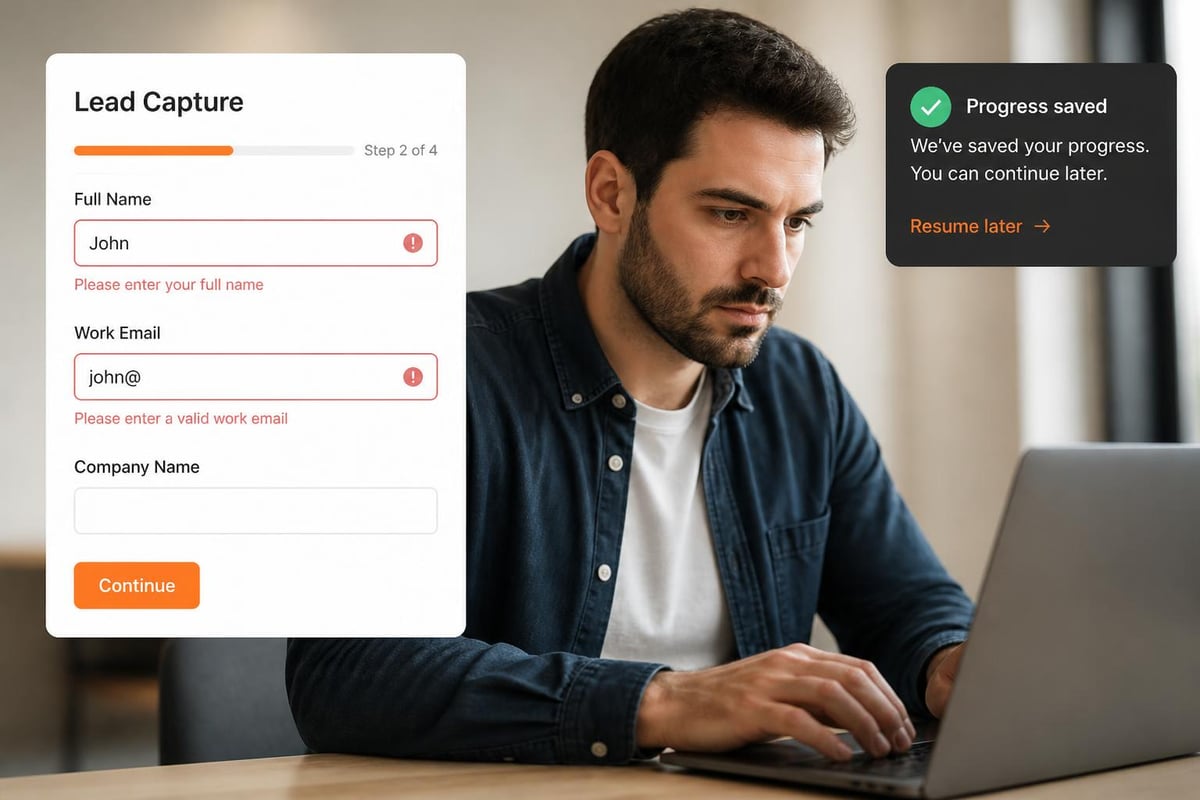
The technical implementation matters significantly. If your form saves progress, prospects can return later to complete it. If it doesn't, abandonment at step two means you've captured nothing. Similarly, field validation needs to happen in real-time. Discovering that someone entered an invalid email address only after they've completed all three steps creates frustration that undoes the goodwill you've built through thoughtful form design.
Strategic Field Selection and Data Capture Priorities
Every field you add to your lead form serves one of three purposes: qualification, personalization, or administration. Qualification fields determine whether this prospect fits your ideal client profile. Personalization fields enable customized follow-up. Administrative fields facilitate internal routing and record-keeping. Understanding which category each field serves helps you make rational decisions about what to include.
Budget range is a qualification field that many software development companies avoid because they fear scaring away prospects. This fear is misguided. Prospects without budget aren't leads; they're research subjects gathering information for future reference. Asking about budget doesn't eliminate qualified prospects. It eliminates unqualified ones before they consume sales resources. The phrasing matters: "What budget range have you allocated for this project?" performs better than "How much can you spend?" because it assumes they've already made a financial commitment.
Industry vertical operates as both a qualification and personalization field. If your team specializes in healthcare software, prospects from that sector represent better fits than those from retail or manufacturing. Capturing this information upfront allows you to route the inquiry to team members with relevant expertise and reference appropriate case studies in your follow-up communication. This early specialization increases close rates because prospects perceive you as domain experts rather than generalists.
Timeline fields reveal urgency and realistic expectations. A prospect who needs custom software delivered in three weeks either misunderstands what custom development entails or has unrealistic expectations that will make them difficult to satisfy. One who's planning for a launch eighteen months away may not be ready to commit. The six-to-twelve-month window often represents the sweet spot where prospects have concrete plans but haven't yet locked into alternative solutions.
Form Placement, Visibility, and Conversion Context
Where your lead form lives determines who finds it and what mindset they're in when they arrive. A form buried at the bottom of your services page captures people who've already decided they want custom development. A form linked from your homepage navigation captures a broader audience at various stages of awareness. These different contexts require different form designs.
Embedding forms directly on high-traffic pages increases submissions but decreases quality. Prospects can complete your form without reading about your methodology, seeing your portfolio, or understanding your positioning. They're form-filling, not lead-generating. Conversely, requiring prospects to click through to a dedicated form page introduces friction that filters out casual inquirers while attracting those willing to take extra steps.
Smart placement involves matching form complexity to page context. Your homepage might feature a simple three-field form that asks about project type, timeline, and email. This low-friction entry point captures interest without demanding commitment. The form then redirects to a more detailed questionnaire. Case study pages might include contextual forms that pre-populate project type based on the case study they're viewing, reducing fields while increasing relevance.
Mobile optimization isn't optional. According to lead generation best practices, over sixty percent of form submissions now happen on mobile devices. Forms that require horizontal scrolling, use tiny input fields, or rely on dropdown menus that don't work well on touchscreens create abandonment. Input types matter: using type="tel" for phone numbers brings up the numeric keyboard automatically, reducing friction on mobile devices.

Automation, Integration, and Response Workflow
Form submissions represent the beginning of a process, not the end. What happens in the sixty seconds after someone clicks submit often determines whether that lead converts. Manual processes introduce delays that kill momentum. The prospect was engaged enough to fill out your form right now. Making them wait hours or days for a response allows competing priorities to reclaim their attention.
Immediate automated acknowledgment serves multiple purposes. It confirms submission success, setting expectations for next steps. It provides immediate value through relevant resources like whitepapers or case studies. It begins relationship-building before human interaction occurs. The content and tone of this email reveal your company's sophistication. Generic "Thank you for your interest" messages miss the opportunity to demonstrate expertise and reinforce the prospect's decision to reach out.
Backend integration determines whether form data flows smoothly into your sales process or requires manual transcription. Forms that don't integrate with your CRM create data entry work. Someone needs to copy information from email notifications into your system, introducing errors and delays. Direct integration means lead details populate your CRM instantly, triggering assignment rules and workflow automation without human intervention. The Brytend CRM addresses this challenge with AI-driven lead form capabilities that capture prospect information and automatically initiate customized follow-up workflows based on response patterns.

Lead scoring automation separates high-potential prospects from those requiring nurturing. Forms that capture company size, budget range, timeline, and decision authority provide enough data to calculate preliminary scores. Prospects above certain thresholds route immediately to senior sales staff. Those below enter nurturing sequences. This automated triage ensures your best closers spend time with your best prospects.
Compliance, Security, and Trust Signals
Software development clients share sensitive information about their business challenges, competitive positioning, and budget allocation. Forms that don't communicate security and privacy protections trigger legitimate concerns that reduce submission rates. Trust signals need to be explicit, not assumed.
Privacy policy links beneath form fields demonstrate compliance awareness. GDPR and CCPA regulations require explicit consent for data collection and processing. Simply including a checkbox that says "I agree to the privacy policy" with a link to your actual policy satisfies legal requirements while showing prospects you take data protection seriously. Forms lacking these elements raise questions about your company's attention to compliance, particularly concerning for prospects in regulated industries.
SSL certificates and HTTPS protocols are baseline requirements that affect both security and search engine rankings. Forms hosted on non-secure pages trigger browser warnings that destroy credibility. Beyond the technical implementation, visual indicators like lock icons or "Secure Form" badges provide psychological reassurance even when prospects don't understand the underlying technology.
Social proof adjacent to forms leverages the principle that people trust organizations others have trusted. Displaying client logos, testimonial excerpts, or project counts near your form provides context that this isn't a random inquiry form but rather the entry point to working with an established software development team. According to best practices for lead generation forms, strategically placed testimonials can increase form conversion rates by up to thirty-four percent.
Testing, Iteration, and Continuous Improvement
Every lead form contains assumptions about what information matters, how much friction prospects will tolerate, and what messaging resonates. These assumptions remain hypothetical until tested against actual user behavior. Companies that treat their form as a finished product rather than an ongoing experiment leave conversion improvements undiscovered.
A/B testing reveals which variations perform better, but only when you test meaningful variables. Changing button colors generates negligible impact compared to testing different field sequences, varying the number of required versus optional fields, or experimenting with single-page versus multi-step formats. Meaningful tests require sufficient traffic volume and clear success metrics. A test that runs for three days with forty-seven total form views doesn't generate statistically significant results.
Form analytics expose abandonment patterns that qualitative feedback misses. If thirty percent of prospects abandon at the budget field, you've identified a friction point. Perhaps the field is poorly worded, the available ranges don't match prospect expectations, or the placement feels premature before you've established value. Without analytics, you might never discover this systematic leak in your funnel.
Heatmaps and session recordings show how real users interact with your form. Do they hesitate before certain fields? Do they attempt to skip required fields? Do they click submit multiple times because your confirmation messaging is unclear? These behavioral insights complement conversion data with context that explains the numbers. You're not just seeing that people abandon; you're seeing exactly where and potentially why.
Error Handling and Recovery Mechanisms
Form errors represent a critical juncture where prospects either receive clear guidance toward successful submission or abandon in frustration. The difference often comes down to how your form communicates problems and facilitates correction. Generic error messages like "Please fix the errors below" force prospects to hunt for what went wrong. Inline validation that highlights specific fields with specific problems reduces cognitive load.
Real-time validation catches errors before submission. If someone enters an email address without the @ symbol, flagging it immediately while they're still focused on that field makes correction natural. Waiting until they've completed all fields and clicked submit creates a disruptive experience where they need to scroll back, locate the problem, and rebuild the mental context they had when originally filling that field.
Recovery mechanisms for abandoned forms can recapture otherwise lost leads. If your form saves partial progress and you've captured an email address, you can send a reminder to complete the submission. This approach requires careful implementation to avoid annoying prospects who deliberately chose not to continue. The messaging matters: "We noticed you started a project inquiry but didn't finish. Can we help with any questions?" feels helpful. "Complete your form now!" feels pushy.
Auto-save functionality prevents data loss when technical issues occur. Nothing frustrates prospects more than spending ten minutes filling out a detailed form only to have their session time out or their browser crash, erasing all their work. Forms that save progress in browser local storage or on your server protect against this risk and demonstrate respect for the prospect's time investment.
Multi-Channel Form Strategy and Channel-Specific Optimization
Lead forms don't exist only on your website. LinkedIn Lead Gen Forms, paid search landing pages, email signature forms, and social media contact options all represent different channels with different contexts and constraints. A one-size-fits-all approach ignores the unique characteristics of each channel.
LinkedIn Lead Gen Forms benefit from pre-populated fields that LinkedIn fills automatically with profile data. This reduces friction dramatically but limits your control over field validation and format. According to LinkedIn lead generation form best practices, these forms convert at significantly higher rates than traditional landing pages because professionals can submit inquiries with two clicks. The trade-off is less detailed information and lower qualification certainty.
Paid search landing pages require tight alignment between ad messaging and form content. If your ad promises a free consultation about healthcare software development, your landing page form needs to reinforce that specific offer rather than presenting a generic contact form. Message match between ad copy and form headline increases conversion rates by reducing the cognitive dissonance that occurs when prospects feel they've been directed to the wrong place.
Email signature forms offer ultra-low-friction contact methods for warm prospects who are already engaging with your team through email. These forms should be minimal-perhaps just project type and preferred contact time-because the email context has already established trust and initial interest. Asking these prospects to complete a fifteen-field form creates unnecessary barriers.
Form Data Utilization and Sales Intelligence
The information prospects provide through your lead form has value beyond initial qualification. It shapes your entire sales approach, informs your pitch customization, and reveals market trends that should influence your service offerings. Companies that treat form data as mere contact information waste its strategic potential.
Response patterns reveal unmet market needs. If sixty percent of your form submissions indicate interest in AI integration for legacy systems, you've identified a demand signal worth exploring. Perhaps you should develop specialized expertise in that area, create relevant case studies, or adjust your marketing messaging to highlight this capability. Form data aggregated over time creates market intelligence that informs business strategy.
Field-level analysis shows which questions resonate and which create resistance. If prospects consistently skip an optional field about current technology stack, either the field isn't relevant to their concerns or the phrasing doesn't communicate its purpose clearly. If they consistently fill out a field about integration requirements, that topic matters to them and should be prominently addressed in your follow-up communication.
Qualification accuracy improves as you correlate form responses with eventual outcomes. Prospects who indicated budget ranges above a certain threshold might close at higher rates. Those from specific industries might have longer sales cycles. These patterns emerge only when you track form data through your entire sales funnel and analyze which early indicators predict eventual conversion. This retrospective analysis should feed forward into lead scoring refinement.
Frequently Asked Questions
How many fields should a software development lead form include to balance information gathering with completion rates?
The optimal field count depends on your offer's complexity and where prospects are in the buying journey. For top-of-funnel forms capturing initial interest, three to five fields typically maximize completion while gathering essential qualification data like project type, timeline, and contact information. Mid-funnel forms for prospects who've already engaged with your content can extend to eight to twelve fields including budget range, technical requirements, and decision authority without excessive abandonment. The critical factor isn't absolute field count but perceived value exchange. Prospects tolerate longer forms when they understand why you need the information and how it enables better service. Progressive profiling spreads data collection across multiple interactions rather than demanding everything upfront.
What specific fields best qualify custom software development prospects without creating excessive friction?
Budget range serves as the single most effective qualification field because it immediately segments prospects who've allocated funds from those conducting preliminary research. Industry or business sector enables routing to specialized team members and relevant case study references. Project timeline distinguishes urgent needs from future planning, helping prioritize sales follow-up. Decision-making authority identifies whether you're speaking with the ultimate decision-maker or an influencer who needs to convince others. Technical complexity indicators like integration requirements, user volume, or regulatory compliance needs help estimate project scope before initial conversations. These fields collectively provide enough context to determine fit, prioritize follow-up, and personalize initial outreach without overwhelming prospects with premature detail requests.
How should software development companies handle budget questions in lead forms when prospects are reluctant to share financial information?
Frame budget questions around allocation rather than limits by asking "What budget range have you allocated for this project?" instead of "What's your maximum budget?" This phrasing assumes they've already made financial commitments, normalizing the question. Provide ranges rather than open text fields to reduce precision anxiety. Brackets like "Under $50K," "$50K-$150K," "$150K-$300K," and "Over $300K" give prospects cover while still providing useful qualification data. Position the budget question after value-building fields that ask about their challenges and goals, so they understand why you need this information. Consider making it optional with a note that budget information helps you provide more relevant recommendations, converting it from a barrier to a value-add. Track completion rates specifically for this field to identify if it's causing systematic abandonment.
What automated responses should immediately follow software development lead form submissions?
Send an instant confirmation email acknowledging submission and setting clear expectations for response timing. Include immediate value like a relevant case study, technical whitepaper, or portfolio examples matching their indicated project type. Provide alternative contact methods for urgent needs rather than forcing prospects to wait for your standard response window. Trigger internal notifications to appropriate team members based on project characteristics captured in the form. If the prospect indicated healthcare software needs, notify your healthcare specialist rather than sending a generic alert to a shared inbox. Initiate lead scoring calculations that prioritize high-value prospects for same-day human outreach. For lower-scored leads, begin email nurture sequences that provide educational content while keeping your company visible until they're ready for sales conversations. The goal is making prospects feel heard immediately while efficiently routing them into appropriate follow-up tracks.
How can software development firms reduce form abandonment on mobile devices where screen size limits form design options?
Implement single-column layouts that eliminate horizontal scrolling and allow natural vertical progression. Use appropriate input types so mobile keyboards automatically adjust-type="tel" for phone numbers brings up numeric keypads, type="email" provides quick access to @ symbols. Minimize typing by using radio buttons, checkboxes, and select dropdowns where appropriate, though ensure dropdowns work smoothly on touchscreens. Enable auto-fill functionality so browsers can populate fields from saved information. Increase touch target sizes to at least 48×48 pixels to prevent mis-taps on adjacent fields. Show field labels above input boxes rather than using placeholder text that disappears when typing begins, preventing disorientation about what information belongs in each field. Test extensively on actual mobile devices, not just desktop browsers resized to mobile dimensions, because touch interaction patterns differ fundamentally from mouse-based navigation. According to resources on creating effective lead generation forms, mobile-optimized forms can achieve completion rates comparable to desktop when properly designed.
What integration capabilities should software development lead forms have to prevent manual data entry and workflow gaps?
Direct CRM integration ensures form submissions automatically create contact records, opportunity records, and activity logs without human transcription. API connections to marketing automation platforms enable immediate nurture sequence enrollment based on form responses. Calendar integration allows prospects to select meeting times during the form process, eliminating scheduling email exchanges. Slack or Teams notifications alert relevant team members instantly when high-priority leads submit forms, enabling rapid response. Webhook capabilities send form data to custom applications or databases your development team has built for specialized workflow needs. Email marketing platform integration adds new leads to appropriate segments for targeted communication. Analytics platform integration tracks form conversion sources, completion rates, and abandonment patterns. The specific integrations you need depend on your existing technology stack, but the principle remains constant-form data should flow automatically into every system that needs it, eliminating manual transfer that introduces delays and errors.
How frequently should software development companies test and revise their lead forms based on performance data?
Establish a quarterly review cycle examining form completion rates, lead quality metrics, and conversion-to-customer percentages for form-generated leads. This regular cadence prevents both neglect and over-optimization. Between quarterly reviews, monitor weekly for dramatic changes that might indicate technical problems or sudden traffic source shifts requiring immediate attention. Run A/B tests continuously on meaningful variables like field sequence, required versus optional field designation, or form length, but limit tests to one variable at a time to maintain clear causation. Allow tests to run until reaching statistical significance, typically requiring several hundred form submissions per variation depending on your traffic volume. Correlation analysis between form responses and eventual deal outcomes should happen monthly, identifying which early indicators predict successful engagements. This analysis informs lead scoring adjustments and field relevance decisions. Market conditions, competitive positioning, and service offering changes may also trigger ad-hoc form revisions outside the regular schedule when alignment between form content and business reality becomes outdated.
Strategic lead form design separates software development companies that attract qualified prospects from those constantly chasing unqualified inquiries. The investment in thoughtful field selection, progressive disclosure, mobile optimization, and intelligent automation pays dividends through higher-quality pipelines and more efficient sales processes. If you're ready to transform how your business captures and qualifies potential clients, Brytend brings deep technical expertise in building custom solutions that align perfectly with your specific workflow requirements and business objectives.