A lead generation form is a digital data collection interface that captures prospect information in exchange for value, converting anonymous visitors into identifiable leads. Effective forms balance friction reduction with data quality requirements, serving as the primary conversion mechanism in B2B software marketing workflows. Modern implementations integrate validation logic, conditional fields, CRM connectivity, and analytics tracking to maximize conversion rates while maintaining lead quality standards.
TL;DR:
- Lead generation forms capture prospect data through structured fields linked directly to CRM systems and marketing automation platforms
- Optimal forms balance field count with conversion goals, typically using 3-7 fields for top-of-funnel offers and progressive profiling for later stages
- Technical implementation requires validation logic, mobile responsiveness, GDPR compliance controls, and real-time integration with backend systems
- Form optimization involves A/B testing field order, copy variations, button placement, and multi-step designs to reduce abandonment rates
- Analytics tracking must monitor field-level completion rates, time-to-submit, error occurrences, and post-submission lead quality metrics
What Is a Lead Generation Form and How Does It Function
A lead generation form is a structured web interface that collects contact and qualification data from prospects in exchange for gated content, trials, demos, or consultations. The form acts as a bidirectional data exchange mechanism between the prospect and the business.
Forms consist of input fields (text, email, phone, dropdown), submission logic, validation rules, and backend integration endpoints. When a user completes and submits a form, the data passes through validation layers before routing to a CRM database, marketing automation platform, or custom API endpoint. The system then triggers follow-up workflows such as email confirmation, sales notification, or lead scoring calculation.
Core Components of Form Architecture
Every functional lead generation form requires specific technical elements working in concert:
- Input fields with appropriate type attributes (email, tel, url, text) for browser-level validation
- Client-side validation using JavaScript to provide immediate feedback on field errors
- Server-side validation to verify data integrity and prevent malicious submissions
- CAPTCHA or honeypot mechanisms to block bot traffic and spam submissions
- Privacy consent checkboxes to comply with GDPR, CCPA, and regional data protection regulations
- Integration middleware connecting form submissions to CRM, email service providers, and analytics platforms
Modern forms use progressive disclosure patterns where initial fields remain minimal, with additional questions appearing conditionally based on previous responses. This approach reduces perceived friction while gathering necessary qualification data.

How to Design High-Converting Lead Generation Forms
Form design directly impacts conversion rates through visual hierarchy, field arrangement, copy precision, and psychological friction management. Research on lead generation form design indicates that reducing fields from 11 to 4 can increase conversions by 120%.
Start with a clear value proposition positioned above the form fields. Users must immediately understand what they receive in exchange for their information. Use action-oriented button copy specifying the outcome ("Download Whitepaper" or "Start Free Trial") rather than generic submissions ("Submit" or "Send").
Field Selection and Ordering Strategy
Field count represents the primary conversion barrier. Each additional field increases abandonment probability by an average of 5-8%.
Essential fields for top-of-funnel offers:
- Full name or first name only
- Business email address
- Company name (for B2B contexts)
Progressive profiling fields for qualified leads:
- Job title or role
- Company size or revenue bracket
- Specific pain points or use cases
- Technology stack or current solutions
- Implementation timeline
Order fields from least to most sensitive information. Begin with name, proceed to email, then ask company details before requesting phone numbers. This sequence builds commitment gradually through the consistency principle.
| Field Type | Average Completion Rate | Conversion Impact |
|---|---|---|
| First Name | 94% | Baseline |
| 89% | -5% vs baseline | |
| Phone | 67% | -27% vs baseline |
| Company | 81% | -13% vs baseline |
| Job Title | 76% | -18% vs baseline |
Always mark required fields explicitly with asterisks or "(required)" labels. Optional fields should clearly state their optional status to prevent user hesitation.
Why Mobile Optimization Determines Form Performance
Mobile devices account for 58-62% of B2B website traffic in 2026, making mobile-responsive design non-negotiable. Forms must adapt to smaller screens without horizontal scrolling, zooming requirements, or precision-tap challenges.
Mobile optimization requires specific technical implementations beyond responsive CSS. Input fields need appropriate mobile keyboards (email keyboards for email fields, numeric keypads for phone numbers). Touch targets must meet the minimum 44×44 pixel size recommendation to prevent mis-taps.
Mobile-Specific Design Requirements
Vertical stacking replaces multi-column layouts on mobile viewports. Single-column forms reduce cognitive load and eliminate horizontal eye movement. Field labels position above inputs rather than beside them to preserve width for user input.
Auto-focus behavior differs between desktop and mobile contexts. Desktop forms benefit from auto-focusing the first field on page load. Mobile implementations should avoid auto-focus to prevent unexpected keyboard appearances that disrupt user orientation.
Implement native HTML5 input types to trigger appropriate mobile keyboards:
type="email"displays @ and domain shortcutstype="tel"shows numeric dialpadtype="url"includes .com quick accesstype="date"triggers native date pickers
Consider implementing click-to-call functionality for phone number fields on mobile devices, reducing friction for prospects who prefer immediate phone contact.
What Steps Optimize Form Conversion Rates
Form optimization follows systematic testing methodologies rather than intuition-based changes. Best practices for lead generation forms emphasize continuous experimentation with field arrangement, copy variations, and visual design elements.
Establish baseline metrics before implementing changes. Track form views, starts (first field interaction), completions, and abandonment points. Field-level analytics reveal which specific questions cause drop-off.
Testing Prioritization Framework
High-impact test candidates:
- Field count reduction experiments
- Button copy and color variations
- Multi-step vs single-page layouts
- Value proposition headline alternatives
- Social proof element positioning
Lower-priority optimization areas:
- Form border styling
- Label capitalization
- Input field padding
- Placeholder text variations
Run controlled A/B tests changing one variable at minimum sample sizes of 350 conversions per variant for statistical significance. Multi-variate testing requires substantially larger traffic volumes.
The Brytend CRM includes built-in form analytics and A/B testing capabilities, enabling software teams to track field-level completion rates and automatically route qualified leads based on response data. This integrated approach eliminates manual data transfer between form platforms and customer management systems.

How to Implement Multi-Step Form Designs
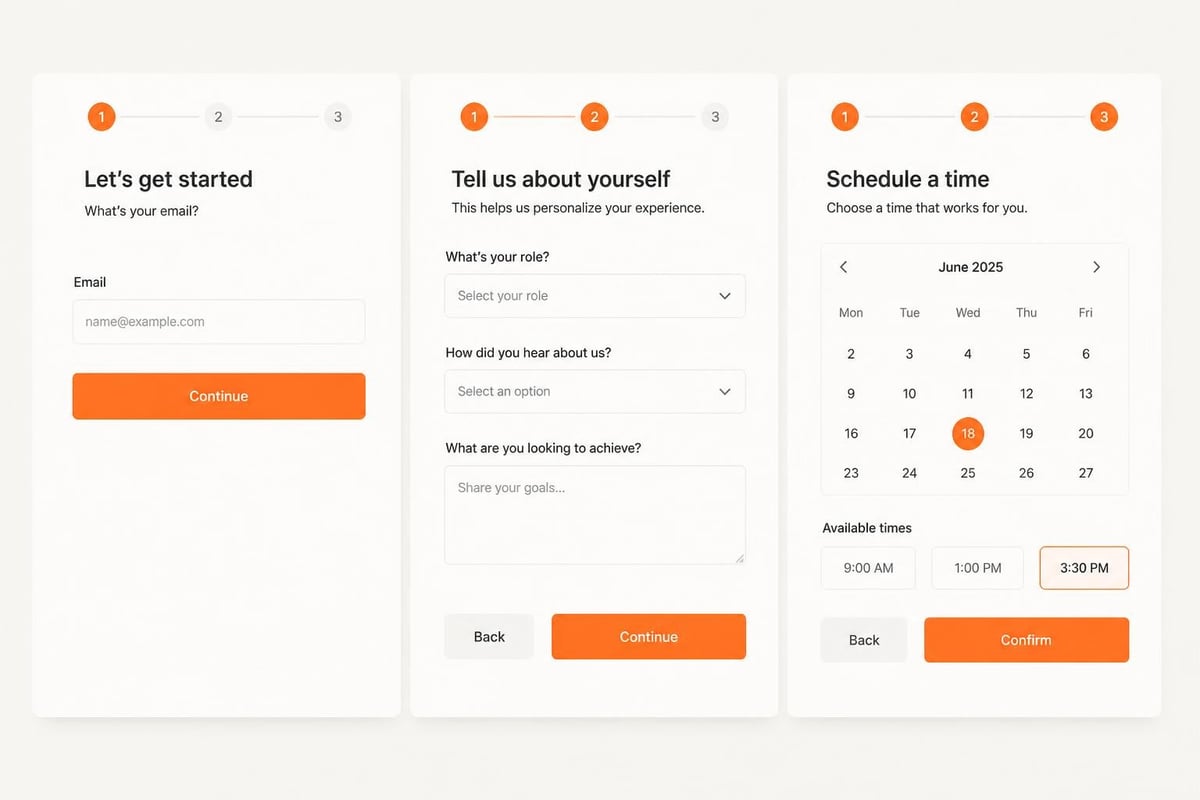
Multi-step forms segment lengthy data collection into sequential pages or progressive disclosure sections. This pattern reduces perceived friction by showing progress indicators and limiting visible fields at each stage.
Research shows multi-step designs outperform single-page equivalents when total field count exceeds 6-7 inputs. The approach works through commitment escalation-users invest time in early steps, creating psychological momentum toward completion.
Multi-Step Architecture Pattern
Step 1 – Minimal qualification (2-3 fields):
- Email address
- Company name
- Primary interest/goal
Step 2 – Contact details (2-3 fields):
- Full name
- Job title
- Phone number (optional)
Step 3 – Context and timing (2-3 fields):
- Current solution/status
- Timeline for implementation
- Additional requirements (text area)
Each step transition provides micro-confirmation feedback ("Great, just two more questions"). Progress bars showing completion percentage (33%, 66%, 100%) reduce abandonment by setting clear expectations.
Implement step persistence using session storage or URL parameters so users can return without losing previous inputs. Error states should prevent progression to subsequent steps until current validation passes.
What Technical Integration Requirements Support Form Functions
Backend integration connects form submissions to business systems where lead data drives sales and marketing activities. Forms function as data input mechanisms, but value derives from downstream processing and activation.
Standard integration points include CRM platforms, marketing automation systems, email service providers, analytics tools, and custom databases. Each connection requires API authentication, field mapping, error handling, and confirmation workflows.
Integration Architecture Components
API endpoint configuration:
- Authentication tokens or API keys
- Webhook URLs for real-time data transfer
- Field mapping between form IDs and CRM properties
- Data transformation logic for format standardization
Error handling protocols:
- Retry logic for temporary connection failures
- User-facing error messages for submission problems
- Admin notifications for integration breakdowns
- Fallback email delivery when API calls fail
Confirmation and routing workflows:
- Thank-you page redirects with conversion tracking pixels
- Confirmation email delivery with next-step guidance
- Internal notifications to sales representatives
- Lead scoring calculation and assignment rules
Custom software development teams can build proprietary integration layers that connect forms to legacy systems, industry-specific platforms, or custom databases unavailable through standard connectors.
What Common Mistakes Reduce Form Effectiveness
Form implementation failures often stem from overlooking user psychology, technical requirements, or post-submission workflows. Recognizing these patterns prevents conversion loss.
Critical form design errors:
- Requesting information before establishing value exchange
- Using vague button copy that fails to specify the outcome
- Implementing validation that only triggers on submission
- Requiring phone numbers for low-commitment offers
- Failing to display privacy policy links near submit buttons
- Auto-playing videos or animations that distract from form completion
Technical implementation problems:
- Missing mobile viewport meta tags causing display issues
- Disabled browser autofill preventing quick completion
- CAPTCHA challenges appearing before users interact
- Broken confirmation pages creating post-submit confusion
- Analytics tracking failures preventing performance measurement
Post-submission workflow gaps:
- Delayed or missing confirmation emails
- Generic thank-you messages without next steps
- No immediate value delivery for gated content promises
- Lack of sales follow-up for high-intent submissions
The most damaging mistake involves collecting lead data without structured follow-up systems. A lead generation form without CRM integration and response protocols creates data graveyards rather than revenue pipelines.
How Do Manual and Automated Form Systems Compare
Manual form processing relies on email notifications or spreadsheet exports requiring human intervention for data entry, routing, and follow-up initiation. Automated systems use API integrations and workflow automation to eliminate manual steps.
| Feature | Manual Processing | Automated Integration |
|---|---|---|
| Data entry | Copy-paste to CRM | Real-time sync |
| Lead routing | Manual assignment | Rule-based auto-assignment |
| Response time | Hours to days | Seconds to minutes |
| Error rate | 3-5% human error | <0.1% system error |
| Scalability | Linear with headcount | Unlimited capacity |
| Compliance tracking | Manual documentation | Automatic audit logs |
Automated systems connect form submissions directly to CRM platforms through API webhooks or native integrations. When a prospect submits information, the system creates a contact record, assigns ownership based on territory rules, calculates lead scores, triggers email sequences, and logs all activities without human touch.
Manual approaches work for very low-volume scenarios (under 10 leads monthly) but break down as volume scales. The delay between submission and sales contact increases with manual processing, directly reducing conversion rates at each pipeline stage.
What Privacy and Compliance Standards Apply to Form Data
Data protection regulations mandate specific technical and procedural controls for collecting, storing, and processing personal information through forms. GDPR (European Union), CCPA (California), and industry-specific regulations like HIPAA impose legal requirements.
Forms must obtain explicit consent before collecting personal data. This requires unchecked opt-in boxes with clear language explaining data usage. Pre-checked boxes violate GDPR consent standards.
Compliance Implementation Checklist
Required form elements:
- Privacy policy link positioned before submit button
- Explicit consent checkbox for marketing communications
- Purpose statement explaining data collection reasons
- Contact information for data protection officer
- Option to request data deletion or export
Technical security measures:
- SSL/TLS encryption for data transmission
- Secure storage with encryption at rest
- Access controls limiting who views form submissions
- Audit logs tracking data access and modifications
- Regular security assessments and penetration testing
Documentation requirements:
- Records of consent with timestamps
- Data processing agreements with third-party vendors
- Privacy impact assessments for high-risk processing
- Breach notification procedures and contact lists
Forms collecting health information, financial data, or children's information face additional regulatory requirements beyond general business contact collection.
What Case Example Demonstrates Effective Form Strategy
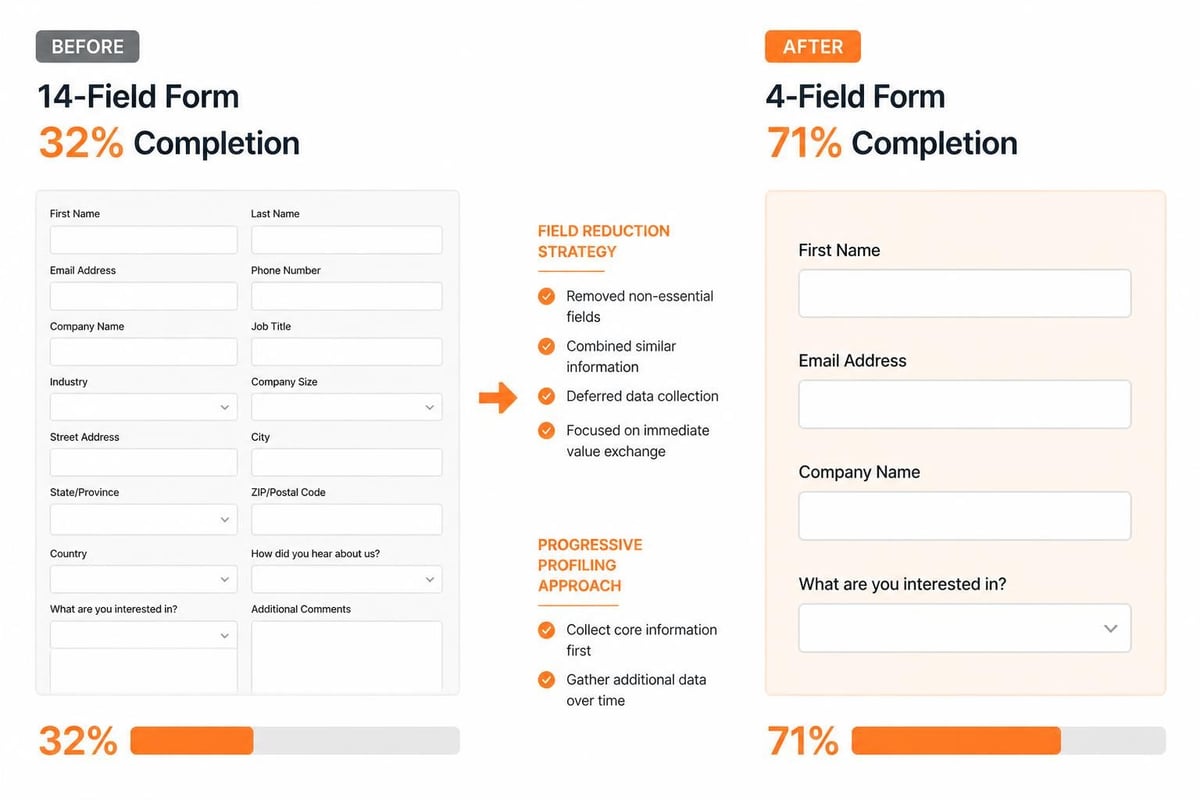
A B2B software company offering project management tools restructured their demo request form in early 2026 to address 68% abandonment rates. The original form requested 14 fields including company revenue, employee count, current tools, implementation timeline, budget range, and detailed requirements.
The optimization strategy reduced initial fields to four: business email, company name, primary pain point (dropdown), and team size bracket. Additional qualification questions moved to a post-submission questionnaire sent via email after value delivery.
Results after 90 days:
- Form completion rate increased from 32% to 71%
- Total qualified leads increased 87% despite identical traffic
- Sales conversion rate improved 23% due to better lead quality signals from engaged prospects
- Average time-to-first-contact decreased from 18 hours to 47 minutes through automated routing
The company implemented progressive profiling in their CRM, enriching contact records over time through multiple touchpoints rather than demanding comprehensive information upfront. This approach balanced conversion optimization with sales team data requirements.
How to Measure Form Performance Beyond Conversion Rate
Conversion rate represents one dimension of form effectiveness. Comprehensive measurement includes lead quality metrics, field-level analytics, and downstream revenue attribution.
Key performance indicators:
- Form view to start rate (percentage who interact with first field)
- Field-by-field completion rates identifying abandonment points
- Average time to complete form
- Error rate per field
- Mobile vs desktop completion rate variance
- Lead-to-opportunity conversion rate
- Cost per qualified lead
- Revenue per form submission
Track these metrics in analytics platforms that correlate form behavior with sales outcomes. Systems integrating form data with CRM pipelines reveal which form variations produce leads that convert to customers rather than merely submitting information.
Implement event tracking for micro-interactions: field focus, field blur, error messages displayed, correction attempts, and help text clicks. These behavioral signals identify usability problems invisible in aggregate conversion metrics.
Heat mapping and session recording tools show how users interact with forms, revealing confusion points, reading patterns, and decision hesitation. Qualitative observation complements quantitative measurement.
Lead generation forms serve as critical conversion mechanisms when designed with systematic attention to field selection, mobile optimization, technical integration, and compliance requirements. Brytend develops custom form solutions integrated directly with CRM systems, enabling businesses to capture, qualify, and activate leads through automated workflows tailored to specific sales processes and data requirements.