TL;DR:
- Lead format is the standardized structure for organizing prospect data fields including contact information, source, status, and qualification criteria
- Proper lead format enables automated routing, scoring, and integration across marketing and sales systems
- Essential fields include basic contact data, lead source, lead status, qualification score, and custom attributes
- Consistent lead format reduces data errors, improves conversion tracking, and accelerates sales cycles
- Best practices require field validation, standardized naming conventions, and regular format audits
A lead format is a predefined data structure that organizes prospect information into standardized fields for consistent capture, storage, and processing across marketing and sales systems.
What Is Lead Format and Why Does It Matter?
Lead format defines how prospect data is structured before entering your CRM or sales pipeline. The format specifies required fields, optional fields, data types, validation rules, and relationships between data elements.
Without standardized lead format, businesses face duplicate records, incomplete data, and manual cleanup that wastes hours weekly. A properly defined lead format ensures every prospect record contains the minimum viable information needed for qualification and routing decisions.
Core Components of Lead Format
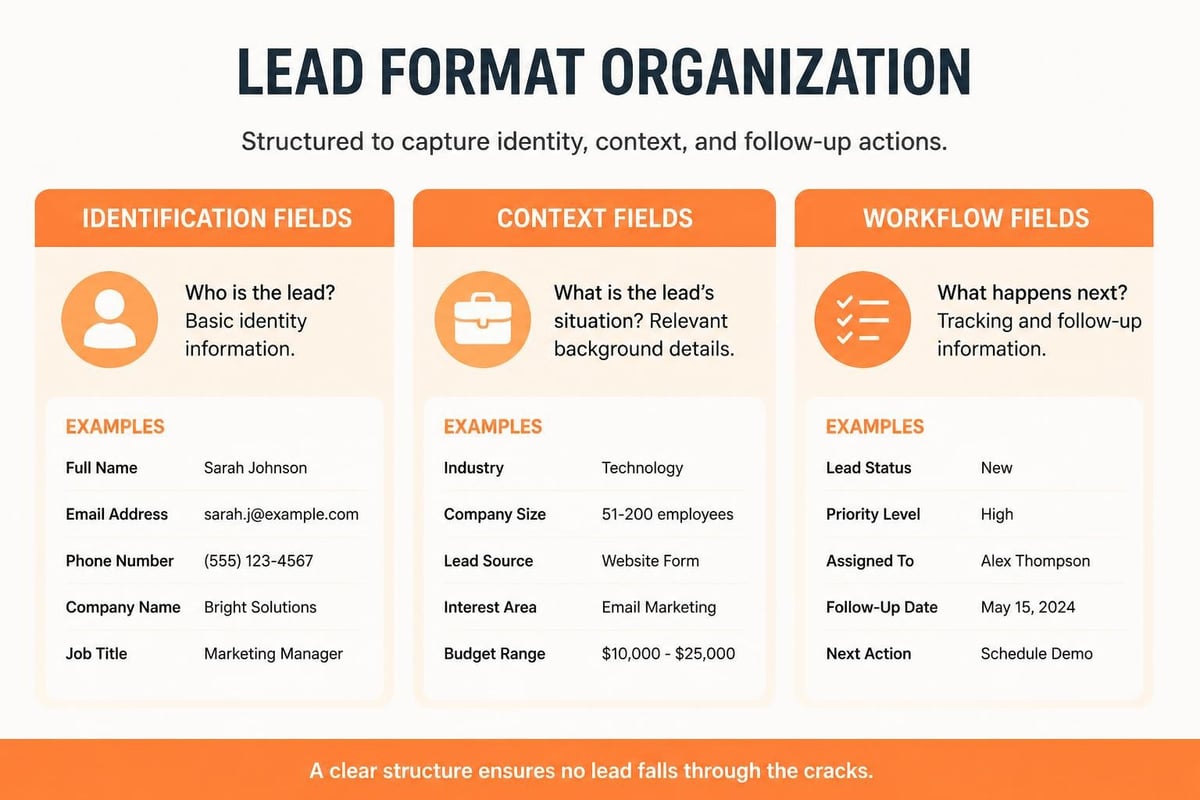
Every lead format contains three categories of fields: identification data, context data, and workflow data.
Identification fields include:
- Full name (first, last, middle)
- Email address (validated format)
- Phone number (with country code)
- Company name
- Job title or role
Context fields capture:
- Lead source (webinar, content download, referral)
- Campaign identifier
- UTM parameters or tracking codes
- Geographic location
- Industry or vertical
Workflow fields manage:
- Lead status (new, contacted, qualified, disqualified)
- Lead score (numerical value based on criteria)
- Assignment (sales rep or team)
- Created date and modified date
- Next action or follow-up date
The specific fields you include depend on your sales process and qualification criteria. B2B companies typically require more fields than B2C businesses to support longer sales cycles and committee-based decisions.
How Should Lead Format Be Structured for Maximum Efficiency?
Structure your lead format to match your actual sales workflow, not theoretical best practices. Start with mandatory fields that gate form submission, then add optional fields that enhance qualification without creating friction.
Field Organization Best Practices
Use hierarchical field grouping to organize related data elements. Group contact information separately from company details and qualification criteria.
| Field Category | Mandatory Fields | Optional Fields | Data Type |
|---|---|---|---|
| Contact | Email, Last Name | First Name, Phone | String, Validated Email |
| Company | Company Name | Industry, Size | String, Dropdown |
| Context | Lead Source | Campaign, UTM | Dropdown, String |
| Qualification | Status | Score, Interest Level | Dropdown, Integer |
Implement field dependencies where one field's value determines which additional fields appear. For example, if "Industry" equals "Manufacturing," display fields for production volume and equipment types.
Dynamic vs. Static Field Structure
Static lead formats use identical fields for every prospect regardless of source or type. Dynamic formats adapt field requirements based on entry point, campaign, or prospect characteristics.
Dynamic formats reduce form abandonment by showing only relevant fields. A webinar registration requires fewer fields than a demo request, even though both create lead records in the same system.
Modern lead generation formats increasingly use progressive profiling, where returning visitors see different fields than first-time visitors to gradually build complete profiles without overwhelming single interactions.
What Are the Essential Fields Every Lead Format Must Include?
Every functional lead format requires five essential field types that enable basic processing and qualification. Missing any category creates gaps that force manual intervention or data loss.
Minimum Viable Lead Format
Contact method (at minimum, email address) provides the communication channel. Phone numbers are optional but recommended for high-value leads requiring direct outreach.
Identification (full name or last name minimum) personalizes communication and distinguishes between prospects. Single name fields create problems with international names and salutation generation.
Source attribution (where the lead originated) enables campaign ROI calculation and source quality analysis. Without source tracking, you cannot optimize marketing spend or identify highest-converting channels.
Timestamp (when the lead was created) establishes lead age for velocity metrics and follow-up prioritization. Automated timestamps prevent manual entry errors.
Status indicator (current position in sales process) prevents duplicate outreach and enables pipeline reporting. Status fields should use controlled vocabularies, not free text.
Additional fields should align with your specific qualification criteria for determining Marketing Qualified Leads versus Sales Qualified Leads. Budget authority, timeline, and specific needs frequently appear in B2B formats.

How Do You Implement Lead Format Across Multiple Capture Points?
Consistent lead format across web forms, event registrations, chat interactions, and manual entry requires centralized schema definition and validation enforcement.
Multi-Channel Format Standardization Steps
- Define the master lead schema in your CRM system with all possible fields, data types, and validation rules
- Map each capture point to the master schema, identifying which fields each channel can populate
- Create field mapping documentation showing how different sources use different labels for the same underlying field
- Implement validation at capture to reject invalid data before it enters your system
- Build fallback handling for partial submissions or offline data entry scenarios
- Test end-to-end flow from each capture point through to CRM record creation
LinkedIn Lead Gen Forms automatically populate contact information from profile data, reducing manual entry errors. Configure these forms to match your standard lead format specifications while leveraging pre-filled fields.
For custom software integrations, implement API-based lead creation that validates format before accepting submissions. RESTful APIs should return specific error codes for format violations, identifying which fields failed validation and why.
Format Consistency for Event and Offline Sources
Trade show lead capture presents unique format challenges because badge scanners and business cards provide inconsistent data structures. When implementing trade show lead capture, standardize how booth staff record qualifying questions and notes fields.
Paper forms and manual entry create the highest risk of format inconsistency. Provide data entry templates that mirror your digital format, including dropdown options and field requirements. Consider OCR technology for digitizing handwritten forms while maintaining format standards.
Brytend CRM addresses multi-channel lead format challenges through AI-driven lead forms that adapt field requirements based on entry context while maintaining consistent underlying data structure. The Brytend CRM platform enforces validation rules across all capture points, ensuring clean data regardless of source.

What Lead Format Mistakes Cause Data Quality Problems?
Format errors compound over time, creating duplicate records, incomplete profiles, and unreliable reporting. Most mistakes stem from inconsistent field definitions or inadequate validation.
Common Format Design Errors
Ambiguous field labels confuse data entry personnel and form users. "Company" might mean employer, vendor, or competitor depending on context. Use specific labels like "Employer Name" or "Current Company."
Free text where dropdowns belong creates data inconsistency. Industry, lead source, and status fields require controlled vocabularies to enable filtering and reporting. Free text produces dozens of variations for identical concepts.
Missing required field indicators let incomplete submissions enter your system. Visual cues (asterisks, colored labels) and validation enforcement prevent partial records.
Excessive mandatory fields increase form abandonment rates. Research shows each additional required field reduces conversion by approximately 4-7%. Balance data completeness against capture rate.
Inadequate field length limits truncate data unexpectedly. Email fields need 255 characters minimum, company names require 200+, and notes fields should accommodate 2000+ characters.
Format Validation Issues
Implement format validation at capture, not just storage. Email validation should verify structure (username@domain.extension) before submission. Phone number validation should accept international formats and strip formatting characters.
Required field validation must execute client-side for immediate feedback and server-side for security. Client-side validation improves user experience; server-side validation prevents malicious or corrupted submissions.
Date field validation should enforce logical constraints. "Desired implementation date" cannot precede today's date. "Company founded" cannot exceed current year.
How Does Lead Format Impact Marketing and Sales Integration?
Lead format serves as the data contract between marketing automation platforms and sales CRM systems. Format mismatches cause integration failures, duplicate records, and attribution errors.
Format Mapping for System Integration
Marketing automation platforms and CRM systems rarely use identical field structures. Integration requires field mapping that translates between formats while preserving data integrity.
One-to-one mapping directly connects equivalent fields between systems. Marketing's "email_address" maps to CRM's "email" field. Simple but requires exact field existence in both systems.
One-to-many mapping distributes single source fields to multiple destination fields. A combined "full_name" field splits into "first_name" and "last_name" in the destination system.
Many-to-one mapping consolidates multiple source fields into single destination fields. Separate "phone_mobile" and "phone_office" fields merge into one "phone" field, typically prioritizing mobile numbers.
Transformation mapping applies logic during transfer. Text values like "Hot," "Warm," "Cold" convert to numeric scores (100, 50, 25) during CRM import.
Lead Format and Scoring Systems
Lead scoring requires consistent format for the fields used in scoring algorithms. If lead source uses different values across capture points, source-based scoring breaks.
Effective scoring formats include:
- Demographic fields (job title, company size, industry) for fit scoring
- Behavioral fields (pages visited, content downloaded, email engagement) for interest scoring
- Explicit interest fields (budget, timeline, specific needs) for intent scoring
Numeric fields enable mathematical scoring more easily than text fields. Convert categorical data to numeric scales where possible.
What Are Lead Format Best Practices for Different Industries?
Industry-specific lead formats capture vertical-relevant qualification criteria while maintaining core contact and context fields.
B2B Software and Services Format
B2B software leads require fields for company size, current technology stack, budget authority, and decision timeline. Include role-specific fields since multiple stakeholders influence purchases.
Sample B2B software lead format:
- Contact: First name, last name, email, phone, LinkedIn profile
- Company: Name, size (employee count), industry, website
- Context: Lead source, campaign, UTM parameters
- Qualification: Role, budget authority, current solution, pain points, timeline, competitors considered
Manufacturing and Industrial Format
Manufacturing leads need specifications about production volume, equipment types, compliance requirements, and facility locations. Technical specifications often appear in custom fields.
Industrial lead formats benefit from serialized inventory references when prospects inquire about specific equipment models or service capabilities. This approach mirrors the data structure used in service management systems that track equipment through its lifecycle.
Professional Services Format
Consulting, legal, and financial services capture practice area interest, company stage (startup, growth, mature), and specific service needs. Confidentiality concerns often limit visible field options.
How Do You Optimize Lead Format Over Time?
Lead format optimization requires regular analysis of field completion rates, data quality metrics, and conversion correlation.
Format Performance Metrics
Field completion rate measures how often optional fields contain data. Fields with less than 20% completion may be irrelevant or confusing. Fields with 100% completion might be good candidates for required status.
Form abandonment analysis identifies which fields cause users to exit before submission. A/B test removing suspected problem fields or making them optional.
Data decay tracking monitors how quickly field values become outdated. Phone numbers and job titles change faster than email addresses and names. High-decay fields need refresh workflows.
Conversion correlation identifies which fields predict deal closure. Fields that correlate with won opportunities deserve prominence; uncorrelated fields are candidates for removal.
Format Revision Process
- Audit current format against actual data usage in reports and workflows
- Survey sales team about which fields they actually reference during prospect conversations
- Analyze field utilization in your CRM to identify unused or rarely-populated fields
- Test format variations using A/B testing on equivalent traffic sources
- Document format changes with effective dates and migration plans for existing records
- Communicate changes to all teams that capture or consume lead data
Format changes affect historical reporting. Maintain field mapping documentation showing when fields were added, removed, or redefined. This enables accurate trend analysis across format versions.
What Role Does Lead Format Play in Compliance and Privacy?
Data protection regulations like GDPR and CCPA affect lead format design through consent tracking, data minimization, and processing purpose documentation.
Compliance-Required Format Elements
Consent timestamp records when prospect agreed to data collection and communication. Required for GDPR compliance and audit trails.
Consent scope specifies what prospect agreed to (email marketing, phone calls, data sharing with partners). Use separate boolean fields for each consent type rather than single combined field.
Data source documents how you obtained the prospect's information (direct submission, purchase, inference). GDPR requires this for data subject access requests.
Processing purpose explains why you collected each data element. Generic "marketing" purposes may not satisfy regulatory requirements.
Retention date indicates when the lead record should be reviewed for deletion or archival. Calculate based on last interaction date plus retention policy duration.
Privacy-Focused Format Design
Minimize data collection to fields genuinely needed for qualification and communication. Each field should have documented business justification.
Avoid collecting sensitive data categories (health information, financial details, political affiliations) unless absolutely necessary and properly secured.
Implement field-level encryption for sensitive data elements. Email addresses and phone numbers increasingly require encryption at rest.
Provide clear privacy policy links at data capture points. Format should include checkbox field for privacy policy acknowledgment, separate from marketing consent.
How Does Lead Format Support Attribution and ROI Analysis?
Accurate attribution requires lead format fields that capture complete source information including campaign, channel, content, and touchpoint sequence.
Attribution-Focused Format Fields
First touch source records the initial interaction that created awareness. Typically the first UTM source or referrer URL.
Last touch source captures the final interaction before conversion. Often the field that receives attribution credit in last-touch models.
Multi-touch data stores all significant touchpoints in the prospect journey. Requires structured fields or related object storage.
Campaign identifier links leads to specific marketing initiatives. Use consistent naming conventions across all campaigns.
Content identifier specifies which asset (whitepaper, webinar, tool) generated the lead. Enables content ROI calculation.
Different content formats align with funnel stages, making content identifier fields valuable for understanding which formats drive qualified leads versus raw volume.
Format Requirements for Multi-Touch Attribution
Multi-touch attribution models require lead formats that store touchpoint sequences, not just single source fields. Implement related object storage for touchpoint history rather than attempting to cram multiple touches into single fields.
Each touchpoint record should capture timestamp, source, medium, campaign, content, and conversion value. Link touchpoint records to lead records through foreign key relationships.
What Technologies and Tools Support Lead Format Management?
Modern lead format management relies on CRM platforms, marketing automation systems, form builders, and data validation services.
CRM and Format Definition
CRM systems provide the master schema for lead format. Salesforce, HubSpot, Microsoft Dynamics, and custom CRM solutions each offer field definition tools with varying flexibility.
Custom CRM development through software development companies enables complete format control including complex validation rules, dependent fields, and industry-specific structures that off-the-shelf platforms may not support.
Form Builders and Format Enforcement
Form builders like Typeform, Gravity Forms, and JotForm translate lead format into user-facing interfaces. Configure form builders to match your CRM format exactly, including validation rules and field dependencies.
API-based form submissions should validate against your format schema before accepting data. RESTful APIs enable real-time format validation with specific error messaging.
Data Validation and Enrichment
Services like ZeroBounce and NeverBounce validate email format and deliverability before leads enter your system. Implementing validation at capture prevents invalid data from corrupting your database.
Data enrichment services append additional fields to leads after capture. Clearbit and ZoomInfo add firmographic data based on email domain. Configure enrichment to populate optional format fields, never overwrite user-submitted data.
Standardized lead format drives data quality, enables automation, and improves conversion tracking across your marketing and sales technology stack. The structure you implement today determines how effectively you can qualify, route, and convert prospects for years to come. Brytend develops custom CRM solutions with format structures tailored to your specific qualification criteria, compliance requirements, and integration needs, ensuring clean data flows from first capture through deal closure.