A trade show lead capture form is a structured document or digital interface used to record contact information, qualification criteria, and engagement data from booth visitors during exhibitions and industry events. Organizations use these forms to collect actionable prospect data that sales teams can prioritize and convert into customers. The design and implementation of a trade show lead capture form directly affects lead quality, follow-up speed, and return on event investment.
TL;DR:
- Trade show lead capture forms must collect essential contact data and qualification criteria in under 60 seconds
- Digital forms integrate with CRM systems for immediate lead routing and automated follow-up workflows
- Effective forms use structured fields, standardized terminology, and lead scoring to prioritize high-value prospects
- Form design should balance data completeness with visitor experience to maximize conversion rates
- Mobile-optimized forms enable real-time data capture and reduce manual data entry errors
What Is a Trade Show Lead Capture Form
A trade show lead capture form is a standardized data collection tool that records visitor information during face-to-face booth interactions at trade shows, conferences, and industry exhibitions. The form captures essential fields such as name, company, email, phone number, job title, and qualification criteria.
Digital lead capture forms replace paper-based systems with mobile applications, tablet interfaces, or badge scanning technology. These digital systems transmit data directly to customer relationship management platforms, eliminating manual transcription and reducing data entry delays.
Core Components of Effective Lead Capture Forms
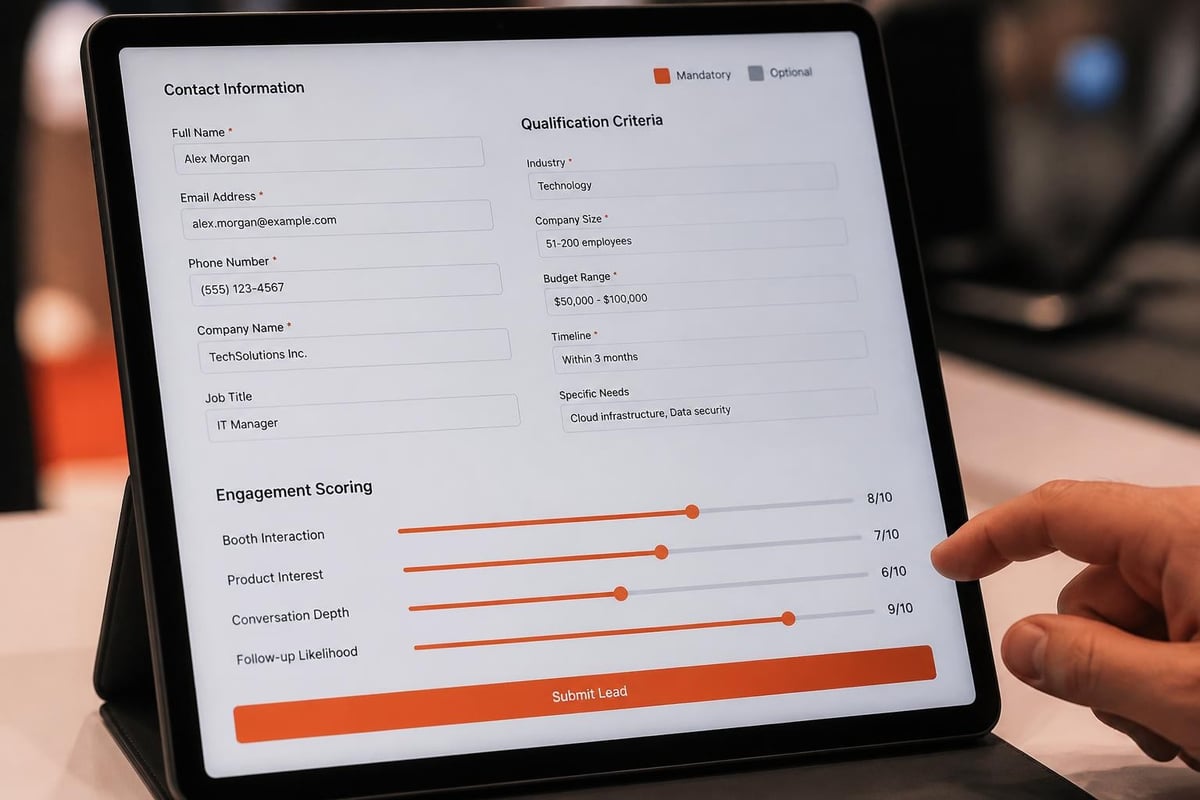
Every trade show lead capture form must include mandatory fields that enable sales follow-up and optional fields that support lead qualification. The mandatory section consists of contact information that allows immediate outreach after the event.
Mandatory fields include:
- Full name (first and last name in separate fields)
- Company name
- Email address (validated format)
- Phone number (with country code)
- Job title or role
Qualification fields include:
- Industry or sector
- Company size (employee count or revenue range)
- Budget authority (decision maker, influencer, end user)
- Timeline for purchase or implementation
- Specific product or service interest
- Current solution or vendor
The Brytend CRM platform supports custom lead capture forms with conditional logic, allowing fields to appear based on previous responses, which reduces form length while maintaining data depth.

How to Design a Trade Show Lead Capture Form
Start by identifying the minimum viable data set required for sales qualification. Effective lead capture forms balance completeness with completion speed, targeting a 60-second interaction time.
Define clear categories for lead scoring at the point of capture. Sales teams need immediate context to prioritize follow-up actions based on visitor readiness and fit.
Step-by-Step Form Design Process
Follow this structured workflow to create a functional trade show lead capture form:
- Map sales qualification criteria by identifying the data points that differentiate hot, warm, and cold leads in your sales process
- Reduce field count by eliminating non-essential questions that do not directly support qualification or follow-up
- Establish field validation rules to ensure data quality at entry (email format, phone number structure, required selections)
- Create lead scoring thresholds by assigning point values to responses that indicate purchase intent, budget authority, or timeline urgency
- Configure CRM integration to automate lead routing based on score, industry, company size, or geographic territory
- Design mobile interface optimized for tablet or smartphone entry in booth environments with limited desk space
- Test form flow with booth staff before the event to identify unclear questions or technical issues
| Form Element | Best Practice | Common Mistake |
|---|---|---|
| Field count | 8-12 total fields | 20+ fields requiring excessive time |
| Question format | Multiple choice or dropdown | Open text fields requiring typing |
| Validation | Real-time error messages | Post-submission validation only |
| Mobile layout | Single column, large touch targets | Multi-column desktop layout |
| Integration | Live CRM sync every 5 minutes | Manual export after event |
Custom software solutions allow organizations to build forms that match specific qualification frameworks rather than adapting sales processes to generic templates. Brytend develops tailored form interfaces that integrate directly with existing CRM and marketing automation platforms.
What Questions Should a Trade Show Lead Capture Form Include
The most effective forms use a two-tier question structure separating universal fields from role-specific qualification criteria. Universal fields apply to all booth visitors regardless of product interest or company profile.
Universal Contact Fields
Every lead requires basic contact information that enables immediate follow-up communication through email, phone, or mail channels.
Standard contact fields:
- First name and last name (separate fields for personalization)
- Business email address (work domain validation)
- Direct phone number (mobile preferred for immediate reach)
- Company name (with autocomplete from verified business databases)
- Job title or functional role (standardized categories)
Qualification and Segmentation Fields
These fields determine lead priority and sales approach. Trade show lead qualification separates tire-kickers from genuine prospects through targeted questions.
Priority qualification questions:
- What challenge brought you to our booth today? (dropdown: specific pain points)
- What is your timeline for addressing this need? (options: immediate, 1-3 months, 3-6 months, 6-12 months, research only)
- What is your role in the purchase decision? (options: final decision maker, influencer/recommender, end user, researcher)
- Which product or solution interested you most? (checkboxes: specific offerings)
- Are you currently using a competing solution? (yes/no with vendor name field)
- What is your company size? (employee ranges or revenue brackets)
Structured response options produce cleaner data than open text fields. Dropdown menus and checkbox arrays force consistency in terminology, enabling accurate segmentation and automated routing rules.
How Do Digital Lead Capture Forms Improve Trade Show ROI
Digital forms eliminate the three-week lag between event completion and lead delivery that characterizes paper-based systems. Real-time data transmission enables same-day or next-day follow-up while booth conversations remain fresh in prospect memory.
Automated lead scoring assigns priority levels immediately upon form completion. High-scoring leads trigger instant notifications to sales representatives, enabling outreach within hours rather than weeks.
Comparison: Manual vs Digital Lead Capture
| Capability | Paper Forms | Digital Forms |
|---|---|---|
| Data entry speed | 2-3 minutes per lead | 30-60 seconds per lead |
| CRM delivery time | 2-3 weeks post-event | Real-time or hourly sync |
| Data accuracy rate | 65-75% (transcription errors) | 95-98% (validation rules) |
| Lead scoring | Manual post-event | Automatic at capture |
| Follow-up speed | 2-4 weeks average | 1-3 days average |
| Integration cost | High (manual labor) | Low (automated API) |
Organizations using digital lead capture methods report 40-60% improvement in lead-to-opportunity conversion rates compared to manual paper processes.

Integration with CRM and Marketing Automation
The primary advantage of digital trade show lead capture forms is direct integration with existing business systems. API connections transmit lead data to CRM platforms without manual export or import steps.
Integration capabilities include:
- Bi-directional sync with Salesforce, HubSpot, Microsoft Dynamics, or custom CRM platforms
- Automatic lead assignment based on territory, product interest, or company size
- Trigger-based email sequences for different lead score segments
- Calendar booking links for immediate meeting scheduling
- Document delivery automation (product sheets, case studies, pricing guides)
Custom CRM solutions like those offered through Brytend’s customer relationship management platform support unique qualification workflows that match specific industry requirements or complex sales processes.
What Are Common Trade Show Lead Capture Form Mistakes
The most frequent error is over-engineering forms with excessive fields that exceed visitor patience thresholds. Forms requiring more than 90 seconds to complete see 60-70% abandonment rates as booth traffic increases.
Critical Design and Implementation Errors
Length and complexity issues:
- Including 15-20 fields when 8-10 deliver equivalent qualification value
- Using open text fields instead of structured dropdown or checkbox options
- Requesting information available through post-event enrichment services
- Duplicating fields already captured by badge scanning technology
Technical and workflow problems:
- No offline capability when WiFi fails in convention centers
- Missing data validation allowing incomplete or malformed entries
- No backup process when tablets freeze or battery dies
- Unclear lead ownership rules causing duplicate follow-up or gaps
Follow-up integration failures:
- No automated routing from form submission to sales queues
- Delayed CRM sync creating 24-48 hour lag before sales access
- Missing lead score thresholds for priority assignment
- No documented follow-up timeline or responsibility matrix
Organizations should test complete workflows from form entry through CRM delivery and sales notification before event day. Structured lead capture playbooks document every step from booth greeting through post-show nurture campaigns.
How to Optimize Lead Capture Forms for Mobile Devices
Mobile optimization requires single-column layouts with large touch targets sized for finger input rather than mouse precision. Minimum button size should be 44×44 pixels with adequate spacing to prevent mis-taps.
Mobile-Specific Design Requirements
Tablet and smartphone interfaces demand different interaction patterns than desktop forms. Touch-optimized forms use native mobile input types that trigger appropriate keyboards and validation.
Mobile optimization elements:
- Vertical scrolling layout (no horizontal scroll)
- Large input fields (minimum 16px font size)
- Native input types (tel, email, url) triggering correct keyboards
- Autocomplete enabled for name and company fields
- Dropdown menus instead of radio buttons for touch efficiency
- Progress indicators for multi-page forms
Offline functionality requirements:
- Local data storage when internet connectivity fails
- Automatic sync when connection restores
- Visual confirmation of successful submission
- Queue management for pending uploads
The Brytend mobile app framework supports offline-first data capture with automatic synchronization, ensuring no leads are lost due to connectivity issues in crowded exhibition halls.
What Compliance Requirements Affect Trade Show Lead Forms
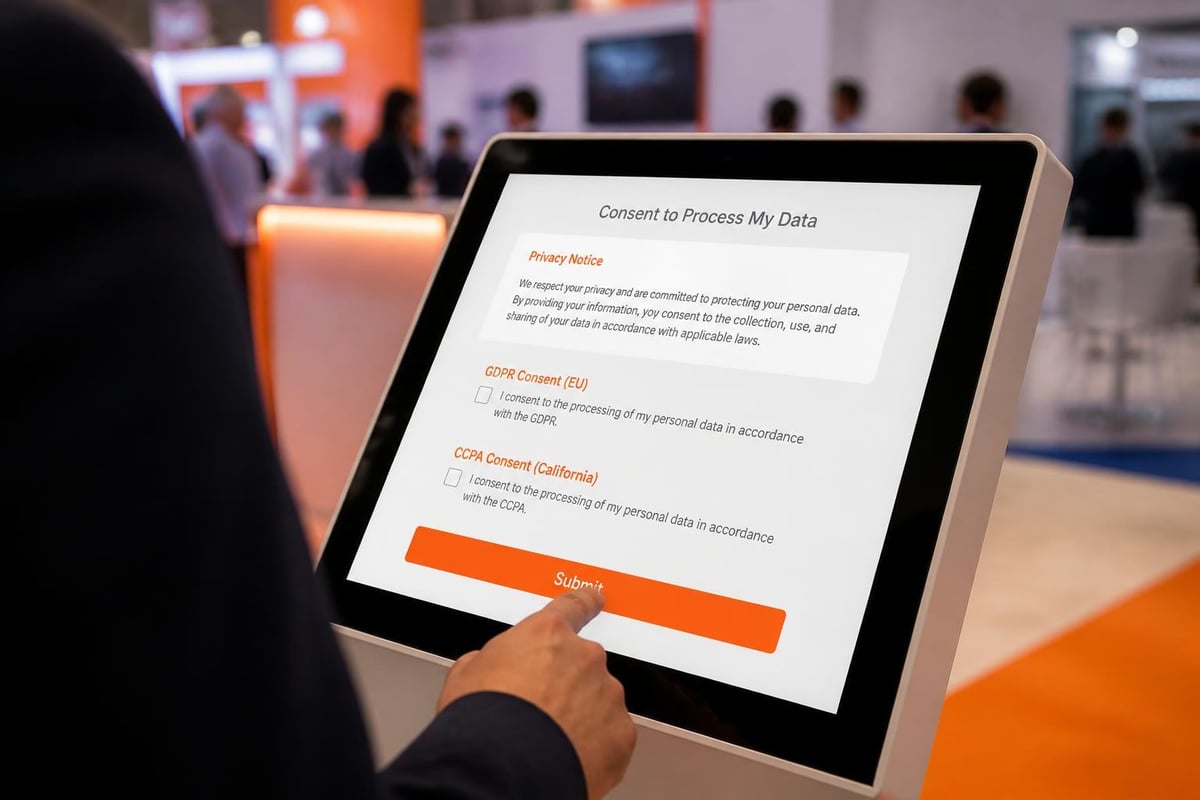
Data privacy regulations including GDPR, CCPA, and industry-specific requirements mandate explicit consent for data collection and processing. Trade show lead capture forms must include clear privacy notices and opt-in mechanisms.
Required Compliance Elements
Every form must display accessible privacy disclosures before data submission. Consent must be freely given, specific, informed, and unambiguous according to GDPR Article 4(11).
Mandatory compliance components:
- Clear statement of data controller identity and contact information
- Specific description of data processing purposes
- Explanation of legal basis for processing (consent or legitimate interest)
- Notice of data retention period or criteria
- Statement of data subject rights (access, rectification, erasure, portability)
- Separate opt-in checkbox for marketing communications (pre-checked boxes violate GDPR)
- Link to complete privacy policy document
Organizations operating internationally must implement region-specific consent mechanisms. Forms should detect visitor location and apply appropriate regulatory requirements based on jurisdiction.
Badge scanning technology that captures data from RFID-enabled event credentials requires the same consent mechanisms as manually completed forms. Trade show lead capture best practices emphasize verbal consent confirmation before badge scans.
How to Train Booth Staff on Lead Capture Forms
Booth staff training should focus on conversational qualification rather than mechanical form completion. The goal is natural dialogue that gathers qualification data through relevant questions, not interrogation-style data collection.
Staff Training Components
Effective training programs cover both system mechanics and conversational techniques that make form completion feel like helpful consultation rather than administrative burden.
Technical training elements:
- Form field definitions and proper response selection
- Offline mode activation and sync verification
- Error handling and incomplete submission recovery
- Lead scoring criteria and priority designations
- Privacy compliance requirements and consent scripts
Conversational qualification training:
- Open-ended discovery questions that naturally lead to qualification data
- Transition phrases that move from conversation to form completion
- Objection handling for visitors resistant to providing information
- Time management techniques for high-traffic periods
- Lead categorization decision trees for consistent scoring
Role-playing exercises prepare staff for common scenarios including unqualified visitors, competitors gathering intelligence, and high-priority prospects requiring executive attention. Documentation should include quick-reference guides for field definitions and scoring criteria.
Organizations with complex product portfolios benefit from conditional form logic that displays relevant fields based on product interest. This requires staff training on navigation paths and branch logic.
What Metrics Measure Lead Capture Form Performance
Form completion rate is the primary metric indicating whether design and length align with visitor patience. Completion rates below 70% suggest forms are too long or fields are unclear.
Key Performance Indicators
Capture efficiency metrics:
- Form completion rate (completed forms ÷ initiated forms)
- Average completion time (target: 45-75 seconds)
- Field abandonment rate by specific question
- Incomplete submission rate
- Manual correction rate after submission
Lead quality metrics:
- Lead-to-opportunity conversion rate by event
- Average lead score distribution (hot/warm/cold percentages)
- Sales-accepted lead rate (SAL %)
- Time from capture to first sales contact
- Cost per qualified lead by event
Post-event analysis should examine field-level data to identify questions causing abandonment or confusion. Fields with high skip rates or validation errors require revision for future events.
Better lead quality rather than higher volume produces superior ROI from trade show investments. Forms optimized for qualification over quantity generate smaller lead lists with higher conversion potential.
Case Example: Manufacturing Equipment Distributor
A European industrial equipment distributor redesigned their trade show lead capture form based on sales team feedback about data gaps affecting qualification. The original 22-field form captured extensive demographic data but missed critical buying signals.
The revised form reduced to 11 fields focused on application requirements, current equipment age, and budget cycle timing. Completion rate increased from 58% to 89%. More importantly, lead-to-quote conversion improved from 12% to 27% because sales teams received actionable qualification data instead of demographic profiles.
The company implemented conditional logic showing industry-specific questions only when relevant, further reducing form length for most visitors while maintaining depth for specialized applications. This approach maintained high completion rates while capturing detailed technical requirements when needed.
Effective trade show lead capture forms balance data completeness with visitor experience, using structured fields and mobile optimization to maximize both quantity and quality of prospect information. Strategic form design directly impacts follow-up efficiency and conversion rates. Brytend develops custom software solutions that integrate lead capture workflows with CRM platforms, marketing automation, and sales processes, ensuring your trade show investment generates measurable business results through data-driven follow-up systems.