TL;DR:
- Project task management tools organize tasks, assign ownership, track dependencies, and provide visibility across teams and timelines.
- Key features include task hierarchies, status tracking, resource allocation, deadline enforcement, and integration with development and communication systems.
- Deployment models range from cloud SaaS platforms to self-hosted solutions with custom workflows and data control.
- Selection criteria include team size, project complexity, integration requirements, compliance needs, and total cost of ownership.
- Effective implementation requires standardized terminology, role-based permissions, automated notifications, and regular workflow audits.
A project task management tool is a software system that organizes work into discrete tasks, assigns responsibilities, tracks progress, and manages dependencies to ensure project completion within defined constraints.
These systems function as the operational layer between strategic project planning and daily execution. Organizations use project task management tools to break down deliverables into actionable items, allocate resources, monitor status changes, and maintain accountability across distributed teams.
What Are Project Task Management Tools and How Do They Function?
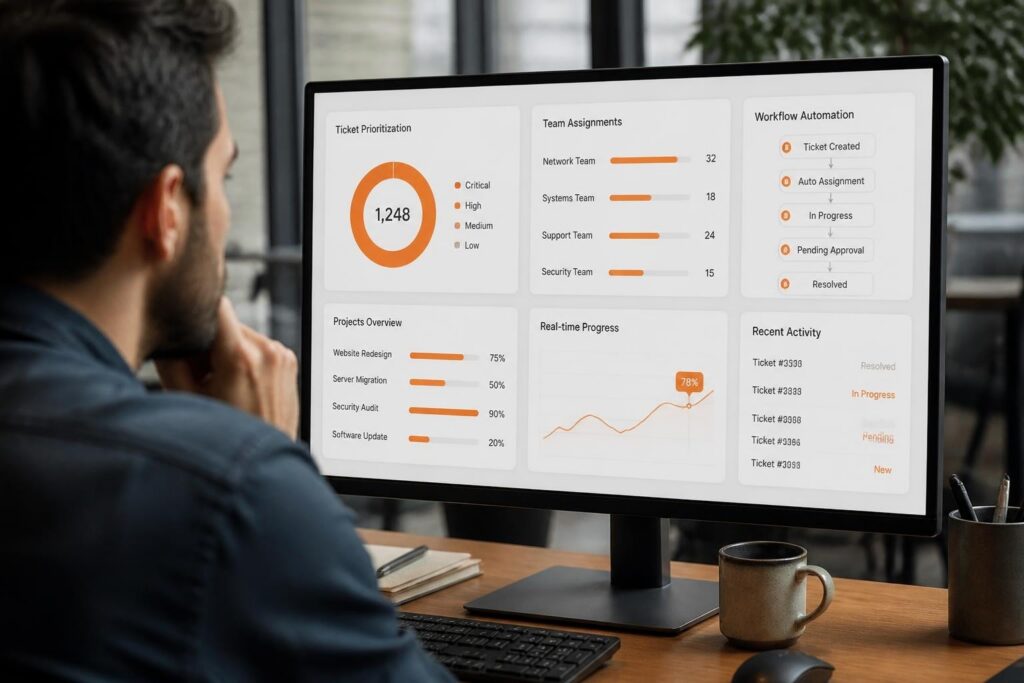
Project task management tools provide structured frameworks for defining, organizing, and monitoring work units across project lifecycles. These systems establish hierarchical task structures where parent tasks contain subtasks, dependencies link sequential work, and status fields track progression through defined workflows.
Core functionality includes task creation interfaces, assignment mechanisms, deadline tracking, priority ranking, and status dashboards. Most platforms support custom fields for client identifiers, cost codes, technical specifications, or compliance checkpoints. Advanced systems integrate time tracking, resource capacity planning, and automated status updates based on dependency completion.
Essential Components of Task Management Systems
Modern project task management tools contain several integrated subsystems:
- Task database storing attributes (title, description, assignee, deadline, status, priority, tags)
- Workflow engine enforcing state transitions and approval chains
- Notification system triggering alerts on assignment, deadline approach, or status change
- Permission layer controlling visibility and edit rights by role or team
- Reporting module aggregating metrics on completion rates, overdue items, and resource utilization
- Integration APIs connecting to version control, CI/CD pipelines, communication platforms, and documentation repositories
The task database serves as the central repository. Each task record contains standard fields plus custom attributes defined by administrators. Relationships between tasks include parent-child hierarchies, dependencies (finish-to-start, start-to-start), and cross-project links.
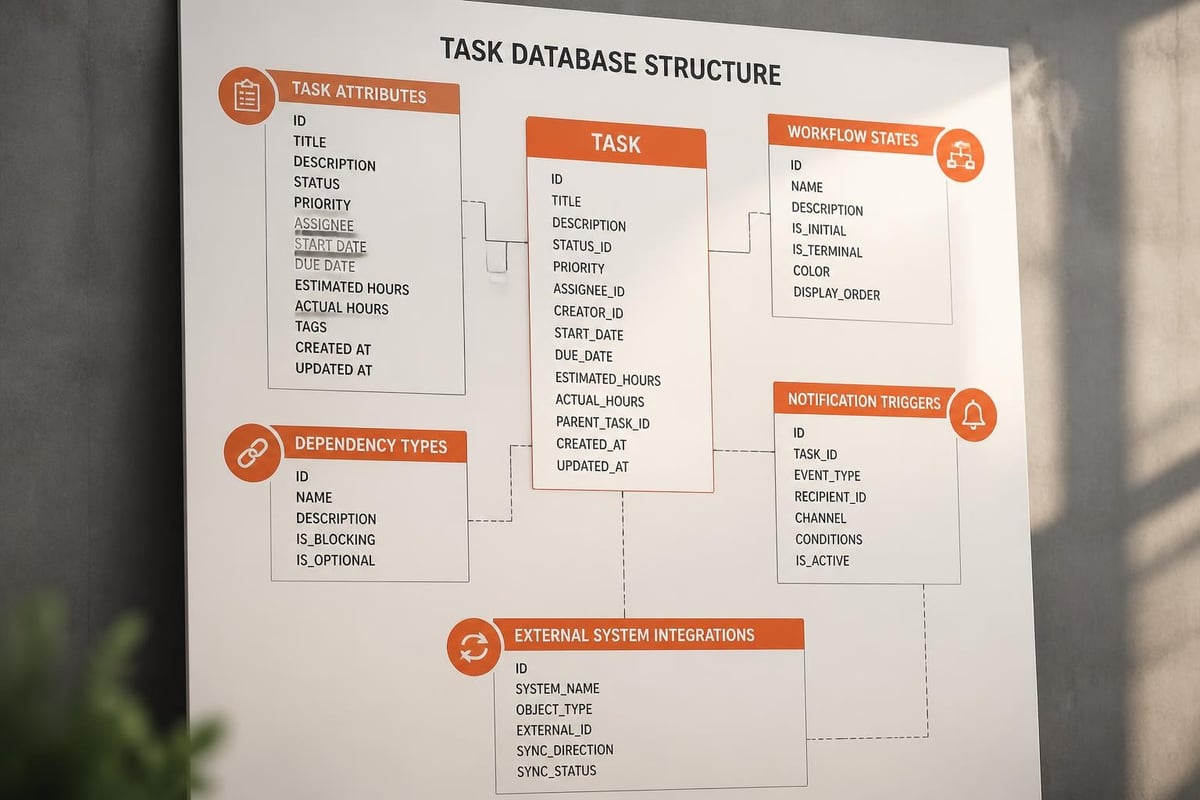
Workflow engines enforce business rules. A task cannot transition from "In Progress" to "Complete" without required field validation or approval from designated reviewers. Some systems support multi-stage workflows where code review, QA testing, and client acceptance each represent distinct states with specific entry and exit criteria.
How Do Organizations Select Project Task Management Tools?
Selection requires evaluating functional requirements against deployment models, integration capabilities, and long-term scalability. Organizations typically assess 8-12 platforms through structured criteria matrices before pilot testing 2-3 finalists.
Functional Requirements Analysis
Start by documenting current workflows and pain points. Map existing task types, approval chains, reporting needs, and integration dependencies. Identify non-negotiable requirements versus nice-to-have features.
Critical evaluation dimensions include:
| Criterion | Evaluation Questions |
|---|---|
| Task Structure | Supports unlimited nesting? Custom task types? Cross-project dependencies? |
| Workflow Flexibility | Configurable states? Conditional transitions? Approval routing? |
| Resource Management | Capacity planning? Skill matching? Workload balancing? |
| Integration Depth | API quality? Webhooks? Native connectors for Git, Slack, JIRA? |
| Reporting | Custom dashboards? Exportable data? Real-time vs batch updates? |
| Mobile Access | Full feature parity? Offline capability? Native apps vs responsive web? |
Deployment model significantly impacts total cost and control. Cloud SaaS platforms offer rapid deployment and automatic updates but limit customization and data residency options. Self-hosted solutions provide complete control over data, workflows, and integrations but require infrastructure management and version upgrades.
Integration Architecture Considerations
For software development teams, version control integration determines workflow efficiency. Tools must link commits, pull requests, and builds to specific tasks. This connection enables traceability from requirement through code change to deployment.
Key integration patterns:
- Bi-directional sync where task status updates trigger branch creation and merge completion updates task state
- Commit linking through task IDs in commit messages for automatic association
- Build status reflection where CI/CD pipeline results update task progress automatically
- Documentation cross-reference linking task IDs to specification documents, API definitions, and test plans
Communication platform integration reduces context switching. When task comments, assignments, or status changes post to dedicated channels, teams maintain awareness without constant tool monitoring. This pattern works best when notifications include sufficient context (task title, assignee, deadline) to enable action without navigation.
What Features Differentiate Advanced Project Task Management Tools?
Advanced platforms extend beyond basic task tracking to provide resource optimization, predictive analytics, and automated dependency management. These capabilities support complex projects with multiple workstreams, external dependencies, and compliance requirements.
Dependency Management and Critical Path Analysis
Sophisticated tools automatically calculate critical paths based on task dependencies and duration estimates. When a dependent task shifts, the system recalculates downstream impacts and flags newly at-risk deadlines. This automation prevents manual schedule updates and ensures teams focus on bottleneck tasks.
Dependency types include:
- Finish-to-start (FS): Task B cannot start until Task A completes
- Start-to-start (SS): Task B cannot start until Task A starts
- Finish-to-finish (FF): Task B cannot finish until Task A finishes
- Start-to-finish (SF): Task B cannot finish until Task A starts
Advanced systems support lag time (delays between dependent tasks) and lead time (overlap allowances). For example, QA testing might start 2 days before development completes (lead time) or documentation might begin 1 day after feature deployment (lag time).
Resource Capacity and Skill Matching
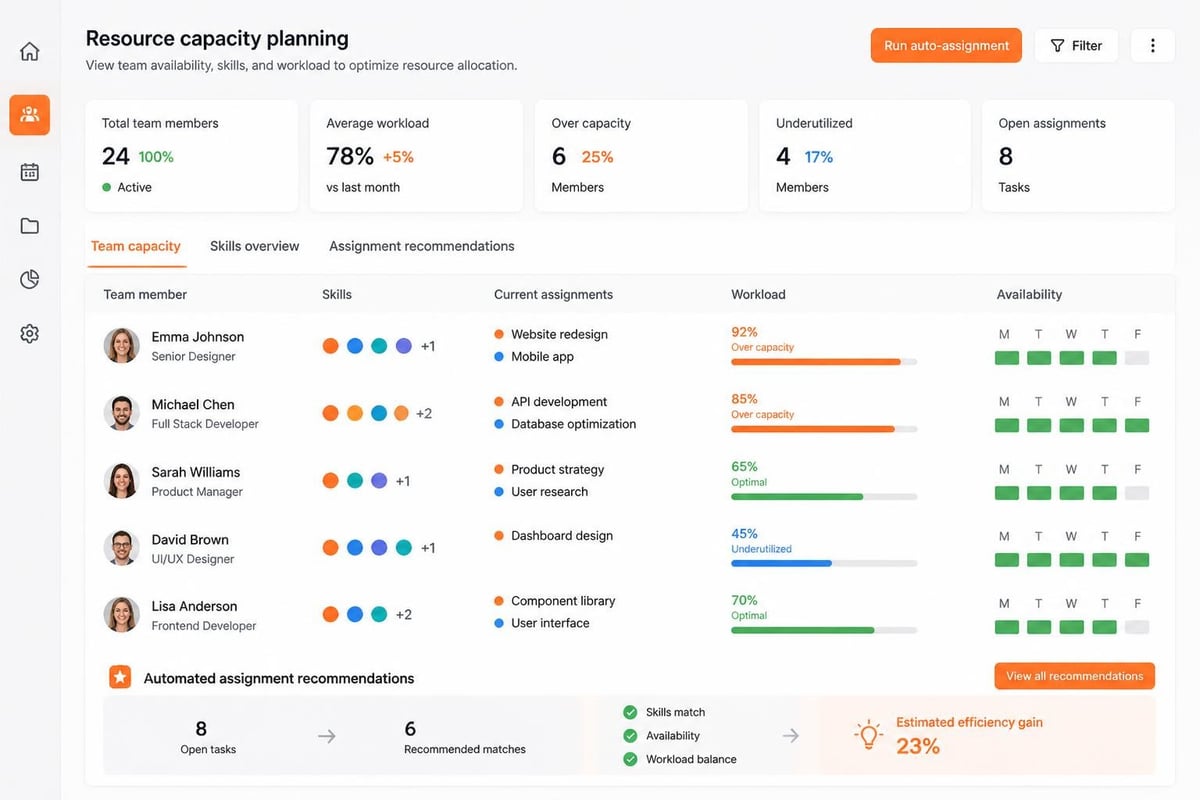
Enterprise project task management tools incorporate resource management modules that track availability, skills, and allocation across projects. When assigning tasks, the system recommends team members based on skill match, current workload, and historical performance on similar work.
Capacity planning features include:
- Workload visualization showing hours allocated vs available by person and week
- Skill matrices defining competencies and proficiency levels
- Availability calendars reflecting PTO, holidays, and non-project commitments
- Allocation thresholds alerting when individuals exceed sustainable utilization rates
This functionality prevents overallocation and ensures tasks align with team member expertise. Research on behavioral biases shows that manual resource allocation often suffers from availability heuristic and recency bias, making automated recommendation systems valuable for balanced team utilization.
How Should Teams Implement Task Management Workflows?
Effective implementation follows a phased approach: workflow design, tool configuration, pilot testing, training, and iterative refinement. The goal is adoption through demonstrated value rather than forced compliance.
Phase 1: Workflow Standardization (Weeks 1-2)
Define task lifecycle stages, transition rules, and required fields. Map current ad-hoc processes to formalized workflows that teams will recognize and accept.
Standard workflow for software development tasks:
- Backlog: Task created but not yet scheduled
- Planned: Task assigned to sprint or release cycle
- In Progress: Developer actively working
- Code Review: Pull request submitted for peer review
- QA Testing: Code merged, undergoing quality verification
- Client Review: Feature deployed to staging for acceptance testing
- Complete: Deployed to production and verified
- Archived: Historical record after project closure
Each transition requires specific criteria. "In Progress" to "Code Review" mandates completed branch with pull request URL. "QA Testing" to "Client Review" requires passed test cases and deployment confirmation.
Phase 2: Tool Configuration (Weeks 3-4)
Configure the selected platform to match designed workflows. Create custom fields for project codes, client identifiers, cost centers, and technical classifications. Establish permissions ensuring team members view relevant tasks while project managers access cross-project dashboards.
Integration setup connects task systems to existing tools:
- Link to Git repositories for automatic commit association
- Configure Slack or Teams channels for task notifications
- Connect time tracking systems for effort capture
- Integrate with documentation platforms for specification linking
Testing validates all workflows before team onboarding. Create sample projects covering common scenarios: new feature development, bug fixes, technical debt, infrastructure updates. Verify that tasks transition correctly, notifications trigger appropriately, and integrations function reliably.
Phase 3: Pilot and Training (Weeks 5-6)
Launch with a single team or project to identify friction points before organization-wide rollout. Provide hands-on training focused on daily workflows rather than comprehensive feature coverage.
Training should demonstrate:
- Creating and assigning tasks from templates
- Updating task status and logging time
- Setting dependencies and viewing critical paths
- Filtering personal task lists by deadline and priority
- Generating progress reports for stakeholder updates
Collect feedback systematically through surveys and usage analytics. Monitor which features see adoption and which cause confusion. Adjust workflows and training materials based on actual usage patterns.
What Challenges Arise in Task Management Tool Adoption?
Common implementation obstacles include workflow fragmentation, inconsistent data entry, notification overload, and integration gaps. Successful deployments address these issues through governance policies, automation, and continuous improvement.
Workflow Fragmentation
Teams often maintain parallel tracking systems: some tasks in the official tool, others in spreadsheets, emails, or chat threads. This fragmentation undermines visibility and creates reconciliation overhead.
Solutions include:
- Mandatory task creation for all billable work requiring time entry linked to task IDs
- Integration breadth ensuring task system connects to all daily-use platforms
- Import utilities migrating existing task lists from legacy systems
- Executive sponsorship reinforcing single source of truth expectations
Making task creation effortless reduces parallel system temptation. Quick-add interfaces, email-to-task conversion, and chat bot commands lower friction for task capture.
Data Quality and Consistency
Inconsistent task descriptions, missing deadlines, or incorrect status updates reduce system value. Teams lose trust when dashboards display inaccurate information or reports contain incomplete data.
Enforcement mechanisms include:
| Mechanism | Implementation |
|---|---|
| Required Fields | Block task creation without title, assignee, deadline, and priority |
| Field Validation | Restrict status values, enforce date formats, require numeric cost codes |
| Template Enforcement | Pre-populate standard fields from project templates |
| Automated Reminders | Notify assignees of tasks approaching deadline or lacking updates |
| Quality Dashboards | Display metrics on task completeness and update recency by team |
Regular workflow audits identify data quality issues. Monthly reviews examining task age distribution, status transition patterns, and field completion rates highlight improvement areas.
How Do Custom Development Needs Influence Tool Selection?
Organizations with unique workflows, compliance requirements, or integration demands often require customizable platforms or purpose-built solutions. Off-the-shelf tools provide 80% of needed functionality, leaving critical gaps that reduce adoption or force workarounds.
When Standard Tools Prove Insufficient
Generic project task management tools struggle with industry-specific workflows. Consider a manufacturing service organization tracking equipment maintenance: tasks link to serialized inventory, require technician certification validation, and generate compliance certificates. Standard tools lack inventory integration, certification tracking, and automated certificate generation.
Custom development addresses these gaps through:
- Database schema extensions adding equipment serial numbers, certification records, and service history
- Workflow customization enforcing certification checks before task assignment
- Integration development connecting to inventory systems and certification databases
- Report generation producing compliance certificates with audit trails
Organizations frequently need task management integrated into larger business systems. A CRM with built-in task tracking ensures sales activities, customer requests, and project deliverables exist within unified data models. The Brytend CRM demonstrates this integration by connecting customer interactions directly to task workflows, eliminating data silos between sales and delivery teams.

Build vs Buy Decision Framework
Evaluate custom development when:
- Workflow complexity exceeds configuration capabilities of available platforms
- Integration requirements span proprietary internal systems
- Data residency or compliance mandates prohibit cloud SaaS deployment
- Long-term total cost of ownership favors internal development over licensing fees
- Competitive advantage depends on unique workflow optimization
Understanding project management methodologies helps frame these decisions within broader organizational context. Custom development makes sense when task management represents core competitive differentiation rather than commodity infrastructure.
Implementation Case: Field Service Task Automation
A utility company managing 12,000 service appointments monthly needed task management integrated with GPS dispatch, equipment databases, and regulatory compliance tracking. Off-the-shelf tools lacked real-time technician location integration and automated compliance documentation.
Custom solution components:
- Mobile task interface with offline capability for field technicians
- GPS integration automatically updating task status based on arrival and departure
- Serialized equipment database linking tasks to specific meters, transformers, or infrastructure
- Automated compliance document generation capturing technician credentials, timestamps, and photographic evidence
- Integration with ERP for parts inventory and billing automation
Implementation reduced administrative overhead by 35% and improved compliance documentation completeness from 78% to 99.2%. The custom system paid for development costs within 14 months through reduced manual data entry and compliance violation penalties.

What Metrics Indicate Effective Task Management Tool Usage?
Measuring adoption and value requires tracking both utilization metrics and outcome improvements. Successful implementations show increased task completion rates, reduced overdue items, and improved estimate accuracy.
Utilization and Adoption Metrics
Monitor these leading indicators:
- Task creation rate: Tasks created per team member per week
- Update frequency: Percentage of tasks updated within 48 hours
- Status distribution: Ratio of tasks across workflow states
- Overdue percentage: Tasks past deadline divided by total active tasks
- Completion velocity: Tasks completed per sprint or time period
Healthy adoption shows 90%+ of team members creating tasks weekly, 80%+ of tasks updated within two days, and overdue rates below 15%. Declining update frequency or rising overdue percentages signal disengagement requiring intervention.
Outcome and Value Metrics
Assess business impact through:
| Metric | Calculation | Target |
|---|---|---|
| Cycle Time | Average days from task creation to completion | Decreasing trend |
| Estimate Accuracy | Actual hours vs estimated hours variance | <20% variance |
| On-Time Delivery | Tasks completed by deadline / total tasks | >85% |
| Rework Rate | Tasks reopened / tasks completed | <10% |
| Resource Utilization | Allocated hours / available hours | 75-85% |
Tracking these metrics over quarters reveals whether the tool improves project predictability and execution efficiency. Advanced risk prioritization methodologies can layer onto task metrics, identifying high-risk work items requiring additional oversight or resources.
Comparing manual vs automated task management quantifies value:
- Manual tracking: Status updates require 15-30 minutes per project manager daily for spreadsheet maintenance and email coordination
- Automated tracking: Status updates occur in real-time through workflow transitions and integrations, reducing coordination time by 80%
Cost savings from reduced administrative overhead often justify platform investment within 6-12 months for teams exceeding 15 members.
How Do Project Task Management Tools Support Compliance and Audit Requirements?
Regulated industries require documented workflows, approval trails, and change history for audit verification. Project task management tools provide these capabilities through audit logs, immutable histories, and configurable approval chains.
Audit Trail and Change History
Enterprise platforms maintain complete audit logs recording every task creation, modification, assignment change, status update, and deletion. Each log entry captures timestamp, user identity, field changed, previous value, and new value.
Compliance reporting extracts these logs for regulatory submissions. A pharmaceutical development project might need documentation showing all testing tasks completed by qualified personnel within specified timeframes. Audit reports query task histories filtered by project code, task type, and date range, producing evidence for validation protocols.
Approval Workflow Documentation
Multi-stage approval processes enforce segregation of duties. Code changes require peer review approval before merging. Expense tasks require manager approval before payment processing. Production deployments require both technical and business stakeholder signoff.
Configured approval chains document decision authority and timing. The system prevents workflow progression until all required approvals complete, creating tamper-proof records of authorization sequences.
What Integration Patterns Optimize Development Team Workflows?
Software development teams achieve maximum value when project task management tools integrate tightly with version control, CI/CD pipelines, and communication platforms. These integrations automate status updates and maintain traceability without manual overhead.
Version Control Integration Patterns
Best practices for Git integration:
- Branch naming conventions include task IDs (feature/TASK-123-user-authentication)
- Commit message parsing automatically links commits to tasks via ID references
- Pull request automation transitions tasks to "Code Review" status on PR creation
- Merge triggers update task status to "Ready for QA" when PRs merge to main branch
- Deployment hooks mark tasks complete when CI/CD deploys to production
This automation maintains accurate task status without developer intervention. Task-focused interfaces reduce context switching by surfacing relevant tasks directly within development environments.
CI/CD Pipeline Integration
Continuous integration systems should update task status based on build and test results:
- Failed builds revert tasks from "In Review" to "In Progress" with failure details
- Passed integration tests advance tasks to "QA Testing" automatically
- Production deployment success transitions tasks to "Complete" with deployment timestamp
- Rollbacks reopen tasks with incident linking
This integration ensures task status reflects actual code state rather than developer perception.
How Do Project Task Management Tools Scale Across Organizations?
Enterprise scalability requires multi-project visibility, resource sharing, and portfolio-level reporting while maintaining team autonomy for daily workflows. Effective tools balance centralized governance with decentralized execution.
Multi-Project Portfolio Management
Portfolio views aggregate task metrics across projects for executive visibility. Dashboards display resource allocation, budget consumption, and risk indicators across 50-500+ concurrent projects without teams maintaining separate status reports.
Portfolio features include:
- Cross-project resource pools sharing specialized skills across initiatives
- Dependency visualization showing inter-project task dependencies
- Capacity planning forecasting resource needs across project roadmaps
- Risk rollup surfacing high-priority blockers requiring executive intervention
Project management best practices emphasize standardized templates and processes that portfolio tools enforce through configuration rather than documentation.
Team Autonomy with Governance
Successful enterprise implementations provide teams with workflow customization within guardrails. Teams define their task types, custom fields, and workflow states while organization-level policies enforce required fields, naming conventions, and reporting standards.
This balance prevents both chaos from complete autonomy and rigidity from excessive standardization. Teams adopt tools willingly when workflows match their needs while executives gain necessary visibility without forcing unnatural process conformity.
What Emerging Capabilities Are Reshaping Project Task Management Tools?
Machine learning integration, natural language processing, and predictive analytics represent the next generation of task management functionality. These capabilities automate routine decisions and surface insights from historical project data.
AI-Driven Task Recommendations
Modern platforms analyze historical data to recommend:
- Optimal assignees based on skills, availability, and past performance on similar tasks
- Realistic estimates calculated from comparable completed tasks with similar characteristics
- Dependency suggestions identifying likely task relationships from project patterns
- Risk predictions flagging tasks likely to miss deadlines based on complexity and team capacity
Task dependency recommendation algorithms demonstrate how machine learning improves project planning accuracy by suggesting relationships that human planners might overlook.
Natural Language Task Creation
Conversational interfaces enable task creation through chat commands or voice input. Users describe work in natural language: "Create task for database migration testing assigned to Sarah due Friday." NLP parsing extracts task attributes, confirms interpretation, and creates structured task records without form completion.
This capability reduces friction for quick task capture during meetings or while context-switching between activities.
Predictive Completion Analysis
Analytics engines process completion patterns to forecast project outcomes. By analyzing current task status, historical velocity, and dependency chains, systems predict likely completion dates with confidence intervals. When predictions fall outside acceptable ranges, early warnings enable corrective action before formal deadline breaches.
Effective project task management tools transform work coordination from manual tracking to automated workflows with real-time visibility and predictive insights. The right platform balances standardization with flexibility, provides deep integrations with existing systems, and scales from team-level execution to portfolio-level governance. When organizations need task management capabilities tailored to unique workflows, compliance requirements, or integration demands that exceed off-the-shelf solutions, Brytend develops custom software that aligns precisely with operational needs while providing ongoing support to ensure long-term success.