
A workshop tool rental system is a software platform that manages the complete lifecycle of tool inventory, from reservation and checkout to maintenance tracking and return processing. These systems reduce equipment loss, automate billing, and provide real-time visibility into tool availability for rental businesses, makerspaces, and industrial facilities.
TL;DR:
- Workshop tool rental systems automate inventory tracking, reservations, and checkout processes for tools and equipment
- Core features include serialized asset management, maintenance scheduling, billing automation, and customer self-service portals
- Implementation reduces tool loss by 40-60% and cuts administrative overhead by 30-50%
- Modern systems integrate QR/barcode scanning, mobile access, and compliance documentation
- Best practices include unique asset identification, preventive maintenance workflows, and automated service reminders
What Is a Workshop Tool Rental System
A workshop tool rental system is a specialized software platform that manages the reservation, checkout, tracking, maintenance, and billing of tools and equipment available for rental or shared use. The system maintains a digital record of each asset with unique identification, tracks usage history, schedules preventive maintenance, and automates customer-facing processes such as online booking and payment.
These platforms serve three primary user groups: rental businesses that monetize tool inventory, industrial facilities that manage shared equipment across departments, and makerspaces that coordinate tool access among members. Each implementation requires accurate asset identification, real-time availability tracking, and comprehensive usage logging.
The fundamental workflow begins with asset registration. Each tool receives a unique serial number or identifier linked to a digital record containing specifications, purchase date, maintenance history, and current condition. Operators then configure rental rates, availability rules, and maintenance intervals within the system.

How Does a Workshop Tool Rental System Track Equipment
Equipment tracking relies on unique identifiers assigned to each physical asset. Most systems use barcode labels, QR codes, or RFID tags attached to tools. Scanning these identifiers during checkout and return creates timestamped transaction records that capture who used the equipment, when, and for how long.
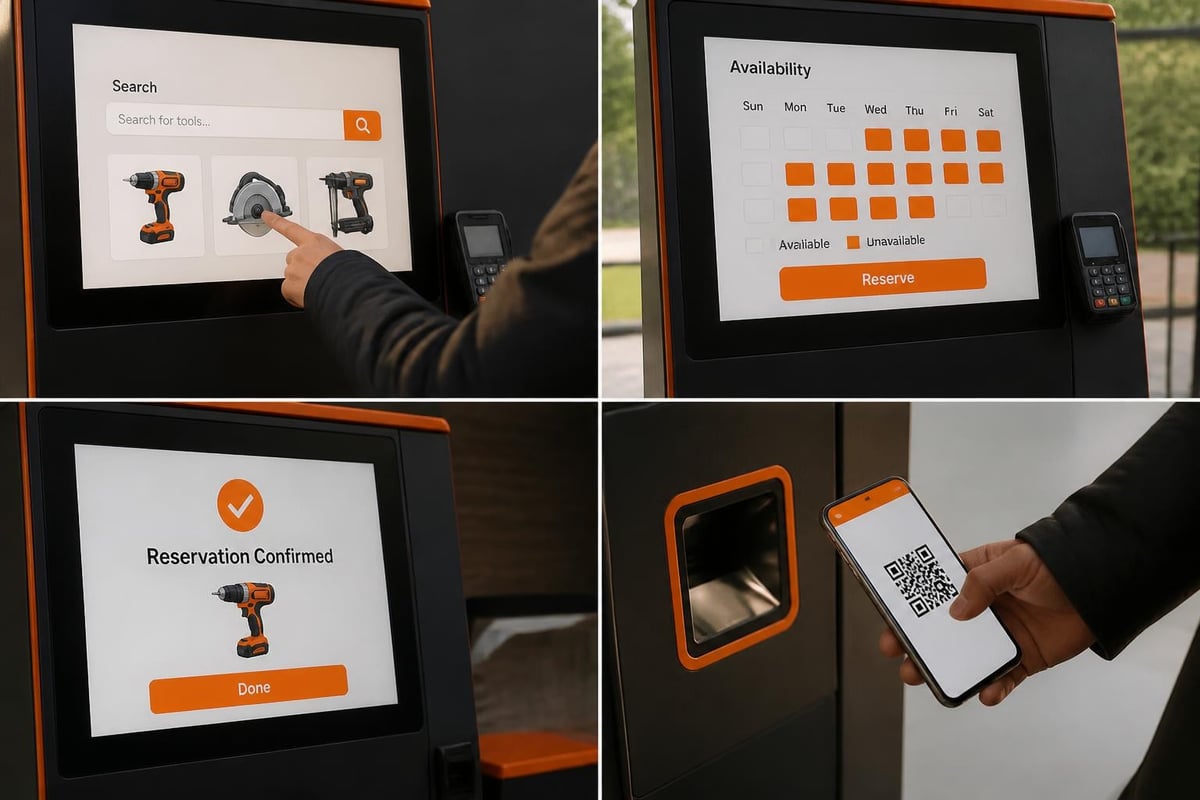
Modern implementations like 24/7 self-service tool rental systems enable customers to scan tools directly using kiosks or mobile apps without staff intervention. This approach reduces labor costs while providing round-the-clock access to equipment.
Asset tracking methods:
- Barcode/QR scanning: Staff or customers scan labels during checkout and return
- RFID tags: Automated detection when tools pass through designated zones
- GPS trackers: Real-time location monitoring for high-value or mobile equipment
- Manual entry: Backup option when scanning infrastructure is unavailable
- Photo documentation: Visual records of tool condition at checkout and return
Serialized inventory management assigns each tool instance a unique record rather than treating identical tools as fungible items. This granularity enables condition tracking, maintenance scheduling, and loss attribution to specific transactions. For example, a facility with ten identical drills maintains ten separate records, each tracking individual usage hours, repair history, and current location.
The Brytend Service Module provides this level of detail through serialized asset registration, allowing organizations to track equipment lifecycles from acquisition through disposal. By maintaining comprehensive service histories, teams identify patterns such as frequent repairs on specific tool models or unusually high usage rates that indicate need for additional inventory.
Integration with access control systems adds a security layer. Automated lockers or caged areas unlock only when a valid reservation exists, preventing unauthorized tool removal. Transaction logs create audit trails for compliance documentation and loss investigation.
Why Do Businesses Implement Workshop Tool Rental Systems
Businesses implement these systems to reduce equipment loss, optimize inventory utilization, and automate administrative tasks. Manual tracking through paper logbooks or spreadsheets creates gaps in accountability, while digital systems enforce checkout procedures and maintain complete usage records.
Primary business drivers:
| Business Goal | System Capability | Typical Impact |
|---|---|---|
| Reduce tool loss | Mandatory checkout/return scanning, automated alerts | 40-60% reduction |
| Increase utilization | Real-time availability visibility, online reservations | 25-35% increase |
| Lower admin costs | Automated billing, self-service portals | 30-50% reduction |
| Improve maintenance | Scheduled service based on usage hours, automated reminders | 20-30% longer tool life |
| Generate revenue | Dynamic pricing, late fee automation, utilization analytics | 15-25% revenue growth |
Financial justification often centers on loss prevention. Professional tool management systems report that automated checkout processes reduce tool loss and theft by creating clear accountability chains. When employees know each transaction is logged with their identity and timestamp, casual borrowing without returns decreases significantly.
Utilization optimization represents another key value driver. Many organizations discover that 20-30% of their tool inventory sits idle while teams purchase duplicates due to poor visibility. A centralized reservation system reveals actual availability, reducing unnecessary capital expenditure on redundant equipment.
Compliance requirements in regulated industries necessitate complete documentation of tool calibration, inspection, and maintenance. Systems that generate service certificates and maintain audit-ready records streamline regulatory compliance while reducing manual documentation burden. Organizations can leverage custom form solutions to create inspection checklists and compliance documentation workflows tailored to their specific regulatory requirements.
What Are the Core Features of a Workshop Tool Rental System
Core features divide into four functional categories: inventory management, customer interface, operations automation, and analytics. Each category addresses specific operational requirements within the rental workflow.
Inventory Management Features
Inventory management capabilities form the system foundation. Asset registration creates digital twins of physical tools, storing specifications, purchase information, location assignments, and current status. Maintenance scheduling generates preventive maintenance tasks based on usage hours, calendar intervals, or condition assessments.
Essential inventory functions:
- Serialized asset records with unique identifiers
- Multi-location inventory tracking across facilities or warehouses
- Category and specification management for search and filtering
- Condition assessment workflows with photo documentation
- Parts and accessory tracking linked to parent tools
- Depreciation calculation and asset lifecycle management
Usage-based maintenance triggers differ from calendar-based scheduling. A compressor running 200 hours requires service regardless of elapsed days, while a tool sitting unused may still need periodic inspection. Advanced systems track both metrics and generate maintenance tasks based on whichever threshold arrives first.
Customer and User Interface
Customer-facing portals enable self-service reservation, checkout, and return. Users search available inventory by category, specifications, or availability dates, then submit reservation requests. Approved reservations generate pickup instructions and access codes for automated lockers or checkout stations.
Mobile applications extend functionality beyond desktop access. Customers scan QR codes to initiate checkout, upload condition photos, and receive digital receipts. Staff use mobile interfaces for field operations such as delivery verification, on-site inspections, and equipment transfers between locations.
Notification systems keep users informed throughout the rental lifecycle. Automated messages confirm reservations, remind customers of upcoming returns, alert staff to overdue items, and notify maintenance teams of service due dates. Email, SMS, and in-app notifications provide multiple communication channels.
Operations Automation
Automated workflows reduce manual intervention in routine processes. Billing engines calculate rental charges based on duration, equipment category, and customer tier, then generate invoices and process payments. Late fee calculation and collection follow configurable business rules.
Access control integration manages physical security. When a customer completes checkout in the system, electronic locks receive unlock commands for the specific tool's storage location. Return scanning triggers lock engagement and availability status updates.
Contract management automates agreement generation, signature collection, and renewal notifications. Rental agreements pull customer information and equipment details from the system, populate standardized templates, and route documents for electronic signature. Completed agreements attach to transaction records for reference and compliance documentation.
Analytics and Reporting
Analytics modules transform transaction data into operational insights. Utilization reports identify high-demand equipment requiring inventory expansion and underused tools candidates for sale or reallocation. Revenue analysis breaks down income by equipment category, customer segment, and time period.
Maintenance cost tracking compares service expenses against rental income for each asset. Tools with excessive maintenance costs relative to utilization may warrant replacement rather than continued repair. This analysis supports data-driven capital budgeting decisions.
Compliance reporting generates audit documentation showing calibration status, inspection completion, and maintenance history. Regulatory submissions pull directly from system records rather than requiring manual compilation from multiple sources.
How to Implement a Workshop Tool Rental System: Step-by-Step
Implementation follows a structured sequence from requirements definition through user training. Proper planning prevents scope creep and ensures the deployed system matches operational needs.
Implementation steps:
-
Define system requirements and scope: Document tool categories, user roles, transaction workflows, integration needs, and compliance requirements. Identify must-have features versus nice-to-have enhancements.
-
Select software platform: Evaluate vendors based on feature alignment, scalability, integration capabilities, and total cost of ownership. Consider both cloud-based SaaS and on-premises deployment models.
-
Prepare asset inventory: Conduct physical inventory count, assign unique identifiers, photograph each tool, and document specifications. Apply barcode or QR labels to all equipment.
-
Configure system settings: Set up locations, categories, rental rates, maintenance intervals, user roles, and workflow rules. Define approval processes and notification triggers.
-
Integrate with existing systems: Connect to accounting software for billing, access control systems for security, and customer databases for user management. Test data synchronization and error handling.
-
Load initial data: Import asset records, customer accounts, existing reservations, and historical maintenance logs. Verify data accuracy and completeness.
-
Test workflows end-to-end: Execute complete rental cycles from reservation through return, maintenance scheduling, and billing. Validate all integrations and automated processes.
-
Train users and staff: Provide role-specific training for customers, counter staff, maintenance technicians, and administrators. Develop reference documentation and video tutorials.
-
Launch and monitor: Begin live operations with enhanced monitoring of system performance, user adoption, and error rates. Collect feedback and address issues promptly.
-
Optimize based on data: Review utilization reports, identify workflow bottlenecks, and refine processes. Expand features based on demonstrated user needs.
Data migration from legacy systems often presents the largest implementation challenge. Manual records in spreadsheets or paper logbooks require conversion to structured digital formats. Organizations should allocate 20-30% of implementation effort to data cleanup, validation, and migration testing.
Change management determines adoption success. Staff accustomed to manual processes may resist digital workflows initially. Improving rental workshop organization requires both technology implementation and process redesign supported by clear communication about benefits and expectations.
What Challenges Arise in Workshop Tool Rental System Management
Operational challenges span technical, process, and user adoption dimensions. Addressing these issues proactively prevents system abandonment and ensures long-term value realization.
Data Quality and Maintenance
Asset data degrades over time without active maintenance. Tools get lost, retired equipment remains in active status, and specification records become outdated. Organizations need governance processes that define update responsibilities, schedule periodic audits, and enforce data quality standards.
Duplicate records emerge when staff create new asset entries rather than updating existing ones. Implementing unique identifier validation and search-before-create workflows prevents duplication. Regular deduplication campaigns identify and merge redundant records.
User Compliance and Adoption
Systems fail when users bypass checkout procedures. Informal tool borrowing without scanning defeats tracking and accountability objectives. Enforcing physical access controls that require system interaction prevents circumvention.
Training remains an ongoing need as new employees join and software updates introduce changed workflows. Organizations should maintain current training materials, conduct regular refresher sessions, and provide readily accessible help resources.

Customer resistance to self-service interfaces occurs when platforms are unintuitive or unreliable. User experience testing during implementation identifies friction points before launch. Gradual rollout with assisted transactions helps customers build confidence before full self-service activation. Organizations can leverage custom CRM solutions that integrate rental workflows with customer relationship management, creating seamless experiences from initial inquiry through return processing.
Integration and Technical Issues
System integrations with accounting platforms, access control hardware, and legacy databases create technical dependencies. API failures, authentication issues, and data synchronization errors disrupt operations. Robust error handling, monitoring alerts, and fallback procedures maintain service continuity during technical problems.
Mobile connectivity in warehouse environments may be unreliable. Offline-capable applications that sync when connectivity restores enable continued operation during network outages. Barcode scanners with local storage buffer transaction data until network access returns.
Maintenance Scheduling Conflicts
Popular tools generate reservation conflicts when maintenance schedules overlap with high-demand periods. Predictive scheduling algorithms optimize service timing during anticipated low-demand windows. Maintaining spare inventory for frequently serviced items ensures availability continuity.
Emergency repairs disrupt reservation schedules when tools break down unexpectedly. Automated rescheduling systems notify affected customers and offer alternative equipment or revised pickup times. Transparent communication about service delays preserves customer relationships.
How to Optimize Workshop Tool Rental System Performance
Performance optimization targets both technical efficiency and operational effectiveness. Systematic improvement cycles identify bottlenecks, test solutions, and measure results.
Optimization strategies:
- Implement dynamic pricing: Adjust rental rates based on demand patterns, encouraging off-peak usage and maximizing revenue during high-demand periods
- Optimize inventory levels: Analyze utilization data to identify under-stocked popular items and over-stocked low-demand equipment
- Streamline checkout processes: Reduce transaction time through express lanes for pre-reserved items and bulk checkout capabilities
- Enhance preventive maintenance: Shift from reactive repairs to usage-based preventive service schedules that reduce downtime
- Automate customer communications: Deploy triggered notifications for reservation confirmations, pickup reminders, return alerts, and satisfaction surveys
- Create equipment bundles: Package complementary tools for common projects, increasing average transaction value
- Establish tiered service levels: Offer premium access tiers with benefits like extended rentals, reservation priority, and waived fees
Advanced implementations use machine learning to predict equipment demand. Historical reservation patterns, seasonal trends, and external factors like weather forecasts inform inventory positioning decisions. Industrial platform development demonstrates how mobile-first architectures with predictive analytics enable 24/7 operations with minimal staffing.
Real-time monitoring dashboards provide operational visibility. Managers view current checkout rates, available inventory levels, maintenance queue depth, and revenue performance. Alert thresholds trigger notifications when metrics exceed normal ranges, enabling rapid response to emerging issues.
Workshop layouts influence operational efficiency. Organizing tools by category with clear signage reduces customer search time. High-turnover items positioned near checkout stations minimize transaction friction. Best practices for tool inventory organization include logical grouping, standardized labeling systems, and dedicated spaces for maintenance and cleaning.
Manual vs Automated Workshop Tool Management
The contrast between manual and automated approaches illustrates the operational transformation these systems enable.
| Aspect | Manual Process | Automated System |
|---|---|---|
| Checkout | Paper logbook, handwritten entries | Barcode scan, instant digital record |
| Availability | Staff checks physical inventory | Real-time online visibility |
| Reservations | Phone calls, manual calendar | Online booking, automated confirmation |
| Billing | Manual invoice creation | Automated calculation and invoicing |
| Maintenance | Spreadsheet tracking, manual reminders | Usage-based triggers, automated scheduling |
| Loss prevention | Honor system, periodic audits | Mandatory checkout, accountability tracking |
| Analytics | Manual report compilation | Automated dashboards, trend analysis |
| Customer access | Business hours only | 24/7 self-service capability |
Manual systems place administrative burden on staff for routine transactions. Each checkout requires time to locate tools, complete paperwork, and log information. Staff availability limits operating hours and transaction throughput.
Automated platforms shift routine tasks to self-service interfaces, freeing staff for high-value activities like customer consultation, equipment demonstrations, and maintenance operations. Labor reallocation typically enables service expansion without proportional headcount increases.
Accountability differences are substantial. Manual logbooks with illegible entries provide weak audit trails when tools go missing. Digital systems create tamper-resistant transaction records linking specific individuals to equipment through timestamped checkout events.
Best Practices for Workshop Tool Rental Systems
Established best practices improve system effectiveness and user satisfaction across diverse implementation contexts.
Operational best practices:
- Enforce unique asset identification: Label every tool with scannable identifiers resistant to wear and environmental exposure
- Conduct regular physical audits: Quarterly inventory counts verify system records match physical assets
- Document condition thoroughly: Require photos at checkout and return to resolve damage disputes objectively
- Maintain cleaning and inspection protocols: Establish standardized procedures executed before tools return to available status
- Implement graduated consequence systems: Progressive penalties for late returns and policy violations encourage compliance
- Provide multiple access channels: Offer online, mobile, kiosk, and staff-assisted transaction options accommodating diverse user preferences
- Create clear usage policies: Publish rental terms, acceptable use guidelines, and safety requirements in accessible formats
- Schedule regular data cleanup: Monthly reviews identify and resolve data quality issues before they compound
Communication consistency prevents user confusion. Standardized terminology across signage, system interfaces, and staff interactions reinforces correct workflow understanding. For example, consistently using "checkout" rather than mixing "checkout," "pickup," and "borrow" reduces ambiguity.
Shared tool management in collaborative environments requires special attention to access equity, usage tracking, and community governance. Member-driven organizations benefit from transparent utilization data and democratic decision-making processes for equipment acquisition.
Security considerations extend beyond access control. Sensitive customer data requires encryption, access restrictions, and compliance with data protection regulations. Regular security audits identify vulnerabilities in authentication systems, payment processing, and data storage.
Case Example: Industrial Tool Rental Implementation
A commercial garage services provider managing tool inventory across three workshop locations implemented a workshop tool rental system to address persistent equipment loss and poor utilization visibility. Prior to implementation, the company relied on paper checkout logs that staff frequently skipped during busy periods.
The implementation team conducted a complete inventory count, identifying 847 tools across locations. Each asset received a QR code label linked to a digital record containing specifications, purchase date, and assigned location. Staff and technicians received mobile app training enabling tool checkout via smartphone scanning.
Within 90 days of launch, the company documented measurable improvements. Tool loss decreased 52% as mandatory checkout procedures created clear accountability. Utilization analysis revealed that 23% of inventory could be consolidated from low-use locations to high-demand facilities, improving availability without additional purchases. Administrative time spent tracking tools and managing reservations dropped 38%, freeing counter staff for customer service activities.
Maintenance scheduling shifted from reactive emergency repairs to proactive service based on usage hours. Compressor service intervals aligned with actual run time rather than arbitrary calendar schedules, reducing premature maintenance while preventing unexpected failures. Service certificate generation automated compliance documentation for commercial clients.
The system paid for itself within eleven months through reduced replacement costs, improved utilization, and decreased labor overhead. Garage service providers like NextLevel Garage Co. managing complex tool inventories across multiple service categories benefit from centralized platforms that track specialized equipment while maintaining service quality standards.
Integration Strategies for Workshop Tool Rental Systems
System integrations extend functionality by connecting rental platforms with complementary business systems. Strategic integration planning identifies high-value connections that streamline workflows and eliminate duplicate data entry.
Critical integration points:
- Accounting and ERP systems: Automate invoice generation, payment processing, and financial reporting
- Access control hardware: Synchronize electronic locks, gates, and security systems with rental authorizations
- Customer relationship management: Share customer profiles, contact information, and interaction history
- Maintenance management systems: Coordinate work orders, parts inventory, and technician scheduling
- E-commerce platforms: Enable online rental transactions with shopping cart and payment gateway integration
- Calendar and scheduling tools: Sync reservations with staff calendars and facility availability
- Marketing automation: Trigger campaigns based on rental history, preferences, and lifecycle stage
API availability and documentation quality determine integration complexity. Well-designed APIs with comprehensive documentation enable rapid connection development, while proprietary systems requiring custom middleware increase implementation costs and maintenance burden.
Real-time versus batch synchronization represents another design choice. Real-time updates provide immediate consistency across systems but increase network dependency and processing overhead. Batch synchronization reduces resource consumption but introduces temporary data discrepancies between systems.
Error handling protocols maintain data integrity when integrations fail. Systems should log failed synchronization attempts, queue retries, and alert administrators to persistent failures. Fallback procedures enable continued operation during extended outages of connected systems.
Organizations looking to streamline lead generation and customer engagement can integrate rental platforms with marketing automation systems that nurture prospects through educational content about equipment capabilities and rental benefits.
Advanced Features in Modern Workshop Tool Rental Systems
Emerging capabilities extend beyond core rental management into predictive analytics, IoT integration, and artificial intelligence applications.
Advanced capabilities:
- Predictive maintenance algorithms: Machine learning models forecast equipment failures based on usage patterns and sensor data
- IoT sensor integration: Real-time monitoring of tool location, operating conditions, and performance metrics
- Dynamic pricing engines: Algorithmic rate adjustment based on demand forecasting, competitor pricing, and inventory levels
- Computer vision inspection: Automated damage detection through photo analysis at return processing
- Voice-activated interfaces: Hands-free checkout and status queries for field operations
- Blockchain provenance tracking: Immutable records of ownership, maintenance, and usage history
- Augmented reality user guides: In-app instructions overlaid on physical tools demonstrating proper usage
IoT-enabled tools transmit operational data to rental systems during use. Sensors track location, operating hours, vibration levels, and performance parameters. This telemetry enables precise usage-based billing, condition monitoring, and theft prevention through geofencing alerts.
Computer vision systems analyze return photos to identify damage automatically. Neural networks trained on thousands of tool images detect cracks, dents, wear patterns, and missing components. Flagged items route to manual inspection while undamaged tools return to available status immediately.
AI-powered virtual assistants handle routine customer inquiries about availability, pricing, and policies. Natural language processing interprets questions and provides accurate answers, reducing support ticket volume. Complex inquiries escalate to human staff seamlessly.
Organizations developing custom software solutions can explore AI learning platforms to understand how artificial intelligence enhances operational efficiency and customer experience in rental management applications.
Compliance and Documentation Requirements
Regulated industries impose documentation requirements that rental systems must accommodate. Proper system configuration ensures audit readiness and regulatory compliance without manual record compilation.
Compliance documentation:
- Calibration certificates: Records proving measurement tools meet accuracy standards
- Safety inspection reports: Documented checks of protective equipment and power tools
- Maintenance logs: Complete service history showing preventive maintenance and repairs
- User certifications: Verification that operators possess required training for specialized equipment
- Incident reports: Documentation of accidents, injuries, or equipment damage during rental periods
- Environmental compliance: Records of proper disposal for batteries, fluids, and contaminated tools
Systems supporting regulated operations should enforce workflows that prevent non-compliant actions. For example, requiring valid certification verification before authorizing checkout of specialized equipment like aerial lifts or gas detection instruments.
Audit trail requirements necessitate immutable transaction records with timestamp, user identification, and action documentation. Edit capabilities should be restricted to authorized administrators, with all changes logged separately to prevent record tampering.
Data retention policies balance compliance requirements against storage costs. Organizations must maintain records for prescribed periods varying by jurisdiction and industry. Automated archival processes move aged data to lower-cost storage while preserving retrieval capability for audit requests.
Custom service modules designed for regulated environments can enforce compliance workflows, generate required documentation, and maintain audit-ready records aligned with industry-specific requirements.
Mobile and Remote Access Capabilities
Mobile functionality transforms rental operations by extending system access beyond fixed workstations to field locations, customer sites, and delivery vehicles.
Mobile capabilities:
- Customer mobile apps: Self-service reservation, checkout via QR scanning, condition documentation, and digital receipts
- Staff field applications: Delivery confirmation, on-site damage assessment, equipment transfers, and maintenance task completion
- Offline operation modes: Transaction buffering during network unavailability with automatic synchronization upon reconnection
- Location services: GPS tracking for delivery routing, geofencing alerts, and asset location verification
- Mobile payment processing: Integrated credit card readers and digital wallet support for on-site transactions
- Push notifications: Real-time alerts for reservation confirmations, return reminders, and maintenance updates
Responsive web interfaces adapt to various screen sizes, providing consistent functionality across desktop, tablet, and smartphone devices. Native mobile applications offer enhanced performance and offline capabilities but require separate development for iOS and Android platforms.
Security considerations for mobile access include device authentication, encrypted data transmission, and remote wipe capabilities for lost or stolen devices. Multi-factor authentication adds security layers for high-privilege operations like administrative functions.
Battery consumption optimization extends field operation duration. Efficient code, cached data, and configurable sync intervals reduce power draw. Background processing limitations preserve battery life during extended periods between active usage.
Organizations serving diverse customer segments can develop platform integrations that extend rental management capabilities into specialized applications, similar to how gaming console repair services use customized inventory systems to track device status through multi-step diagnostic and repair workflows.
Workshop tool rental systems transform equipment management through automated tracking, self-service access, and data-driven optimization. Implementation success requires careful planning, comprehensive data preparation, and sustained attention to user adoption. Organizations seeking custom software solutions tailored to their specific rental workflows can work with experienced development teams. Brytend specializes in building integrated platforms that connect rental management with broader business systems, creating seamless operations from customer inquiry through equipment return and maintenance scheduling.


