Management system software centralizes business processes, automates workflows, and enforces compliance standards across departments. Organizations deploy these systems to replace manual tracking, reduce operational errors, and maintain regulatory documentation in industries ranging from manufacturing to healthcare.
TL;DR
- Management system software is a digital platform that organizes, automates, and monitors business operations according to defined rules and standards
- Common types include quality management systems (QMS), document management systems (DMS), enterprise content management (ECM), and integrated service platforms
- Key benefits are audit trail automation, real-time compliance monitoring, workflow standardization, and cross-department data visibility
- Selection criteria include regulatory requirements, integration capabilities, user access controls, scalability, and vendor support
- Implementation requires process mapping, data migration planning, role-based configuration, and phased user adoption
What Is Management System Software
Management system software is a structured application that captures, processes, and reports operational data according to business rules, compliance standards, or industry frameworks. It replaces spreadsheets, paper forms, and disconnected databases with centralized records accessible through role-based permissions.
These platforms enforce standardized workflows by requiring specific data inputs before advancing tasks to the next stage. For example, a quality management system may block production approval until inspection results, calibration certificates, and material traceability documentation are uploaded and verified against acceptance criteria.
Core Components of Management System Software
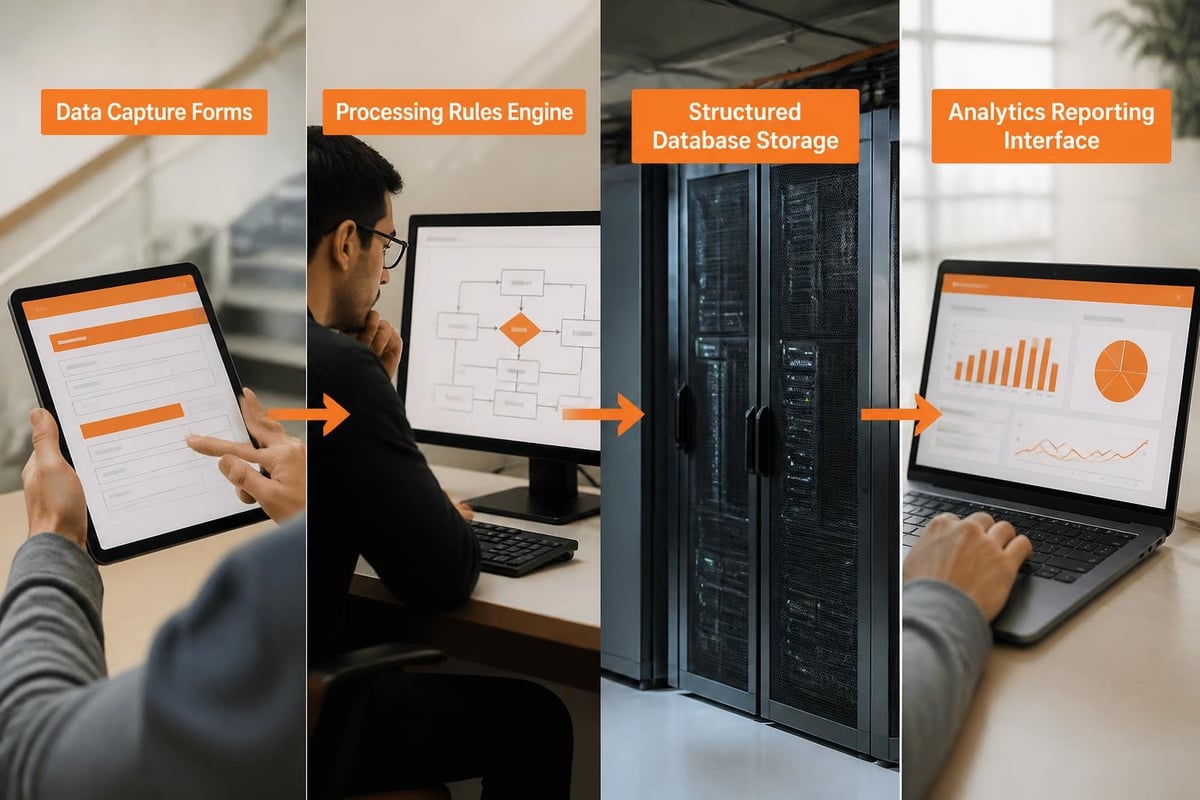
Every management system software includes four structural layers that determine functionality and user experience.
Data capture layer defines fields, forms, and input methods. This includes dropdown menus for standardized selections, date pickers for temporal data, file upload widgets for supporting documents, and barcode scanners for serialized inventory. The system validates entries against predefined rules before storing them in the database.
Processing engine applies business logic to captured data. It triggers notifications when thresholds are exceeded, calculates metrics from raw inputs, assigns tasks based on conditions, and generates sequential identifiers for records. The engine operates continuously without manual intervention.
Storage and retrieval infrastructure organizes records in relational databases or document repositories. It maintains version histories, audit logs, and metadata tags that enable filtered searches. Access controls restrict visibility based on user roles and departmental boundaries.
Reporting and analytics module transforms stored data into dashboards, compliance reports, and performance metrics. Users create custom views by selecting dimensions, applying filters, and scheduling automated distribution to stakeholders.
How Does Management System Software Improve Operations
Management system software reduces manual effort by automating repetitive tasks and enforcing process consistency across locations. The primary operational improvements appear in task routing, documentation control, and exception management.
Automated Workflow Routing
The software assigns tasks to specific users or departments based on triggering events. When a customer submits a service request through a web form, the system creates a ticket, assigns it to the appropriate technician based on skill set and geographic zone, and notifies the technician via email or mobile push notification. The technician receives job details, equipment history, and required parts without manual dispatcher intervention.
Sequential approval chains route documents through defined hierarchies. A purchase requisition moves from requestor to department manager to procurement to finance, with each approver receiving notifications only when prior steps complete. The system timestamps each action and maintains a complete approval trail.
Real-Time Compliance Monitoring
Organizations subject to regulatory frameworks benefit from continuous compliance verification. ISO 30301:2011 standards define requirements for records management systems that support accountability and business efficiency through systematic controls.
The software compares current states against compliance requirements and flags deviations immediately. If equipment calibration expires, the system locks that equipment from use in production workflows and notifies calibration staff. If required training certifications lapse, affected employees lose access to restricted areas or functions until recertification is complete.
| Compliance Function | Manual Process | Automated Process |
|---|---|---|
| Certificate tracking | Spreadsheet review monthly | Real-time expiration alerts |
| Audit documentation | Gather files across locations | One-click report generation |
| Change control | Email approval chains | Sequential digital signatures |
| Training verification | HR file review | Automatic role-based access |
Exception Detection and Escalation
The system identifies deviations from normal patterns and escalates them according to severity rules. When service call response times exceed contractual SLAs, the software notifies supervisors and optionally reassigns the ticket to available personnel. When inventory levels drop below reorder points, purchase requisitions generate automatically.
Threshold-based alerts prevent minor issues from becoming major failures. Temperature sensors in cold storage facilities transmit readings to the management system every five minutes. If temperatures drift outside acceptable ranges, the system sends immediate alerts to facility managers and automatically activates backup cooling systems if the deviation persists beyond a defined interval.
What Types of Management System Software Exist
Management system software categories align with functional domains and regulatory frameworks. Organizations often deploy multiple specialized systems or select integrated platforms that combine capabilities.
Quality Management Systems (QMS)
QMS platforms enforce ISO 9001 requirements and industry-specific quality standards. They manage nonconformance reports, corrective and preventive actions (CAPA), supplier quality, and internal audits. Manufacturing companies use QMS to track lot genealogy, maintain inspection records, and document process deviations.
A medical device manufacturer records each production step with operator ID, equipment used, material lot numbers, and environmental conditions. When a field complaint occurs, the QMS traces the affected unit back through every manufacturing operation, identifying all potentially impacted units from the same production batch.
Document and Content Management Systems
Enterprise content management systems organize unstructured data including contracts, technical drawings, policies, and correspondence. They provide version control, metadata tagging, full-text search, and retention scheduling aligned with legal requirements.
Engineering teams store CAD files, specifications, and design calculations in the document management system. When engineers revise a drawing, the system increments the revision number, archives the previous version, and routes the new version through an approval workflow. Released drawings become read-only to prevent unauthorized modifications.
Service and Maintenance Management
Service management platforms schedule preventive maintenance, track work orders, manage spare parts inventory, and generate service histories for equipment fleets. They calculate next service dates based on calendar intervals, operating hours, or cycle counts.
Brytend offers comprehensive tools for organizations requiring structured service workflows and equipment lifecycle tracking. The Brytend Service Module enables businesses to register serialized inventory, configure custom service protocols, automate maintenance reminders based on equipment-specific intervals, and generate compliance certificates with complete service histories.

Field service companies configure service templates for each equipment type. A template for commercial HVAC units might include filter replacement every 90 days, refrigerant level checks every 180 days, and electrical connection inspections annually. When technicians complete service calls, they record findings in mobile applications that sync to the central management system.
Integrated Business Management Platforms
Large organizations deploy enterprise resource planning (ERP) systems that combine financial accounting, supply chain management, human resources, and customer relationship functions. These platforms share a common database, eliminating duplicate data entry and ensuring consistency across modules.
A sales order entered in the CRM module automatically creates a production work order in manufacturing, reserves inventory in the warehouse module, and generates a shipment task in logistics. The accounting module recognizes revenue when the shipment confirms delivery.

How to Select Management System Software for Your Organization
Selection requires mapping current processes, identifying pain points, and evaluating vendor capabilities against specific requirements. The process typically spans 60 to 90 days for mid-sized implementations.
Requirements Analysis Phase
Start by documenting existing workflows through process mapping sessions with department stakeholders. Identify inputs, decision points, outputs, and handoffs between roles. Note where errors occur, delays happen, or compliance gaps exist.
Prioritize requirements into three categories: mandatory (system unusable without this), important (significant value but workarounds possible), and desired (nice-to-have enhancements). Mandatory requirements typically include regulatory compliance features, integration with existing systems, and security controls.
Evaluation Criteria Framework
Use a scoring matrix to compare vendor offerings objectively across weighted criteria:
- Functional fit: Does the system support your specific workflows without extensive customization? Request vendor demonstrations using your actual data and scenarios.
- Integration architecture: Can the system exchange data with existing ERP, CRM, or accounting platforms? Evaluate API availability, supported data formats, and real-time versus batch synchronization.
- Deployment model: Determine whether cloud-hosted, on-premises, or hybrid deployment aligns with security policies and infrastructure capabilities.
- User experience: Assess interface complexity, mobile accessibility, and learning curve through pilot testing with representative users.
- Vendor stability: Review financial health, customer retention rates, development roadmap, and support response times.
Technical Architecture Considerations
The NIST critical software definition highlights security requirements for software that performs critical functions, emphasizing the importance of secure development practices and supply chain verification.
Database structure determines scalability and query performance. Relational databases excel at structured transactional data with complex relationships. Document-oriented databases suit unstructured content with flexible schemas. Graph databases optimize networked relationships common in asset hierarchies or supplier networks.
Authentication and authorization mechanisms protect sensitive data. Multi-factor authentication reduces credential compromise risks. Role-based access control (RBAC) assigns permissions through group membership rather than individual user configuration. Audit logging records all access and modification events for compliance verification.
Total Cost of Ownership Calculation
Beyond software licensing fees, account for implementation services, data migration, training, ongoing support, and infrastructure costs.
| Cost Component | Typical Range | Notes |
|---|---|---|
| Software licenses | $50-500/user/month | Varies by module count |
| Implementation services | 20-40% of license cost | First-year setup |
| Data migration | $10,000-100,000+ | Depends on source complexity |
| Training | $500-2,000/user | Role-specific curricula |
| Annual support | 18-22% of license cost | Updates and help desk |
| Integration development | $15,000-150,000 | Per connected system |
What Are Common Implementation Challenges
Management system software projects fail when organizations underestimate change management requirements, rush deployment timelines, or neglect data quality issues. Successful implementations address these predictable obstacles proactively.
Data Migration Complexity
Legacy systems contain inconsistent formats, duplicate records, and missing required fields. Migrating this data without cleanup produces unreliable reports and user frustration.
Data cleansing steps include deduplication based on matching algorithms, standardization of naming conventions, validation against business rules, and enrichment of incomplete records. Allocate 30-40% of implementation time to data preparation activities.
Test migrations in sandbox environments before production cutover. Verify record counts, relationship integrity, and calculated fields. Reconcile summary totals between old and new systems to confirm completeness.
User Adoption Resistance
Employees comfortable with existing processes resist new tools that change daily routines. Without active buy-in, users enter minimal required data, bypass system workflows through workarounds, or continue parallel processes in spreadsheets.
Adoption strategies include identifying departmental champions who advocate for the system, providing role-specific training focused on "what's in it for me" benefits, implementing feedback loops where users influence configuration decisions, and celebrating early wins publicly.
Phase deployment by department or function rather than enterprise-wide launches. This limits risk, allows learning from initial rollouts, and builds momentum through demonstrated successes.
Integration Failures
Disconnected systems force duplicate data entry and create synchronization conflicts. Integration projects require detailed understanding of both systems' data models and business logic.
Map data field correspondences between systems explicitly. Define which system serves as master for each data element to prevent circular update conflicts. Establish error handling procedures when integration processes fail.
Consider middleware platforms that specialize in system integration rather than point-to-point custom coding. These tools provide pre-built connectors, transformation logic, and monitoring capabilities that reduce development time.
How to Optimize Management System Software Performance
After initial deployment, continuous improvement activities maximize return on investment and adapt the system to evolving business needs. Optimization focuses on workflow refinement, report development, and capability expansion.
Workflow Analysis and Refinement
Review system-generated metrics to identify bottlenecks. If approval tasks remain in certain users' queues for extended periods, investigate whether workload balancing, delegation authorities, or automated approvals could accelerate throughput.
Process mining techniques analyze actual workflow paths from system logs. They reveal where processes deviate from designed flows, indicating workarounds, exceptions, or training gaps. Organizations discover that 80% of cases follow standard paths while 20% require special handling previously unknown to management.
Iterate configurations based on user feedback. Monthly review sessions with power users surface pain points and enhancement requests. Prioritize changes that benefit multiple departments or eliminate repetitive manual tasks.
Advanced Reporting and Analytics
Standard reports satisfy basic needs, but custom analytics unlock deeper insights. Build dashboards that correlate process metrics with business outcomes.
A service organization might correlate first-time fix rates with technician training completion, parts availability, and equipment age. Analysis reveals that technicians who completed advanced diagnostics training achieve 15% higher first-time fix rates on equipment older than five years, justifying expansion of that training program.
Predictive analytics apply machine learning algorithms to historical data. Equipment failure prediction models analyze maintenance records, operating conditions, and sensor data to forecast failures before they occur. This enables condition-based maintenance that reduces downtime compared to fixed-interval scheduling.
API and Automation Expansion
Expose system data through APIs that enable custom integrations and third-party tool connections. Field technicians use mobile apps that pull service history from the management system, capture on-site findings through voice dictation and photos, and automatically update work orders upon completion.
Robotic process automation (RPA) bots interact with system interfaces to handle repetitive tasks. A bot might monitor incoming email for service requests, extract relevant details using natural language processing, create system tickets, and assign them based on predefined rules.
Progressive automation strategy: from manual data entry to form-based workflows to API integrations to intelligent bots handling exception-based processes
Security and Compliance Updates
Regulatory requirements and threat landscapes evolve continuously. Schedule quarterly reviews of access permissions, removing accounts for departed employees and adjusting rights based on role changes.
Apply software updates and security patches during planned maintenance windows. Test updates in staging environments before production deployment to identify configuration conflicts or unexpected behavior changes.
Organizations operating in regulated industries should review COBIT 2019 framework principles for governance and management of enterprise IT, ensuring alignment between system capabilities and governance requirements.
What Best Practices Ensure Long-Term Success
Sustainable management system software initiatives treat the platform as a strategic asset requiring ongoing investment rather than a one-time project. Success patterns include executive sponsorship, dedicated system administration, and continuous training.
Dedicated System Administration
Assign specific personnel responsible for system configuration, user management, and issue resolution. System administrators develop deep platform expertise, maintain documentation, coordinate vendor interactions, and serve as primary escalation points for complex problems.
Administrator responsibilities include creating new users and assigning roles, configuring workflows and approval routing, developing custom reports and dashboards, managing data imports and exports, monitoring system performance and storage utilization, and coordinating software updates.
Organizations with 50-200 users typically require 0.5-1.0 FTE for administration. Larger deployments or heavily customized systems need proportionally more support.
Governance Committee Structure
Establish a cross-functional committee that reviews system performance, prioritizes enhancement requests, and resolves configuration disputes between departments. The committee meets monthly or quarterly depending on organizational complexity.
Committee composition should include department representatives who use the system daily, IT personnel responsible for infrastructure and security, executive sponsor providing strategic direction and resource allocation, and system administrators presenting technical constraints and capabilities.
Document decisions in meeting minutes distributed to all stakeholders. Maintain a public enhancement backlog where users submit requests and vote on priorities.
Common Mistakes to Avoid
These preventable errors undermine management system software investments:
- Over-customization: Excessive modifications increase upgrade complexity and vendor support costs. Use standard configurations whenever possible.
- Inadequate testing: Deploying untested workflows to production creates user frustration and data quality issues. Establish formal testing protocols.
- Poor documentation: Undocumented configurations create knowledge gaps when administrators depart. Maintain current process documentation and system settings.
- Neglecting mobile access: Field workers and remote employees need mobile-optimized interfaces. Evaluate mobile capabilities during vendor selection.
- Ignoring data quality: "Garbage in, garbage out" applies universally. Implement validation rules and periodic data audits.
Brief Case Example: Industrial Gas Distribution
A specialty gas distributor with 200 employees serving manufacturing customers deployed service management software to track 3,500 gas detection instruments requiring annual calibration. Previously, technicians used paper forms recording calibration results, creating an administrative burden to compile compliance reports for customers.
The management system automated calibration scheduling based on each instrument's last service date, assigned work orders to technicians by geographic territory, and provided mobile apps for on-site data entry. Technicians scanned instrument barcodes, recorded gas readings, and captured digital signatures on tablets. The system generated compliance certificates immediately upon service completion.
Results after twelve months included 98% on-time calibration compliance versus 73% previously, 85% reduction in certificate generation time from 4 days to 8 hours, and elimination of data entry errors from manual transcription. Customer satisfaction scores for calibration services increased 22 points.
Comparison: Manual vs. Automated Management
| Process Aspect | Manual Management | Management System Software |
|---|---|---|
| Data entry | Multiple systems, duplicate entry | Single entry, auto-propagation |
| Compliance verification | Periodic manual audits | Continuous automated monitoring |
| Reporting | Days to compile from multiple sources | Real-time dashboard access |
| Error rates | 3-5% data entry errors typical | <0.5% with validation rules |
| Audit trail | Incomplete, requires reconstruction | Complete timestamped logs |
| Scalability | Linear cost increase with volume | Marginal cost decrease per unit |
How Management System Software Integrates With Development Workflows
Software development teams building custom applications require management systems that support agile methodologies, version control integration, and automated testing pipelines. These specialized platforms differ from operational management systems but share common architectural principles.
Development workflow platforms track requirements, user stories, sprint planning, and defect resolution. They integrate with code repositories to link commits to specific work items, enabling traceability from requirement through deployment.
Research on quality requirements management in agile development identifies challenges including requirements volatility, cross-functional coordination, and balancing speed with thoroughness. Management systems address these through structured workflows, stakeholder collaboration tools, and automated quality gates.
Continuous integration and deployment pipelines rely on management platforms that trigger automated builds when developers commit code, execute test suites and report results, deploy passing builds to staging environments, and create production deployment requests requiring approval.
Modern development teams evaluate database management system performance to optimize application responsiveness and scalability. Custom software projects benefit from systematic evaluation frameworks that compare DBMS options against specific workload requirements.
Teams building internal tools for clients often leverage existing platforms rather than building from scratch. Brytend specializes in custom software development that integrates with clients' existing management systems, extending functionality through APIs and creating purpose-built interfaces that match specific operational workflows.
Management system software delivers measurable value through process automation, compliance enforcement, and operational visibility when organizations invest in proper selection, implementation, and ongoing optimization. The right platform aligns with regulatory requirements, integrates with existing infrastructure, and scales with business growth. Brytend helps organizations design and implement custom management solutions tailored to unique operational needs, providing expert development services that bridge gaps between standard platforms and specific business requirements.