Software design software represents a specialized category of development tools that enable teams to plan, model, visualize, and document software systems before writing code. These platforms range from architecture modeling tools and UML diagram editors to prototyping applications and collaborative design systems. Organizations use software design software to reduce development costs, improve team communication, and ensure technical decisions align with business requirements before committing resources to implementation.
TL;DR:
- Software design software helps teams plan and visualize systems before coding, reducing rework and miscommunication
- Key categories include architecture tools, UML editors, wireframing platforms, and collaborative design systems
- Selection criteria include team size, project complexity, integration requirements, and standardization needs
- Proper implementation requires defined workflows, templates, version control, and regular design reviews
- ROI comes from reduced defects, faster onboarding, better documentation, and improved stakeholder alignment
What Is Software Design Software and Why Does It Matter?
Software design software is a class of applications that facilitate the planning, modeling, visualization, and documentation of software systems prior to or during development. These tools enable architects, developers, and stakeholders to create representations of system structure, behavior, data flow, and user interfaces without writing production code.
The purpose extends beyond simple diagramming. Modern software design software supports collaborative workflows, version control integration, code generation, reverse engineering, and compliance documentation. Teams use these platforms to establish shared understanding, validate architectural decisions, and maintain living documentation that evolves with the codebase.
Organizations implementing software development best practices recognize that design-phase investments prevent costly rework during implementation and maintenance phases.
Categories of Design Tooling
Architecture and Modeling Tools
- Enterprise architecture platforms for system-level planning
- UML diagram editors supporting all 14 diagram types
- Data modeling applications for database schema design
- Component and service modeling for microservices architectures
Prototyping and Wireframing Applications
- Low-fidelity wireframe tools for early concept validation
- High-fidelity mockup platforms with interactive elements
- User flow mapping for experience design
- Responsive design preview across device types
Collaborative Design Platforms
- Real-time co-editing for distributed teams
- Comment and annotation systems for async feedback
- Design system management and component libraries
- Handoff tools bridging design and development

How Do You Select the Right Software Design Software?
Selection begins with documenting current design processes, pain points, and team structure. Organizations must evaluate tools against specific criteria rather than adopting platforms based solely on popularity or vendor marketing.
Team Size and Distribution
- Small co-located teams may prioritize simplicity over collaboration features
- Distributed teams require robust real-time collaboration and cloud access
- Enterprise organizations need role-based access control and audit trails
- Mixed internal/external teams benefit from guest access and presentation modes
Project Complexity Requirements
- Simple web applications may need only wireframing tools
- Enterprise systems require comprehensive architecture modeling
- Embedded systems demand specialized diagram types (state machines, timing diagrams)
- Data-intensive applications benefit from integrated data modeling
| Evaluation Criterion | Small Teams | Enterprise Teams | Distributed Teams |
|---|---|---|---|
| Collaboration Features | Medium | High | Critical |
| Learning Curve | Low preferred | Medium acceptable | Low-Medium |
| Integration Depth | Basic | Comprehensive | Medium-High |
| Cost per User | Critical | Less Critical | Medium |
| Cloud vs Desktop | Either | Cloud preferred | Cloud required |
The software design principles your team follows should directly influence tool selection, as different platforms support different methodologies with varying levels of native support.
Integration and Ecosystem Considerations
Modern software design software must integrate with existing development toolchains. Evaluate connections to version control systems, project management platforms, continuous integration pipelines, and documentation repositories.
Critical Integration Points:
- Git integration for design file versioning
- JIRA/Azure DevOps for requirement traceability
- Confluence/SharePoint for documentation publishing
- Slack/Teams for notification workflows
- Development IDEs for code generation or import
Teams working across custom software development projects require flexibility to adapt tools to varied client technology stacks and compliance requirements.
What Features Define Professional-Grade Design Software?
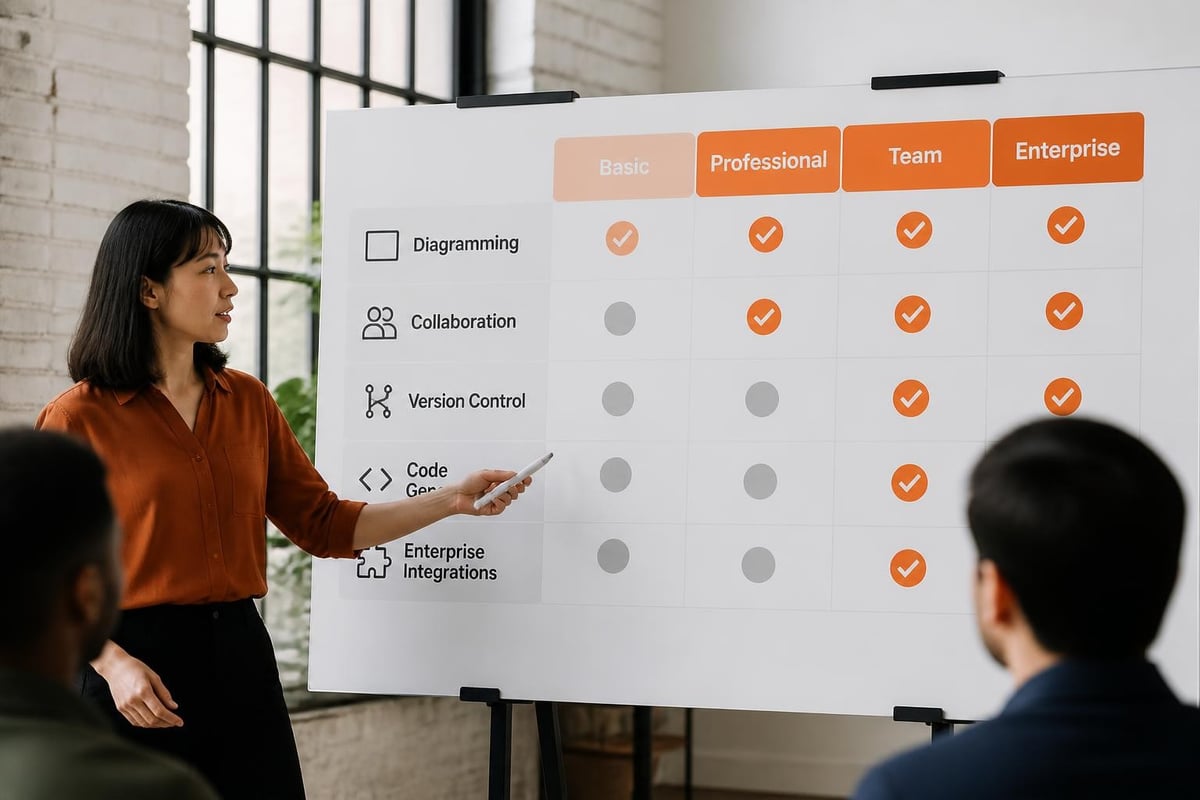
Professional software design software distinguishes itself through depth of functionality, not breadth of diagram types. Organizations should prioritize platforms offering features that directly support their design methodology and quality standards.
Version Control and Change Management
- Built-in versioning with diff visualization
- Branching and merging for parallel design work
- Change history with author attribution
- Rollback capabilities for error recovery
Template and Component Libraries
- Pre-built templates for common patterns
- Reusable component libraries with inheritance
- Design system integration and maintenance
- Custom template creation and sharing
Validation and Analysis
- Syntax checking for diagram correctness
- Consistency validation across related diagrams
- Impact analysis for proposed changes
- Metric calculation (complexity, coupling, cohesion)
Code Generation and Reverse Engineering
Bidirectional synchronization between design artifacts and code reduces documentation drift. Professional platforms support generating skeleton code from models and updating models from existing codebases.
- Framework-specific code generation (Spring, .NET, React)
- Database DDL generation from data models
- API specification generation (OpenAPI, RAML)
- Reverse engineering from source code or databases
How Should Teams Implement Software Design Software?
Implementation success depends on establishing clear processes before tool adoption. Organizations that deploy software design software without defined workflows see low adoption and inconsistent results.
Phase 1: Process Definition (Weeks 1-2)
- Document current design practices and artifacts
- Identify mandatory versus optional design activities
- Define roles (who creates, reviews, approves designs)
- Establish artifact naming and organization standards
- Create approval workflows for design changes
Phase 2: Tool Configuration (Weeks 2-3)
- Set up organization accounts and user provisioning
- Configure templates matching organizational standards
- Import existing component libraries and patterns
- Establish folder structures and access controls
- Configure integrations with existing tools
Phase 3: Pilot Implementation (Weeks 4-6)
- Select 2-3 projects representing typical complexity
- Train pilot team members on tool and process
- Monitor usage patterns and collect feedback
- Adjust templates and workflows based on learning
- Document lessons learned and best practices
Phase 4: Organization Rollout (Weeks 7-12)
- Conduct training sessions for all design stakeholders
- Migrate existing design artifacts to new platform
- Enforce tool usage through defined-entry criteria
- Establish support channels for questions
- Monitor adoption metrics and address resistance
Organizations specializing in task and project management understand that tool adoption requires parallel process improvement and change management.
What Mistakes Do Organizations Make With Design Software?
Common implementation failures stem from treating software design software as a documentation tool rather than an integrated design methodology component. These mistakes reduce ROI and undermine team confidence in design processes.
Mistake 1: Adopting Tools Before Defining Processes Organizations purchase platforms expecting tools to define best practices. Without established design workflows, teams create inconsistent artifacts that fail to support downstream activities. Define what to create, when, and why before selecting tools.
Mistake 2: Over-Designing for Simple Projects Applying enterprise architecture modeling to simple CRUD applications wastes time and creates maintenance burden. Match design rigor to project risk and complexity. Not every application requires comprehensive UML modeling.
Mistake 3: Treating Designs as Disposable Artifacts Creating designs solely for initial approval, then abandoning them during development, eliminates design software value. Designs must remain synchronized with implementation to support maintenance and evolution.
Mistake 4: Insufficient Training Investment Providing only basic tool training without methodology education produces technically correct but strategically ineffective designs. Teams need instruction in both software design fundamentals and platform-specific capabilities.
| Mistake | Impact | Mitigation |
|---|---|---|
| No defined process | Inconsistent outputs | Document workflows first |
| Over-design simple projects | Wasted effort | Risk-based design rigor |
| Abandoned designs | Documentation debt | Living design practices |
| Tool-only training | Poor design quality | Methodology education |
| No version control | Lost change history | Mandatory versioning |
The principles outlined in software architecture best practices apply regardless of specific tooling choices, emphasizing that process maturity precedes tool effectiveness.
How Does Software Design Software Impact Development ROI?
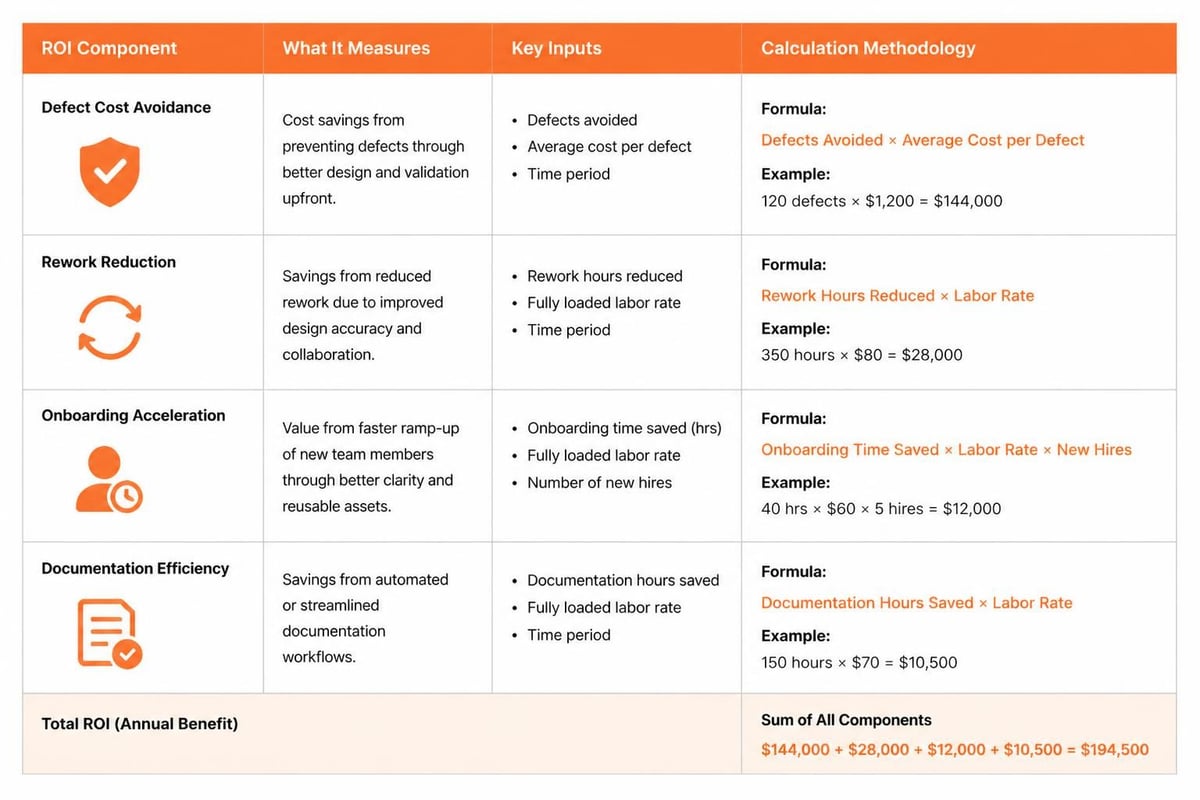
Quantifiable benefits emerge when organizations properly implement design practices supported by appropriate tooling. ROI calculation must account for both direct cost savings and indirect quality improvements.
Direct Cost Reduction
- 40-60% reduction in requirement-related defects through early validation
- 25-35% faster developer onboarding with comprehensive design documentation
- 15-25% reduction in rework from architectural inconsistencies
- 30-50% faster impact analysis for change requests
Quality and Risk Improvements
- Earlier defect detection at 10-100x lower remediation cost
- Reduced technical debt accumulation through enforced standards
- Better security posture through architectural review gates
- Improved regulatory compliance with traceable design decisions
Collaboration and Communication Benefits
- Shared vocabulary reducing misunderstanding between technical and business stakeholders
- Asynchronous collaboration reducing meeting overhead for distributed teams
- Visual communication improving client engagement and approval processes
- Knowledge preservation reducing key-person dependency
Manual Design Processes Versus Automated Tooling
Organizations operating without dedicated software design software typically use generic diagramming tools or whiteboard-based processes. This approach lacks versioning, collaboration features, validation, and integration capabilities.
Manual Process Limitations:
- No automatic consistency checking across related diagrams
- Manual synchronization between designs and code
- Difficult collaboration with version conflicts
- No traceability from requirements through design to code
- Limited reuse of patterns and components
Automated Tooling Advantages:
- Built-in validation preventing common modeling errors
- Automatic code skeleton generation reducing implementation time
- Conflict resolution for concurrent editing
- Automated impact analysis for proposed changes
- Central repository enabling enterprise-wide pattern reuse
Organizations implementing development best practices recognize that professional tooling investment aligns with broader quality and efficiency objectives.
What Workflow Practices Maximize Design Software Value?
Effective utilization requires integrating software design software into development lifecycle gates rather than treating it as an optional documentation activity. Organizations should establish mandatory checkpoints where design artifacts enable progression to subsequent phases.
Requirements to Design Gate
- Functional requirements traced to use case or user story models
- Non-functional requirements documented in architectural decision records
- Stakeholder approval captured on conceptual architecture diagrams
- Design scope validated against project constraints
Design to Implementation Gate
- Detailed design documents reviewed and approved
- Component interfaces specified with contracts defined
- Data models validated against business rules
- Security and compliance requirements addressed in design
Implementation to Testing Gate
- Design documentation updated to reflect as-built architecture
- Test cases traced back to design specifications
- Integration points validated against interface designs
- Performance models validated with actual measurements
For organizations building custom solutions, platforms like the Brytend Survey Module demonstrate how specialized design decisions (form structures, workflow logic, reporting requirements) benefit from upfront modeling before development begins. Visualizing form dependencies, validation rules, and data flows prevents rework during implementation and ensures client requirements translate accurately into working software.

Design Review Best Practices
Regular design reviews ensure artifacts maintain quality and alignment with evolving requirements. Structured review processes identify issues before they propagate to code.
- Peer Review: Two developers review all designs before implementation approval
- Architecture Review: Senior architects review designs introducing new patterns or technologies
- Security Review: Security specialists review designs handling sensitive data or external integrations
- Stakeholder Review: Business representatives validate designs against functional requirements
- Compliance Review: Regulatory specialists confirm designs meet applicable standards
How Do Design Tools Support Different Development Methodologies?
Software design software adapts to various development approaches, though feature priorities differ between waterfall, agile, and hybrid methodologies. Teams should configure tools to reinforce rather than conflict with established practices.
Waterfall Development Support
- Comprehensive upfront design with detailed specifications
- Formal approval workflows and sign-off tracking
- Baseline management and change control processes
- Complete documentation generation for handoff
Agile Development Support
- Lightweight modeling focused on current sprint scope
- Just-in-time design elaboration as stories approach implementation
- Collaborative sketching for team design discussions
- Continuous refinement as understanding evolves
Hybrid Approach Support
- High-level architecture defined upfront with detail deferred
- Iteration-based design elaboration aligned with release planning
- Architectural runway maintained ahead of implementation teams
- Spike solutions documented for complex technical decisions
Technology-Specific Considerations
Different application types require different design emphasis. Organizations should evaluate whether prospective software design software adequately supports their primary development domains.
Web Application Design: Interface wireframes, responsive layouts, user flows, API specifications, component hierarchies
Mobile Application Design: Screen flows, gesture interactions, offline behavior, platform-specific patterns, performance budgets
Enterprise System Design: Service architectures, integration patterns, data models, security boundaries, scalability planning
Embedded System Design: State machines, timing diagrams, hardware interfaces, resource constraints, real-time behavior
Teams working across multiple domains benefit from platforms offering extensibility through plugins or custom diagram types rather than forcing all projects into identical modeling approaches.
What Emerging Trends Are Shaping Software Design Software?
The software design software market continues evolving as artificial intelligence, cloud computing, and remote work reshape development practices. Organizations planning long-term tool investments should evaluate vendor roadmaps against these trends.
AI-Assisted Design
- Automated diagram generation from natural language requirements
- Pattern recognition suggesting appropriate design structures
- Intelligent component recommendations based on context
- Automated documentation generation from visual models
Cloud-Native Collaboration
- Real-time multiplayer editing eliminating version conflicts
- Infinite canvas approaches supporting large-scale system modeling
- Browser-based access removing installation barriers
- Mobile companion apps for review and annotation
Design System Integration
- Bidirectional sync between design tools and component libraries
- Automated design token management and propagation
- Visual regression testing integration
- Design-to-code workflow automation
Developer Experience Focus
- Command-line interfaces for automation and scripting
- API-first platforms enabling custom integration
- Git-based workflows matching developer expectations
- IDE plugins bringing design context into coding environment
Organizations following software design methodologies should monitor how emerging capabilities support or enhance their chosen approaches.
How Should Organizations Measure Design Software Success?
Measuring software design software effectiveness requires defining metrics before implementation and tracking them consistently. Successful organizations establish baseline measurements during pilot phases and monitor trends quarterly.
Adoption Metrics
- Percentage of projects with design artifacts before implementation
- Number of active users versus licensed seats
- Design artifact creation rate (models per project)
- Time spent in design tool versus other development tools
Quality Metrics
- Defects traced to design-phase issues versus implementation issues
- Percentage of design reviews identifying significant problems
- Architecture decision records created and referenced
- Design-code synchronization rate (manual audits)
Efficiency Metrics
- Time from requirements to approved design
- Developer onboarding time to productivity
- Change request impact analysis time
- Documentation generation time
Value Metrics
- Cost of defects found in design versus testing versus production
- Rework percentage attributable to design gaps
- Stakeholder satisfaction with design communication
- Technical debt reduction from improved upfront design
Organizations should review metrics quarterly, investigating significant deviations and adjusting processes accordingly. Metrics demonstrating insufficient value should trigger process examination before blaming tools.
Software design software delivers measurable value when organizations establish clear design processes, select tools matching their specific requirements, and integrate design activities into development workflows. Success requires process definition before tool selection, comprehensive team training, and consistent measurement of outcomes. Brytend specializes in developing custom software solutions that align with clients' unique design methodologies and quality standards, providing expertise across web development, mobile applications, cloud computing, and ongoing support to ensure your design investments translate into reliable, maintainable systems.
Frequently Asked Questions About Software Design Software
What is software design software?
Software design software is any tool that lets teams plan, model, visualize, or document a software system before — or while — it is built, rather than tools used to write the code itself. This spans UML and architecture modeling tools, wireframing and UX design tools, and diagramming platforms.
What is the difference between software design software and a diagramming tool?
A general diagramming tool draws shapes and connectors for any purpose. Software design software is purpose-built for modeling software specifically — it understands concepts like classes, entities, API flows, and system components, often generating or validating documentation from the model itself.
Is software design software the same as low-code development platforms?
No. Software design software helps teams plan and document a system’s architecture and behavior. Low-code platforms let non-developers assemble a working application from pre-built components. Design software can feed into custom development; low-code replaces parts of it.
Do small teams need dedicated software design tools?
Even small teams benefit from lightweight design and documentation before building, since it catches architectural mistakes while they are still cheap to fix. The right level of tooling scales with project complexity rather than team size alone.