Customer relation management systems are software platforms that store every contact, conversation and transaction with a customer in one shared record. For a gas detection supplier, service company or calibration lab, that record also needs to hold the instruments you service and the compliance documents you issue.
A customer relationship management (CRM) system is a database and workflow tool that links customers, sales activity, service history and communication so teams work from the same information. Adoption is already widespread: Eurostat reports that CRM software use among EU enterprises rose between 2023 and 2025.
What is a CRM system and what does it do?
A CRM system is software that records customers and every interaction with them, then uses that data to manage sales, service and communication. Microsoft’s overview of CRM software describes CRM as a way to manage customer data across sales, marketing and service.
The main functions are:
- Contact and account management: one record per company, with its people, sites and history.
- Lead and opportunity tracking: each enquiry moves through defined stages until it is won or lost.
- Activity logging: calls, emails, quotes and visits are attached to the customer record.
- Service management: requests, visits and follow-ups are scheduled and tracked.
- Reporting: pipeline, response times and renewals are summarized from live data.
Most generic CRMs stop at this point. A gas detection service company needs more, because its customers own regulated equipment. Each detector, calibration gas cylinder and SCBA set has its own history that must be traceable to a customer.
How do customer relation management systems work?
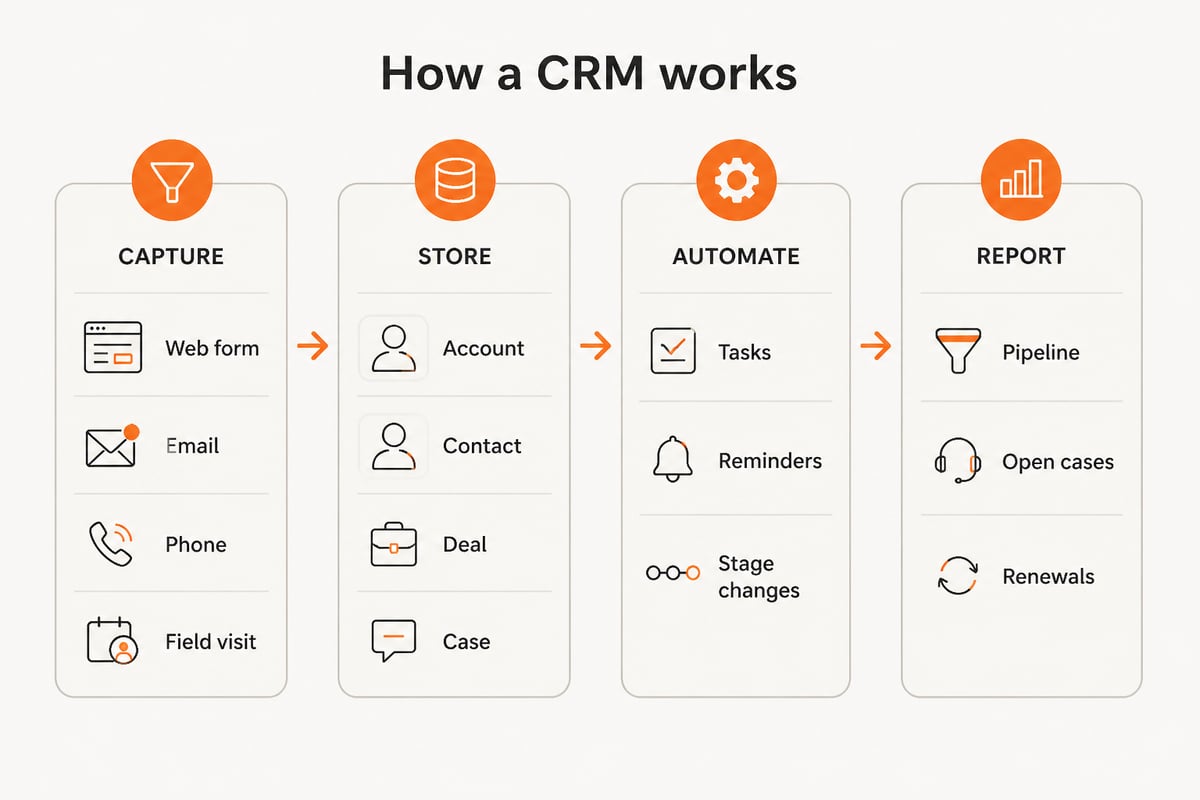
Customer relation management systems work by collecting data from every channel into one customer record, applying workflow rules to it, and exposing it to each team through role-based views. The flow has four parts.
- Capture. Web forms, email, phone calls, quotes and field visits create or update records. A form submitted on your website, for example, can create a lead and attach it to an existing account if the company is already known.
- Store. Data is held in structured objects: accounts, contacts, deals, cases and activities. Linking these objects is what lets a service case show the account, the contact who raised it and the quote that preceded it.
- Automate. Rules assign tasks, send reminders and move records between stages. A typical rule creates a follow-up task three days after a quote is sent and escalates it to a manager if the task is still open a week later.
- Report. Dashboards summarize the pipeline, open service cases and upcoming renewals.
Role-based views keep each team focused. A salesperson sees open deals, a technician sees assigned visits, and a manager sees totals across both.
Integrations connect the CRM to invoicing, email and other systems. A CRM that cannot exchange data with quoting, service or invoicing forces staff to retype information, which is where most data errors start.
What types of CRM systems exist?
CRM systems fall into four common types: operational, analytical, collaborative and industry-specific. The types describe what the software is built to do, and most real products combine two or more of them.
| Type | Main purpose | Typical use |
|---|---|---|
| Operational | Automates sales, marketing and service processes | Lead follow-up, quoting, case handling |
| Analytical | Analyzes customer data for patterns | Churn reports, revenue by account |
| Collaborative | Shares customer information across teams | Sales, service and support seeing one history |
| Industry-specific | Adds fields and workflows for one sector | Equipment service, calibration, compliance |
Operational CRMs handle the daily work, such as assigning a new enquiry to a salesperson or opening a case when a customer reports a faulty instrument. Analytical CRMs sit on top of that data and answer questions like which accounts have stopped ordering. Collaborative CRMs matter when sales, service and the office each contact the same customer and need one shared history. Industry-specific CRMs add objects the generic types lack, such as instruments, cylinders and certificates.
Deployment is a separate choice. Cloud CRMs run on the vendor's servers and charge per user. Self-hosted systems run on your own infrastructure. Custom-built systems are designed around your exact workflow, which suits companies whose process does not fit a template.
Why do gas detection service companies need a specialized CRM?
Gas detection service companies need a specialized CRM because their customer relationships depend on equipment records, calibration dates and compliance documents that a standard CRM does not hold. A generic contact database can tell you when you last emailed a customer. It cannot tell you which of their 40 fixed and portable detectors are due for a bump test next month.
Four gaps appear most often in standard CRMs:
- No asset link. Instruments, cylinders and SCBA sets are not tied to the customer who owns them.
- No document trail. Calibration certificates and test results live in shared folders instead of on the customer record.
- No due-date logic. Renewal and recalibration reminders depend on spreadsheets.
- No audit history. It is hard to show who changed a record, when and why.
These gaps matter at audit time. A customer's safety officer may ask for the full service history of one detector. If the answer takes hours of searching, the relationship suffers, even when the work itself was done correctly.
Brytend addresses this by running one platform in place of several disconnected systems, with customers, devices, documents and data shared across every module. Gas tests are checked against your own limits, and a clearance is given only when the air is safe.
What does an equipment service workflow look like in a CRM?
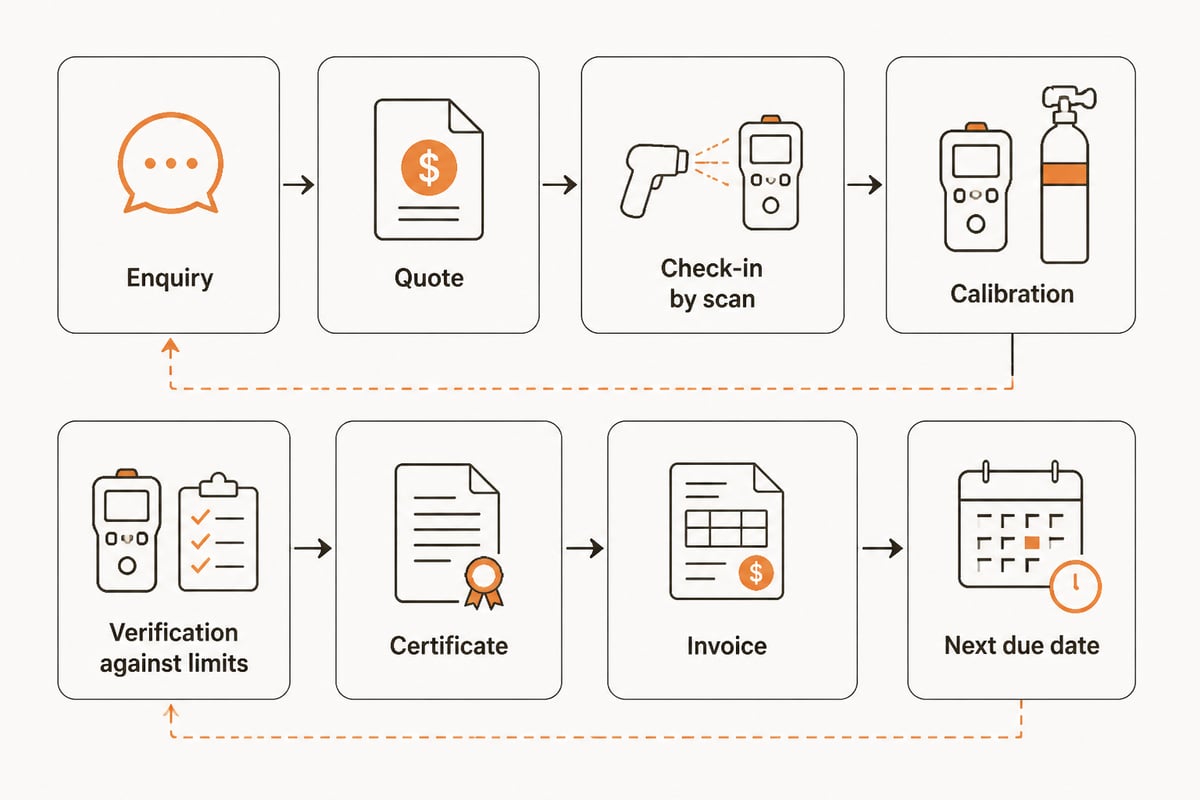
An equipment service workflow in a CRM follows a customer's instrument from enquiry to returned certificate, with each step recorded against the customer account. Here is a hypothetical example for a service company handling a client's portable gas detectors.
- Enquiry. A customer asks for recalibration of a set of portable detectors. The request becomes a lead linked to the existing account.
- Quote. The quote is built from the customer's registered devices and the agreed service price list, then approved and logged.
- Collection. A work order is created and the instruments are checked in, each scanned against its asset record.
- Service and calibration. The technician records test results, the gas and cylinder used, and any parts replaced.
- Verification. Results are compared against the limits you have set. Instruments that fail are flagged for repair instead of being returned.
- Documentation. Calibration certificates are generated and attached to the customer and to each device.
- Invoicing. The invoice is built from the work already registered, so no one re-enters it.
- Follow-up. The next calibration due date is set and a reminder is scheduled on the account.
Every step leaves a record on the customer account. Brytend's calibration management software and work order management software cover steps 3 to 6, while invoicing software handles step 7. Invoices are Peppol BIS Billing 3.0 e-invoicing ready.
What benefits do customer relation management systems bring?
Customer relation management systems bring faster response, less duplicated work and a single source of customer truth. Microsoft’s summary of CRM benefits groups them under customer relationships, team productivity, unified data, decision-making and efficiency.
Survey data supports the time argument. In a 2024 Freshworks survey of U.S. business owners and professionals, many respondents said CRM saved employees several hours of work per week, and most planned to increase their CRM budget the following year. Service use is also common: in a 2025 survey of B2B professionals reported by PLANADVISER, most businesses used CRM solutions for customer service.
Most of the time savings come from removing repeated lookups and retyping. When quotes, cases and contact details sit in one record, staff stop switching between inboxes, spreadsheets and folders to answer a single customer question. Managers gain a second benefit, because reports draw on live records instead of figures compiled by hand at month end.
For a service company, the practical gains are specific:
- Customers receive recalibration reminders before instruments expire, not after.
- Technicians see the full equipment history before they arrive.
- Office staff stop searching for certificates, because each one is attached to the record.
- Managers see which accounts have overdue equipment and which have open quotes.
What are the common reasons CRM projects fail?
CRM projects most often fail because staff do not use the system, not because the software lacks features. A 2025 survey of B2B professionals reported by PLANADVISER found that only a minority said their teams fully embraced and effectively used their CRM.
The usual causes are:
- Unclear requirements. The system is bought before the team has mapped its process.
- Double entry. Staff must update the CRM and a separate service or invoicing tool.
- Poor fit. Fields and screens reflect a generic sales process, not equipment service.
- No training. Technicians and office staff learn by trial and error.
- Weak data control. Changes are untracked, so users stop trusting the records.
The last point matters for compliance work. In Brytend, every stock change is recorded with a reason, a user and a source document, and corrections above a limit need approval. That kind of traceability keeps records dependable enough for people to rely on.
How do you choose a CRM system for a service business?
Choose a CRM by listing your service process first, then testing each candidate against it. Use this sequence.
- Map your process. Write down the path from enquiry to certificate to invoice.
- List required records. Include customers, sites, instruments, cylinders, certificates and test results.
- Check asset support. Confirm the system links equipment to the owning customer and keeps its history.
- Check integrations. Invoicing, e-invoicing, email and any calibration tools should exchange data without retyping.
- Review security and certification. Look for recognized standards and clear data hosting terms.
- Test with real data. Load a sample of 20 to 30 customers and instruments and run a full service cycle.
- Plan adoption. Decide who trains staff and who owns data quality.
Brytend is ISO 9001 and ISO 27001 certified, with EU hosting and your data staying yours. Brytend is rated 5.0 on Google.
Brytend CRM manages customer relationships alongside the service, asset and compliance modules, so customer records and equipment records stay linked. It includes AI-driven lead forms and questionnaires that fit your workflow.

For customer data handling specifically, see Brytend's pages on managing customer relationships and its customer CRM system.
Companies whose process does not fit an off-the-shelf tool can also commission custom work. Brytend's software solutions page describes how it builds tailored systems.
FAQ
What does CRM stand for?
CRM stands for customer relationship management. In search, people also type "customer relation management," which refers to the same category of software.
How much do CRM systems cost?
Cloud CRM pricing is usually per user per month and varies by vendor and plan, so current figures should be taken from each vendor's pricing page.
Can AI be added to a CRM?
Yes. Common AI functions include lead scoring, form handling and draft replies. Brytend describes its approach on the AI integration page.
Start by listing the records your next audit would require for one customer, then check whether your current system can produce them in under a minute. Brytend builds service, calibration, asset and CRM software for gas detection and safety equipment companies, with customers, devices and documents on one platform. To see it applied to your own process, read about Brytend CRM and then Start free trial with Brytend on your own customer and equipment data.