

Project management software that ends with an invoice.
Plan installations, inspections, turnarounds and trainings with tasks, a Gantt chart and your team. Register hours on the job and invoice them, together with the quotes, orders and equipment of the same customer.
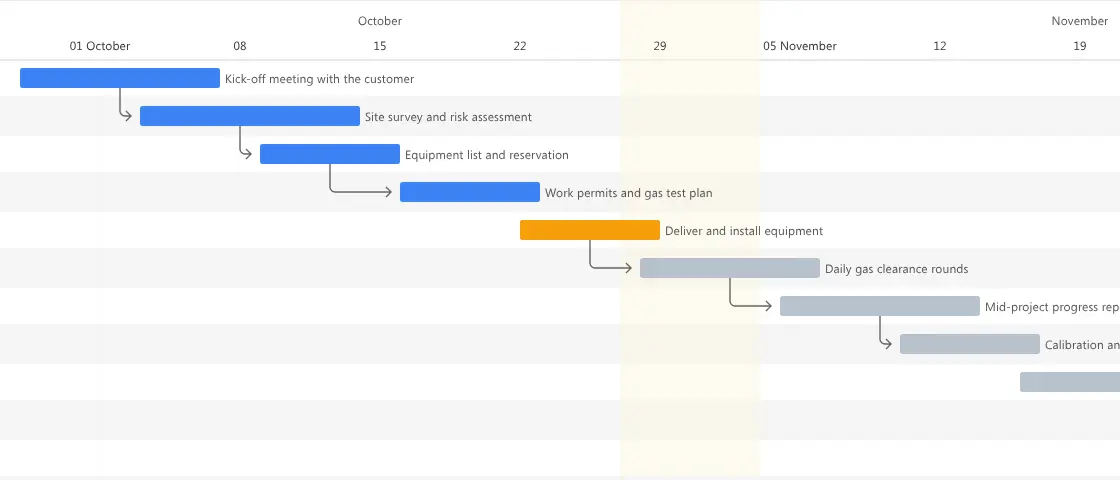
Project management software helps a team plan work, divide it into tasks, follow progress and keep track of time and budget. Brytend Projects does this for service, rental, safety and inspection companies, and links every project to the customer, the quote, the order and the invoice.
Projects is one part of Brytend, the business operations platform that unifies CRM, Assets, Rentals, Quality, Service, Compliance, Documents, Reporting and AI in one integrated system.
From kick-off to final invoice in one project plan
Every task has a start date, a due date and an owner. Link tasks to each other so the next step starts when the previous one is done, and see the whole plan in a Gantt chart by day, week, month or year.
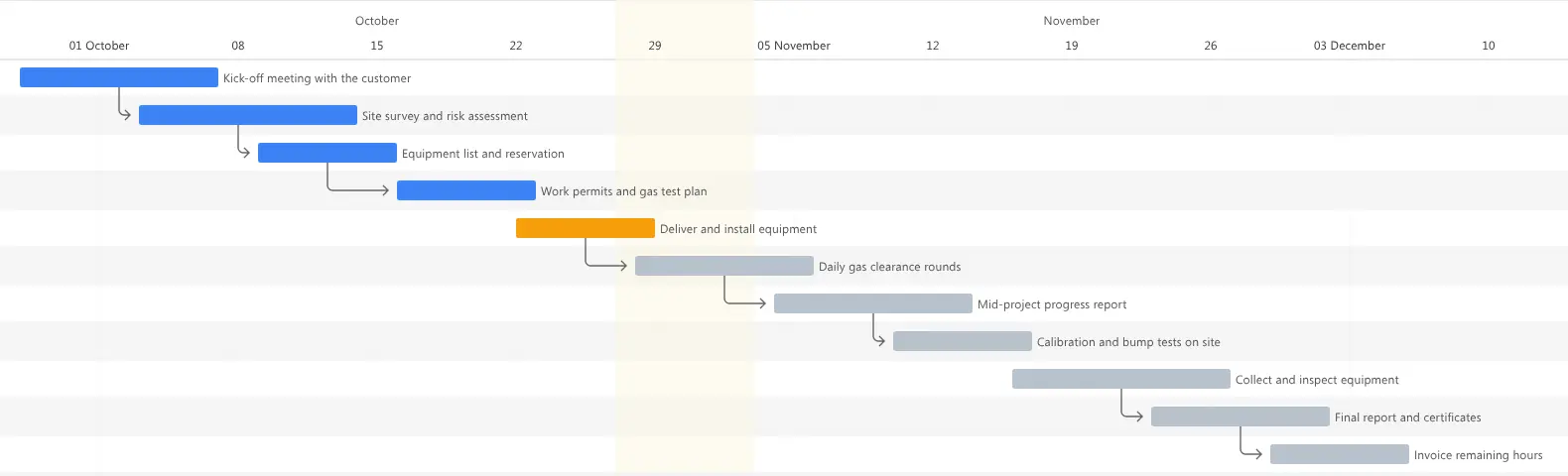
Project plan in Brytend. Screenshot with sample data.
Where projects lose time and money
The plan lives in a spreadsheet
Nobody knows which version is current, and the technician on site never sees the changes made at the office.
Hours are written down too late
Hours end up on paper or in a separate app, get lost and are never invoiced.
The customer keeps calling
Without a shared view, the customer asks for updates by phone and e-mail, and your team spends time answering instead of working.

Every task in the right phase, with the right person
Group tasks by phase, such as preparation, execution and close-out, and give each task an owner. Your team sees its own tasks, comments and files in one place and gets a notification when a task is created or changed.
- Task groups with their own colour
- Task dependencies that can block the next step
- Comments and files on every task
- Send a task to your calendar as an iCal invitation
Register hours where the work is done
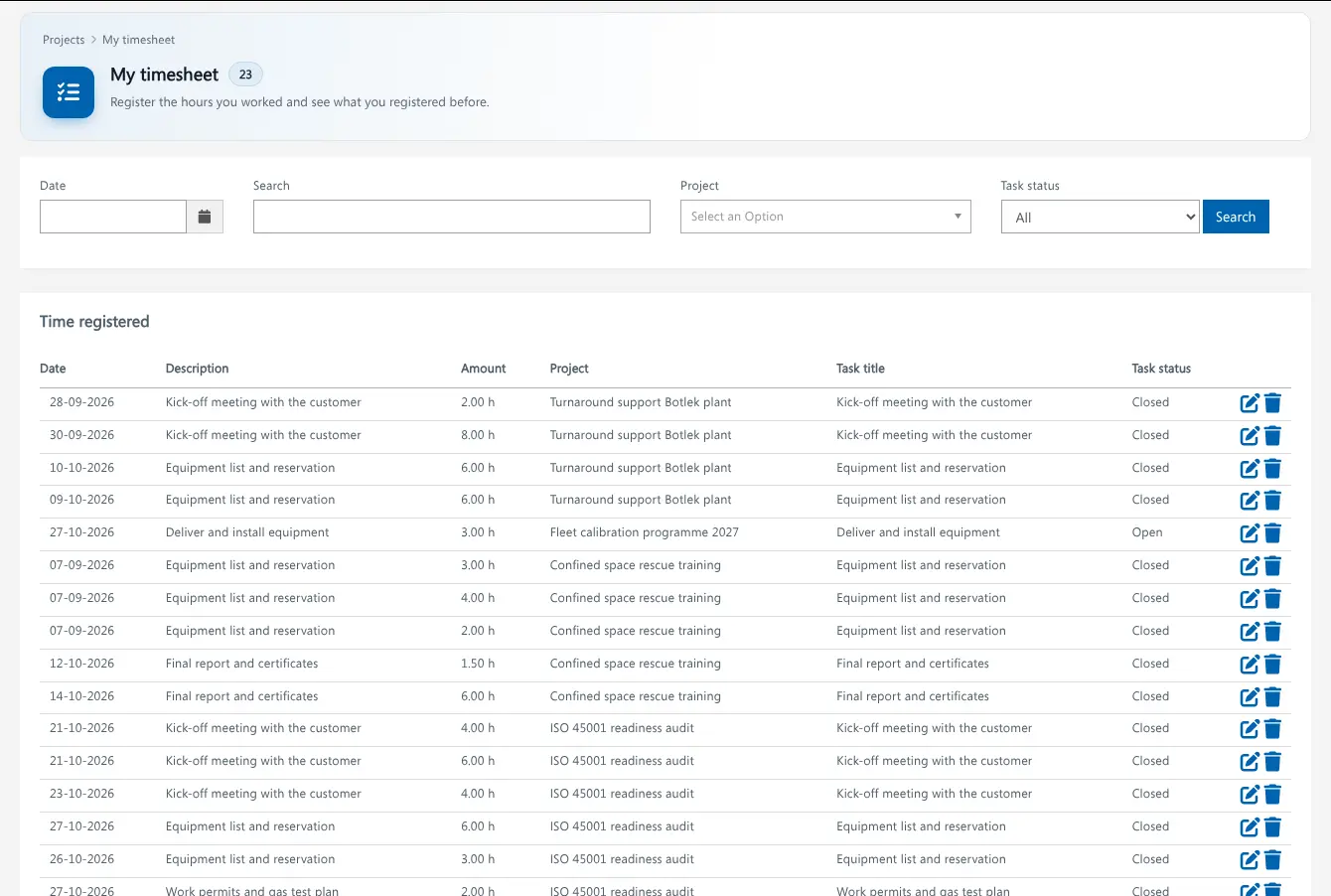
Everyone registers hours on the project and the task in their own timesheet. Set an hourly rate per team member, see what each project costs, and turn the unbilled hours into an invoice with a few clicks.
- Hours per project, task and person
- Hourly rate per team member and payments to staff or subcontractors
- Invoice project hours from Sales, so no hour is billed twice
Project management features
Project pipeline
Move projects through your own statuses, from new project to completed, with budget, expected revenue and start and end dates.
Gantt chart
See all tasks and their dependencies on a timeline by day, week, month or year.
Linked sales documents
Open the proposals, orders, subscriptions, invoices and loans of a project from tabs on the project itself.
Customer portal
Share selected tasks with your customer in the portal. The customer can follow progress, comment and add files.
Team and rates
Add team members to a project with their own hourly rate, and keep track of what has been paid.
Projects overview
Widgets show open projects, hours logged, open and overdue tasks and how many tasks were done on time.
Run a project in three steps
Plan
Create the project for your customer, add the team and split the work into tasks and phases.
Do the work
Everyone works from the same plan, registers hours on their tasks and keeps the customer updated in the portal.
Invoice
Turn the unbilled hours into an invoice and close the project with all documents in one place.
Rated 5 stars on Google
“We used to create and track orders in Ultimo. Switching to Brytend was a challenge, yet we were very pleasantly surprised. Not only the software, but their support too is better than expected. Super!”
“Our company has used Brytend software for several years. It has let us tackle various processes quickly and efficiently that we had not found a solution for before.”
“Excellent experience with this company and its software applications. If you want changes, no problem. Arranged quickly and at a fair price.”
Reviews translated from Dutch.
More than project management software
Part of one platform
Projects link to your customers, quotes and orders and invoices, so nothing has to be typed twice.
Certified and secure
Brytend itself is ISO 9001 and ISO 27001 certified. Read how we protect your information on our security page.
Made for field work
Built for companies whose projects happen on site: installations, inspections, rentals, gas testing and safety services.
Frequently asked questions
What is project management software?
Project management software helps a team plan work, split it into tasks, follow progress and track time and budget. Brytend adds the link to the customer, the quote, the order and the invoice.
Does Brytend have a Gantt chart?
Yes. Every project has a Gantt chart that shows all tasks and their dependencies on a timeline, by day, week, month or year.
Can my team register hours on a project?
Yes. Everyone has a personal timesheet to register hours per project and task. You set an hourly rate per team member and see the hours per project.
Can I invoice project hours?
Yes. In Sales you create an invoice from the unbilled project hours. Hours that are invoiced are marked, so they are never billed twice.
Can my customer follow the project?
Yes. You choose which tasks are visible in the customer portal. The customer sees the progress and can comment and add files.
Which companies use Brytend Projects?
Service, rental, safety and inspection companies that run projects on site, such as installations, turnarounds, inspection rounds and trainings.
How does the free trial work?
You use the Brytend platform free for 90 days with your own team. Start the trial here or take the tour first, or call us on +31 (0)85 013 02 04 if you have questions first.
Plan it. Do it. Invoice it.
Start your free 90-day trial and run your next project, with hours and invoices, in Brytend.
Prefer to talk first? Call +31 (0)85 013 02 04