
Accounting software where the books keep themselves.
Sales invoices, purchase invoices, payments, bank lines and stock movements are booked automatically as your team works. Reconcile the bank, file the VAT return and read the profit and loss from the same books, without exporting anything.
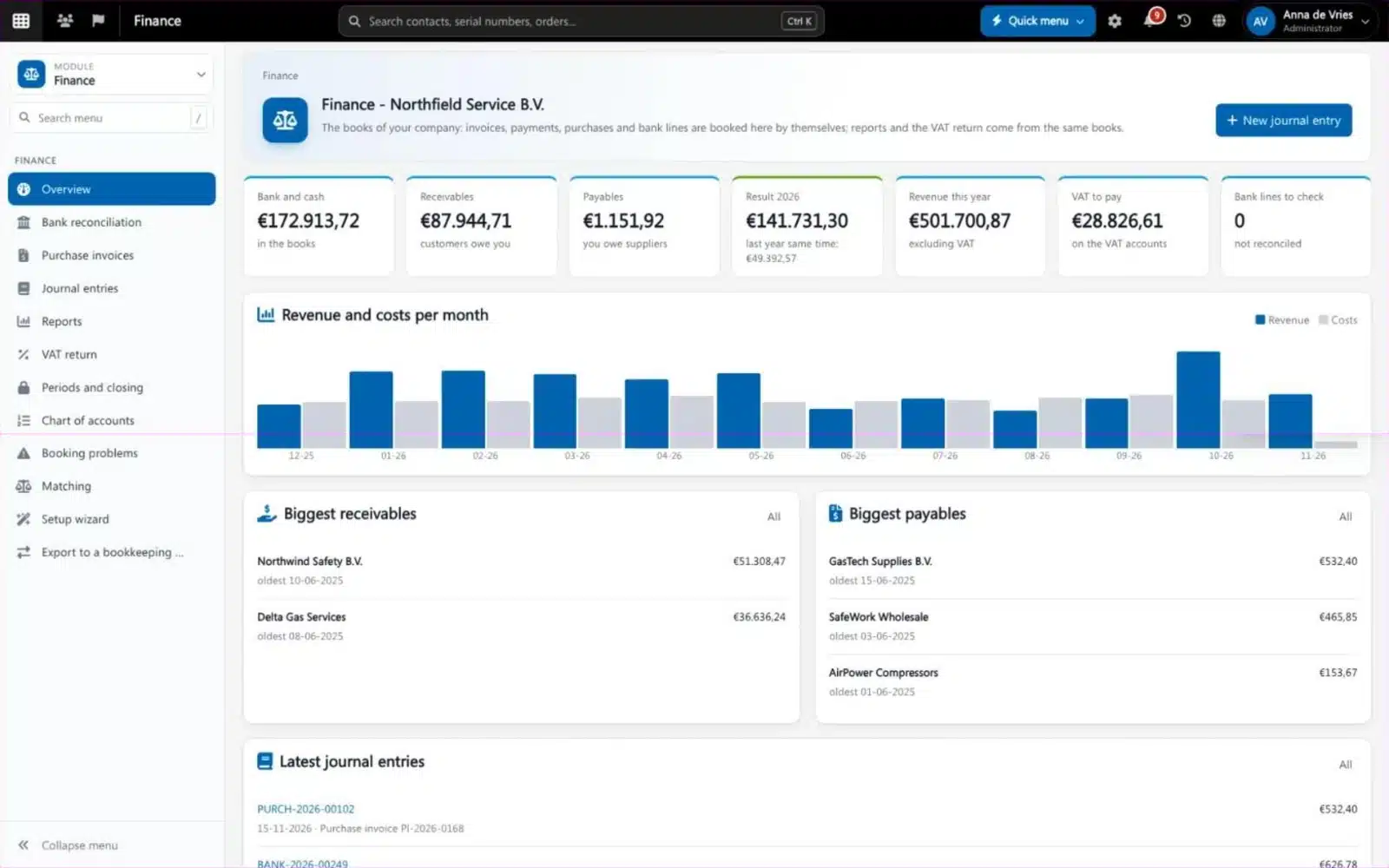
Accounting software keeps the books of a company: the general ledger, receivables and payables, bank, VAT and the reports a director and accountant need. Most accounting packages get their data from somewhere else, by export or retyping. Brytend Finance sits in the same platform as your quotes, orders, invoices, purchasing and stock, so every document is booked where it is made.
Finance is one part of Brytend, the business operations platform that replaces multiple disconnected business systems with one fully integrated platform: CRM, Assets, Rentals, Quality, Service, Compliance, Documents, Reporting and AI.
Bank lines that match themselves
Bank lines come in through the bank feed. Customer payments are matched to their invoices automatically; the rest you book on an account, a purchase invoice, a transfer or a rule that does it next time.
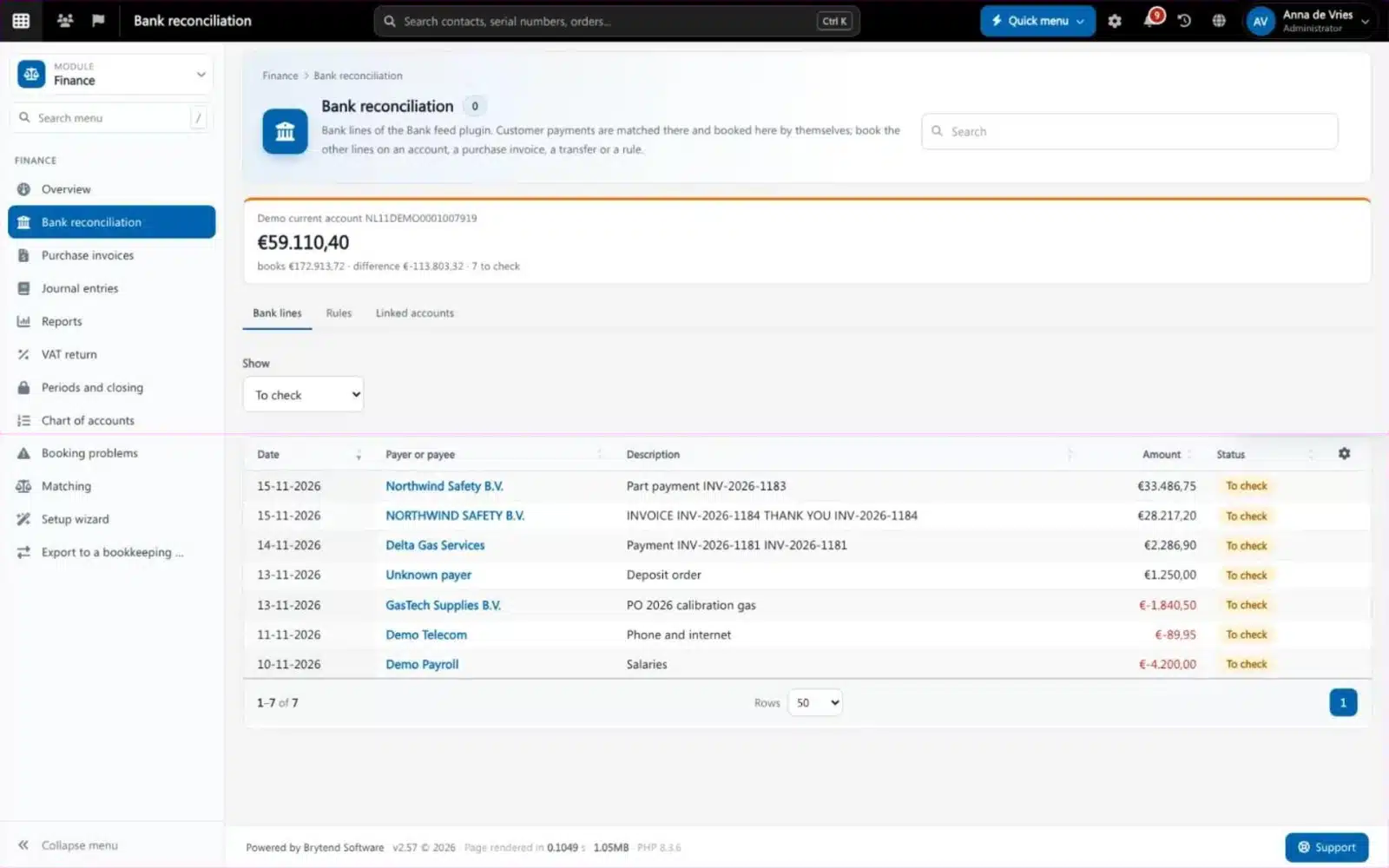
Bank reconciliation in Brytend Finance. Screenshot with sample data.
What goes wrong without accounting software
Two systems, one truth
Invoices are made in one system and booked in another, and the two never quite agree.
The bank at month end
Someone spends days matching payments to invoices by hand before the numbers can be trusted.
Reports that are already old
The director sees last quarter’s figures because the books are only up to date after the accountant has done them.
VAT return from the booked lines
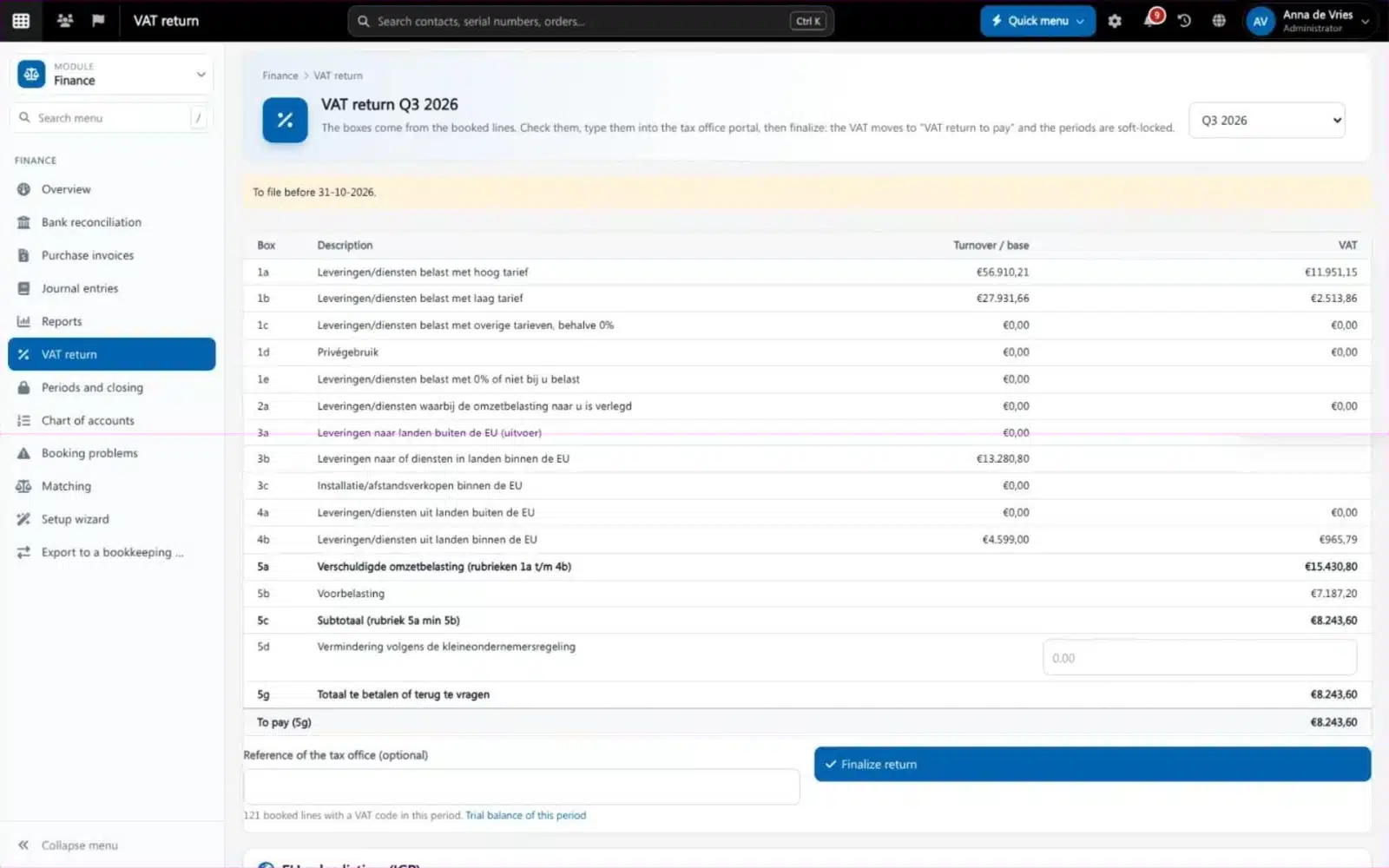
Brytend fills the VAT return boxes from the lines you booked. Check them, type them into the tax office portal and finalize: the VAT moves to VAT to pay and the periods are locked.
- Country packs with the chart of accounts, VAT codes and return boxes
- Periods and closing, soft and hard locks
- Profit and loss, balance sheet, trial balance, ledger card and open items
- Journal entries are never changed or deleted: a wrong entry is reversed
Finance features
Automatic booking
Sales invoices, payments, purchase invoices, expense claims and stock movements are booked as they happen.
Bank reconciliation
Bank feed, automatic matching of customer payments and rules for the lines that come back every month.
Purchase invoices
Purchase invoices and expense claims from Document control are booked after approval, split over accounts, VAT codes or departments.
Setup wizard
Answers questions about your company, sector, fiscal year and VAT and builds a chart of accounts that fits. Stop and continue later.
VAT return
The return boxes come from the booked lines; finalize to book the VAT and lock the period.
Reports
Profit and loss, balance sheet, trial balance, ledger cards and open items per department, exported or printed.
Matching checks
Every day Brytend checks that stock, purchase orders, orders and invoices match the books, and tells the right person what does not.
More companies
Every own company has its own books, with a company switcher.
Export to your accountant
Keep the books here and also send them to an outside package, or only export, as before.
Get started in three steps
Run the setup wizard
Tell Brytend about your company and VAT, and it builds the chart of accounts, journals and periods.
Connect the bank
Switch on the bank feed and link your bank accounts.
Work as usual
Invoices, purchases and stock are booked by themselves. Check the bank lines and file the VAT return.
Rated 5 stars on Google
“We used to create and track orders in Ultimo. Switching to Brytend was a challenge, yet we were very pleasantly surprised. Not only the software, but their support too is better than expected. Super!”
“Our company has used Brytend software for several years. It has let us tackle various processes quickly and efficiently that we had not found a solution for before.”
“Excellent experience with this company and its software applications. If you want changes, no problem. Arranged quickly and at a fair price.”
Reviews translated from Dutch.
More than accounting software
Booked where it is made
Every invoice, purchase and stock movement is booked in the same platform, so nothing is retyped.
Approval first
Purchase invoices follow the approval of Document control before they reach the books.
Numbers you can use today
The same books feed the dashboards, so the director sees this week’s figures.
Works with the other Brytend modules
Invoicing
See how Invoicing works with Finance.
Stock
See how Stock works with Finance.
Document control
See how Document control works with Finance.
Dashboards
See how Dashboards works with Finance.
Frequently asked questions
What is accounting software?
Software that keeps the books of a company: ledger, receivables, payables, bank, VAT and reports. Brytend Finance does this inside the platform where your invoices, purchases and stock already live.
Do I still need my accountant?
Yes, if you want one. Brytend can keep the books and also send them to your accountant’s package, or only export invoices to it as before.
Which countries are supported?
Country packs hold the national parts: chart of accounts, VAT codes and VAT return boxes. A Dutch pack and an international pack are available today.
How does bank reconciliation work?
Bank lines arrive through the bank feed. Customer payments are matched to their invoices; you book the remaining lines on an account, a purchase invoice or a transfer, or make a rule for next time.
Can I change a booked entry?
No. Journal entries are never changed or deleted. A wrong entry is reversed with a new one, so the audit trail stays complete.
Can I run more than one company?
Yes. Every own company has its own books, setup answers and reports, and you switch between them.
How does the free trial work?
You use the full Brytend platform free for 90 days. Take the tour first, or start the trial straight away.
Books that are up to date the moment the work is done.
Take the tour to see Finance with the rest of the platform, or start your free 90-day trial.
Prefer to talk first? Call +31 (0)85 013 02 04