
Inventory control software where every stock change has a reason.
One stock ledger: every receipt, sale, transfer, correction and count is a movement with who did it, when, why and which document caused it. Counts and corrections go through approval, so your stock figure can be trusted.
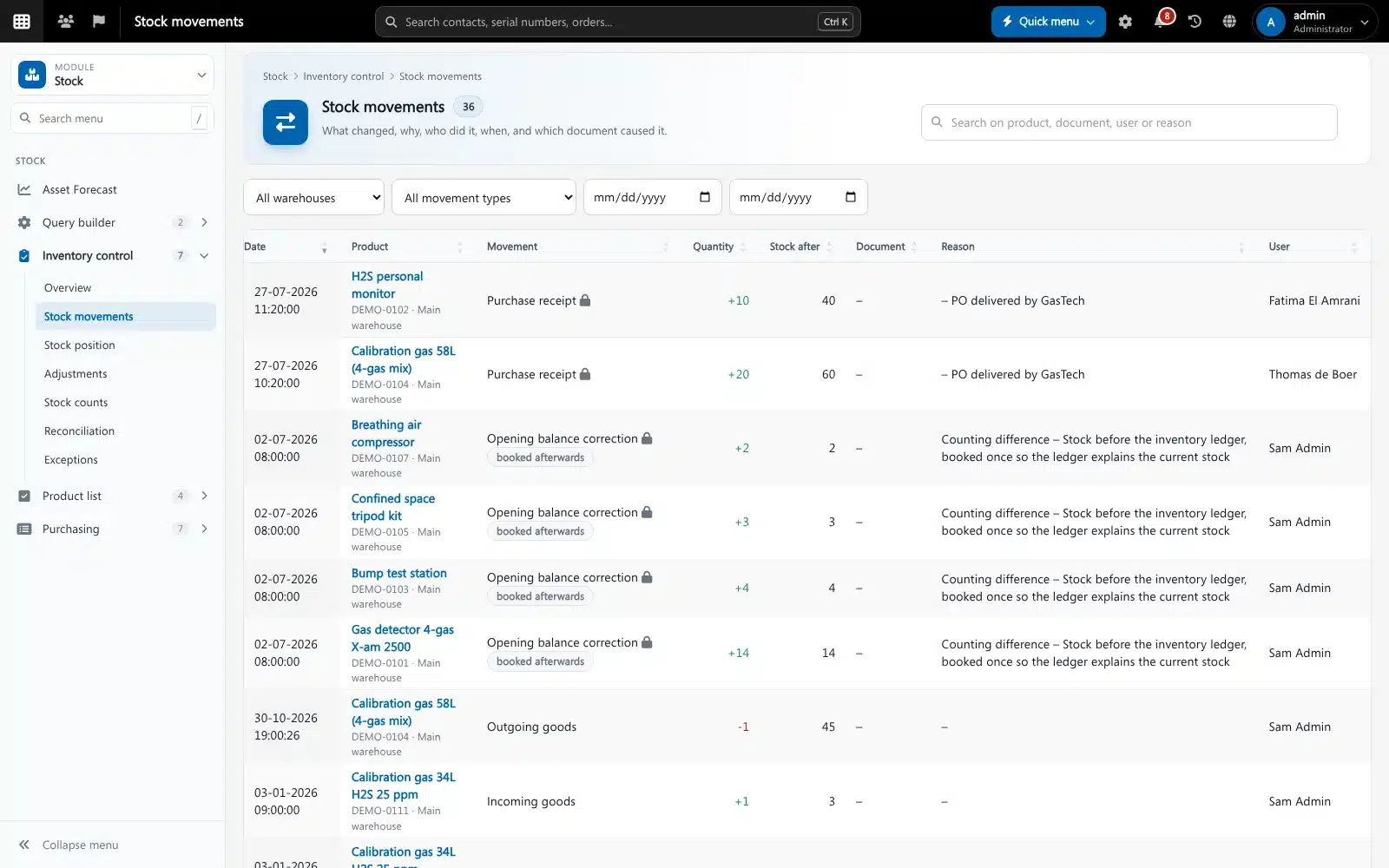
Inventory control is keeping the stock figures in your system equal to what is really on the shelf, and being able to explain every difference. Brytend does this with a stock ledger: stock only changes through a movement with a type, a reason, a user and a source document, and corrections above a limit need approval.
Inventory control is one part of Brytend, the business operations platform that replaces multiple disconnected business systems with one fully integrated platform: CRM, Assets, Rentals, Quality, Service, Compliance, Documents, Reporting and AI.
See what needs attention
One overview shows products below minimum, negative stock, differences in the ledger, corrections waiting for approval, open counts, products due for a cycle count and dead stock.
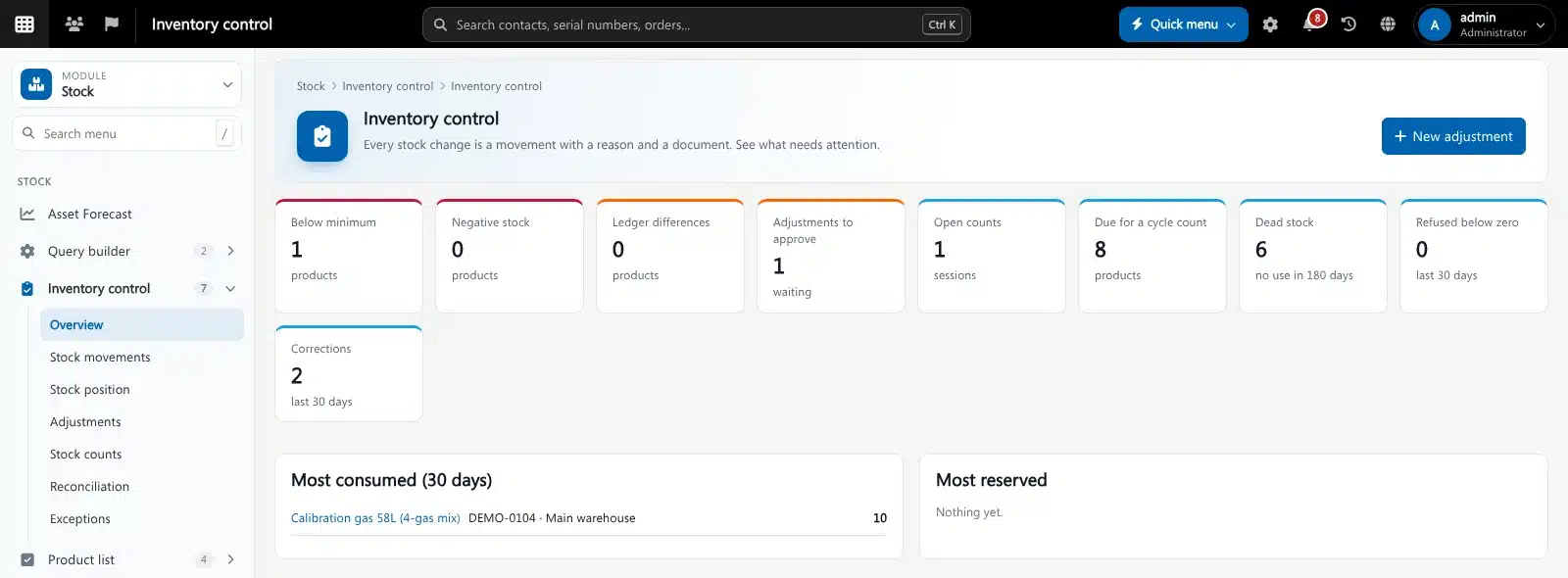
Inventory control overview in Brytend. Screenshot with sample data.
What goes wrong without inventory control software
Stock that nobody can explain
The system says 12, the shelf has 9, and nobody knows when or why it changed.
Corrections without control
Anyone can type over a stock figure. Losses disappear as “corrections” without a second pair of eyes.
One big count a year
Counting the whole warehouse once a year takes days, and errors stay hidden for months.
Count a little, often
Start a count for a warehouse, a product group or an ABC class. Brytend divides your products into A, B and C by outgoing value and tells you which ones are due for a cycle count.
- ABC classes: A every 30 days, B every 91, C once a year
- Count with the scanner in the Brytend app
- Differences become adjustments with a reason
- Booked counts are locked in the ledger
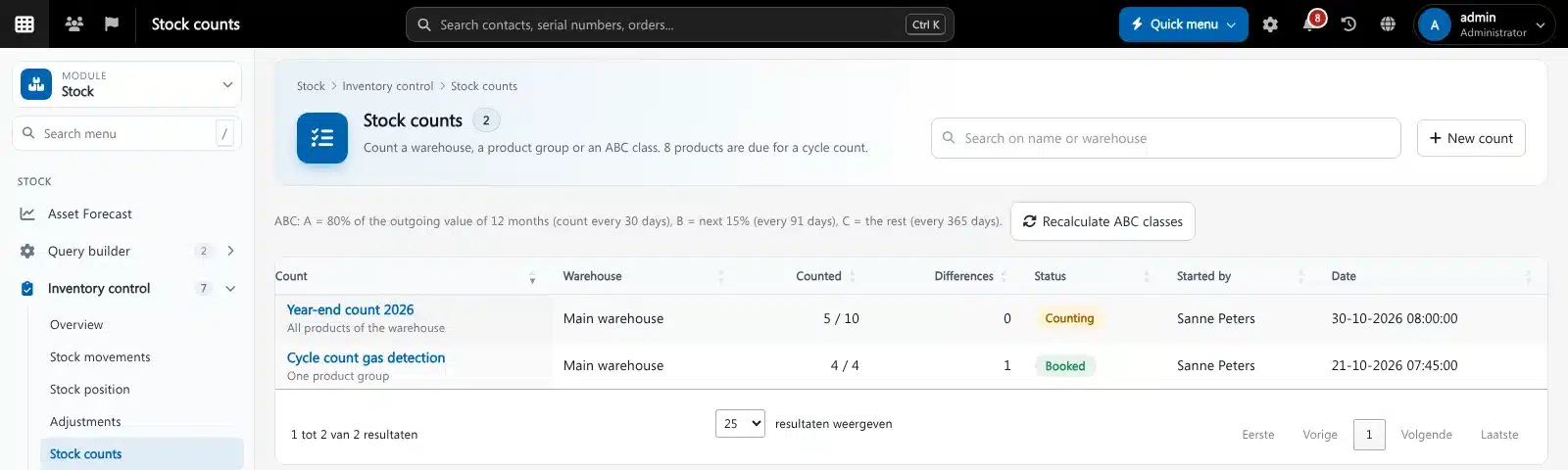
Inventory control features
Stock ledger
Every stock change is a movement with type, quantity, stock after, reason, user and source document.
Adjustments with approval
Corrections above your limit wait for approval; the person who asked cannot approve their own.
Cycle counting
ABC classes by outgoing value with their own count interval, plus full warehouse counts.
Reconciliation
Compare the ledger with the stock figure per product and fix differences with an explained movement.
No negative stock
Moves that would take stock below zero are refused and logged, or allowed only where you choose.
Transfers
Moving stock between warehouses books two linked movements, so nothing gets lost on the way.
Reservations
Stock promised on quotes and orders is reserved, so you see what is really free.
Dead stock
Products with no use in 180 days are listed, so you can sell them off or stop buying them.
Notifications
Approvers get a notification in the bell or by e-mail when a correction waits for them.
Get started in three steps
Opening balance
Brytend books your current stock once as the opening balance, so the ledger explains today’s figure.
Work as usual
Receipts, orders, services and transfers book their movements automatically.
Count and approve
Run cycle counts, approve the corrections and check the overview for anything that needs attention.
Rated 5 stars on Google
“We used to create and track orders in Ultimo. Switching to Brytend was a challenge, yet we were very pleasantly surprised. Not only the software, but their support too is better than expected. Super!”
“Our company has used Brytend software for several years. It has let us tackle various processes quickly and efficiently that we had not found a solution for before.”
“Excellent experience with this company and its software applications. If you want changes, no problem. Arranged quickly and at a fair price.”
Reviews translated from Dutch.
More than inventory control software
Linked to purchasing
Receipts come from purchase orders in Stock and purchasing.
Every warehouse
Products and locations live in Warehouse, the same catalogue for every channel.
Ready for forecasts
The ledger feeds the stock reorder forecast in Dashboards and forecasts.
Works with the other Brytend modules
Stock
See how Stock works with Inventory control.
Warehouse
See how Warehouse works with Inventory control.
Sales: quotes and orders
See how Sales: quotes and orders works with Inventory control.
Service and inspections
See how Service and inspections works with Inventory control.
Frequently asked questions
What is inventory control software?
Software that keeps your stock figures right and explains every change. In Brytend every stock change is a movement with a reason, a user and a document, and corrections need approval.
What is a stock audit trail?
A complete list of every stock movement: what changed, by how much, who did it, when, why and which document caused it. Brytend keeps it in the stock ledger, and booked movements cannot be edited.
What is cycle counting?
Counting a small part of your stock often instead of everything once a year. Brytend groups products into ABC classes by outgoing value and tells you which products are due for a count.
Can staff count with a phone?
Yes. Counts can be done with the scanner in the Brytend app.
Who can approve a stock correction?
Users with the approval right. Corrections above the limit you set wait for approval, and the person who asked cannot approve their own correction.
What happens with my current stock when I start?
Brytend books the current stock once as an opening balance, so from that moment the ledger explains every change.
How does the free trial work?
You use the full Brytend platform free for 90 days. Take the tour first, or start the trial straight away.
Stock you can explain. Every time.
Take the tour to see Inventory control with the rest of the platform, or start your free 90-day trial.
Prefer to talk first? Call +31 (0)85 013 02 04