
Logistics software for everything that comes in, gets worked on and goes out.
Devices for calibration, rental returns, purchase deliveries and warranty claims are scanned in at one intake desk. Each becomes a process with a number, a status, its units and a timeline, until it is shipped back and the costs are on the order.
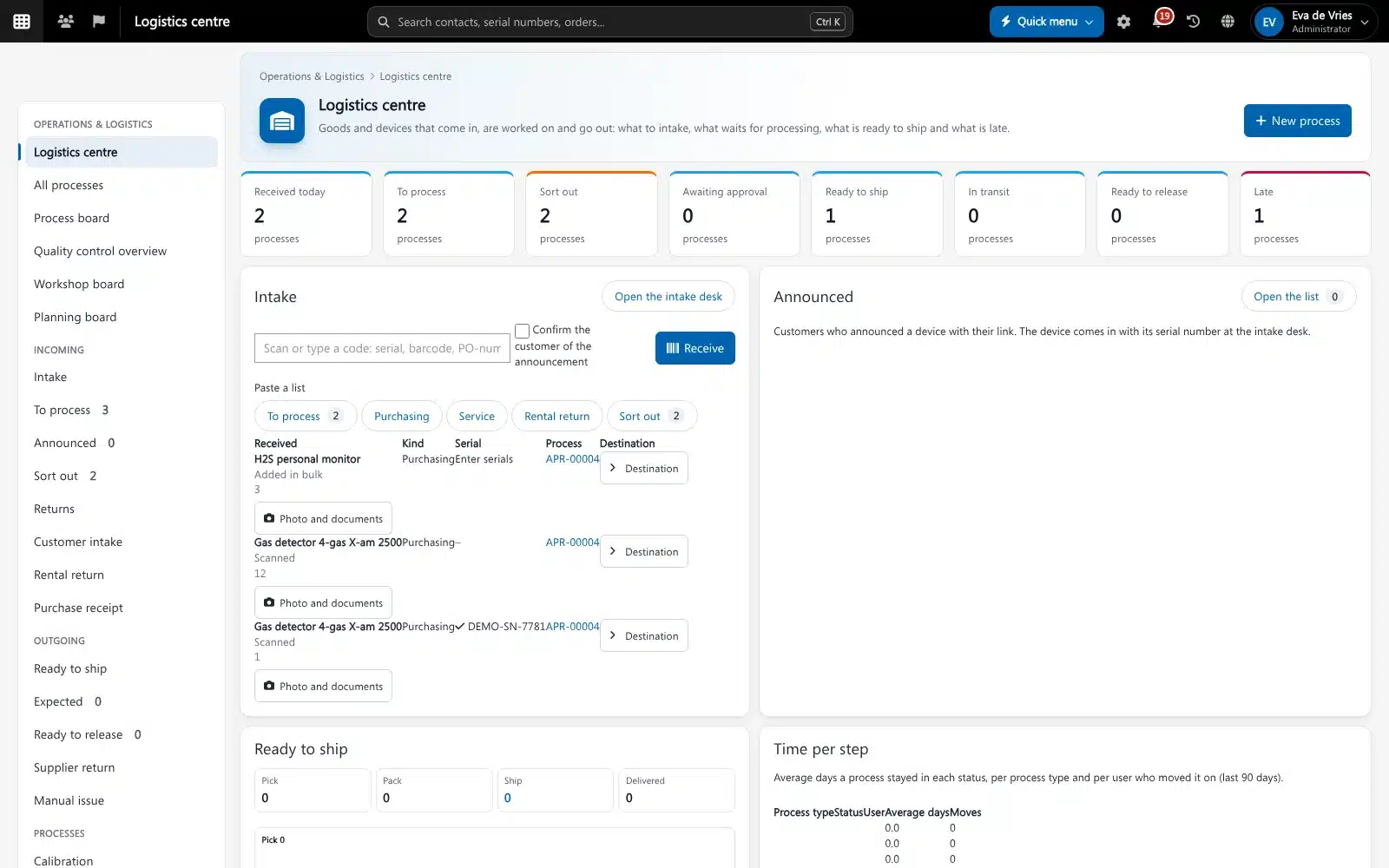
Logistics software keeps track of the physical work on goods and devices: what arrives, where it goes, who works on it and when it leaves again. In Brytend Operations & Logistics the order stays the commercial agreement and the process is the work. Every repair, calibration, rental return or purchase delivery is a process linked to its customer, order and invoice, so sales, service and the warehouse look at the same thing.
Operations & Logistics is one part of Brytend, the business operations platform that replaces multiple disconnected business systems with one fully integrated platform: CRM, Assets, Rentals, Quality, Service, Compliance, Documents, Reporting and AI.
One page per piece of work
A process shows its status bar, the units with serial, lot and location, the linked customer, order and invoice, the documents, the shipments, the cost lines and a timeline of every change and who made it.
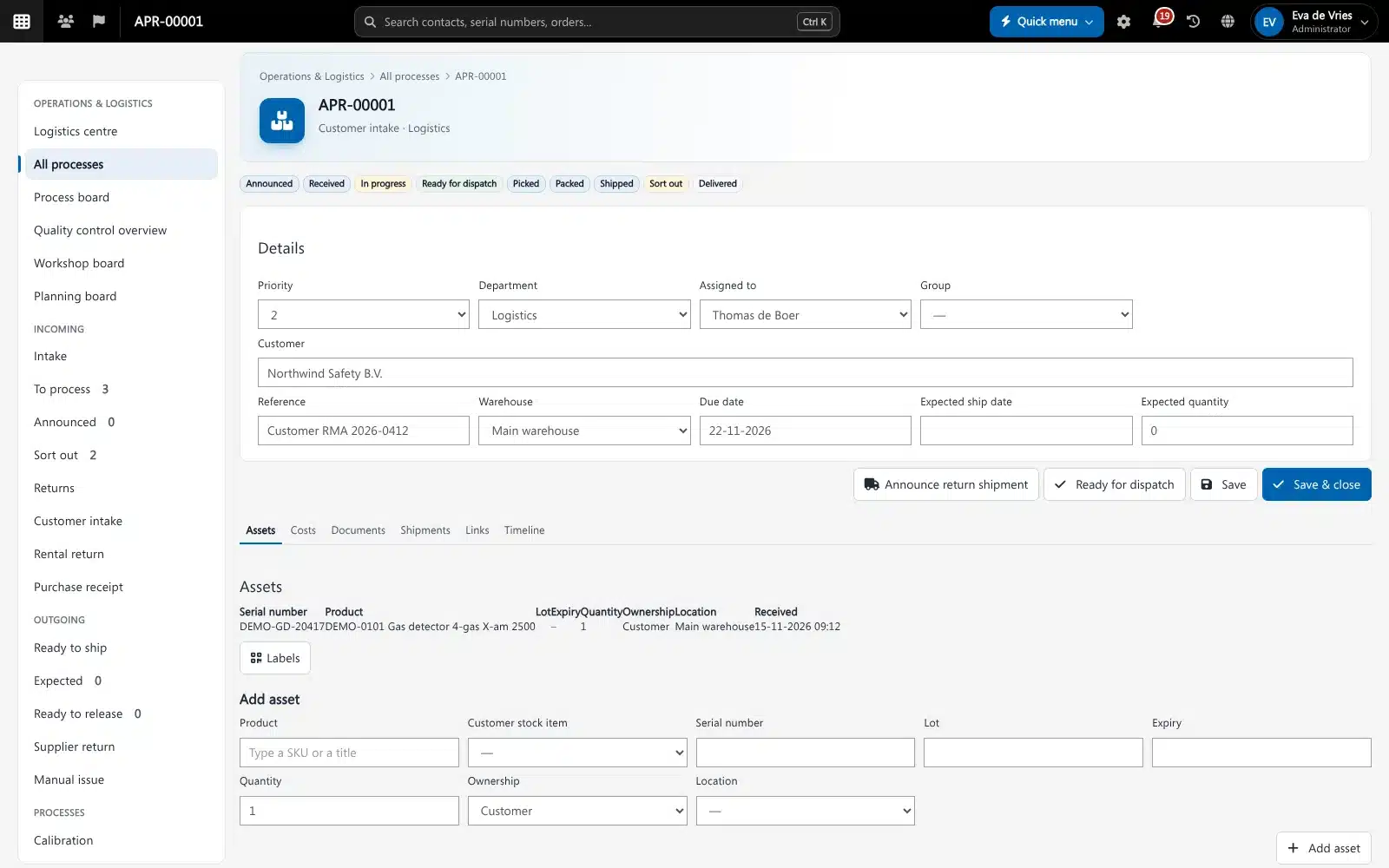
A process page in Operations & Logistics. Screenshot with sample data.
What goes wrong without logistics software
Boxes nobody can place
A device arrives without paperwork and sits on a shelf until someone works out whose it is and what should happen to it.
Work you cannot see
Sales cannot tell a customer where their device is, because the repair lives on a note, a spreadsheet or in one person’s head.
Costs that slip through
Parts, gas and shipping used on a job never make it to the invoice, or end up on it twice.
One intake desk for everything that arrives
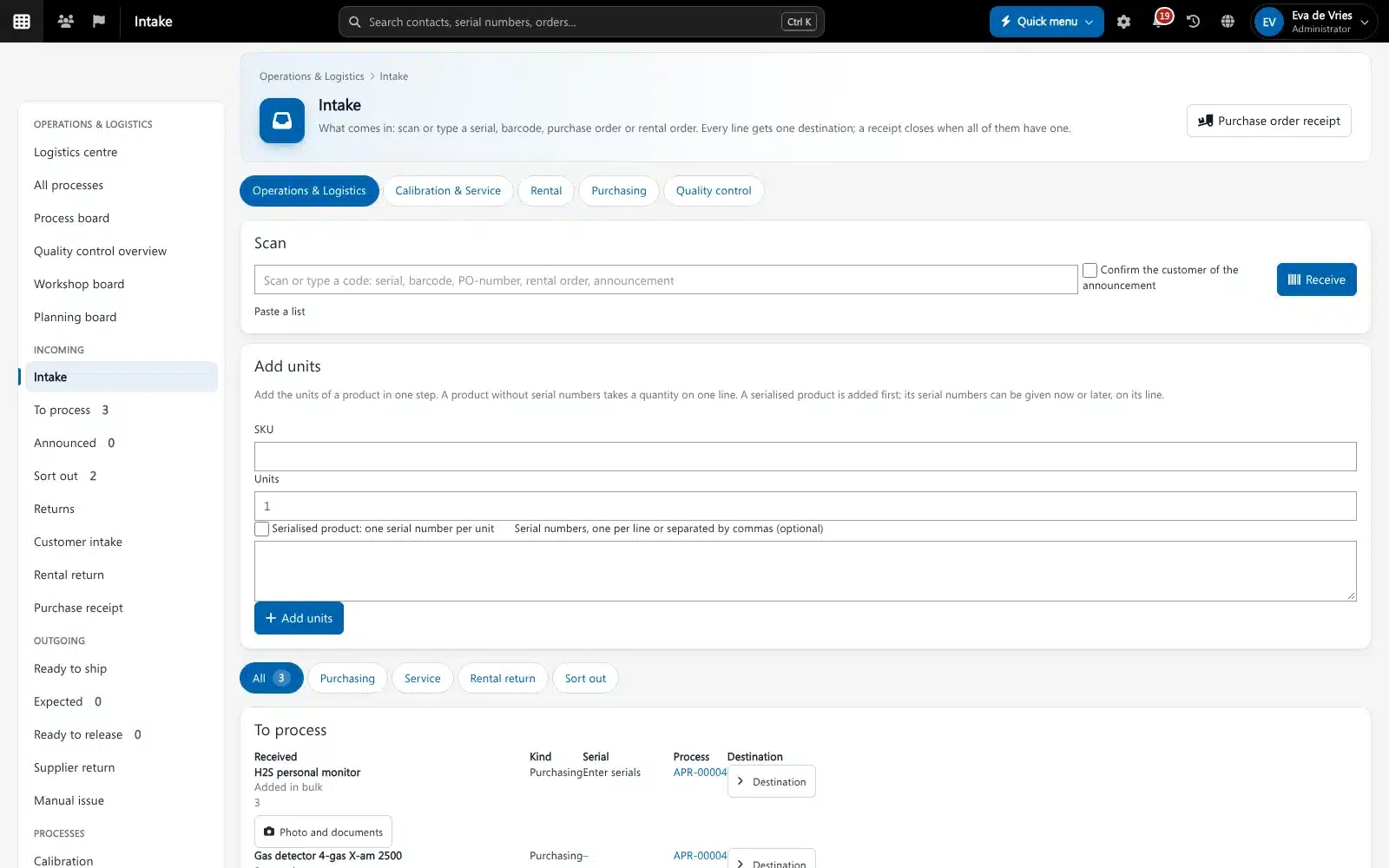
Scan a serial number, barcode, purchase order number, rental order or customer announcement. Brytend recognises it, adds it to the receipt and asks for one destination per line.
- Serials of installed devices, rental units and stock are recognised on scan
- A purchase order number receives all its open lines and books them into stock
- Unknown codes go to Sort out instead of getting lost
- Every line gets one destination: put away, assign to an order, or send to Calibration & Service
Operations & Logistics features
Logistics centre
The start page of the department: received today, to process, sort out, awaiting approval, ready to ship, in transit and late, each one click from its list.
Process board
The statuses of a process type as columns and the processes as cards. Drag a card to move it on; a late card shows how many days late it is.
Rental returns
Each pile at the returns desk is a return process: inspect every unit, record damage, review missing units and move damage charges to the rental order after a preview.
Purchase receipts
Goods on a purchase order become one receipt process with the packing slip, received quantities, deviations and arrival dates.
Work orders and workshop
Calibration, repair and service work orders on the devices of a process, a workshop board per status and a planning board that suggests qualified engineers with time.
Costs billed once
Parts, gas uses and carrier costs are added by themselves. Move them to the order, a new quote or a draft invoice, priced by contract, price group or list price. Nothing is billed twice.
Ready to ship
Pick, pack, ship and delivered per process, the goods expected to leave, and the orders whose lines can be released now.
Warranty and quality control
Warranty claims as their own process type, and one overview of open gas incidents, service incidents and tickets.
Assignment rules and rights
Rules decide which department, group or person gets a new process. Departments can be limited to a permission group.
Get started in three steps
Switch on your process types
Choose which types you use (customer intake, calibration, repair, rental return, purchase receipt, warranty and more), with their departments and numbering.
Scan in what arrives
Receive at the intake desk and give every line a destination. Customers can announce their devices in advance.
Work, ship and bill
Follow each process on the board, ship it with a carrier label and move its costs to the order or invoice.
Rated 5 stars on Google
“We used to create and track orders in Ultimo. Switching to Brytend was a challenge, yet we were very pleasantly surprised. Not only the software, but their support too is better than expected. Super!”
“Our company has used Brytend software for several years. It has let us tackle various processes quickly and efficiently that we had not found a solution for before.”
“Excellent experience with this company and its software applications. If you want changes, no problem. Arranged quickly and at a fair price.”
Reviews translated from Dutch.
More than logistics software
Linked to the order
A process is linked to its customer, order or quote and invoice, so the commercial side and the work never drift apart.
Built on your stock
Receipts, put-aways and shipments are real stock moves in Stock, and every move carries its process.
Service and rental included
Work orders are the service records you already use, and rental returns start from the returns desk of Rental.
Works with the other Brytend modules
Stock
See how Stock works with Operations & Logistics.
Service and inspections
See how Service and inspections works with Operations & Logistics.
Rental and loans
See how Rental and loans works with Operations & Logistics.
Invoicing
See how Invoicing works with Operations & Logistics.
Frequently asked questions
What is logistics software?
Software that tracks goods and devices through intake, work and dispatch. Brytend Operations & Logistics turns each repair, calibration, rental return, purchase delivery or warranty claim into a process with its own status, units, costs and timeline.
What is the difference between an order and a process?
The order is the commercial agreement with the customer. The process is the physical work on the goods. A process is linked to its order, quote or invoice, and its costs can be moved there after a preview.
Which process types are there?
Customer intake, calibration, repair, service, rental return, purchase receipt, internal transfer, supplier return, manual issue, warranty and quality control. You switch on the ones you use.
Can customers announce a return?
Yes. A customer can announce devices from the announce page, the portal or the app. The announcement is matched when the parcel is scanned at the intake desk.
Does it work with carriers?
With a carrier connected, shipping a process makes the carrier label and takes the stock out. A return label for an announced return is not made yet.
Can costs end up on the invoice twice?
No. Each stock move, gas use or shipment makes one cost line, and a billed line shows Billed and cannot move again.
How does the free trial work?
You use the full Brytend platform free for 90 days. Take the tour first, or start the trial straight away.
Know where every device is, from the dock to the invoice.
Take the tour to see Operations & Logistics with the rest of the platform, or start your free 90-day trial.
Prefer to talk first? Call +31 (0)85 013 02 04