

Document control software for audits you pass first time.
Keep every procedure, certificate, contract and drawing in one controlled register: the right version, approved by the right people, with a full audit trail for ISO 9001, ISO 27001 and VCA.
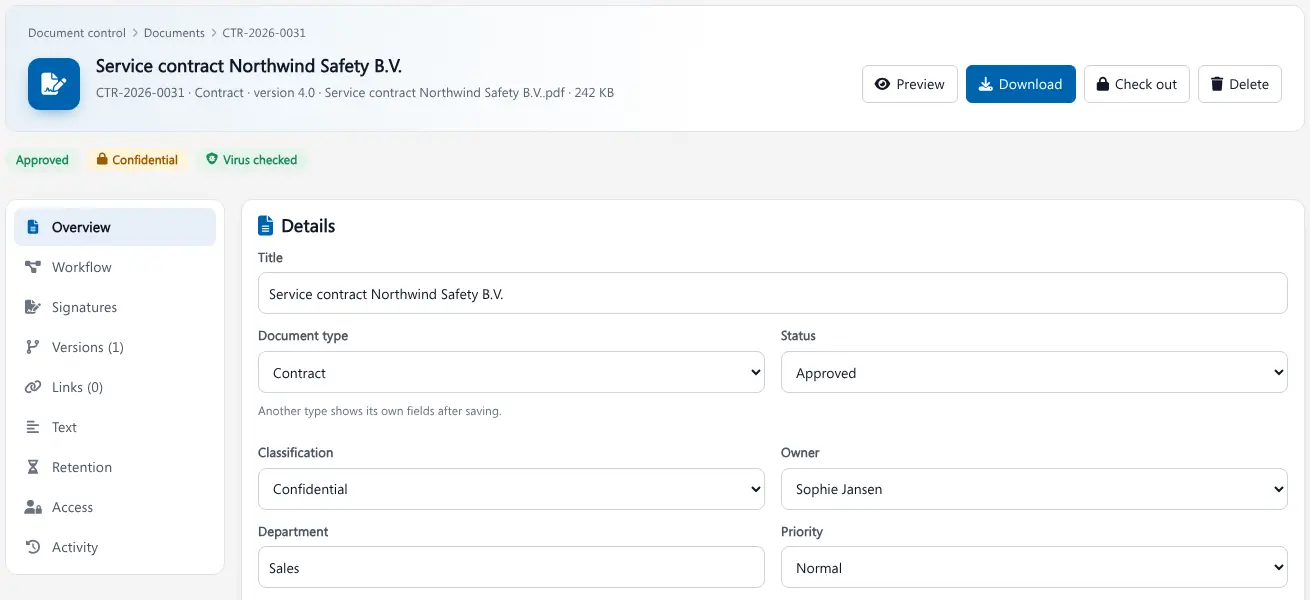
Document control is the way an organisation makes sure everyone works with the current, approved version of a document, and can prove who changed, reviewed and approved it. Brytend Document Control does that for service, rental, safety and inspection companies, without paper binders or shared folders.
Document Control is one part of Brytend, the business operations platform that unifies CRM, Assets, Rentals, Quality, Service, Compliance, Documents, Reporting and AI in one integrated system.
Every document, its status and its expiry date on one screen
Policies, procedures, certificates, contracts, reports and drawings in one list, with status, classification, version and expiry date. Search even finds words inside the files.
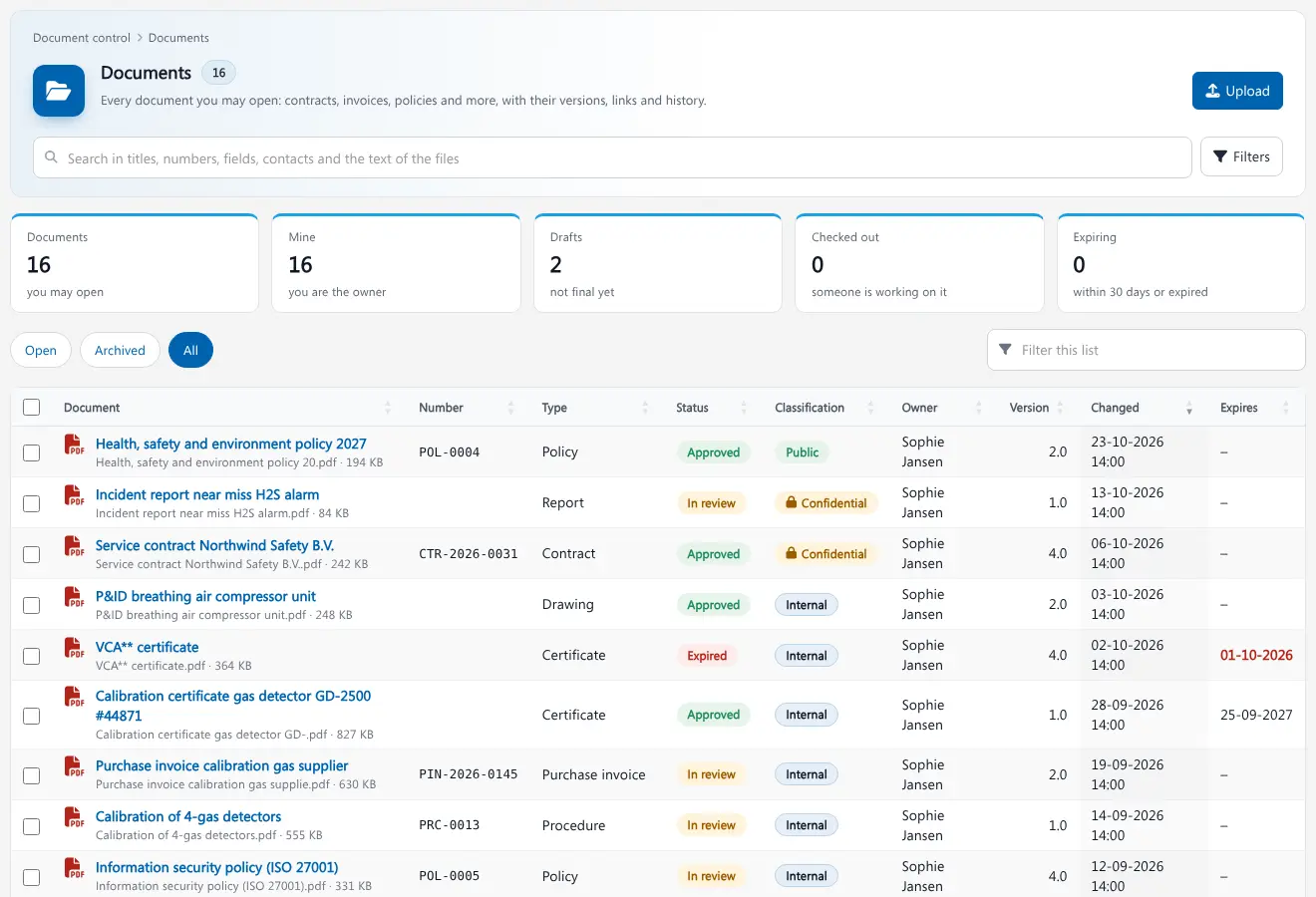
Document register in Brytend. Screenshot with sample data.
The risks of documents in shared folders
The wrong version on site
A technician follows an old procedure because the new one is in someone’s mailbox. In safety work that is a real risk.
No proof during an audit
The auditor asks who approved a procedure and when. Without an audit trail, you lose hours searching e-mails.
Certificates that expire unnoticed
A calibration certificate or VCA certificate expires and nobody sees it until a customer asks for it.
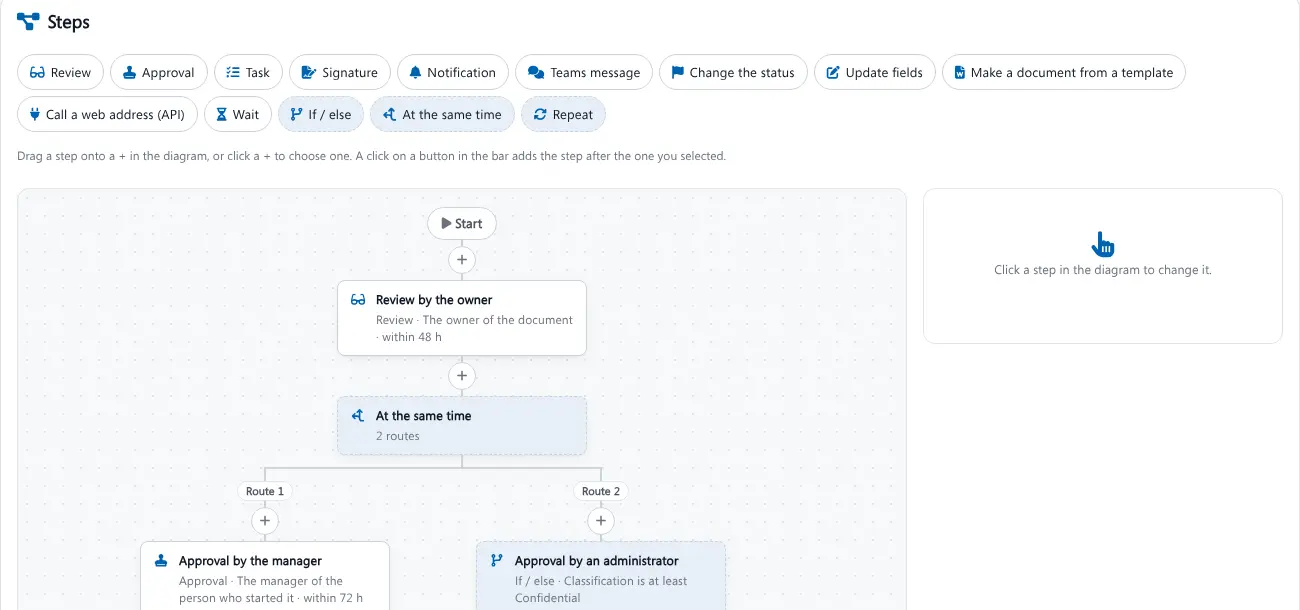
Build your approval route without code
Drag steps into a workflow: a review by the owner, approval by the manager, an extra approval for confidential documents, a signature or a Teams message. Brytend follows the route, sends reminders and escalates when a deadline passes.
- Review, approval, task, signature and notification steps
- Routes one after the other or at the same time
- If / else rules, for example on classification
- Deadlines, reminders and escalation
Document control features
Versions and check-out
Every change becomes a new version with notes. Check a document out while you work on it, so nobody overwrites your changes.
Full audit trail
Every view, change, approval and download is logged in a tamper-evident activity history you can show an auditor.
Electronic signatures
Send contracts and procedures for signature to colleagues and customers, and keep the signed copy with the document.
Expiry and due dates
Set an expiry date on certificates and a due date on procedures. The overview shows everything that expires within 30 days, so you renew in time.
Classification and access
Mark documents as public, internal or confidential and decide per document who may open it. Confidential files get a watermark.
Retention and legal holds
Retention policies per document type tell you when a document may be removed, and a legal hold stops it from being deleted.
Search inside files
Brytend reads the text of PDFs and scans, so you find a procedure by a word in it, not only by its title.
Virus check on upload
Every uploaded file is scanned before anyone can open it, and stored safely outside the public website.
Requests and dossiers
Ask customers or suppliers to upload documents through a secure link, and bundle documents per project or customer in a dossier.
Controlled documents in three steps
Upload
Upload your procedures, certificates and contracts, or let suppliers and customers send them through a request link.
Review and approve
The workflow sends each document to the right reviewers and approvers, with reminders.
Use and prove
Everyone works with the current version, and the audit trail shows exactly what happened.
Rated 5 stars on Google
“We used to create and track orders in Ultimo. Switching to Brytend was a challenge, yet we were very pleasantly surprised. Not only the software, but their support too is better than expected. Super!”
“Our company has used Brytend software for several years. It has let us tackle various processes quickly and efficiently that we had not found a solution for before.”
“Excellent experience with this company and its software applications. If you want changes, no problem. Arranged quickly and at a fair price.”
Reviews translated from Dutch.
More than document control software
Part of one platform
Documents link to customers, equipment and service records and purchase invoices, so every file has its context.
Certified and secure
Brytend itself is ISO 9001 and ISO 27001 certified. Read how we protect your information on our security page.
Also on your phone
Review and approve documents from the Brytend mobile app, wherever you are.
Frequently asked questions
What is document control software?
Document control software keeps documents in one controlled register with versions, review and approval workflows, access rights and an audit trail, so everyone uses the current approved version and you can prove it.
Does Brytend help with ISO 9001 and ISO 27001 audits?
Yes. Brytend keeps the version history, approvals and a full activity log of every document, which is the evidence auditors ask for under ISO 9001 clause 7.5 and ISO 27001.
Can I build my own approval workflow?
Yes. The workflow designer lets you add review, approval, task, signature and notification steps, run them one after the other or at the same time, and set deadlines and escalation without any code.
How does Brytend handle expiring certificates?
You set an expiry date on a certificate. The document overview counts and lists everything that expires within 30 days or has expired, so you can renew before it lapses.
Who can see confidential documents?
Each document has a classification and its own access rules. Confidential documents are only visible to the people you allow, and previews get a watermark.
Can suppliers and customers upload documents?
Yes. Send a request with a secure upload link. The uploaded files are virus-checked and land in the right place in Brytend.
How does the free trial work?
You use the Brytend platform free for 90 days with your own team. Start the trial here or take the tour first, or call us on +31 (0)85 013 02 04 if you have questions first.
The right document. Approved. Every time.
Start your free 90-day trial and bring your procedures, certificates and contracts under control in Brytend.
Prefer to talk first? Call +31 (0)85 013 02 04