A document control procedure is the written set of rules for how a company creates, reviews, approves, releases, changes and archives its controlled documents, so that everyone works from the current approved version and old versions cannot be used by mistake. It defines who may write and approve each type of document, how documents are numbered and versioned, how changes are requested and recorded, and how long old versions are kept. ISO 9001 clause 7.5 requires this kind of control for documented information, and most auditors ask to see the procedure before anything else.
TL;DR:
- A document control procedure covers the full life cycle: draft, review, approval, release, distribution, change and archive
- Every controlled document needs a unique number, a version, an owner, an approver and a status
- Only released documents may be used in daily work; drafts and superseded versions must be clearly marked or out of reach
- Changes go through the same review and approval as the first version, with a short reason for the change
- Software enforces the procedure with approval routes, version history and an audit trail, so it does not depend on people remembering the rules
A document control procedure, often written as a standard operating procedure (SOP) for document control, is the instruction that tells everyone how controlled documents are managed.
What Is a Document Control Procedure?
Every company has documents that people must follow exactly: work instructions, calibration procedures, inspection checklists, safety instructions, forms, policies and drawings. If two versions of a calibration procedure are in circulation, a technician can follow the old one and a customer gets a wrong result. A document control procedure prevents that.
The procedure answers a few simple questions:
- Which documents are controlled, and which are not?
- Who writes, reviews and approves each type?
- How do we number and version documents?
- How do people find the current version, and how do we stop them using an old one?
- How are changes requested, approved and communicated?
- How long do we keep old versions and records?
It is itself a controlled document. It has a number, an owner and a version, just like the documents it governs.
What Does ISO 9001 Require for Document Control?
ISO 9001:2015 uses the term “documented information” instead of documents and records, but the requirements in clause 7.5 are clear. When you create or update documented information you must make sure it has proper identification (title, date, author, reference number), the right format and media, and is reviewed and approved for suitability. You must also control it: it must be available where and when it is needed, protected against loss and improper use, and managed for distribution, access, storage, version changes, retention and disposal. Documents of external origin, such as manufacturer manuals and standards, need control too. The full text is in the ISO 9001:2015 standard.
ISO 9001 no longer demands a written procedure for this, but in practice almost every certified company has one, because it is the easiest way to show the auditor how the requirements are met. ISO 13485, ISO 45001 and ISO 17025 have similar requirements.
What Are the Steps in a Document Control Procedure?
1. Identify the document type
Decide whether the new document is controlled. Procedures, work instructions, forms, policies and specifications usually are. Meeting notes and e-mails usually are not. Each type has its own owner, approver and review interval.
2. Assign a number and title
Give the document a unique number using your numbering system, for example WI-SRV-014 for work instruction 14 of the service department. The number never changes; the version does.
3. Draft the document
The author writes the document using the approved template, with header fields for number, title, version, owner, approval date and next review date.
4. Review
One or more reviewers check content and practicality. For a calibration procedure that may be a senior technician and the quality manager. Comments are handled before approval.
5. Approve and release
The approver signs off, the status changes to “released” and the effective date is set. From that moment it is the only valid version.
6. Distribute and train
Make the released version available where it is used and tell the people who need it. For important changes, plan a short instruction and record who has read it.
7. Change control
Anyone can request a change, but the change follows steps 3 to 6 again. The new version records what changed and why. The old version becomes “superseded” automatically.
8. Periodic review, archive and disposal
Review each document at a set interval, for example every two or three years, even if nothing changed. Superseded and withdrawn versions go to the archive and are kept for the retention period, then disposed of.
What Does a Document Control Procedure Example Look Like?
A short SOP for document control often follows this outline:
| Section | Content |
|---|---|
| 1. Purpose | Make sure only current, approved documents are used |
| 2. Scope | All controlled documents of the company, including external documents |
| 3. Definitions | Controlled document, record, version, released, superseded, owner, approver |
| 4. Responsibilities | Document owner, reviewer, approver, quality manager, all employees |
| 5. Numbering and versioning | Number format per document type; version 1.0, 1.1, 2.0 rules |
| 6. Creation, review and approval | Template, review route per type, approval signature |
| 7. Distribution and access | Where released documents are available; who may see which classification |
| 8. Changes | Change request, reason, impact check, new approval, communication |
| 9. Review interval | Default review period per type |
| 10. Archive and retention | Retention periods, legal holds, disposal |
| 11. External documents | How manuals and standards are registered and kept current |
| 12. Records | Which records the procedure produces (approval history, read confirmations) |
Keep it short. A document control procedure of 30 pages is a sign that the rules are too complicated to follow.
How Should You Number and Version Controlled Documents?
A simple numbering system beats a clever one. Use a prefix for the document type, a department code and a sequence number: PR-QA-001 for a quality procedure, FO-SRV-022 for a service form. Avoid putting the version in the number.
For versions, many companies use major and minor numbers. A minor version (1.1) for corrections that do not change the meaning, such as typos; a major version (2.0) for changes in content that require new approval and possibly training. Whatever you choose, write it down and apply it the same way everywhere.
Where Do Document Control Procedures Usually Go Wrong?
- Printed copies: a printed work instruction in the workshop stays there long after a new version is released. Mark prints as “uncontrolled when printed” or avoid them.
- Shared folders: files named procedure_final_v3_new.docx with no clear status. People take whatever they find first.
- Approval by e-mail: nobody can show later who approved which version and when.
- No review dates: documents from ten years ago describe equipment you no longer use.
- External documents forgotten: manufacturer manuals change, but the old PDF stays on the server.
- Expiring certificates: certificates and permits stored as documents expire without anyone noticing.
How Does Document Control Software Enforce the Procedure?
A written procedure tells people what to do. Software makes the right way the only way. In Brytend document control, every document has a number, version, owner, status and expiry or review date on one screen. The approval route per document type is built in a designer without code: who reviews, who approves, in which order, and what happens when someone rejects.
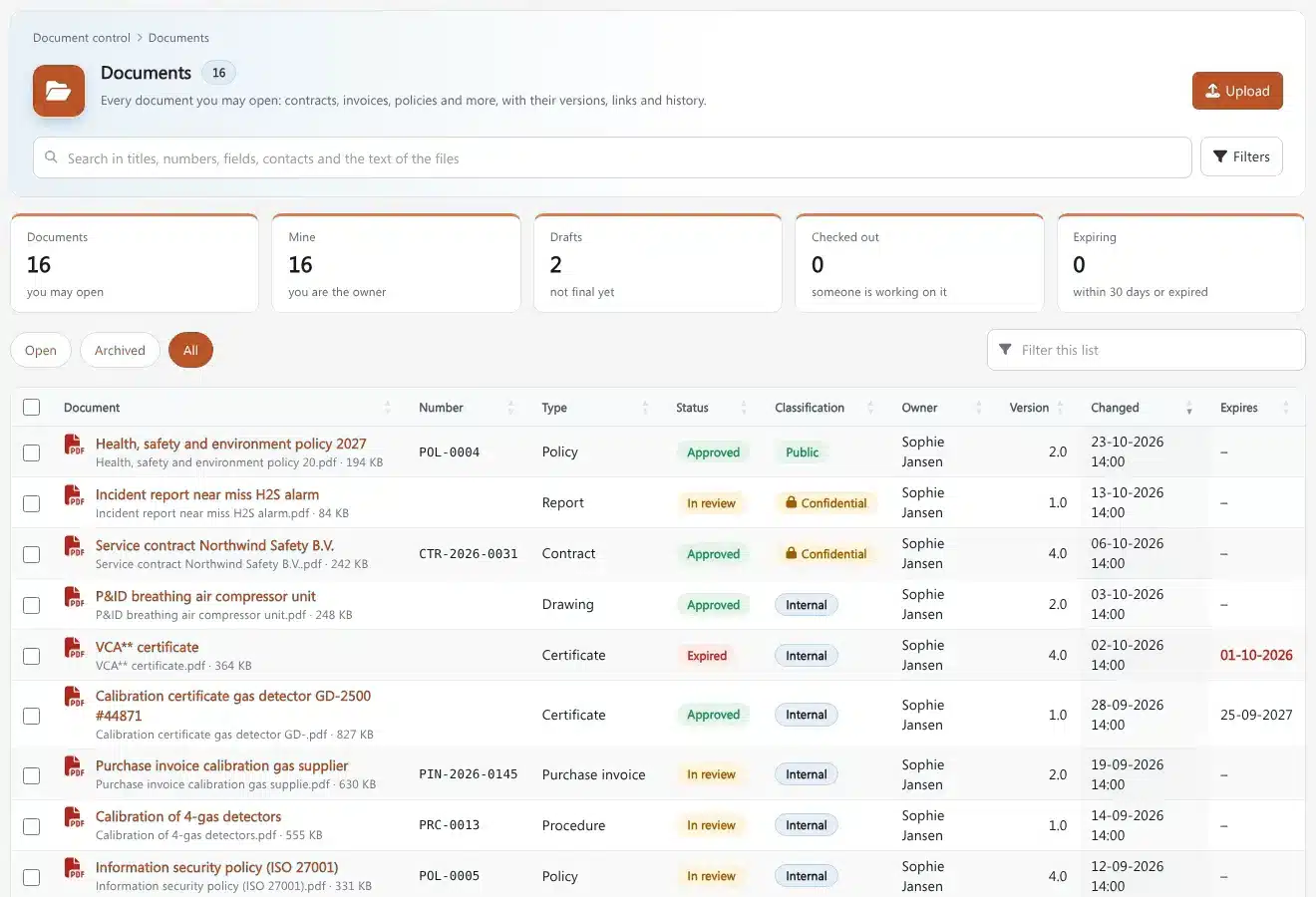
- Versions and check-out: one person edits at a time, every version is kept, and only the released one is shown by default
- Full audit trail: who created, reviewed, approved and opened each version, with dates
- Electronic signatures: approval is recorded with the person and time, not in an e-mail
- Expiry and review dates: reminders before a document or certificate expires
- Classification and access: confidential documents are only visible to the right groups
- Retention and legal holds: archived versions are kept as long as required and protected from deletion
- Search inside files: find a procedure by a word in the text, not only by its title
Because document control is part of the same platform, released documents can be linked to other work. A calibration procedure can be attached to the calibration work that uses it, course material in Brytend Academy can be a controlled document, and the AI can answer questions from released documents only. For service teams who also need structured job reports, the service documentation guide covers the record side.
Frequently Asked Questions About Document Control Procedures
What is a document control procedure?
A document control procedure is the set of rules for creating, reviewing, approving, releasing, changing and archiving controlled documents. It makes sure everyone uses the current approved version and that old versions cannot be used by mistake.
What are the steps of document control?
The main steps are identifying the document type, numbering, drafting, review, approval and release, distribution, change control, periodic review and archiving. Changes go through review and approval again before a new version is released.
Is a document control procedure required by ISO 9001?
ISO 9001:2015 does not require a written procedure by name, but clause 7.5 requires control of documented information. Most certified companies keep a document control procedure because it is the clearest way to show the auditor how the requirements are met.
What is the difference between a document and a record?
A document tells people how to do something and can change over time, such as a procedure or form template. A record is evidence that something was done, such as a filled-in form or test result, and should not be changed after it is created.
How often should controlled documents be reviewed?
Most companies review controlled documents every two to three years, and immediately when a process, law or piece of equipment changes. The review interval should be set per document type in the document control procedure.
What is uncontrolled when printed?
Uncontrolled when printed is a marking on printed copies that says the paper version may be out of date. The only valid version is the released version in the document control system.
What software is best for document control?
Good document control software has numbering, version history, approval routes, electronic signatures, review and expiry reminders, access control and an audit trail. Brytend document control includes all of these and links documents to service, training and AI in one platform.
A good document control procedure is short, clear and followed every day. It makes sure people use the current version, that every change is reviewed and approved, and that you can prove all of it during an audit. Software takes the discipline out of people’s heads and puts it into the workflow. If you want numbering, approval routes, versions, expiry dates and an audit trail without building it yourself, Brytend document control is ready to use. Try it free for 90 days.