TL;DR:
- Power tool rental software automates inventory tracking, reservations, billing, and maintenance scheduling for equipment rental operations
- Key features include real-time availability tracking, serialized asset management, automated service reminders, and integrated payment processing
- Implementation typically takes 4-12 weeks with ROI achieved through reduced double-bookings, lower administrative costs, and improved asset utilization
- Modern systems integrate with mobile apps, barcode scanners, and accounting platforms to create end-to-end rental workflows
- Custom solutions address industry-specific requirements like compliance tracking, multi-location management, and customer self-service portals
Power tool rental software is a specialized business management system that automates the complete rental lifecycle including inventory control, customer reservations, contract generation, billing, equipment maintenance scheduling, and reporting for businesses that rent power tools and equipment.
What Is Power Tool Rental Software and What Does It Do?
Power tool rental software manages the operational workflow for businesses that rent construction equipment, power tools, and industrial machinery to contractors, DIY customers, and commercial clients. The system tracks each individual asset through its entire lifecycle from acquisition to retirement.
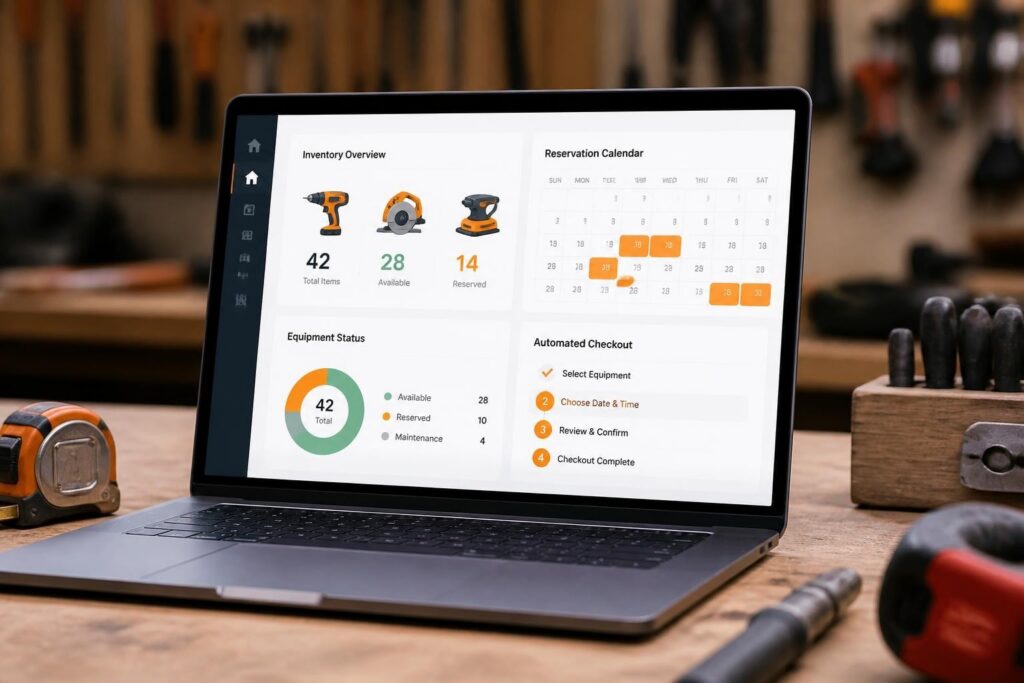
Core functions include asset registration with unique identifiers, availability calendars that prevent double-bookings, automated pricing calculations based on rental duration, digital contract generation, payment processing, and maintenance scheduling. Modern platforms integrate with barcode scanners and RFID readers to speed up check-in and check-out processes.

The software eliminates manual spreadsheets and paper-based processes that create errors and inefficiencies. According to industry statistics, the tool rental market continues to grow as construction businesses prefer renting over purchasing expensive equipment. This growth increases demand for efficient rental management systems.
Core Modules in Rental Management Systems
Complete power tool rental software includes several integrated modules:
- Asset Management: Serial number tracking, depreciation calculation, location monitoring, condition assessment
- Reservation System: Online booking portal, availability calendar, automated confirmation emails, waitlist management
- Contract Generation: Customizable rental agreements, digital signatures, terms and conditions enforcement
- Billing Engine: Hourly/daily/weekly rate calculation, damage fees, late charges, tax application
- Maintenance Tracking: Service schedules, repair history, parts inventory, equipment downtime logging
- Customer Database: Contact information, rental history, credit limits, preferred payment methods
- Reporting Dashboard: Utilization rates, revenue by category, overdue rentals, maintenance costs
The Brytend Service Module provides comprehensive functionality for managing serialized inventory, scheduling preventive maintenance, and generating service certificates-capabilities essential for power tool rental operations that must document equipment condition and compliance.

Integration capabilities determine how well the system fits into existing business workflows. Most rental software connects with accounting platforms like QuickBooks, payment processors such as Stripe or Square, email marketing tools, and SMS notification services.
How Does Power Tool Rental Software Improve Operational Efficiency?
Power tool rental software reduces administrative workload by automating repetitive tasks that consume staff time. Manual processes require employees to check availability across multiple spreadsheets, calculate rental fees by hand, type contracts, and track equipment location through paper logs.
Automated systems handle these tasks instantly. When a customer requests a specific power drill for next Tuesday, the software checks real-time availability, reserves the asset, calculates pricing based on duration and customer category, generates a contract, and sends confirmation-all within seconds.
| Manual Process | Automated Process | Time Saved |
|---|---|---|
| Check availability across 3-5 spreadsheets | Instant calendar lookup | 5-8 minutes per booking |
| Calculate rental fees with calculator | Automatic pricing engine | 3-5 minutes per transaction |
| Type contract from template | Auto-generated digital contract | 10-15 minutes per rental |
| Call customer for pickup reminder | Automated SMS notification | 2-3 minutes per reminder |
| Update inventory spreadsheet | Real-time database update | 5-7 minutes per transaction |
The cumulative time savings translate to significant cost reductions. A rental business processing 50 transactions daily saves approximately 15-20 hours weekly through automation, equivalent to reducing staffing needs or reallocating personnel to customer service and sales activities.
Best practices for managing real-time equipment availability emphasize preventing double-bookings and minimizing idle inventory-two critical benefits delivered by modern rental software systems.
Revenue Optimization Through Better Asset Utilization
Rental software increases revenue by maximizing equipment utilization rates. Manual systems lack visibility into which assets sit idle versus which are constantly rented, making inventory decisions difficult.
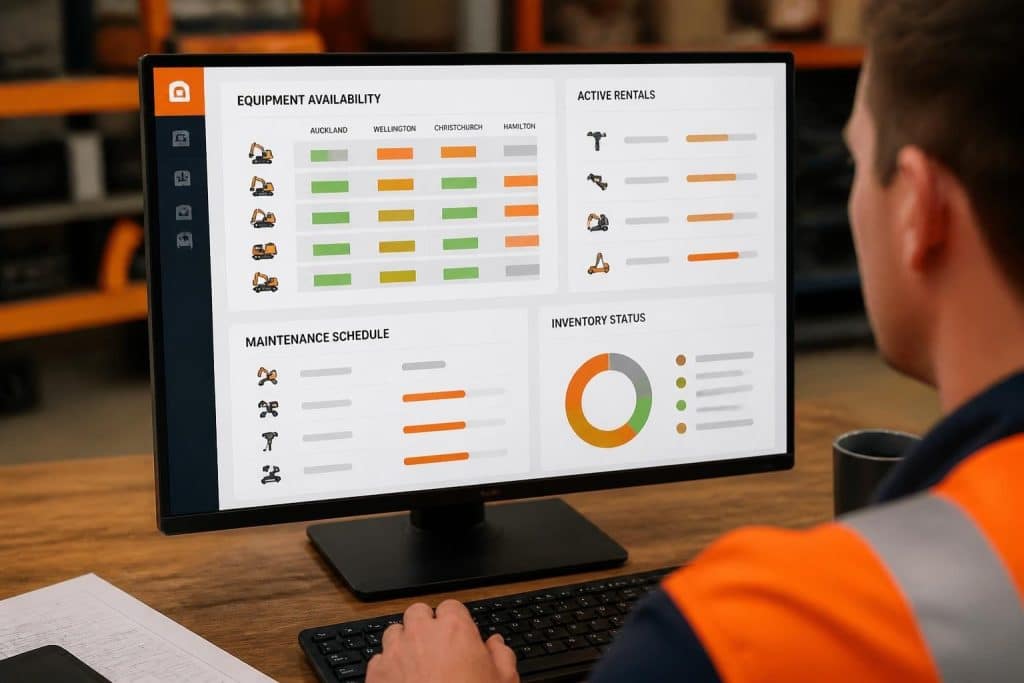
Analytics dashboards show utilization percentages for each asset category. If cement mixers average 85% utilization while pressure washers only reach 40%, the business can adjust purchasing decisions and marketing focus accordingly.
Dynamic pricing features adjust rates based on demand, seasonality, and competition. The system can automatically increase weekend rates during peak construction season or offer discounts on underutilized equipment to stimulate rentals.
Reduced equipment loss represents another revenue protection benefit. GPS tracking integration and automated return reminders decrease the percentage of tools that go missing or are returned late without penalty.
What Are the Essential Features for Power Tool Rental Operations?
Power tool rental software must include specific capabilities that address industry requirements. Generic asset management systems lack the specialized functions rental businesses need.
Serialized Inventory Management
Each individual power tool requires unique tracking separate from SKU-level inventory. Two identical circular saws purchased on the same day have different maintenance histories, wear patterns, and depreciation schedules.
Serialized tracking assigns unique identifiers to each asset:
- Generate or import manufacturer serial numbers
- Add internal asset tags with barcode or QR code
- Record purchase date, cost, supplier, and warranty information
- Track location (warehouse, customer site, repair shop)
- Document condition at each check-in and check-out
- Maintain complete rental and service history
This granular tracking enables accurate depreciation calculation, targeted maintenance scheduling, and theft recovery. When a customer reports damage, the system immediately identifies which specific unit was affected and pulls its complete history.
Reservation and Booking Engine
The reservation system must handle complex scenarios beyond simple calendar blocking. Power tool rentals involve multiple variables including equipment availability, delivery logistics, customer credit limits, and seasonal demand fluctuations.
Advanced booking features include:
- Multi-site inventory: Check availability across warehouse locations and reserve from optimal site
- Equipment substitution: Suggest comparable alternatives when requested item is unavailable
- Bundle packages: Create equipment kits for common jobs (framing package, concrete finishing package)
- Recurring reservations: Schedule weekly or monthly equipment needs for long-term projects
- Waitlist automation: Notify customers when previously unavailable equipment becomes free
- Delivery scheduling: Coordinate transport logistics with rental period
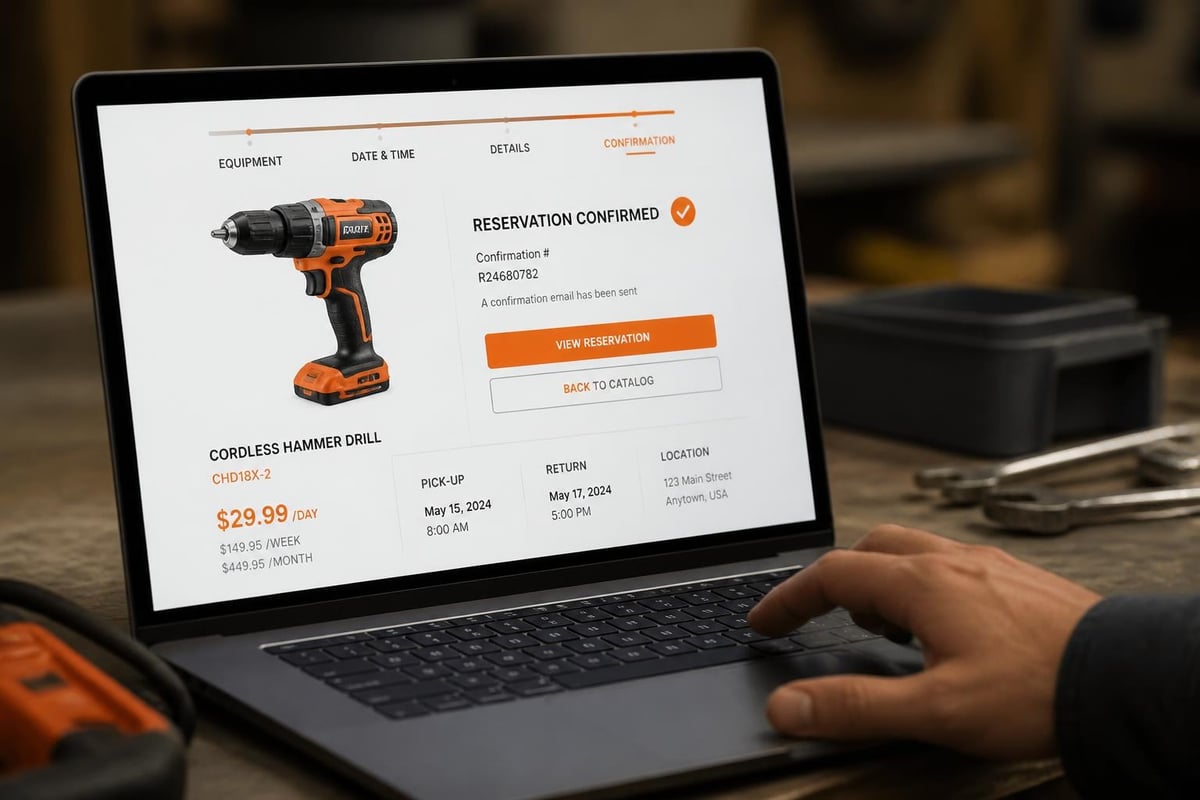
Customer self-service portals reduce phone inquiries by allowing online browsing, instant availability checks, and direct booking without staff involvement. Digital rental platform solutions extend business hours and capture bookings when the physical location is closed.
Maintenance and Service Tracking
Power tools require scheduled maintenance to ensure safety, performance, and longevity. Rental software automates service tracking through configurable rules based on usage hours, rental cycles, or calendar intervals.
The system triggers maintenance events automatically:
- Monitor cumulative usage hours or rental count
- Generate service work order when threshold is reached
- Remove equipment from available inventory
- Assign to maintenance technician with task checklist
- Record parts used, labor hours, and findings
- Update service history and return to rental fleet
- Schedule next maintenance based on new baseline
This structured approach prevents equipment failures at customer sites-a critical service quality issue that damages reputation and creates liability exposure. Documented maintenance history also supports warranty claims and resale value when retiring assets.
How Do Businesses Implement Power Tool Rental Software Successfully?
Implementation of power tool rental software follows a structured methodology to minimize disruption and ensure user adoption. Rushed deployments without proper planning typically result in data quality issues, workflow gaps, and staff resistance.
Pre-Implementation Assessment and Planning
Successful implementations begin with comprehensive assessment of current processes, pain points, and business requirements. This discovery phase identifies what the new system must accomplish.
Key assessment activities include:
- Process mapping: Document current workflows from customer inquiry through equipment return
- Data audit: Inventory existing customer records, equipment lists, pricing structures, and contracts
- Integration requirements: Identify systems that must connect (accounting, payment processing, marketing)
- User roles: Define permissions for counter staff, managers, technicians, and administrators
- Reporting needs: Specify metrics and dashboards required for business decisions
- Mobile requirements: Determine field capabilities needed for delivery crews and service technicians
Implementation of construction software requires developing a detailed plan with timelines, resource allocation, and success criteria-principles that apply equally to rental software deployment.
The planning phase should identify a project champion who owns the implementation, coordinates stakeholder input, and maintains momentum through challenges. Without dedicated leadership, implementations drift and lose organizational focus.
Data Migration and System Configuration
Data migration represents the most time-consuming implementation phase. Businesses typically underestimate the effort required to clean, standardize, and import existing records.
Migration follows this sequence:
- Export existing data from spreadsheets, legacy systems, or paper records
- Clean and standardize records to match new system requirements (consistent naming, complete fields)
- Map data fields from old structure to new database schema
- Import in stages starting with reference data (customers, equipment categories) before transactional data
- Validate accuracy by comparing record counts and spot-checking individual entries
- Reconcile discrepancies and reimport corrected data as needed
System configuration includes setting up rental rate tables, tax rules, contract templates, email notifications, user permissions, and integration connections. Best practices for implementing equipment rental software emphasize thorough testing in a sandbox environment before going live with production data.
Configuration should reflect actual business rules. If the company charges by half-day increments, offers contractor discounts, or requires deposits on high-value equipment, these policies must be encoded in the system's pricing and workflow logic.
Training and Phased Rollout
User training determines whether staff embrace or resist the new system. Comprehensive training covers not just button-clicking but why the system works the way it does and how it benefits employees' daily work.
Effective training programs include:
- Role-based sessions: Counter staff need booking and checkout training; managers need reporting; technicians need maintenance module
- Hands-on practice: Use test data to simulate real transactions rather than passive demonstrations
- Quick reference guides: One-page checklists for common tasks like processing a return or generating an invoice
- Super-user designation: Identify power users who receive advanced training and provide peer support
- Ongoing education: Schedule refresher sessions and advanced technique workshops after initial rollout
Phased rollout reduces risk by limiting scope initially. Start with one equipment category or one location, validate the system works correctly, then expand. This approach allows course correction before full deployment.
What Challenges Do Rental Businesses Face With Software Adoption?
Power tool rental software implementation encounters predictable obstacles that require proactive management. Understanding common challenges enables preparation and mitigation strategies.
Data Quality and Historical Record Issues
Many rental businesses operate for years with inconsistent record-keeping. Customer information exists across multiple sources with duplicates and outdated contact details. Equipment records lack serial numbers, purchase dates, or complete maintenance history.
Poor data quality creates migration challenges. The new system requires complete, accurate information to function properly. Businesses must invest time cleaning data before importing, which delays go-live dates and frustrates stakeholders who expected quick deployment.
Mitigation approaches include:
- Allocate 30-40% of implementation timeline specifically to data preparation
- Prioritize active customers and frequently rented equipment over historical records
- Accept that some historical data will be lost or manually recreated over time
- Use implementation as opportunity to establish data quality standards going forward
Staff Resistance and Change Management
Employees who have performed manual processes for years often resist new systems that change their daily routines. This resistance manifests as continued use of old methods alongside the new system, creating dual processes that undermine benefits.
Common objections include "the old way works fine," "this system is too complicated," or "I don't have time to learn something new." These statements often mask underlying fears about job security, technology competence, or loss of informal control.
Effective change management addresses emotional and practical concerns:
- Involve staff in software selection and configuration decisions to build ownership
- Communicate specific benefits that help employees' work (less time on paperwork, fewer customer complaints)
- Celebrate early wins and recognize staff who embrace the new system
- Provide patient support during the learning curve without criticism
- Enforce consistent usage by leadership example and clear expectations
Integration Complexity With Existing Systems
Power tool rental businesses typically use multiple software tools including accounting platforms, payment processors, email marketing services, and inventory scanners. The rental software must integrate with these systems to avoid manual data entry between platforms.
Integration challenges arise when:
- Existing systems lack modern APIs or integration capabilities
- Data formats are incompatible requiring transformation middleware
- Real-time synchronization is needed but systems only support batch updates
- Custom integrations require developer resources and ongoing maintenance
| Integration Type | Complexity | Timeline | Cost Range |
|---|---|---|---|
| Pre-built connector (QuickBooks, Stripe) | Low | 1-2 weeks | Included in software |
| Zapier/Make automation | Medium | 2-4 weeks | $100-500/month tools |
| Custom API integration | High | 6-12 weeks | $5,000-25,000 development |
| Legacy system custom export/import | Very High | 12-20 weeks | $15,000-50,000 development |
Businesses should prioritize critical integrations for initial implementation and address secondary connections in later phases. Starting with native functionality and adding integrations incrementally reduces complexity and shortens time-to-value.
How Can Businesses Measure ROI From Rental Software Investment?
Power tool rental software represents significant investment in licensing fees, implementation costs, training time, and operational adjustment. Businesses need clear metrics to evaluate whether the system delivers expected returns.
Quantifiable Efficiency Metrics
Operational efficiency improvements provide measurable ROI indicators:
- Transaction processing time: Measure minutes required to complete rental, return, and billing processes before and after implementation
- Administrative labor hours: Calculate weekly hours spent on rental administration and compare post-implementation
- Double-booking incidents: Count instances where same equipment was reserved to multiple customers simultaneously
- Invoice accuracy: Track billing errors requiring correction and customer credit issuance
- Equipment utilization rate: Measure percentage of time assets generate rental revenue versus sitting idle
A mid-size rental business processing 200 transactions weekly typically sees 40-60% reduction in administrative time within three months of implementation. This translates to reallocating 1-2 full-time equivalents from paperwork to customer service or sales.
Revenue Impact Analysis
Revenue improvements justify rental software investment through several mechanisms:
- Reduced idle inventory: Better visibility into underutilized equipment enables targeted marketing and pricing adjustments
- Fewer lost rentals: Online booking captures after-hours reservations that previously went to competitors
- Improved collections: Automated invoicing and payment reminders reduce days sales outstanding
- Higher equipment turnover: Faster check-in/check-out processes increase daily rental capacity
- Premium pricing for availability: Guaranteed availability through better inventory management supports rate increases
Industry market research shows the equipment rental sector continues growing, creating opportunities for businesses that optimize operations through technology adoption.
Case example: A regional rental company with 800 power tools implemented specialized rental software replacing spreadsheet-based processes. Results after six months included 23% increase in equipment utilization (from 61% to 84%), 18% reduction in administrative costs through staff reallocation, and 31% decrease in overdue accounts receivable. Total investment of $45,000 in software and implementation generated estimated annual benefit of $127,000, achieving ROI in approximately four months.
Customer Satisfaction and Retention Indicators
Software impact on customer experience affects long-term business value:
- Repeat customer rate: Percentage of customers who return for additional rentals within 12 months
- Net Promoter Score: Customer willingness to recommend the business to others
- Average reservation-to-pickup time: Speed from booking to equipment availability
- Complaint resolution time: Hours or days to address customer issues
- Online review ratings: Third-party feedback on rental experience
Improved customer experience creates competitive differentiation in commoditized markets where multiple providers offer similar equipment at comparable prices. Self-service capabilities, automated communication, and reliable availability build customer preference and loyalty.
What Customization Options Matter for Power Tool Rental Businesses?
Off-the-shelf rental software provides core functionality but rarely matches specific business requirements perfectly. Customization capabilities determine whether the system can adapt to unique workflows, specialized equipment types, or industry-specific compliance needs.
Industry-Specific Equipment Categories
Power tool rental businesses handle diverse equipment with varying characteristics:
- Consumable tracking: Some tools require consumables (saw blades, drill bits, sanding discs) that must be inventoried separately
- Fuel/charge management: Gas-powered equipment needs fuel level tracking; battery tools require charge state monitoring
- Safety certification: Certain equipment requires operator certification verification before rental
- Accessory kits: Tools often rent with required accessories (ladders with stabilizers, compressors with hoses)
- Environmental compliance: Emission standards may restrict where certain equipment can be used
Custom fields and workflows accommodate these variations. The system should allow defining equipment-specific attributes, rental requirements, and checkout procedures without requiring developer modification.
Pricing Complexity and Business Rules
Rental pricing involves complex variables beyond simple hourly rates:
- Tiered pricing: Different rates for retail customers, contractors, and commercial accounts
- Volume discounts: Reduced rates when renting multiple items simultaneously
- Duration breaks: Hourly rate for 1-4 hours, daily rate for 4-24 hours, weekly rate for longer periods
- Damage waiver options: Optional insurance add-on to rental contracts
- Delivery and pickup fees: Distance-based charges or flat rates for equipment transport
- Seasonal pricing: Higher rates during peak construction season, lower during slow periods
The system must encode these rules in its pricing engine rather than requiring manual calculation and override for each transaction. Configurable pricing matrices allow defining rates by equipment category, customer type, duration, and date range.
Workflow Automation and Notifications
Custom automation reduces manual intervention for routine scenarios:
- Pre-rental reminders: Email customers 24 hours before scheduled pickup with directions and requirements
- Overdue escalation: Progressive notification sequence for late returns (SMS at 2 hours overdue, email at 24 hours, phone call at 48 hours)
- Maintenance triggers: Automatic work order creation when equipment reaches service interval
- Restocking alerts: Notification when popular items are available again after rental
- Credit hold workflow: Block new rentals for customers with outstanding invoices over defined threshold
Custom software development enables these specialized workflows tailored to specific business processes. Generic rental platforms offer basic notifications but lack the flexibility to implement complex, multi-step automation sequences.
Compliance and Documentation Requirements
Certain power tool categories require regulatory compliance documentation:
- Safety inspection records: Required for aerial lifts, scaffolding, and pressure equipment
- Operator qualifications: Verification that customer possesses required certifications
- Environmental permits: Documentation for equipment used in regulated areas
- Insurance certificates: Proof of liability coverage for high-value or dangerous equipment
- Equipment testing: Periodic electrical safety testing, pressure vessel certification, emissions testing
The rental software should capture, store, and retrieve compliance documentation as part of the rental workflow. Integration with digital signature platforms enables collecting acknowledgments and waivers during checkout.
What Future Trends Will Impact Power Tool Rental Software?
Power tool rental software continues evolving to incorporate emerging technologies and respond to changing customer expectations. Businesses evaluating systems should consider roadmap and future capabilities.
IoT Integration and Connected Equipment
Internet-of-things sensors enable real-time monitoring of equipment location, usage, and condition. GPS trackers prevent theft and verify delivery. Hour meters automatically record operating time for maintenance scheduling. Vibration sensors detect abnormal operation indicating mechanical problems.
Connected equipment benefits include:
- Usage-based billing: Charge customers for actual operating hours rather than calendar time
- Predictive maintenance: Identify developing failures before equipment breaks down at customer site
- Theft recovery: Locate missing equipment through GPS tracking
- Utilization accuracy: Replace estimated utilization with precise operating data
- Remote diagnostics: Troubleshoot equipment problems without physical inspection
IoT integration requires rental software with APIs that accept sensor data, process it into actionable information, and trigger appropriate workflows like maintenance work orders or customer notifications.
Mobile-First Customer Experience
Customers increasingly expect mobile-native experiences rather than desktop websites forced onto phone screens. Modern rental software provides dedicated mobile apps for browsing inventory, making reservations, managing active rentals, and submitting returns.
Mobile capabilities extend beyond customer-facing functions:
- Delivery drivers use mobile apps to capture delivery signatures and document equipment condition
- Service technicians access maintenance checklists and record repairs from field locations
- Sales staff demonstrate availability and complete reservations at customer job sites
- Managers monitor operations and approve exceptions from any location
Mobile app solutions designed for rental workflows provide better user experience than generic responsive websites, increasing adoption and reducing friction in rental processes.
AI-Powered Demand Forecasting
Artificial intelligence algorithms analyze historical rental patterns, seasonal trends, local construction activity, and economic indicators to predict future equipment demand. These forecasts inform purchasing decisions, pricing strategies, and inventory allocation.
AI applications in rental software include:
- Dynamic pricing optimization: Adjust rates automatically based on predicted demand and current availability
- Inventory recommendations: Suggest which equipment to purchase based on utilization trends and market gaps
- Maintenance scheduling: Optimize service timing to minimize impact on high-demand periods
- Customer churn prediction: Identify at-risk customers likely to switch to competitors
- Upsell recommendations: Suggest complementary equipment during booking process
As AI capabilities mature, rental software will shift from reactive record-keeping to proactive business intelligence that guides strategic decisions.
Power tool rental software transforms operational efficiency, revenue optimization, and customer experience for equipment rental businesses through automation, real-time visibility, and integrated workflows. Successful implementation requires careful planning, data preparation, and change management. Organizations seeking tailored solutions that address specific industry requirements, compliance needs, or unique business processes benefit from custom development that off-the-shelf platforms cannot deliver. Brytend specializes in creating custom software solutions designed around your specific operational workflows, equipment types, and customer service requirements-contact us to discuss how we can build a rental management system that fits your business precisely.