A lead gen form is a web-based data collection interface that captures contact information and qualification data from potential customers in exchange for content, trial access, or sales consultation. Organizations use these forms to convert anonymous website visitors into identified prospects within their sales pipeline. Well-designed lead gen forms balance data collection requirements against user friction to maximize conversion rates while gathering actionable sales intelligence.
TL;DR:
- Lead gen forms capture prospect data through structured field inputs with validation rules and conditional logic
- Optimal forms use 3-7 fields, prioritize mobile responsiveness, and implement progressive profiling
- Form placement, headline clarity, and privacy compliance directly impact conversion rates
- Integration with CRM systems enables automated lead routing, scoring, and follow-up workflows
- A/B testing field order, labels, and submit button text improves conversion by 15-40%
What Is a Lead Gen Form and How Does It Function
A lead gen form is a structured data entry interface that collects specific information from prospects through text fields, dropdown menus, checkboxes, and radio buttons. The form submits data to a backend system that validates entries, stores records, and triggers automated workflows.
Forms operate through a request-response cycle where the browser sends field values to a server endpoint via POST or GET methods. Server-side validation checks data format, required fields, and business rules before writing records to a database. Modern implementations use AJAX requests to validate fields in real-time without full page reloads.
Core Components of Effective Lead Gen Forms
Every lead gen form contains standardized elements that determine its functionality and user experience. Field types, labels, validation rules, and submission handlers work together to capture clean data.
Essential form elements include:
- Input fields for name, email, phone, company, and job title
- Dropdown selectors for industry, company size, or product interest
- Checkbox consent for privacy policy and marketing communications
- Hidden fields that capture UTM parameters, referral source, and session data
- Submit button with action-oriented copy and loading state feedback
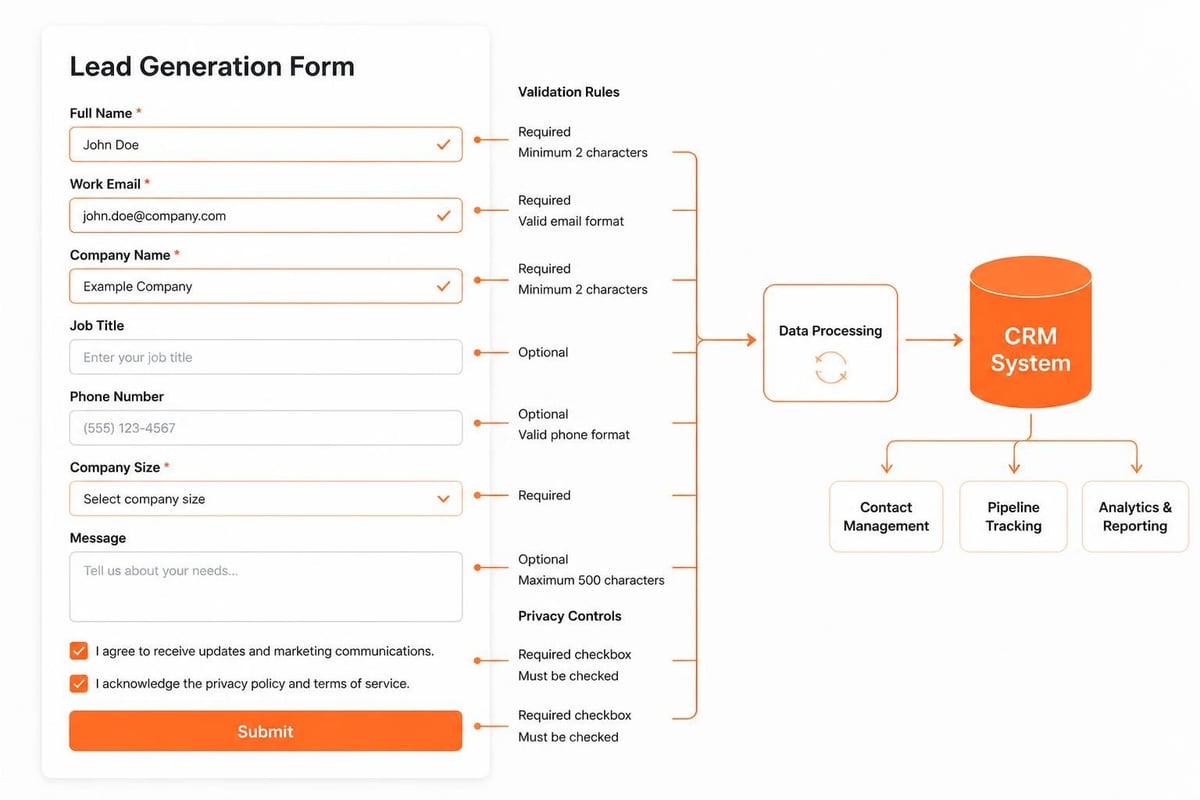
Form structure follows a logical information hierarchy. Contact details appear first, followed by qualification questions, then consent checkboxes. This sequence matches user expectations and reduces cognitive load during completion.
| Form Element | Purpose | Best Practice |
|---|---|---|
| Name field | Personalization | Split into first/last or use single field |
| Primary identifier | Validate format in real-time | |
| Phone | Direct contact | Make optional unless required |
| Company | Account matching | Include autocomplete for known domains |
| Consent | Legal compliance | Use clear, specific language |
Progressive profiling adjusts visible fields based on known contact data. Returning visitors see different questions than first-time form completers, allowing gradual data enrichment without increasing initial friction.
How Do You Design a Lead Gen Form That Converts
Designing a high-converting lead gen form requires testing field count, layout orientation, button placement, and microcopy against conversion metrics. Start with minimal required fields and add only questions that inform sales qualification or routing decisions.
Field reduction directly correlates with conversion improvement. Forms with 3-4 fields convert at 15-25% higher rates than forms with 8-10 fields, though longer forms attract more qualified leads. The optimal field count depends on offer value and buyer journey stage.
Field Selection and Validation Rules
Choose form fields that serve specific sales or marketing functions. Every field should either qualify the lead, enable routing, or support personalization. Remove fields that collect "nice to have" data without clear business purpose.
High-value qualification fields:
- Budget range or investment timeline
- Current solution or vendor
- Decision-making authority
- Implementation urgency
- Specific pain points or requirements
Implement client-side validation using HTML5 attributes and JavaScript. Email fields use type="email" with regex pattern matching. Phone fields apply formatting masks that guide correct entry. Real-time validation reduces form abandonment by preventing submission errors.
According to best practices for lead generation forms, inline validation that shows checkmarks or error messages as users complete each field improves completion rates by 22% compared to validation only on submit.
What Are the Technical Requirements for Lead Gen Forms
Technical implementation determines form reliability, security, and integration capability. Forms must handle validation, spam prevention, data storage, and system integration while maintaining performance across devices and browsers.
Backend processing requires server-side validation that duplicates client-side rules. Never trust client-submitted data without server verification. Validate email format, check required fields, sanitize inputs to prevent SQL injection, and verify CAPTCHA responses before processing submissions.
Integration With CRM and Marketing Platforms
Lead gen forms connect to CRM systems through API endpoints, webhooks, or native integrations. Form submissions trigger HTTP requests that create or update contact records in platforms like Salesforce, HubSpot, or custom databases.
Brytend CRM provides AI-driven lead form capabilities that automatically capture, validate, and route submissions based on qualification criteria. The system integrates with custom software solutions that handle complex routing logic and multi-step form workflows.

Integration implementation steps:
- Configure API authentication credentials and endpoints
- Map form field names to CRM property identifiers
- Set up error handling for failed submissions
- Implement retry logic for temporary connection failures
- Create webhook listeners for real-time processing
- Build fallback email notifications when API is unavailable
Hidden fields pass campaign tracking data to the CRM. UTM parameters, landing page URLs, and referral sources populate automatically using JavaScript that reads URL query strings and cookies. This attribution data connects leads to specific marketing activities.

For organizations managing member data and renewals, swim club software demonstrates effective form integration with member management systems, showing how specialized industries apply lead capture principles to registration and enrollment workflows.
How Can You Optimize Lead Gen Form Placement and Design
Form placement affects visibility and conversion more than any design element. Above-the-fold placement on dedicated landing pages outperforms sidebar or footer forms embedded in content pages. Dedicated landing pages with single conversion goals convert 5-15% higher than multi-purpose pages.
Headline and subheadline copy frame the value exchange. Specific benefit statements like "Get a Custom Quote in 24 Hours" outperform generic phrases like "Contact Us." The headline should answer "What will I receive?" while the subheadline addresses "Why should I complete this now?"
Mobile Responsiveness and Field Layout
Mobile devices account for 40-60% of B2B form traffic. Forms must render properly on screens from 320px to 1920px width. Use single-column layouts, large touch targets (minimum 44×44 pixels), and native mobile input types that trigger appropriate keyboards.
Stack fields vertically on mobile while allowing two-column layouts on desktop for compact forms. Place labels above fields rather than to the left, ensuring readability without horizontal scrolling. According to lead capture form best practices, top-aligned labels reduce completion time by 15% compared to left-aligned labels.
Mobile optimization checklist:
- Input font size minimum 16px to prevent iOS zoom
- Autocomplete attributes for name, email, phone, and address
- Appropriate input types (email, tel, url) for keyboard optimization
- Touch-friendly submit buttons spanning full width
- Minimal required fields due to typing friction
Multi-step forms split long questionnaires into sequential screens. This approach works well for complex B2B sales that require extensive qualification. Progress indicators show completion percentage, reducing abandonment by providing clear end expectations.
What Privacy and Compliance Standards Apply to Lead Gen Forms
Privacy regulations mandate specific disclosures, consent mechanisms, and data handling practices. GDPR, CCPA, and sector-specific regulations like HIPAA impose requirements on form design, data storage, and processing transparency.
Consent checkboxes must use clear, unambiguous language that explains data usage. Pre-checked boxes violate GDPR requirements. Each checkbox should address a specific purpose: newsletter subscription, sales contact, third-party sharing. Users must be able to decline non-essential processing while still accessing the core offer.
Data Security and Spam Prevention
Forms transmit sensitive business information that requires encryption and secure storage. Implement HTTPS for all pages containing forms. Use SSL certificates to encrypt data in transit. Store submitted data in databases with encrypted fields for personally identifiable information.
Spam prevention protects data quality and system resources. Research on privacy and spam risks in lead generation shows that unprotected forms receive 80-95% spam submissions. Implement multiple spam barriers without degrading user experience.
| Spam Prevention Method | Effectiveness | User Impact |
|---|---|---|
| Google reCAPTCHA v3 | 90-95% reduction | Invisible to users |
| Honeypot fields | 70-80% reduction | No user impact |
| Time-based validation | 60-70% reduction | No user impact |
| Email domain validation | 50-60% reduction | Minimal impact |
| Akismet API | 95-99% reduction | No user impact |
Combining multiple methods creates layered protection. A form might use reCAPTCHA v3 for scoring, honeypot fields for bot detection, and time-based validation to catch rapid automated submissions. According to form design best practices, invisible spam protection maintains conversion rates while reducing junk submissions.
How Do You Test and Improve Lead Gen Form Performance
A/B testing identifies specific elements that impact conversion rates. Test one variable at time: field count, button color, headline copy, or field order. Run tests until statistical significance (typically 95% confidence) before implementing changes.
Form analytics track completion rate, field-level abandonment, time to complete, and error frequency. Tools like Google Analytics, Hotjar, or Mixpanel reveal which fields cause abandonment. If 40% of users abandon at the phone number field, consider making it optional or moving it later in the sequence.
Conversion Rate Benchmarks and Improvement Tactics
B2B lead gen forms average 2-5% conversion rates on cold traffic and 10-20% on warm traffic from email campaigns or retargeting. High-intent landing pages with specific offers achieve 15-30% conversion rates.
Proven conversion improvement tactics:
- Reduce fields from 7 to 4 (average 20% lift)
- Change button text from "Submit" to "Get My Quote" (average 12% lift)
- Add trust indicators like security badges (average 8% lift)
- Remove navigation links from landing pages (average 15% lift)
- Include social proof near submit button (average 10% lift)
The Zuko analysis of lead generation forms demonstrates that fields requesting optional information see 30-50% lower completion rates than required fields. Mark truly optional fields clearly or remove them entirely.
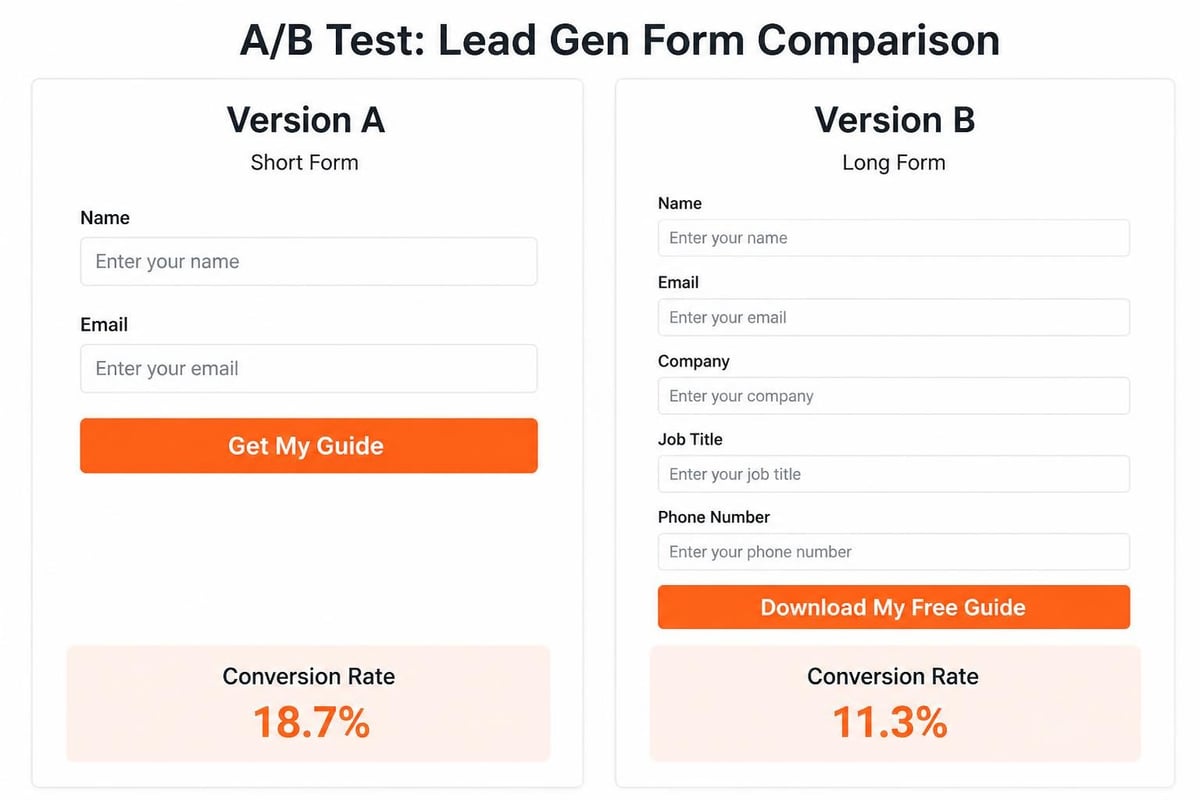
Button copy significantly affects conversion. Action-oriented, benefit-focused text like "Start Free Trial" or "Download Guide" outperforms generic "Submit" by 15-30%. First-person copy ("Get My Free Consultation") tests 5-10% better than second-person ("Get Your Free Consultation").
What Common Mistakes Reduce Lead Gen Form Effectiveness
Asking for unnecessary information kills conversion. Every additional field reduces completion rates by 5-10%. Forms requesting job title, company size, annual revenue, and decision authority before providing value create excessive friction for top-of-funnel prospects.
Poor error messaging frustrates users and causes abandonment. Generic error text like "Invalid entry" provides no guidance. Specific messages like "Email must include @ symbol" or "Phone number requires 10 digits" enable quick correction.
Technical and Design Errors to Avoid
Auto-focus on the first field can disrupt users reading the headline or value proposition. Let users click into fields naturally. Placeholder text that disappears on focus creates memory burden. Use labels that remain visible during data entry.
Critical implementation mistakes:
- Missing mobile optimization causing layout breaks
- Required fields marked with only asterisks (no label text)
- Submit buttons that remain active during processing (allowing duplicate submissions)
- Redirect delays after submission that appear as errors
- Forms that clear all data when validation fails
- Privacy policies hidden behind links without summary text
According to effective lead generation form design, confirmation messaging affects user confidence. Explicit "Thank you" pages with next-step instructions perform better than subtle inline confirmations that users might miss.
How Do Lead Gen Forms Integrate With Sales Workflows
Forms trigger automated lead routing based on field values. Submission data flows to CRM systems where scoring rules assign point values to specific responses. High-scoring leads route immediately to sales reps while lower-scoring leads enter nurture campaigns.
Lead scoring evaluates explicit data (job title, company size, budget) and implicit signals (page views, content downloads, email engagement). A CFO requesting a demo within 30 days scores higher than a manager researching options for next quarter.
Automated Follow-Up and Lead Qualification
Immediate automated responses acknowledge submission and set expectations. Follow-up emails should arrive within 5 minutes of form completion. Delays beyond 1 hour reduce contact rates by 60% compared to sub-5-minute response times.
The automation workflow includes:
- Instant email confirmation with submitted information summary
- CRM record creation or update with form data and timestamp
- Lead scoring calculation based on qualification criteria
- Assignment to sales rep based on territory, product line, or workload
- Task creation for sales follow-up within defined SLA
- Addition to email nurture sequence if not sales-ready
Custom software implementation enables complex routing logic. A gas detection equipment manufacturer might route calibration service requests to service teams, while new equipment inquiries go to regional sales managers. Solutions for project task management can coordinate these multi-team workflows.
How Does Form Performance Compare Across Channels
Form conversion rates vary significantly by traffic source and user intent. Direct traffic and email campaigns generate qualified visitors with 15-30% form completion rates. Paid search traffic converts at 5-15%, while display advertising typically achieves 1-3% conversion.
Channel-specific optimization adjusts form fields and messaging. Visitors from targeted LinkedIn campaigns already demonstrated interest, allowing longer forms with more qualification questions. Cold traffic from banner ads requires minimal friction and strong value propositions.
| Traffic Source | Average Conversion | Optimal Field Count | Form Type |
|---|---|---|---|
| Email campaign | 20-30% | 5-7 fields | Full qualification |
| Direct/branded search | 15-25% | 4-6 fields | Standard lead capture |
| Non-branded search | 5-15% | 3-4 fields | Minimal friction |
| Social media | 3-8% | 2-3 fields | Newsletter signup |
| Display advertising | 1-3% | 2-3 fields | Content download |
Multi-channel attribution connects form submissions to the complete customer journey. A prospect might discover the brand through social media, research via organic search, and convert after an email campaign. Attribution models credit multiple touchpoints rather than only the final click.
For businesses managing digital interactions across platforms, cartes de visite numériques provide seamless contact sharing that complements form-based lead capture, especially at in-person events where traditional forms create friction.
What Advanced Features Enhance Lead Gen Form Functionality
Conditional logic shows or hides fields based on previous answers. If a user selects "Enterprise" for company size, the form reveals budget range options starting at higher values. This personalization reduces irrelevant questions while gathering specific qualification data.
Calculated fields automatically populate based on other inputs. A software pricing form might calculate estimated monthly cost based on selected features and user count. These calculations provide immediate value while capturing requirement details.
Progressive Profiling and Smart Forms
Progressive profiling tracks known contact data across sessions. When a prospect who previously submitted basic information returns, the form asks different questions to gradually build a complete profile. This approach maximizes data collection while maintaining low initial friction.
Smart forms integrate with marketing automation platforms to recognize returning visitors. The system queries the database for existing contact records and pre-fills known fields. Users can verify and update information rather than entering data repeatedly.
Advanced form capabilities:
- Multi-page forms with conditional branching based on answers
- Document upload fields for RFP responses or specification sheets
- Signature capture for agreement acceptance
- Calendar integration for appointment scheduling
- Payment processing for paid content or events
- Real-time availability checking for service appointments
File upload fields enable detailed requirement gathering. A custom software development prospect might attach technical specifications, wireframes, or existing system documentation. These attachments provide sales teams with context before initial conversations.
Businesses exploring custom software development for startups often require complex intake forms that capture technical requirements, integration needs, and timeline constraints beyond standard contact information.
How Do You Handle Form Data After Submission
Post-submission data processing determines lead value and conversion potential. Submitted records enter validation workflows that verify email deliverability, check company domain against known accounts, and enrich data with third-party information sources.
Data enrichment services append firmographic details, technographic data, and contact information to basic form submissions. A submission containing only email and company name expands to include industry classification, revenue range, employee count, and technology stack.
Lead Scoring and Sales Handoff Procedures
Lead scoring models assign numerical values to demographic and behavioral attributes. Explicit scoring evaluates job title (manager: 5 points, director: 10 points, VP: 15 points) and company size (1-50 employees: 5 points, 51-200: 10 points, 201+: 15 points). Behavioral scoring tracks website activity, content downloads, and email engagement.
Combined scores determine sales readiness. Leads exceeding threshold scores trigger immediate sales assignment. Leads below thresholds enter marketing nurture sequences designed to increase engagement and qualification.
The handoff process includes:
- Lead reaches score threshold (typically 50-75 points)
- CRM creates task assigned to territory sales rep
- Notification email alerts rep with lead details and context
- Rep receives suggested talking points based on form responses
- Contact attempts begin within service level agreement window
- Lead status updates track contact attempts and outcomes
Manual vs. automated lead handling shows clear efficiency differences. Manual processing introduces 2-4 hour delays, during which lead interest declines. Automated systems respond instantly, schedule follow-ups automatically, and maintain consistent data quality through validation rules.
Organizations implementing comprehensive lead management benefit from CRM system experience that connects form submissions to broader customer relationship workflows, ensuring no prospect falls through gaps between marketing and sales.
Lead gen forms serve as critical conversion points that transform anonymous visitors into qualified sales opportunities through structured data capture and intelligent routing. Effective forms balance minimal friction against sufficient qualification, implement technical best practices for security and integration, and connect to automated workflows that ensure timely follow-up. Brytend specializes in developing custom lead generation systems that integrate with existing business processes, offering tailored form design, CRM connectivity, and workflow automation that matches your specific qualification requirements and sales methodology.