
TL;DR:
- A web to lead form is a structured HTML form that captures prospect information and automatically creates lead records in a CRM system
- Effective forms require field validation, duplicate detection, and routing rules to assign leads to the correct sales representatives
- Optimal forms balance data collection needs with user experience, typically using 3-8 fields for maximum conversion
- Integration architecture must handle API authentication, error logging, and fallback mechanisms for failed submissions
- Form optimization requires A/B testing, spam filtering, and compliance with data protection regulations
A web to lead form is a digital input interface embedded on websites that collects visitor information and automatically transfers submitted data into a customer relationship management (CRM) system as new lead records.
What Is a Web to Lead Form and How Does It Function
A web to lead form converts website visitors into trackable prospects by capturing contact information and business context in a structured format. The form transmits submitted data through server-side scripts or API connections directly into CRM databases, eliminating manual data entry.
The technical architecture consists of four core components: the front-end HTML form, client-side validation scripts, server-side processing logic, and CRM integration endpoints. When a user submits information, validation rules check data format and completeness before transmission. The server-side script then authenticates with the CRM API, maps form fields to corresponding database fields, and creates a new lead record with timestamp and source attribution.
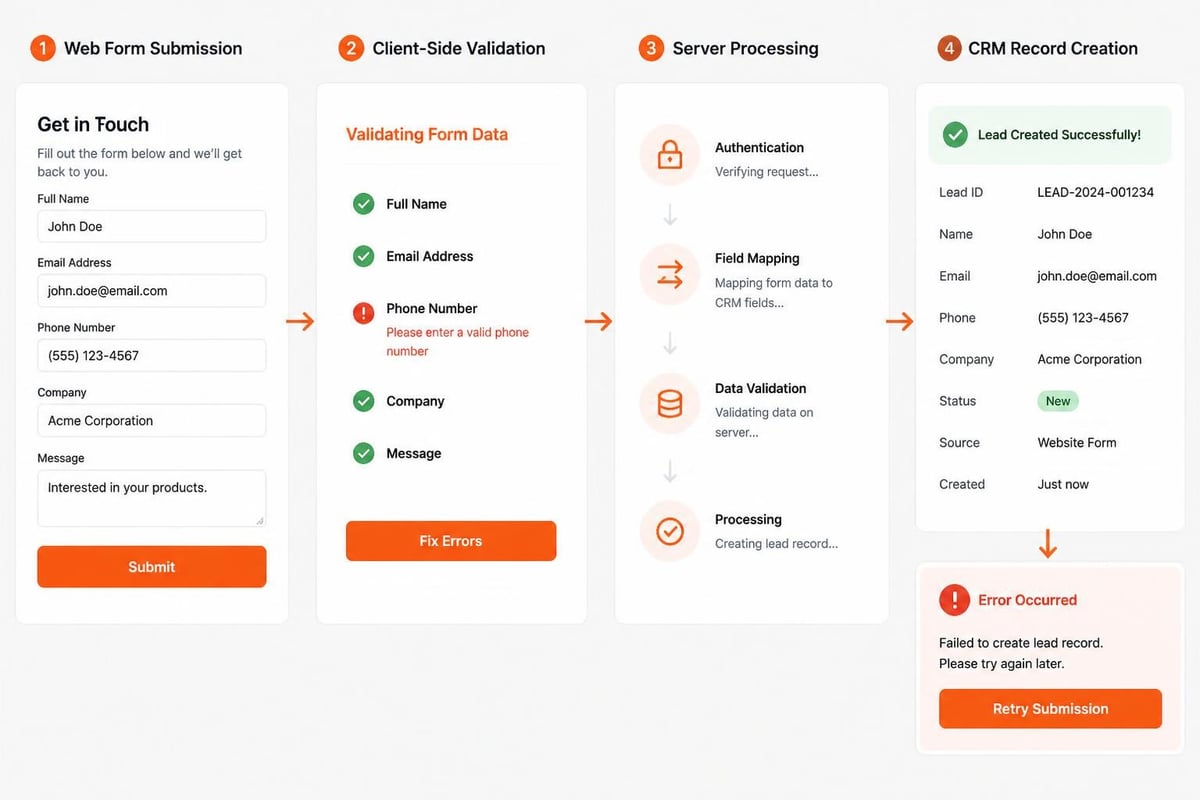
Modern implementations include progressive profiling, which presents different fields to returning visitors based on previously collected data. This approach reduces form fatigue while building comprehensive prospect profiles over multiple interactions.
Essential Field Components
Standard web to lead forms capture identification data (name, email, phone), organizational context (company name, industry, employee count), and qualification information (budget, timeline, pain points). Each field serves a specific function in lead scoring and routing algorithms.
Required fields should be limited to information absolutely necessary for initial contact. Optional fields gather enrichment data that improves lead quality but doesn't prevent submission. Hidden fields can capture source parameters, campaign identifiers, and referral URLs for attribution tracking.
How to Design High-Converting Web to Lead Forms
Form design directly impacts conversion rates and lead quality. The optimal structure prioritizes user experience while collecting actionable sales intelligence.
Field Selection and Order Strategy
Begin forms with the least sensitive information to build psychological momentum. Name and company fields create lower friction than email addresses or phone numbers. Position qualifying questions after contact fields to ensure you capture minimum viable data even if users abandon mid-form.
Recommended field progression:
- First name (required)
- Last name (required)
- Company name (required)
- Work email (required)
- Phone number (optional)
- Job title (optional)
- Company size (optional dropdown)
- Primary challenge (optional multi-select)
Forms with 3-5 fields typically achieve 20-30% higher conversion rates than forms with 8+ fields, but generate less qualified leads. Lead generation best practices emphasize balancing quantity and quality through strategic field selection based on sales process requirements.
Visual Hierarchy and Layout Principles
Single-column layouts outperform multi-column designs by 15-20% in mobile environments. Vertical stacking creates clear visual flow and reduces cognitive load. Group related fields under labeled sections for forms exceeding six inputs.
Input field styling must provide clear focus states, inline validation feedback, and error messages adjacent to problematic fields. Placeholder text should demonstrate format requirements rather than replacing field labels. Submit buttons require action-oriented copy ("Get Your Free Analysis" vs. "Submit") and sufficient visual weight to guide user attention.
| Design Element | Best Practice | Impact on Conversion |
|---|---|---|
| Field count | 3-5 for top-funnel, 6-8 for mid-funnel | 15-25% improvement |
| Button color | High contrast with background | 8-12% improvement |
| Mobile optimization | Responsive single-column layout | 30-40% mobile conversion gain |
| Inline validation | Real-time format checking | 10-15% error reduction |
What Are the Critical Integration Requirements
Web to lead form integration requires authentication protocols, data mapping configuration, and error handling mechanisms to ensure reliable lead capture.
API Connection Architecture
CRM systems expose REST or SOAP APIs that accept form data through authenticated POST requests. Integration scripts must include API credentials (tokens, keys, or OAuth flows), endpoint URLs, and request headers specifying content type and authentication method.
Connection logic should implement retry mechanisms for temporary failures and queue systems for API rate limiting. Failed submissions must trigger email notifications to prevent lead loss and log detailed error information for troubleshooting.
Field Mapping and Data Transformation
Form field names rarely match CRM database column names directly. Mapping configuration translates "company_name" to "Account.Name" or "email_address" to "Contact.Email" according to CRM schema requirements. Custom fields require creation in the CRM before form integration can reference them.
Data transformation rules handle format conversions: phone numbers to E.164 format, date selections to ISO 8601 timestamps, and free-text inputs to standardized picklist values. Industry selections must map to CRM industry taxonomy, and region inputs should convert to territory assignment rules.
Brytend CRM includes AI-driven lead form processing that automatically validates submissions, detects duplicates, and routes leads based on configurable business logic without manual mapping configuration.

How Do You Implement Lead Routing and Assignment Logic
Lead routing determines which sales representative receives each form submission based on territory, product interest, company size, or workload distribution.
Rule-Based Assignment Strategies
Round-robin distribution assigns leads sequentially to available sales representatives, ensuring even workload distribution. Geographic routing directs leads to representatives covering specific states, regions, or countries based on company location or area code. Product-based routing assigns leads to specialists based on selected product categories or service interests.
Common routing criteria:
- Geographic territory (ZIP code, state, country)
- Company revenue or employee count thresholds
- Product or service category selection
- Lead source (organic, paid, partner referral)
- Industry vertical or market segment
- Language preference
Advanced implementations incorporate representative availability, current pipeline capacity, and historical win rates. If the primary assignment rule cannot be satisfied (no representative covers the territory), fallback logic routes to a default queue or backup representative.
Duplicate Detection and Merge Logic
Form submissions frequently generate duplicate records when existing contacts request additional information. Detection logic compares email addresses, phone numbers, and company names against existing database records before creating new leads.
Exact email matches indicate definite duplicates. Fuzzy matching algorithms identify variations in company names ("ABC Corp" vs. "ABC Corporation") and phone number formats. When duplicates are detected, the system can either update the existing record with new information, create a new activity record linked to the existing contact, or alert sales to manual review.
What Validation and Security Measures Are Required
Form validation ensures data quality while security measures prevent spam submissions and protect user information.
Client-Side and Server-Side Validation
Client-side validation using JavaScript provides immediate feedback on format errors without server round-trips. Email validation checks for "@" symbols and domain formats. Phone validation ensures minimum digit counts and removes formatting characters. Required field validation prevents submission of incomplete forms.
Server-side validation repeats all client-side checks to prevent bypass through browser manipulation. Additional server validation includes:
- Email domain verification against disposable email databases
- Phone number validation through carrier lookup services
- CAPTCHA or reCAPTCHA completion verification
- Honeypot field detection for bot submissions
- Submission rate limiting by IP address
Web form best practices recommend implementing validation that guides users toward successful completion rather than blocking submission with cryptic error messages.
CAPTCHA Implementation and Spam Prevention
CAPTCHA challenges distinguish human users from automated bots by requiring visual pattern recognition or behavioral analysis. Google reCAPTCHA v3 operates invisibly, scoring user interactions without explicit challenges for high-confidence human traffic.
Honeypot fields-hidden inputs invisible to humans but filled by bots-provide spam detection without user friction. Time-to-completion tracking flags suspiciously fast submissions. Domain blacklists block submissions from known spam email providers.

How to Optimize Web to Lead Form Performance
Form optimization requires continuous testing, performance monitoring, and iterative refinement based on conversion data and user feedback.
A/B Testing Methodology
Split testing compares form variations to identify highest-converting configurations. Test variables include field count, button copy, form length, page placement, and visual design. Each test should isolate a single variable while maintaining consistent traffic distribution between variants.
High-impact test variables:
- Submit button text and color
- Number of required vs. optional fields
- Presence or absence of privacy policy links
- Form heading and value proposition copy
- Field label wording and help text
Statistical significance requires minimum sample sizes before declaring winners. Forms converting at 10% need approximately 1,000 submissions per variant to detect a 20% improvement with 95% confidence. Testing tools should track conversion rate, completion time, and field-level abandonment.
Performance Monitoring and Analytics
Track form analytics separately from general website metrics to identify conversion bottlenecks. Key metrics include form view count, submission count, completion rate, time to complete, and field-specific abandonment rates.
Abandonment analysis reveals which fields cause users to exit without submitting. High abandonment at phone number fields may indicate privacy concerns, while exit at company size questions could suggest form length fatigue.
| Metric | Calculation | Target Benchmark |
|---|---|---|
| Conversion rate | (Submissions ÷ Form views) × 100 | 15-25% for gated content |
| Completion rate | (Completed ÷ Started) × 100 | 70-85% |
| Average completion time | Total time ÷ Submissions | 30-90 seconds |
| Error rate | Fields with errors ÷ Total fields | <5% |
What Common Implementation Mistakes Should You Avoid
Implementation errors reduce conversion rates, generate low-quality leads, or create technical failures that lose prospect data entirely.
Over-Collection and Friction Points
Requesting unnecessary information creates abandonment. Each additional field reduces conversion by 3-7%. Sales teams often request extensive qualification data that prospects are unwilling to provide during initial contact. Balance lead quality requirements against conversion optimization by progressive profiling across multiple interactions.
Lead capture form best practices emphasize matching form complexity to offer value-asking for minimal information for low-commitment resources and more detailed data for high-value consultations.
Ambiguous field labels confuse users about expected inputs. "Company" might refer to company name or company type. Help text should clarify format requirements and provide examples for complex fields.
Technical Configuration Errors
Incorrect API endpoint URLs or expired authentication tokens cause silent failures where forms appear functional but submissions never reach the CRM. Implement submission confirmation emails to users and internal notification emails to administrators for quality assurance.
Missing error handling allows network failures or API outages to lose lead data without notification. Implement local logging of all submissions before API transmission and retry queues for failed requests.
Form submissions on non-HTTPS pages expose user data to interception. SSL certificates must cover all pages hosting forms, and form action URLs must use HTTPS protocols.
How Do Web to Lead Forms Compare to Manual Lead Entry
Automated web to lead capture delivers significant efficiency and accuracy advantages over manual lead processing while introducing specific technical dependencies.
Manual lead entry requires sales representatives to transcribe information from emails, phone calls, or written notes into CRM records. This process introduces typing errors (10-15% error rate), inconsistent data formatting, and delays between initial contact and CRM record creation.
Automated vs. Manual Comparison:
| Aspect | Automated Web Forms | Manual Entry |
|---|---|---|
| Data accuracy | 95-98% (validation-enforced) | 85-90% (human error) |
| Entry time | Instant upon submission | 2-5 minutes per lead |
| Formatting consistency | 100% standardized | Variable across reps |
| Source attribution | Automatic tracking | Requires manual notation |
| After-hours capture | 24/7 availability | Business hours only |
Automated forms capture leads outside business hours when manual entry is unavailable. This capability proves critical for global businesses serving multiple time zones or prospects researching solutions during evenings and weekends.
The primary disadvantage of automation is technical dependency. Form failures, API outages, or integration errors can lose leads without immediate visibility. Manual processes provide inherent human oversight that catches obvious data problems during entry.
Real-World Implementation Case
A B2B manufacturing equipment distributor implemented web to lead forms to replace their contact-us email system. Previous process required sales assistants to check shared inboxes, copy information into CRM, and assign leads manually-averaging 4-6 hour delays and 12% data entry errors.
The new implementation used a seven-field form (name, email, phone, company, industry, equipment type, message) with dropdown standardization for industry and equipment categories. Integration created CRM leads automatically and routed to territory representatives based on company ZIP code.
Results over six months showed 78% faster lead response times (from 4.2 hours to 55 minutes average), 94% reduction in data formatting inconsistencies, and 23% improvement in lead-to-opportunity conversion attributed to faster response and better data quality. Similar results were documented in the Airstream case study, which achieved 78% lead generation increases through optimized web-to-lead implementation.
What Compliance and Privacy Considerations Apply
Web to lead forms must comply with data protection regulations governing consent, data storage, and user rights across jurisdictions where businesses operate or collect data.
GDPR and CCPA Requirements
General Data Protection Regulation (GDPR) applies to forms collecting data from European Union residents, regardless of company location. Requirements include explicit consent checkboxes for marketing communications, clear privacy policy links, and mechanisms for data access and deletion requests.
California Consumer Privacy Act (CCPA) mandates disclosure of data collection purposes and opt-out mechanisms for California residents. Forms must link to privacy policies explaining what information is collected, how it will be used, and with whom it may be shared.
Compliance checklist:
- Explicit consent checkbox for non-essential data processing
- Privacy policy link visible before submission
- Statement of data usage purpose and retention period
- Opt-in for marketing communications (not pre-checked)
- Mechanism for data access, correction, and deletion requests
- Cookie consent for tracking technologies
- Geographic detection for jurisdiction-specific disclosures
Consent must be freely given, specific, informed, and unambiguous. Pre-checked opt-in boxes do not constitute valid consent under GDPR. Forms should use separate checkboxes for different processing purposes (transactional communications vs. marketing emails).
Data Storage and Retention Policies
Collected data must be stored securely with encryption at rest and in transit. Access controls should limit form data visibility to authorized personnel with legitimate business need. Regular security audits identify potential vulnerabilities in data handling workflows.
Retention policies should specify how long submitted data remains in active systems before archival or deletion. GDPR requires data retention limited to periods necessary for stated purposes. Forms collecting data for sales qualification may not justify indefinite retention of non-converting prospects.

Custom software development solutions can implement jurisdiction-specific compliance rules, automated data retention scheduling, and user preference management to maintain regulatory compliance as requirements evolve.
Web to lead forms transform website traffic into actionable sales opportunities through automated data capture, validation, and CRM integration. Effective implementation requires strategic field selection, robust integration architecture, and continuous optimization based on performance data. When you need a custom web to lead solution tailored to your specific business processes and CRM requirements, Brytend delivers experienced software development expertise to build high-converting forms that integrate seamlessly with your sales workflow.


