

Organizations lose millions annually through poorly designed data collection processes. Manual form handling creates bottlenecks, introduces errors, and prevents teams from accessing the insights they need to make strategic decisions. Gen forms represent a fundamental shift in how businesses approach data gathering, combining intelligent automation with flexible design to eliminate the friction that plagues traditional form systems. When companies continue using outdated paper-based processes or rigid digital templates, they sacrifice speed, accuracy, and competitive advantage.
The Hidden Cost of Traditional Form Systems
Every manual data entry point introduces risk. Research shows that human error rates in data transcription range between 1% and 4%, which sounds minimal until you calculate the impact across thousands of transactions. A healthcare provider processing 10,000 patient intake forms annually with a 2% error rate generates 200 mistakes that could delay treatment, trigger compliance violations, or result in billing disputes. Financial services firms face even higher stakes when incorrect information flows into loan applications, account openings, or regulatory filings.
The time employees spend reformatting, validating, and correcting form data represents pure waste. When a sales team manually transfers lead information from paper forms into CRM systems, they lose hours that should focus on customer conversations. Manufacturing operations that rely on handwritten maintenance logs create gaps in equipment history that prevent predictive maintenance strategies. These inefficiencies compound as organizations scale, creating administrative overhead that grows faster than revenue.
Traditional form builders offer limited flexibility for complex workflows. Most platforms force users to choose between simple templates that lack necessary functionality or complicated custom development that requires IT resources. Marketing teams need dynamic forms that adapt based on user responses, displaying relevant questions while hiding unnecessary fields. HR departments require multi-stage approval processes where different stakeholders review information sequentially. When forms cannot accommodate these requirements, teams resort to workarounds that introduce new points of failure.

What Makes Gen Forms Different
Gen forms leverage artificial intelligence to understand context and automate validation at the point of entry. Rather than accepting any input and flagging errors during post-processing, these systems apply intelligent rules that prevent mistakes before they occur. An address field recognizes invalid postal codes instantly, a date picker prevents impossible scheduling conflicts, and conditional logic ensures respondents only see relevant questions. This real-time validation eliminates the back-and-forth communication traditionally required to correct incomplete submissions.
The architecture behind modern gen forms separates presentation from data structure, enabling organizations to modify form appearance without disrupting backend integrations. When a company rebrands or updates design guidelines, traditional systems require rebuilding forms from scratch, retesting integrations, and migrating historical data. Platforms like Jotform’s form software demonstrate how contemporary tools handle presentation-layer changes while preserving data continuity. This separation reduces maintenance overhead and accelerates deployment of new collection instruments.
Integration capabilities determine whether gen forms streamline operations or create new silos. Truly effective solutions connect seamlessly with existing systems through APIs, webhooks, and native integrations. When a customer submits a service request through a web form, that information should flow directly into ticketing systems, update CRM records, trigger email notifications, and populate analytics dashboards without manual intervention. Each handoff point eliminated represents time saved and errors prevented.
| Traditional Forms | Gen Forms |
|---|---|
| Static field validation | AI-powered context-aware validation |
| Manual data transfer | Automated system integration |
| Linear question flow | Dynamic conditional logic |
| Periodic batch processing | Real-time data streaming |
| Limited mobile optimization | Responsive multi-device design |
| Basic reporting | Advanced analytics with visualization |
Common Implementation Mistakes That Undermine ROI
Organizations frequently underestimate the planning required before deploying new form systems. Teams rush to recreate existing paper forms in digital format without questioning whether those forms capture the right information in the optimal sequence. This digital-first approach perpetuates inefficient processes rather than reimagining workflows. A manufacturing facility might digitize a 50-field equipment inspection checklist without realizing that technicians only complete detailed inspections when initial red flags appear. The resulting digital form frustrates users who must tap through irrelevant fields on tablet devices.
Neglecting mobile experience creates adoption barriers that sabotage digital transformation initiatives. Field service technicians, delivery drivers, and remote inspectors primarily interact with forms through smartphones and tablets. When gen forms fail to accommodate touch interfaces, small screens, and offline scenarios, workers continue using paper as their primary tool. These forms need large tap targets, simplified navigation, progressive disclosure of information, and local data caching that synchronizes when connectivity returns.
Insufficient testing with actual end users leads to abandoned implementations. IT departments often design forms based on technical requirements without validating usability with the people who complete them daily. A complex onboarding form that makes perfect sense to HR professionals might confuse new hires facing their first day stress. Customer feedback forms that seem straightforward to marketing teams could frustrate clients who lack context about product categories or service tiers. Usability testing reveals these disconnects before they impact adoption rates.
Security and compliance considerations frequently emerge as afterthoughts rather than foundational requirements. Forms that collect personally identifiable information, protected health data, or financial records must implement appropriate safeguards from the initial design phase. Organizations discover too late that their chosen platform lacks encryption for data at rest, fails to provide audit trails for access events, or cannot enforce role-based permissions for sensitive fields. Retrofitting security controls disrupts operations and exposes the organization to regulatory penalties during the transition period.
Designing Gen Forms That Users Actually Complete
Question sequencing dramatically influences completion rates and data quality. Starting with simple, non-threatening questions builds momentum and psychological commitment before requesting sensitive information. A job application that immediately demands salary history and references triggers abandonment, while the same form that begins with basic contact details and professional interests establishes rapport. Research on survey design shows that completion rates drop 15% to 25% when complex or personal questions appear in the first third of a form.
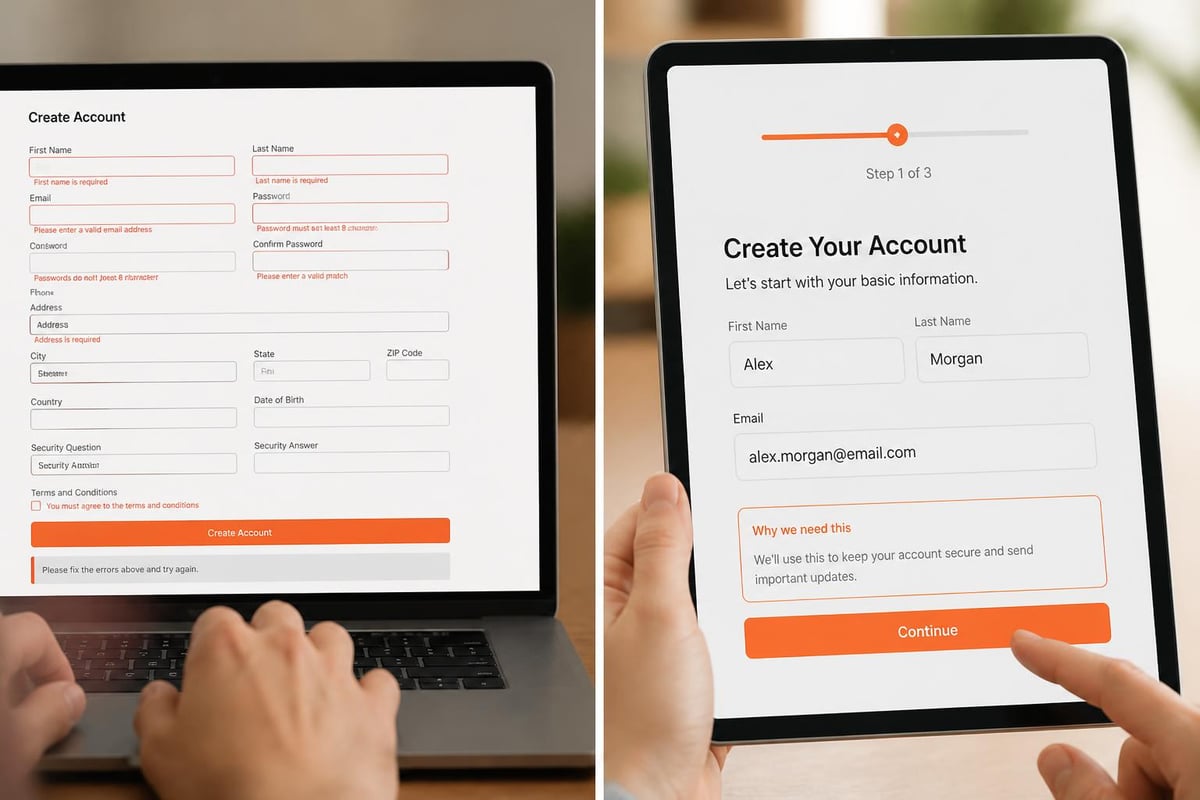
Field labels, help text, and error messages require careful wording to prevent confusion and reduce support burden. Ambiguous labels like "Organization" leave respondents uncertain whether to enter department names, company names, or business units. Effective gen forms provide examples within placeholder text, use tooltips to explain unusual requirements, and display error messages that suggest specific corrections rather than generic warnings. When a phone number field rejects input, stating "Please use format: (555) 555-5555" proves more helpful than "Invalid entry."
Visual hierarchy guides attention to critical fields and reduces cognitive load. Forms that present 50 fields in a single scrolling page overwhelm users and increase abandonment. Breaking information collection into logical sections with progress indicators transforms the experience from daunting to manageable. Multi-step forms can increase completion rates by 10% to 30% compared to single-page equivalents, particularly for complex processes like loan applications or service onboarding.
Integration Strategies That Maximize Automation Value
Webhook-based architectures enable real-time data flow without constant polling or batch processing delays. When a gen form submission triggers a webhook, that event can initiate dozens of downstream actions simultaneously. Customer service teams receive instant notifications, CRM systems create new contact records, analytics platforms update dashboards, and marketing automation tools enroll respondents in appropriate nurture sequences. This event-driven approach reduces latency from hours to seconds.
API connections should handle both read and write operations to create truly interactive experiences. Gen forms that pull data from existing systems can pre-populate fields based on user identity, reducing redundant data entry and improving accuracy. A returning customer accessing a support form sees their account details, order history, and previous ticket information automatically populated. They only provide new information specific to the current request. Platforms like GenZform demonstrate how AI-powered systems can create dynamic forms that adapt based on integration data.
Error handling and retry logic prevent data loss when integrations fail temporarily. Network hiccups, API rate limits, and downstream system maintenance windows create scenarios where form submissions cannot immediately synchronize with connected systems. Robust gen forms implement queuing mechanisms that retry failed transmissions, log errors for administrator review, and notify users appropriately. Without these safeguards, submissions disappear into digital black holes, frustrating users and corrupting datasets.
Data transformation rules ensure information flows correctly between systems with different schemas and requirements. A form might collect a single "Address" field, but the receiving CRM expects separate street, city, state, and postal code fields. Effective integration layers parse, validate, and restructure data during transmission. They convert date formats, standardize phone numbers, normalize text capitalization, and enrich records with additional context. This transformation layer prevents the garbage-in-garbage-out problem that plagues poorly integrated systems.
Measuring Gen Forms Performance and Continuous Improvement
Completion rate tracking reveals friction points that drive abandonment. Analytics platforms should identify which fields cause users to exit, how long respondents spend on each section, and where validation errors occur most frequently. A form with 40% abandonment at the payment information section signals trust issues, security concerns, or complexity problems. Teams can then test alternative layouts, add trust badges, simplify payment options, or provide additional context to address the underlying cause.
Time-to-completion metrics help optimize form length and complexity. While comprehensive data collection serves business needs, every additional field increases abandonment risk. Analyzing completion times identifies outliers where respondents struggle with specific questions or abandon after investing significant effort. A ten-minute average completion time for what should be a three-minute form indicates unnecessary complexity or confusing instructions.
Error rate analysis by field type highlights validation rules that need refinement. When 30% of submissions trigger errors on a specific field, the problem lies with the form rather than users. Phone number fields that reject valid international formats, date pickers that prevent reasonable selections, or email validation that flags legitimate addresses create unnecessary friction. Reviewing error patterns guides adjustments to validation logic and input masks.
| Metric | Target Range | Action Threshold |
|---|---|---|
| Completion Rate | 70% – 85% | Below 60% requires immediate review |
| Average Time | 2 – 5 minutes | Above 8 minutes indicates complexity issues |
| Field Error Rate | Below 5% | Above 10% suggests validation problems |
| Mobile vs Desktop Completion | Within 10% variance | Gap above 15% indicates mobile UX issues |
| Integration Success Rate | Above 98% | Below 95% requires technical investigation |
Scaling Gen Forms Across Enterprise Operations
Template libraries and component reuse accelerate deployment while maintaining consistency. Organizations that build hundreds of forms benefit from standardized elements like contact information sections, legal disclaimers, payment processing modules, and file upload interfaces. Creating approved components with pre-configured validation rules, styling, and integration mappings ensures new forms inherit best practices automatically. This approach reduces development time by 40% to 60% while eliminating inconsistencies that confuse users and complicate maintenance.
Version control and approval workflows prevent unauthorized changes that could disrupt critical processes or introduce compliance violations. In regulated industries, form modifications require review by legal, compliance, and security teams before deployment. Gen forms platforms should maintain complete revision history, enable rollback to previous versions, and enforce approval gates based on organizational policies. Without these controls, well-intentioned updates create unintended consequences.
The Brytend Survey Module provides organizations with complete flexibility to design custom forms that reflect their specific workflows and data collection requirements. Rather than forcing teams into rigid templates, this solution enables creation of fully tailored inspections, audits, surveys, and assessments that match how your organization actually operates.

Multi-language support expands accessibility for global operations and diverse user populations. Forms that automatically detect user language preferences or provide explicit language selection reduce barriers for non-native speakers. Translation should extend beyond labels to include help text, error messages, confirmation screens, and email notifications. Machine translation provides a starting point, but human review ensures cultural appropriateness and technical accuracy.
Privacy and Compliance Considerations
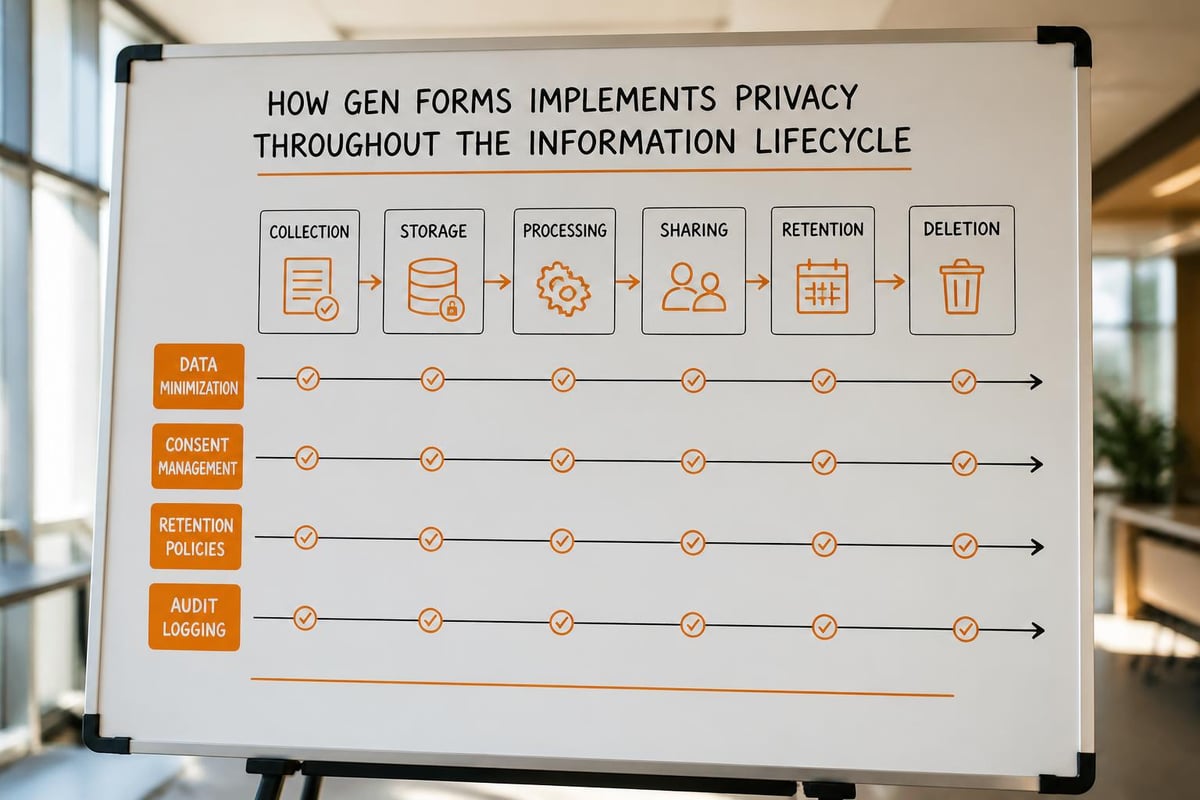
Data minimization principles dictate collecting only information necessary for specific business purposes. Every field added to a form increases privacy risk, storage costs, and regulatory burden. Organizations should periodically audit their gen forms to eliminate fields that serve marginal value or duplicate information available from other sources. A customer service form that requests billing address when that information exists in the CRM creates unnecessary exposure without adding value.
Consent management and preference centers must integrate with form systems to respect user choices. Privacy regulations require organizations to obtain, document, and honor consent for various data uses. Gen forms should present clear consent language, record granular permissions, and enforce those choices across all downstream systems. When a user opts out of marketing communications, that preference must immediately propagate to email platforms, CRM systems, and analytics tools.
Data retention policies need enforcement mechanisms that automatically purge expired information. Organizations establish retention schedules based on legal requirements, business needs, and storage costs, but manual deletion processes rarely execute reliably. Gen forms platforms should support automatic purging of submissions after specified periods, archiving to cold storage, or anonymization that preserves analytical value while eliminating identifying information. The research on document and workflow automation shows how organizations can build compliant processes that execute retention policies automatically.
Audit trails documenting who accessed what information when provide accountability and support compliance investigations. When regulators question data handling practices or security incidents require forensic analysis, comprehensive logs prove essential. Gen forms should record submission events, form modifications, data exports, integration activities, and administrative actions with sufficient detail to reconstruct complete timelines.
Advanced Capabilities That Differentiate Leaders
Conditional logic and dynamic field visibility create personalized experiences that collect relevant information efficiently. Simple yes/no branching represents the baseline, but sophisticated gen forms support complex rule sets based on multiple conditions, calculated fields, and external data sources. A financial services application might adjust required documentation based on loan amount, applicant credit score, employment type, and property location. Showing only relevant fields reduces completion time and improves data quality.
Calculated fields and real-time totals provide immediate feedback that improves user confidence and reduces errors. Order forms that display running totals, tax calculations, and shipping estimates help customers make informed decisions. Loan applications that show monthly payment estimates based on amount, term, and interest rate enable applicants to adjust parameters until they find affordable options. These calculations prevent the disappointment of discovering affordability issues after investing time in application completion.
Digital signature capture and document generation streamline processes that traditionally required printing, signing, scanning, and filing. Service agreements, contracts, authorization forms, and compliance documentation can flow entirely through digital channels when gen forms support legally binding signatures. Integration with document generation systems produces completed contracts and receipts automatically based on form data, eliminating manual document assembly that introduces transcription errors.
Offline functionality ensures field workers can complete forms without constant connectivity. Construction sites, remote facilities, warehouse floors, and rural service areas often lack reliable internet access. Gen forms with offline capability cache forms locally, allow completion without network access, and synchronize data when connectivity returns. This capability proves essential for industries where workers spend significant time in areas with limited coverage.
Emerging Trends Reshaping Form Technology
Artificial intelligence increasingly handles intelligent field suggestions, anomaly detection, and automated completion assistance. Natural language processing enables conversational form interfaces where users describe their needs in plain language rather than navigating complex field structures. Voice input and transcription expand accessibility for users with mobility limitations or situations where typing proves impractical. These AI capabilities appear in platforms like those discussed in genetic-evolutionary deep learning research, showing how machine learning transforms user interfaces.
Biometric authentication simplifies identity verification while enhancing security. Fingerprint scanning, facial recognition, and voice authentication replace knowledge-based verification questions that users forget and fraudsters easily compromise. Mobile devices with built-in biometric sensors enable passwordless form authentication that improves user experience while strengthening security posture.
Blockchain integration provides immutable audit trails and enables decentralized verification workflows. Smart contracts can automate multi-party approvals, escrow arrangements, and compliance verification without central authority. While blockchain applications in form systems remain nascent, organizations handling high-value transactions or requiring tamper-proof records explore these capabilities.
Progressive web applications blur distinctions between web forms and native mobile apps. Users can install form interfaces directly from browsers, access them from home screens, and benefit from app-like performance without app store distribution. This approach simplifies deployment while providing offline capability, push notifications, and seamless updates.
Video content creation platforms like AdsRaw demonstrate how businesses increasingly leverage AI to produce engaging content that drives form completions. Organizations combine AI-generated video advertisements with optimized gen forms to create complete lead generation funnels that convert prospects efficiently.
Building Internal Expertise and Governance
Form design training should extend beyond technical platform knowledge to include user experience principles, accessibility standards, and conversion optimization. Organizations that treat form creation as a specialized skill rather than an administrative task see measurably better results. Training programs covering progressive disclosure, cognitive load management, error prevention, and mobile-first design create internal expertise that improves every form deployment.
Center of excellence models centralize form creation expertise while serving distributed business units. Rather than allowing every department to create forms independently with inconsistent quality and redundant effort, organizations establish dedicated teams that understand platform capabilities, integration patterns, compliance requirements, and UX best practices. These centers of excellence provide templates, consulting, and quality review that accelerate deployment while maintaining standards.
Governance frameworks balance agility with control through clear ownership, approval processes, and quality standards. Organizations need sufficient flexibility for business units to deploy forms quickly while preventing the chaos of unmanaged proliferation. Effective governance defines which form types require approval, establishes naming conventions and metadata standards, and creates feedback loops for continuous improvement.
Regular audits identify orphaned forms, outdated processes, and optimization opportunities. Organizations accumulate forms over time, many of which become obsolete as processes evolve. Periodic reviews identifying low-volume forms, outdated integrations, and redundant data collection enable consolidation that reduces maintenance burden and improves user experience. Analytics showing which forms drive business value versus which consume resources without corresponding benefits guide rationalization efforts.
Gen forms transform data collection from administrative burden into strategic advantage when organizations approach implementation with appropriate planning, governance, and continuous optimization. The difference between success and failure lies not in platform selection but in thoughtful design, robust integration, and commitment to user experience. Brytend helps organizations build custom software solutions that streamline operations through intelligent automation and seamless system integration. Whether you need sophisticated form systems, workflow automation, or comprehensive business applications, our experienced development team creates solutions tailored to your specific requirements and strategic goals.
Frequently Asked Questions
What security measures should gen forms implement when collecting sensitive information?
Gen forms handling sensitive data require encryption both in transit and at rest, role-based access controls limiting who can view submissions, comprehensive audit logging tracking all access and modifications, and compliance with relevant standards like PCI-DSS for payment data or HIPAA for healthcare information. Organizations should implement multi-factor authentication for administrative access, regular security assessments identifying vulnerabilities, and data loss prevention controls preventing unauthorized exports. The platform should support field-level encryption for particularly sensitive information, automated vulnerability scanning, and incident response capabilities that enable rapid containment if breaches occur.
How can organizations prevent form abandonment during long multi-step processes?
Reducing abandonment requires implementing progress indicators showing users how much remains, enabling save-and-resume functionality allowing users to complete forms across multiple sessions, removing unnecessary fields that don't provide sufficient value to justify friction, and providing clear time estimates so users can decide whether to begin. Organizations should test different section breaks to find optimal groupings, consider partial submission handling that captures available data even when users abandon, and implement exit intent detection offering assistance when users show leaving behavior. A/B testing different form lengths, field sequences, and visual presentations identifies optimal configurations for specific audiences and use cases.
What distinguishes basic form builders from enterprise-grade gen forms platforms?
Enterprise platforms provide advanced integration capabilities including bi-directional data sync with multiple systems, sophisticated workflow automation triggering complex business processes, granular role-based permissions supporting organizational hierarchies, comprehensive audit trails meeting compliance requirements, and white-label customization maintaining brand consistency. They support team collaboration features enabling multiple users to build forms cooperatively, version control preventing unauthorized changes, multi-environment deployment allowing testing before production release, and SLA guarantees ensuring reliability for critical business processes. Enterprise solutions offer dedicated support, professional services for complex implementations, and roadmap influence allowing organizations to request features aligned with business needs.
How should organizations handle form data across multiple jurisdictions with different privacy laws?
Multi-jurisdictional compliance requires implementing geolocation-based consent management presenting appropriate disclosures based on user location, data residency controls ensuring information storage complies with local requirements, and privacy preference centers enabling users to exercise rights guaranteed by various regulations. Organizations should conduct privacy impact assessments identifying risks specific to each jurisdiction, implement data processing agreements with all vendors handling information, and establish processes for responding to data subject access requests within legally required timeframes. Legal counsel should review forms collecting data from EU residents for GDPR compliance, California residents for CCPA requirements, and residents of other jurisdictions with specific privacy laws.
What metrics indicate whether gen forms deliver adequate return on investment?
ROI assessment should measure time savings from automated data entry and reduced error correction, cost reduction from eliminated paper processing and manual filing, increased conversion rates from improved user experience, faster process completion from reduced back-and-forth clarification, and improved data quality enabling better business decisions. Organizations should calculate fully loaded costs including platform fees, development time, training, and maintenance against quantified benefits. Tracking metrics like cost per completed submission, error rate reduction, process cycle time improvement, and user satisfaction scores provides ongoing visibility into whether forms deliver expected value. Regular benchmarking against industry standards identifies whether performance remains competitive or requires optimization.
How can organizations ensure forms remain accessible to users with disabilities?
Accessibility requires semantic HTML markup enabling screen readers to interpret form structure correctly, keyboard navigation allowing completion without mouse input, sufficient color contrast meeting WCAG standards for visually impaired users, and clear error messages screen readers can announce effectively. Labels must associate explicitly with form fields, required fields need clear indication beyond color alone, and time limits should allow users with motor impairments adequate completion time or provide extension mechanisms. Organizations should conduct accessibility audits using automated tools and manual testing with assistive technologies, engage users with disabilities in usability testing, and provide alternative contact methods for users who cannot complete digital forms independently.
What strategies help maintain form quality as organizations scale across departments and regions?
Scaling quality requires establishing template libraries providing approved starting points for common use cases, implementing approval workflows requiring review before deployment of forms collecting sensitive data or serving critical processes, creating style guides ensuring visual consistency across all organizational forms, and developing component libraries enabling reuse of validated elements. Organizations should designate form administrators within each department who receive specialized training and coordinate with central governance teams, conduct periodic audits identifying forms requiring updates or retirement, and implement feedback mechanisms allowing users to report problems directly from forms. Knowledge sharing through communities of practice and regular training updates ensure distributed teams benefit from evolving best practices and platform capabilities.