

A lead form is a digital interface that collects contact and qualification data from prospects in exchange for content, services, or sales conversations. These forms serve as the primary conversion mechanism in B2B marketing, capturing visitor information and transforming anonymous traffic into identifiable sales opportunities.
TL;DR:
- Lead forms collect prospect data through strategically designed field sets that balance information needs with completion rates
- Form optimization requires field validation, progressive profiling, and mobile-responsive design to maximize conversion quality
- AI-driven lead scoring and automated routing improve sales efficiency by 40-60% compared to manual processing
- Best practices include limiting fields to 3-7 inputs, using clear CTAs, and implementing CAPTCHA or spam filtering
- Integration with CRM systems enables immediate lead distribution and automated follow-up workflows
What Is a Lead Form and Why Does It Matter
A lead form is a structured data collection tool deployed on websites, landing pages, or digital advertisements to capture prospect information. The form translates visitor interest into actionable sales data by requesting specific fields such as name, email, company, role, and project requirements.
Lead forms directly impact revenue generation. Organizations using optimized lead generation forms report conversion rates between 2-15% depending on form complexity and offer value. For custom software development businesses, lead forms serve dual purposes: they qualify technical requirements while collecting contact details for sales teams.
Core Components of Effective Lead Forms
Every functional lead form contains specific structural elements that determine its performance.
Required field categories:
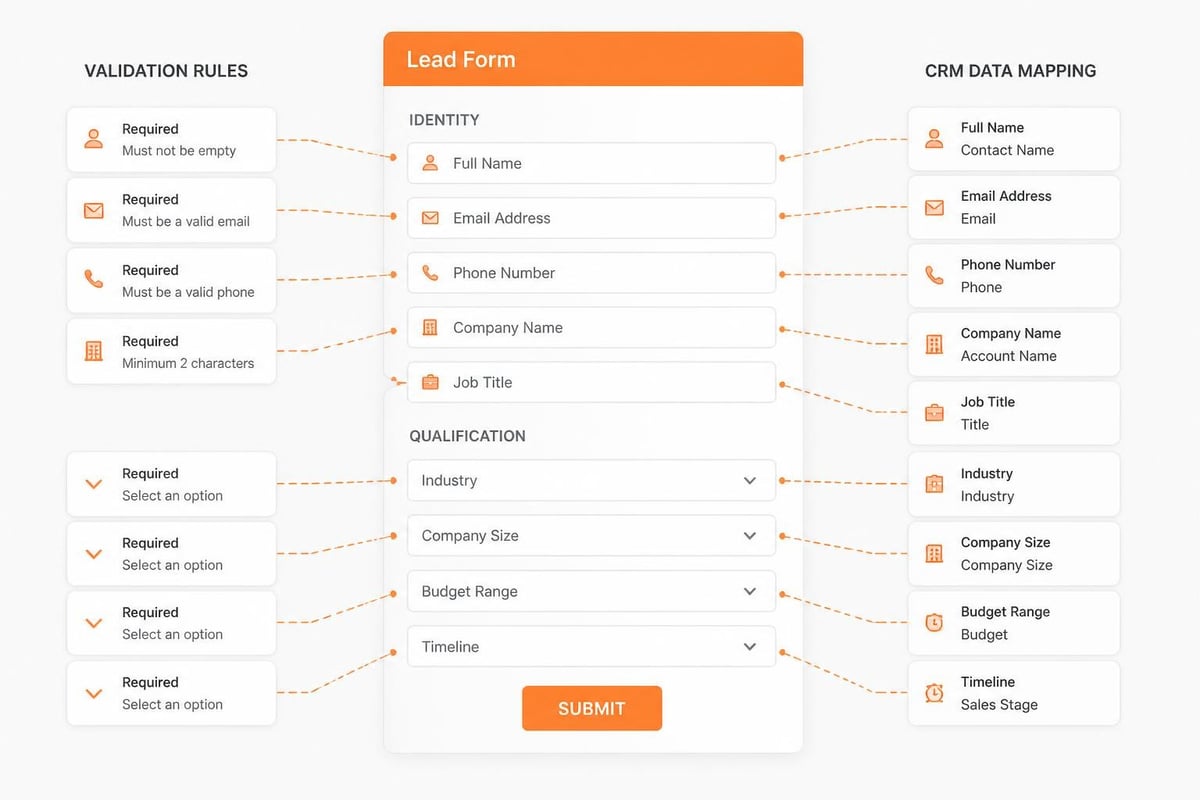
- Identity fields (name, email address, phone number)
- Qualification fields (company name, industry, role or title)
- Intent fields (budget range, project timeline, specific requirements)
- Consent fields (privacy policy acceptance, communication preferences)
The field-to-conversion relationship follows a predictable pattern. Forms with 3-5 fields typically achieve 15-20% higher completion rates than forms with 8-10 fields. However, fewer fields may reduce lead quality by missing critical qualification data.
| Form Length | Average Conversion Rate | Lead Quality Score |
|---|---|---|
| 3-4 fields | 12-18% | Medium |
| 5-7 fields | 8-14% | High |
| 8-12 fields | 4-9% | Very High |
| 13+ fields | 1-4% | Variable |
How to Design High-Converting Lead Forms
Lead form design follows principles that reduce friction while maximizing data quality. Start with field analysis to determine minimum required information for sales qualification.
Step-by-step design process:
- Define qualification criteria – Identify the minimum data points sales teams need to initiate conversations (company size, budget authority, decision timeline)
- Map field sequence – Place simple fields first (name, email) followed by qualifying questions to maintain completion momentum
- Implement validation rules – Apply real-time field validation for email formats, phone number structures, and required selections
- Configure error messaging – Display inline validation feedback immediately below each field rather than after form submission
- Add trust signals – Include privacy statements, security badges, or data handling disclosures near the submit button
- Test mobile rendering – Verify form functionality on devices with screen widths from 320px to 768px
Field labels must use consistent terminology that matches industry language. For software development lead forms, terms like “project scope,” “integration requirements,” or “technology stack” provide clarity that generic labels like “comments” or “details” cannot match.
Best practices for lead capture forms emphasize visual hierarchy and white space. Forms with adequate spacing between fields show 20-30% better completion rates than densely packed layouts.
Progressive Profiling Techniques
Progressive profiling splits data collection across multiple interactions rather than requesting all information in a single form. The system tracks previously submitted data and presents new questions on subsequent form encounters.
Implementation requires CRM integration and cookie tracking. When a known visitor returns, the lead form automatically hides previously answered fields and displays new qualification questions. This approach increases total data collected by 30-50% over time while maintaining form simplicity at each touchpoint.
What Are Common Lead Form Mistakes That Kill Conversions
Lead form failures typically stem from predictable design and configuration errors. Identifying these patterns enables rapid correction.
Critical mistakes and their impact:
- Excessive field requirements – Each additional field beyond seven reduces conversion by approximately 10-15%
- Unclear value proposition – Forms without explicit benefit statements (“Download the guide,” “Schedule your consultation”) show 40% lower completion
- Poor mobile optimization – Non-responsive forms lose 60-70% of mobile traffic immediately
- Missing CAPTCHA or spam prevention – Unprotected forms generate 30-80% bot submissions that waste sales resources
- Weak call-to-action buttons – Generic CTAs like “Submit” convert 20% worse than specific actions like “Get Your Custom Quote”
Form abandonment occurs at predictable stages. Analysis of lead generation form optimization shows 40% of users abandon after viewing the form, 35% abandon after starting but before completion, and 25% abandon at the final submission step due to technical errors or trust concerns.
Validation and Error Handling
Real-time validation prevents submission errors and improves data quality. Implement field-level validation that checks inputs as users complete each field rather than waiting for form submission.
Validation rules by field type:
- Email addresses: Verify format compliance and check for common typos in domain names
- Phone numbers: Apply regional formatting and length requirements based on country selection
- Company names: Flag generic entries like “N/A” or “test” for manual review
- Budget ranges: Ensure selected values align with service minimums or project scope
Error messages must specify the correction needed. Messages like “Please enter a valid email address” provide more value than generic “Error in field” notifications. Position error text directly below the affected field in a contrasting color with adequate font size (minimum 14px) for visibility.
How Does AI Improve Lead Form Performance
Artificial intelligence transforms lead forms from static data collectors into dynamic qualification engines. AI analyzes submission patterns, detects spam, and routes leads based on probability scoring.
Machine learning algorithms evaluate lead quality in real-time by comparing new submissions against historical conversion data. The system assigns scores based on factors including company size indicators, email domain reputation, form completion time, and field answer patterns.
Organizations implementing Brytend CRM benefit from AI-driven lead form capabilities that automatically categorize submissions by project type, budget tier, and technical complexity. The system routes qualified leads to appropriate sales team members within minutes of submission, reducing response time from hours to seconds.

Spam Detection and Data Cleaning
AI-powered spam filtering examines multiple signals beyond traditional CAPTCHA systems. Modern lead form protection analyzes submission velocity, field completion patterns, IP reputation, and content coherence to identify bot traffic.
AI spam detection indicators:
- Form completion time under 3 seconds (human average: 15-45 seconds)
- Sequential field completion without pause or correction
- Repetitive submissions from identical IP addresses within short timeframes
- Email addresses matching known disposable domain patterns
- Incoherent or template-matched text in free-form fields
Spam filtering accuracy reaches 95-98% when combining multiple detection methods, according to research on privacy and spam risks in lead marketing. This prevents sales teams from wasting time on fraudulent inquiries while ensuring legitimate prospects receive immediate attention.

What Lead Form Fields Drive the Highest Quality Submissions
Field selection directly determines both lead quality and form completion rates. Strategic field design balances sales team information needs against prospect willingness to provide data.
Essential Fields for Software Development Lead Forms
Custom software projects require specific qualification data that generic lead forms miss. Effective forms for development services collect technical context alongside contact information.
Priority field categories:
- Project classification – Multiple choice selection: New application, system integration, legacy modernization, mobile development, cloud migration
- Technology preferences – Checkboxes for relevant stacks: React/Angular, Python/Java, AWS/Azure, native mobile, or technology-agnostic
- Timeline urgency – Radio buttons: Immediate need (0-3 months), planning phase (3-6 months), future consideration (6+ months)
- Budget awareness – Range selection aligned to project tiers: $25-50K, $50-100K, $100-250K, $250K+, or not yet determined
- Decision authority – Dropdown: Final decision maker, technical evaluator, budget influencer, or information gathering
Free-text description fields provide valuable context but require careful implementation. Limit these fields to 250-500 characters with clear prompts like “Describe your primary technical challenge” rather than vague “Additional comments.”
| Field Type | Conversion Impact | Lead Quality Impact | Recommended Usage |
|---|---|---|---|
| Email only | Baseline (100%) | Low | Newsletter signup only |
| Email + Name | -8% | Medium-Low | Content downloads |
| Email + Name + Company | -15% | Medium | Webinar registration |
| Email + Name + Company + Role | -22% | Medium-High | Demo requests |
| Full qualification (7-9 fields) | -35% | High | Sales consultation |
How to Integrate Lead Forms with CRM and Marketing Systems
Lead form effectiveness depends on seamless data flow into downstream systems. Integration transforms isolated form submissions into automated sales workflows.
Technical Integration Approaches
API-based integration provides real-time data transfer between lead forms and CRM platforms. When a prospect submits a form, the integration endpoint immediately creates or updates the contact record, assigns ownership, and triggers notification workflows.
Integration implementation steps:
- Configure webhook endpoints – Set up receiving URLs in the CRM that accept POST requests with form data
- Map form fields to CRM properties – Create field correspondence between form inputs and database columns (form “company_name” maps to CRM “account.name”)
- Establish validation rules – Define required fields, format requirements, and duplicate detection logic before accepting submissions
- Set up automation triggers – Configure immediate actions: assignment to sales rep, email notification, task creation, or lead scoring calculation
- Implement error handling – Build retry logic for failed submissions and notification systems for integration failures
- Test end-to-end flow – Verify data accuracy from form submission through CRM record creation and automated response delivery
For complex B2B sales processes, optimizing lead forms with progressive profiling enables gradual data enrichment across multiple touchpoints without overwhelming prospects with lengthy initial forms.
Automated Lead Routing and Response
Intelligent routing distributes leads based on geographic territory, industry expertise, product interest, or round-robin assignment among team members. Rule-based routing ensures each submission reaches the most qualified sales representative.
Response automation maintains engagement momentum while sales teams prepare personalized outreach. Automated sequences include immediate confirmation emails with expected next steps, calendar links for scheduling consultations, and relevant resource delivery based on indicated interests.
Organizations tracking response metrics observe that leads contacted within five minutes convert at 9x the rate of leads contacted after thirty minutes. Automation bridges this gap by acknowledging submissions instantly while human follow-up is prepared.
What Security and Privacy Considerations Apply to Lead Forms
Lead form data collection triggers legal and ethical obligations regarding information security and privacy compliance. Proper implementation protects both business and prospect interests.
GDPR and Privacy Regulation Compliance
Forms collecting data from European visitors must comply with General Data Protection Regulation requirements. Compliance elements include explicit consent mechanisms, clear privacy policy links, data processing disclosures, and opt-in checkboxes for marketing communications.
Required privacy elements:
- Checkbox for privacy policy acceptance (cannot be pre-checked)
- Link to complete privacy policy document
- Explicit consent language for data processing purposes
- Separate opt-in for marketing emails (distinct from form submission consent)
- Contact information for data protection inquiries
Similar requirements apply under California Consumer Privacy Act (CCPA) and other regional regulations. Lead forms should collect only necessary data for the stated purpose and provide transparency about how information will be used, stored, and shared.
Data Security and Transmission Protection
All lead form submissions must transmit over HTTPS encrypted connections to prevent data interception. SSL/TLS certificates should maintain current protocol versions and strong cipher suites.
Form data requires protection at rest within databases through encryption, access controls, and audit logging. Limit employee access to lead data based on role requirements, and implement logging systems that track who accessed which records and when.
Regular security audits should verify proper data handling, test for SQL injection vulnerabilities in form processing code, and confirm that submitted data cannot be accessed through URL manipulation or unauthorized API calls.

How to Measure and Optimize Lead Form Performance
Systematic measurement identifies improvement opportunities and quantifies form effectiveness. Track both conversion metrics and lead quality indicators.
Key Performance Indicators for Lead Forms
Form analytics require monitoring beyond simple submission counts. Comprehensive measurement includes funnel analysis, field-level abandonment tracking, and downstream conversion correlation.
Essential metrics to track:
- Form view to start rate – Percentage of visitors who view the form and begin entering data
- Start to completion rate – Percentage of users who begin the form and successfully submit
- Individual field abandonment – Specific fields where users stop completing the form
- Time to complete – Average duration from first field entry to submission (target: 30-90 seconds)
- Submission to qualified lead rate – Percentage of form submissions that meet sales criteria
- Lead to opportunity conversion – Percentage of form leads that enter active sales pipeline
- Lead to customer conversion – Percentage of form-generated leads that close as customers
Mobile versus desktop performance often shows significant variance. Separate analytics by device type reveal optimization priorities. Forms showing 10-15% conversion on desktop but only 2-4% on mobile require responsive design improvements.
A/B Testing Strategies
Systematic testing isolates variables that impact conversion. Test one element at a time to establish clear cause-effect relationships.
High-impact testing priorities:
- Form length – Test 5-field versus 7-field versions with identical design
- CTA button copy – Compare “Get Started,” “Request Consultation,” “Download Guide,” or “Schedule Demo”
- Field order – Test email-first versus name-first sequences
- Privacy statement placement – Compare positions: above form, below form, or next to submit button
- Required versus optional fields – Test making qualification fields optional with conditional display based on completion
Statistical significance requires adequate sample sizes. Forms receiving fewer than 100 weekly submissions need 4-6 weeks per test variation to reach 95% confidence levels. Higher-traffic forms can complete tests in 7-14 days.
Testing platforms should integrate with analytics systems to track not just form conversion but downstream lead quality. A variation that increases submissions by 20% but decreases qualified leads by 40% represents a net negative outcome.
What Advanced Lead Form Techniques Improve Qualification
Beyond basic contact collection, sophisticated lead forms incorporate conditional logic, multi-step progression, and intelligent pre-population to enhance user experience and data quality.
Conditional Logic and Dynamic Fields
Conditional display shows or hides form fields based on previous responses. This creates personalized form experiences that collect relevant data without overwhelming prospects with irrelevant questions.
Implementation example: A software development lead form asks “What type of project are you planning?” with options including Mobile App, Web Application, System Integration, or Cloud Migration. Based on the selection, the form displays relevant follow-up fields-mobile platform choice (iOS/Android/Both) for mobile projects, or integration system details for integration projects.
Dynamic forms reduce perceived complexity by showing only applicable fields. Users completing a 12-field form see only 6-7 fields relevant to their situation, improving completion rates while maintaining comprehensive data collection.
Multi-Step Form Design
Multi-step forms divide data collection across sequential pages or progressive disclosure sections. This approach reduces visual overwhelm and creates micro-commitments that increase completion rates.
Effective step structure:
- Step 1: Basic contact (2-3 fields) – Name, email, company
- Step 2: Project details (3-4 fields) – Project type, timeline, budget range
- Step 3: Technical requirements (2-3 fields) – Technology preferences, integration needs
- Step 4: Final details (1-2 fields) – Additional context, consent checkboxes
Progress indicators showing “Step 2 of 4” or percentage completion (50% complete) encourage users to finish started forms. Each step completion represents a micro-conversion that increases psychological investment in form completion.
Multi-step forms typically show 20-30% higher overall completion rates than equivalent single-page forms, particularly for forms requiring 8+ fields. However, step 1 to step 2 transition represents a critical drop-off point requiring careful optimization.
FAQs
What is a lead form and why does it matter?
A lead form is a digital tool that collects prospect data. It transforms visitor interest into actionable sales data, crucial for B2B marketing.
How can I design high-converting lead forms?
To design effective lead forms, define qualification criteria, map field sequences, and implement real-time validation. These practices enhance completion rates.
What is the cost of using lead forms for businesses?
Using lead forms can improve conversion rates by 2-15%. The cost varies based on design complexity and integration with CRM systems.
Can AI improve lead form performance?
Yes, AI enhances lead forms by analyzing submission patterns and automating lead routing. This can boost sales efficiency by 40-60%.
How long does it take to see results from lead forms?
Results from optimized lead forms can be observed within weeks. Tracking metrics helps identify improvements in conversion rates.
Does mobile optimization affect lead form conversions?
Yes, poor mobile optimization can lead to a 60-70% loss of mobile traffic. Responsive design is essential for maintaining engagement.
What common mistakes kill lead form conversions?
Common mistakes include excessive field requirements and unclear value propositions. Each additional field can reduce conversion by 10-15%.
Strategic lead form design directly impacts sales pipeline quality and velocity. Businesses that optimize field selection, implement validation rules, and integrate forms with CRM systems convert 40-60% more prospects into qualified opportunities than organizations using generic contact forms. Brytend develops custom lead management solutions that combine intelligent form design with automated qualification workflows, helping software development firms capture higher-quality leads and accelerate sales cycles through purpose-built systems tailored to specific business requirements.