
TL;DR:
- Task management tools organize work assignments, deadlines, and dependencies in a centralized system
- Key selection criteria include workflow automation, integration capabilities, team size scalability, and reporting depth
- Effective implementation requires clear task definition standards, role-based access controls, and defined update protocols
- Common deployment mistakes include over-customization, inadequate user training, and failure to establish task hierarchies
- Manual tracking methods cost teams an average of 8-12 hours per week in coordination overhead
Task management tools are software platforms that organize, assign, track, and report on discrete units of work across teams and projects. These systems replace spreadsheets, email chains, and verbal agreements with structured workflows that maintain visibility, accountability, and progress measurement. Organizations deploy task management tools to reduce coordination costs, prevent work duplication, and maintain delivery schedules across distributed teams.
What Are Task Management Tools and How Do They Function?
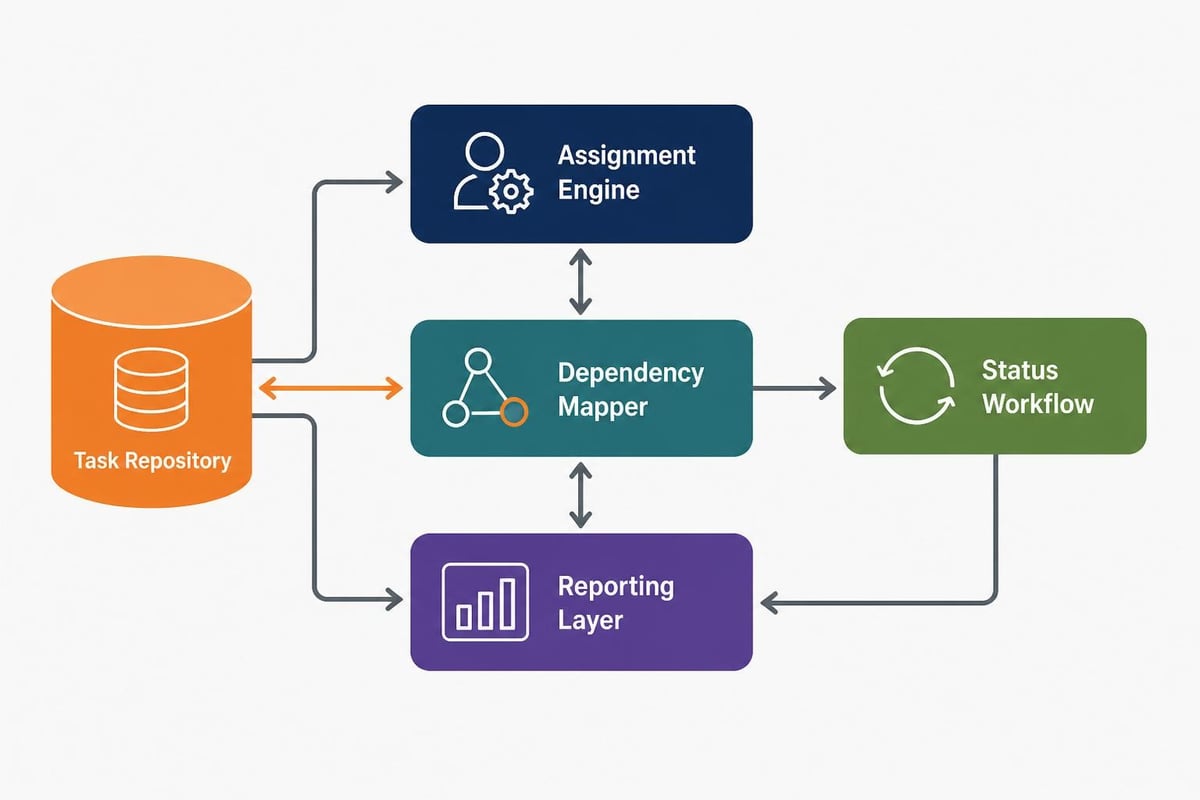
Task management tools digitize work coordination through three core components: task repositories, assignment mechanisms, and progress tracking interfaces. The repository stores all work items with attributes including title, description, priority, deadline, assignee, status, and dependencies. Assignment mechanisms distribute work to specific team members based on availability, skill sets, or predefined workflows. Progress tracking interfaces display task status, completion percentages, and bottleneck identification across individual, team, and organizational views.
Modern implementations extend beyond simple to-do lists. They incorporate automation rules, notification systems, time tracking, file attachments, comment threads, and integration APIs. A typical B2B deployment handles 500-5,000 active tasks simultaneously across 10-100 users.
Core Functionality Components
Task management systems operate through defined data structures and user interactions:
- Task creation: Users define work items with required attributes and optional metadata
- Assignment logic: Manual selection, round-robin distribution, or rule-based routing to team members
- Dependency mapping: Predecessor-successor relationships that control task sequencing
- Status workflows: Predefined stages (backlog, in progress, review, completed) with transition rules
- Notification engine: Alerts triggered by deadlines, status changes, assignments, or mentions
- Reporting layer: Aggregated views of completion rates, overdue items, workload distribution, and timeline adherence
Organizations select task management tools based on workflow complexity, team size, and integration requirements, matching platform capabilities to operational needs.
How Do You Choose the Right Task Management Tool?
Selection begins with workflow analysis and requirement definition. Teams must document current coordination methods, identify pain points, quantify task volumes, and establish success metrics before evaluating platforms. The evaluation framework should assess technical capabilities, user experience, scalability limits, and total cost of ownership.
Decision criteria fall into five categories: functionality depth, integration ecosystem, customization flexibility, user adoption barriers, and vendor stability. Each category contains specific evaluation points that align with organizational needs and technical constraints.
| Evaluation Category | Key Criteria | Assessment Method |
|---|---|---|
| Functionality | Task hierarchies, dependencies, recurring tasks, time tracking | Feature matrix comparison |
| Integration | API availability, native connectors, webhook support, SSO | Technical documentation review |
| Customization | Custom fields, workflow stages, automation rules, views | Trial environment testing |
| Adoption | Interface complexity, mobile apps, learning curve, support resources | User testing sessions |
| Vendor Stability | Market presence, update frequency, SLA terms, data portability | Financial and technical due diligence |
Technical Requirements Assessment
Organizations should define technical specifications before platform evaluation:
- User volume: Current team size plus 2-year growth projection
- Task volume: Average active tasks and peak load scenarios
- Integration needs: Existing systems requiring bidirectional data sync
- Access controls: Role-based permissions, guest access, audit logging requirements
- Deployment model: Cloud SaaS, on-premise installation, or hybrid architecture
- Compliance requirements: Data residency, encryption standards, retention policies
Microsoft’s task management comparison guide provides evaluation frameworks for enterprise environments with existing technology ecosystems.
What Are Common Implementation Challenges and Solutions?
Deployment failures typically result from inadequate planning, insufficient user training, or misaligned expectations. Organizations encounter predictable obstacles when transitioning from manual coordination to structured task management systems.
Primary Implementation Obstacles
Over-customization paralysis occurs when teams attempt to replicate every existing process within the new platform. This creates complex configurations that confuse users and resist future updates. Solution: Start with default workflows and customize only after identifying genuine limitations through actual usage.
Inconsistent task definition standards lead to incomplete information, unclear ownership, and abandoned tasks. Solution: Establish mandatory field requirements and task template libraries with examples for common work types.
Poor integration architecture results in duplicate data entry and synchronization failures. Solution: Map data flows before implementation and use native integrations over custom scripts when available.
Insufficient user adoption stems from inadequate training and competing legacy systems. Solution: Implement phased rollouts with dedicated support resources and disable alternative coordination methods.
Lack of governance policies allows task repositories to become disorganized with outdated, duplicate, or irrelevant items. Solution: Define task lifecycle policies, archival schedules, and regular cleanup protocols.
Research on remote workers’ experiences with task management tools reveals that effective training and clear process documentation significantly improve adoption rates and sustained usage.
How Do Task Management Tools Integrate With Custom Software Development Workflows?
Software development teams require specialized task management capabilities that extend beyond general business workflows. Development-specific requirements include code repository integration, deployment pipeline visibility, bug tracking, sprint planning, and technical documentation linking.
Development Workflow Integration Points
Development teams coordinate work across multiple systems:
- Version control systems: Git repositories linked to task IDs for commit tracking
- Continuous integration pipelines: Build status updates reflected in task progress
- Code review platforms: Pull request approvals required before task completion
- Documentation repositories: Technical specifications and API docs attached to implementation tasks
- Testing environments: QA results and defect reports connected to feature tasks
A typical custom software development project contains task hierarchies with epics (major features), stories (user-facing functionality), tasks (implementation units), and subtasks (granular work items). Dependencies enforce logical sequencing, such as requiring database schema tasks to complete before API endpoint implementation.
For organizations managing service-based operations alongside development work, integration with operational systems becomes critical. Brytend's service module demonstrates how task management extends into equipment maintenance, service scheduling, and compliance documentation, creating unified work visibility across both development and operational teams.

What Manual vs Automated Task Management Approaches Exist?
Organizations coordinate work through manual methods, partially automated systems, or fully integrated platforms. Each approach carries distinct cost structures, coordination overhead, and scalability limits.
Manual Task Management
Manual coordination relies on spreadsheets, email, verbal agreements, and status meetings. Team members maintain individual task lists and report progress through weekly updates or daily standups. This approach requires no software investment but incurs high coordination costs.
Characteristics:
- Zero licensing costs
- Maximum flexibility in task definition
- No learning curve for new tools
- High risk of miscommunication
- Limited visibility into workload distribution
- Difficult progress tracking across teams
- Coordination overhead of 8-12 hours per week for 10-person teams
Partially Automated Systems
Partial automation introduces lightweight tools for specific coordination needs while maintaining manual processes elsewhere. Teams might use shared task boards for sprint planning but rely on email for status updates and spreadsheets for capacity planning.
Characteristics:
- Low initial investment
- Focused solution for specific pain points
- Integration gaps between systems
- Duplicate data entry requirements
- Inconsistent task status across platforms
Fully Integrated Platforms
Integrated platforms centralize all task-related data, automate workflow transitions, and provide unified reporting. Reviews of current task management applications highlight platforms offering comprehensive automation, API ecosystems, and advanced analytics.
Characteristics:
- Moderate to high licensing costs
- Complete workflow automation
- Unified data model across functions
- Comprehensive reporting and analytics
- Requires organizational change management
- Delivers 40-60% reduction in coordination overhead

How Do You Optimize Task Management Tool Usage?
Optimization begins after initial deployment when usage patterns reveal inefficiencies, underutilized features, and process gaps. Teams should establish quarterly review cycles to assess adoption metrics, identify automation opportunities, and refine workflows.
Performance Metrics and Optimization Targets
Track quantitative indicators that reveal system effectiveness:
- Task completion velocity: Average time from creation to completion by task type
- Overdue task percentage: Ratio of past-deadline items to total active tasks (target: <5%)
- Reassignment frequency: Number of times tasks change ownership (indicates unclear initial assignment)
- Comment thread length: Average comments per task (excessive threads suggest unclear requirements)
- Search frequency: How often users search versus navigating hierarchies (indicates organizational issues)
Workflow Refinement Strategies
Continuous improvement requires systematic analysis and incremental adjustments:
Automation rule expansion: Identify repetitive manual actions and create automation rules. Common candidates include automatic assignment based on task type, status transitions triggered by specific events, and notification routing based on priority levels.
Template standardization: Create task templates for recurring work patterns. Software development teams benefit from templates for feature implementation, bug fixes, code reviews, and deployment procedures. Each template pre-populates required fields, checklists, and standard descriptions.
Custom field optimization: Add fields that capture essential metadata without overwhelming users. Effective custom fields include client names, project codes, technical domains, compliance requirements, and estimated effort hours.
View customization: Configure filtered views that display relevant task subsets for specific roles. Developers need views showing assigned coding tasks, testers require views of items ready for QA, and project managers need portfolio-level rollups.
Integration deepening: Expand integrations beyond initial connections. Advanced integrations enable bidirectional data flow, automated task creation from external events, and synchronized status updates across platforms.
The W3C task model framework provides theoretical foundations for designing task workflows that align with user mental models and organizational processes.
What Best Practices Apply to Enterprise Task Management?
Enterprise deployments require governance frameworks that maintain data quality, ensure security compliance, and enable cross-functional coordination. Best practices address common failure modes and establish sustainable operational patterns.
Task Definition Standards
Establish mandatory requirements for all tasks:
- Descriptive titles: Action verb + object + context (e.g., "Deploy authentication API to staging environment")
- Acceptance criteria: Measurable completion conditions stated in present tense
- Effort estimates: Time investment required in hours or story points
- Priority classification: Business impact and urgency using standardized scales
- Due dates: Realistic deadlines based on dependencies and capacity
- Owner assignment: Single individual responsible for task completion
Hierarchy and Organization Principles
Structure tasks in logical hierarchies that reflect work breakdown:
- Portfolio level: Strategic initiatives aligned with business objectives
- Project level: Bounded efforts with defined deliverables and timelines
- Epic level: Major capabilities requiring multiple sprints or phases
- Story level: User-facing functionality deliverable in single iterations
- Task level: Technical work units completable in 1-4 days
- Subtask level: Granular steps within tasks for detailed tracking
Security and Access Controls
Implement role-based permissions that protect sensitive information:
- Viewer role: Read-only access to assigned tasks and project contexts
- Contributor role: Create, update, and comment on tasks within assigned projects
- Project admin role: Full control within specific projects including member management
- System admin role: Platform configuration, integration management, and global settings
Common Mistakes to Avoid
Organizations frequently encounter preventable errors:
Task fragmentation: Creating excessively granular tasks that bury teams in administrative overhead. Maintain minimum task sizes of 2-4 hours of work.
Perpetual backlog growth: Accumulating thousands of low-priority tasks that never get addressed. Implement quarterly backlog grooming sessions with aggressive archival of stale items.
Notification overload: Sending alerts for every status change and comment. Configure notifications for high-priority events only and batch low-priority updates into daily digests.
Unclear ownership: Assigning tasks to multiple people or teams without designated primary responsibility. Enforce single-owner requirement with support team members added as followers.
Status workflow complexity: Creating 15-20 status states that confuse users about appropriate transitions. Limit workflows to 4-6 states maximum.
What Role Do Task Management Tools Play in Compliance and Audit Requirements?
Regulated industries require documented evidence of work completion, approval workflows, and change histories. Task management tools provide audit trails that demonstrate compliance with internal policies and external regulations.
Audit Trail Components
Compliant systems maintain immutable records of task-related activities:
- Creation timestamp: When tasks were defined and by whom
- Assignment history: Complete record of ownership changes with timestamps
- Status transitions: Dated log of workflow stage progressions
- Field modifications: Before/after values for all attribute changes
- Comment threads: Timestamped discussion records with participant identification
- Attachment history: Document uploads, downloads, and deletions with version tracking
- Completion records: Finalization timestamps and approving parties
Compliance Workflow Examples
Equipment service compliance: Organizations managing physical assets must schedule preventive maintenance, document service completion, and maintain certification records. Task management systems create recurring service tasks based on equipment schedules, enforce checklist completion before closure, and generate compliance reports. The task repository becomes the authoritative record for regulatory audits.
Software validation workflows: Medical device and pharmaceutical software development requires verification and validation documentation for each feature. Tasks include mandatory fields for test case references, validation protocol IDs, and reviewer signatures. Completed tasks generate compliance artifacts automatically.
Change management processes: IT infrastructure changes require approval workflows before implementation. Tasks route through approval chains based on change risk classification, maintain evidence of approvals, and link to incident records if issues occur.
Research on chatbot-mediated task management explores how automated systems can enforce compliance requirements through conversational interfaces that guide users through required documentation.

How Do Task Management Tools Scale Across Organizational Growth?
Scalability challenges emerge as organizations expand from 10 to 100 to 1,000+ users. Platform selection must anticipate growth trajectories and evaluate technical limits before they constrain operations.
Scaling Dimensions
Growth affects multiple system aspects simultaneously:
User scaling: Platform performance with increasing concurrent users. Evaluate response times under load, concurrent editing conflicts, and notification delivery delays at 2x and 10x current user counts.
Data scaling: Task repository size impacts search performance and report generation. Systems managing 100,000+ tasks require database optimization, archival strategies, and search indexing.
Workflow complexity: Organizations develop specialized processes as they mature. Platforms must support multiple concurrent workflows, custom automation rules per project, and role-based view configurations.
Integration breadth: Mature organizations operate 50-100 business systems requiring task management integration. API rate limits, webhook reliability, and bidirectional sync capabilities become critical.
Reporting sophistication: Executive stakeholders require portfolio-level analytics, trend analysis, and predictive forecasting. Basic task lists evolve into business intelligence requirements.
Multi-Team Deployment Patterns
Large organizations implement task management through three primary patterns:
- Centralized single instance: All teams use one platform with project-based segmentation
- Federated deployment: Department-specific instances with integration layer for cross-functional work
- Hybrid approach: Core platform for shared work plus specialized tools for unique team needs
What Emerging Capabilities Are Reshaping Task Management Tools?
Platform capabilities evolve rapidly as vendors incorporate artificial intelligence, advanced automation, and predictive analytics. Organizations planning long-term deployments should evaluate vendor roadmaps and emerging functionality.
AI-Powered Features
Intelligent task routing: Machine learning algorithms analyze historical assignment patterns, completion times, and team member expertise to suggest optimal task assignments. Systems learn which developers excel at specific technical domains and route work accordingly.
Automatic time estimation: AI models predict task duration based on title, description, and historical data from similar work. Estimates improve over time as the system observes actual completion patterns.
Priority recommendation: Algorithms evaluate task attributes, dependencies, deadlines, and business impact to suggest priority rankings. This reduces subjective prioritization conflicts and surfaces genuinely urgent work.
Natural language task creation: Users describe work in conversational language, and AI extracts task attributes, suggests titles, and populates fields automatically. This lowers the barrier to capturing work items.
Predictive Analytics
Advanced platforms forecast project completion dates, identify at-risk deliverables, and simulate resource allocation scenarios. Predictive models analyze velocity trends, dependency chains, and capacity constraints to generate probabilistic completion ranges rather than single-date estimates.
Case Example: Custom CRM Development Project
A software development team building a custom CRM system deployed task management with strict hierarchy and automation rules. The project structure included:
- Epic: CRM lead management module
- Stories: Contact import, lead scoring, activity tracking, reporting dashboard
- Tasks: API endpoint implementation, database schema updates, UI components, test coverage
- Automated workflows: Code review required before QA, QA approval required before deployment, production deployment triggers documentation task
The team configured automation rules that moved tasks from "In Progress" to "Code Review" automatically when pull requests were opened. Integration with the CI/CD pipeline updated task status based on build results. The structured approach reduced coordination overhead by 55% compared to their previous email-based system and provided complete audit trails for client status reviews.
Task management tools eliminate coordination friction and provide structured visibility into work distribution, progress, and bottlenecks across teams. Effective implementation requires clear task definition standards, appropriate automation depth, and ongoing optimization based on usage patterns. Brytend develops custom software solutions that integrate with your existing task management infrastructure or build purpose-designed workflow systems tailored to your specific operational requirements and compliance needs.


