IT task management software is a digital platform that organizes, prioritizes, tracks, and automates IT service requests, project tasks, and operational workflows to improve team efficiency and service delivery. These systems centralize work assignments, automate routine processes, and provide visibility into task status across IT departments. Modern it task management software integrates with helpdesk systems, project management tools, and asset databases to create a unified operational environment.
TL;DR
- IT task management software centralizes ticket tracking, project tasks, and service requests in one platform
- Key capabilities include automation, prioritization, SLA monitoring, workflow customization, and integration with ITSM tools
- Selection criteria focus on scalability, customization depth, integration options, and alignment with ITIL or custom frameworks
- Implementation requires clear process mapping, role definition, automation rules, and continuous optimization
- Best practices include standardized naming, granular task breakdown, automated routing, and regular workflow audits
What Is IT Task Management Software and How Does It Work?
IT task management software is a specialized system that captures, assigns, tracks, and resolves IT-related work items through structured workflows and automated rules. The software operates by receiving inputs from multiple channels (email, web forms, integrations, API calls) and converting them into trackable tasks with defined attributes such as priority, category, assigned technician, and due date.
The core workflow begins when a task enters the system. The platform applies predefined rules to categorize the request, determine priority based on impact and urgency, and route it to the appropriate team or individual. Tasks move through stages (new, in progress, pending approval, resolved, closed) with each transition logged for audit and reporting purposes.

Core Components of IT Task Management Platforms
Modern it task management software consists of several interconnected modules that handle different aspects of work coordination:
- Intake module captures requests via forms, email parsing, chat integrations, or API connections
- Assignment engine applies rules to distribute tasks based on skills, availability, workload, or round-robin rotation
- Workflow designer defines stage sequences, approval requirements, escalation triggers, and automated actions
- Notification system sends alerts via email, SMS, or in-app messages when tasks require attention
- Reporting dashboard displays metrics such as open tickets, resolution time, SLA compliance, and team performance
The system maintains a centralized database that stores task details, conversation history, file attachments, time logs, and status changes. This repository enables searching, filtering, and analysis across all work items.
| Component | Function | Example Use |
|---|---|---|
| Intake Forms | Structured data collection | Software installation request with device ID and user details |
| Rule Engine | Automated decision-making | Route network issues to infrastructure team, app bugs to developers |
| SLA Tracking | Deadline monitoring | Alert when P1 incident approaches 2-hour resolution window |
| Knowledge Base | Self-service resolution | Link common password reset tasks to step-by-step documentation |
Why Do IT Teams Need Dedicated Task Management Software?
IT departments manage diverse work types including incident response, service requests, project deliverables, maintenance tasks, and compliance activities. Generic task lists or email-based coordination fail to provide the structure, automation, and visibility required for efficient IT operations.
Dedicated it task management software solves three critical problems. First, it prevents work from falling through cracks by ensuring every request is logged, assigned, and tracked to closure. Second, it enforces consistency through standardized workflows that align with ITSM best practices and regulatory requirements. Third, it provides data-driven insights that reveal bottlenecks, workload distribution, and areas for process improvement.
IT teams operating without specialized software typically experience:
- Lost requests when emails are overlooked or verbal requests are forgotten
- Duplicate work when multiple technicians address the same issue without coordination
- SLA violations due to lack of automated deadline tracking and escalation
- Poor prioritization when high-impact issues are buried in unstructured lists
- Limited accountability without clear assignment records and completion timestamps
The platform creates a single source of truth for all IT work. Team members access a unified queue instead of checking multiple email threads, spreadsheets, or messaging channels. Managers gain visibility into team capacity and can redistribute work before individuals become overloaded.
How to Select the Right IT Task Management Software
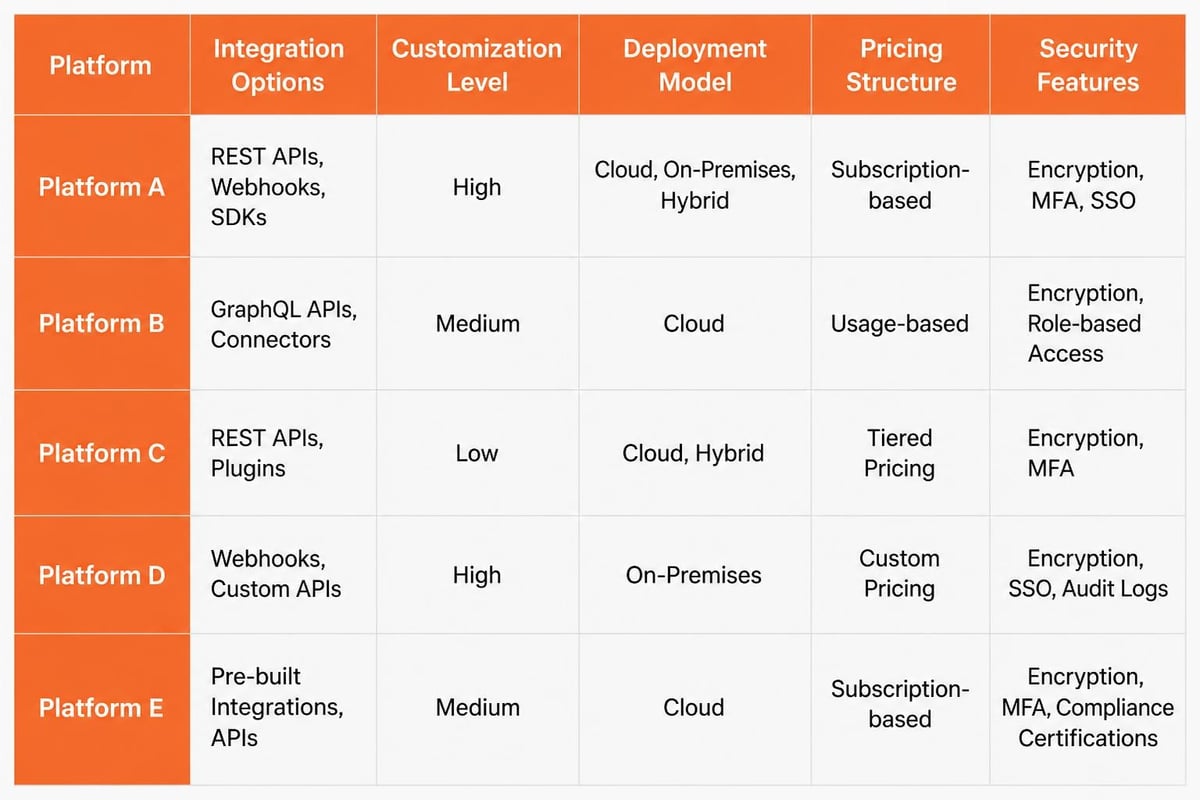
Choosing appropriate it task management software requires evaluating organizational requirements against platform capabilities. The selection process begins with documenting current workflows, pain points, integration needs, and growth projections.
Essential Selection Criteria
Start by defining non-negotiable requirements based on your IT environment:
- Integration compatibility with existing systems (helpdesk, monitoring tools, asset management, authentication directories)
- Customization depth for workflows, fields, forms, and business rules without requiring developer resources
- Scalability limits in terms of user count, task volume, data retention, and API rate limits
- Security controls including role-based access, audit logging, data encryption, and compliance certifications
- Reporting flexibility to create custom dashboards, export data, and analyze trends across dimensions
Evaluate whether the platform supports your operational framework. Organizations following ITIL processes require incident management, problem management, change management, and service catalog modules. Teams using agile methodologies need sprint planning, backlog management, and burndown charts.
For businesses looking to develop custom software solutions, the ideal platform should expose APIs for bidirectional data exchange and support webhook triggers for event-driven automation.
Platform Architecture Considerations
The deployment model impacts performance, control, and total cost:
| Deployment Type | Advantages | Considerations |
|---|---|---|
| Cloud SaaS | Rapid deployment, automatic updates, predictable subscription costs | Data residency requirements, limited customization, ongoing fees |
| Self-hosted | Complete control, deep customization, one-time licensing | Infrastructure management, upgrade responsibility, higher initial cost |
| Hybrid | Sensitive data on-premises, collaboration features in cloud | Integration complexity, dual security management |
Assess the vendor's development roadmap and community ecosystem. Active development indicates ongoing feature additions and security patches. A robust marketplace of extensions allows adding capabilities without custom development.
What Features Define Effective IT Task Management Software?
Effective it task management software provides capabilities that address the full lifecycle of IT work from request intake through resolution and knowledge capture. Feature sets vary across products, but high-performing teams require specific functionality.
Automation and Intelligence
Automation reduces manual effort and ensures consistency:
- Smart routing assigns tasks based on keywords, categories, requester department, or asset type
- Escalation rules automatically elevate unresolved tasks when SLA thresholds approach
- Template application pre-populates subtasks, checklists, and approval chains for standard requests
- Auto-responses acknowledge receipt and provide estimated resolution timeframes
- Scheduled tasks generate recurring work items for maintenance, reviews, and renewals
Advanced platforms incorporate machine learning to suggest task categorization, predict resolution time, or recommend knowledge base articles based on request description.
Collaboration and Communication
IT work often requires coordination across specialists:
- Threaded conversations keep all communication within the task record
- @mentions notify specific individuals without separate emails
- Internal notes separate private team discussion from customer-visible updates
- File attachments store screenshots, log files, configuration exports, and documentation
- Linked tasks show dependencies between related work items
The platform should maintain a complete audit trail showing who viewed, modified, or commented on each task with timestamps.
Reporting and Analytics
Data-driven management requires comprehensive metrics:
- Volume trends showing task creation rate by category, source, or department
- Resolution metrics including mean time to resolution, first-contact resolution rate, and reopened ticket percentage
- SLA performance tracking compliance across priority levels and service types
- Team productivity displaying tasks completed per technician, average handling time, and utilization rates
- Backlog analysis identifying aging tasks, assignment distribution, and queue depth
Export capabilities enable sharing reports with stakeholders or importing data into business intelligence tools. Organizations focused on strategic scaling use these metrics to identify operational drag and optimize resource allocation.
How to Implement IT Task Management Software Successfully
Implementation success depends on thorough preparation, structured rollout, and continuous refinement. The process typically spans 4-12 weeks depending on organizational size and complexity.
Phase 1: Process Documentation and Design
Map current workflows before configuring the system:
- Document task types (incidents, requests, projects, problems, changes) with examples and volumes
- Define priority matrix based on impact (users affected, revenue at risk) and urgency (time sensitivity)
- Identify approval chains for service requests, changes, and purchases
- List integration points with monitoring tools, asset databases, authentication systems, and communication platforms
- Establish SLA targets for acknowledgment and resolution across priority levels
Create detailed workflow diagrams showing decision points, automated actions, and handoffs between teams. This documentation guides system configuration and serves as training material.
Organizations managing service operations should map equipment types, service schedules, and technician specializations to ensure proper task routing and resource planning.
Phase 2: Configuration and Testing
Build the system incrementally:
- Create task templates for common request types with pre-filled fields and subtask checklists
- Configure automation rules starting with simple routing and gradually adding complex conditions
- Set up notification preferences balancing timely alerts with notification fatigue
- Build custom fields to capture organization-specific data (cost center, location code, service tier)
- Import reference data including user lists, asset inventories, and vendor contacts
Test workflows with realistic scenarios before production launch. Verify that tasks route correctly, notifications trigger appropriately, and SLA timers calculate accurately. Following best practices for task management during configuration ensures the system supports actual work patterns.
Phase 3: Rollout and Adoption
Deploy using a phased approach:
- Pilot with one team to validate configuration and gather feedback
- Refine based on real usage adjusting workflows, fields, and automation
- Train additional teams using documentation created during pilot
- Migrate historical data preserving context from legacy systems
- Decommission old tools once teams achieve proficiency with new platform
Assign champions within each team who provide peer support and communicate enhancement requests. Monitor adoption metrics such as task creation rate, time to first assignment, and percentage of work captured in the system versus outside channels.

What Are Common Implementation Challenges and Solutions?
IT task management software projects encounter predictable obstacles. Anticipating these challenges and preparing mitigation strategies improves implementation outcomes.
Resistance to Process Change
Team members accustomed to informal workflows resist structured task management. They perceive forms, categories, and status updates as bureaucratic overhead.
Solution: Demonstrate immediate value by automating repetitive work that teams dislike. Show time savings from auto-routing versus manual email forwarding. Highlight how consolidated task history eliminates searching through email threads. Involve team members in workflow design to ensure the system accommodates real needs rather than theoretical processes.
Over-Customization and Complexity
Organizations attempt to replicate every existing process in the new system, creating excessive custom fields, statuses, and workflows. The resulting complexity confuses users and makes the system difficult to maintain.
Solution: Start with core workflows and standard fields. Add customization only when clear business value justifies the added complexity. Review ITSM best practices to adopt proven patterns before inventing custom approaches. Limit custom statuses to 5-7 per workflow and restrict custom fields to those required for reporting or automation.
Integration Failures
Planned integrations with monitoring tools, asset databases, or authentication systems fail due to API limitations, data format mismatches, or credential issues.
Solution: Validate integration capabilities during software evaluation by testing with actual data sources. Document API dependencies and authentication requirements. Build integrations incrementally, testing data flow in both directions. Maintain fallback manual processes until integrations prove reliable in production.
Inadequate Data Quality
Migrated tasks contain incomplete information, inconsistent categories, or corrupted attachments. Poor data quality undermines reporting and creates duplicate work.
Solution: Clean data before migration using scripts to standardize categories, fill required fields, and remove duplicates. Validate migrated data against business rules. Accept that some historical data may not meet current standards and focus on ensuring new tasks maintain quality through required fields and validation rules.
How to Optimize IT Task Management Software Performance
Optimization transforms basic task tracking into strategic operational intelligence. High-performing IT teams continuously refine their it task management software configuration and usage patterns.
Workflow Efficiency Improvements
Analyze task metrics to identify optimization opportunities:
- Identify bottlenecks where tasks accumulate by examining average time in each status
- Reduce handoffs by expanding skill sets or adjusting assignment rules to route tasks directly to qualified technicians
- Automate repetitive tasks such as software installations or access provisioning through integration with provisioning systems
- Eliminate approval steps for low-risk changes by implementing pre-approved change templates
- Consolidate similar workflows to reduce the number of distinct processes requiring maintenance
Review workflows quarterly to remove obsolete steps and incorporate lessons from completed tasks.
Knowledge Base Integration
Connect task resolution to knowledge capture:
- Link solutions to tasks so resolved incidents automatically suggest knowledge base updates
- Create articles from frequent tasks when the same request type appears repeatedly
- Surface relevant articles during task creation to enable self-service or faster resolution
- Track article effectiveness by measuring deflection rate and user feedback
- Update outdated content when tasks indicate changed procedures or configurations
Knowledge integration reduces resolution time and enables first-level support to handle complex issues without escalation.
Advanced Automation Strategies
Mature implementations leverage sophisticated automation:
- Threshold alerts notify managers when specific task categories exceed normal volumes, indicating potential infrastructure issues
- Dynamic priority adjustment escalates tasks automatically when multiple related incidents suggest broader problems
- Resource forecasting analyzes historical task volumes to predict staffing needs during peak periods
- Compliance validation blocks task closure until required documentation is attached or approval obtained
- Cost tracking calculates labor costs by multiplying time logs against technician billing rates
Organizations developing custom software can extend platform capabilities through API integrations that connect task data to business intelligence dashboards or financial systems.
What Metrics Indicate IT Task Management Software Success?
Measuring it task management software effectiveness requires tracking operational metrics and business outcomes. Focus on indicators that drive decision-making rather than vanity metrics.
Operational Performance Metrics
Monitor these core indicators monthly:
| Metric | Target Range | Action Threshold |
|---|---|---|
| First Response Time | 80% within SLA | <75% triggers process review |
| Resolution Time (P1) | <4 hours average | Spike indicates resource gap |
| Resolution Time (P2-P4) | Declining trend | Increase suggests backlog growth |
| SLA Compliance | >95% overall | <90% requires immediate intervention |
| Reopened Ticket Rate | <5% of closed tasks | >10% indicates quality issues |
| Backlog Age | <10% over 30 days | >20% shows capacity problem |
Segment metrics by task category, team, and requester department to identify specific improvement areas.
Business Impact Metrics
Connect task management to organizational outcomes:
- User satisfaction scores from post-resolution surveys measuring service quality
- Self-service resolution rate showing percentage of requests resolved without technician involvement
- Cost per ticket calculating total IT labor divided by tasks completed
- Time to productivity for new employees measured by speed of access provisioning and equipment setup
- Change success rate tracking percentage of changes implemented without incidents
Compare manual versus automated processes to quantify efficiency gains. For example, measure time required to provision new user accounts before and after implementing automated workflows.
Case Example: Service Management Optimization
A gas detection equipment distributor managing 2,400 serialized devices faced service scheduling bottlenecks. Technicians received service requests via email, manually checked device history in spreadsheets, and scheduled appointments through phone calls.
After implementing it task management software integrated with their asset database, the company achieved:
- 67% reduction in service request response time through automated routing based on device location and technician proximity
- Elimination of missed service intervals through automated reminder generation 30 days before due dates
- Complete audit trail for compliance reporting showing service dates, technician certifications, and calibration results
- Dynamic scheduling that balanced technician workload and optimized travel routes
The platform's integration with their inventory system ensured parts availability before scheduling appointments, reducing repeat visits by 40%.
How Does IT Task Management Software Compare to Project Management Tools?
IT task management software and project management platforms serve different operational needs. Understanding the distinction ensures appropriate tool selection.
IT task management software handles ongoing operational work characterized by unpredictable volume, rapid response requirements, and standardized workflows. Tasks are typically independent work items (incidents, requests, problems) that follow predefined processes from intake to resolution. The focus is reactive service delivery and operational efficiency.
Project management tools coordinate temporary endeavors with defined start and end dates, unique deliverables, and interdependent activities. Work is planned in advance with resource allocation, milestone tracking, and budget management. The focus is proactive delivery of specific outcomes.
When to Use Each Platform
Use it task management software for:
- Helpdesk ticket tracking and incident resolution
- Service request fulfillment (access grants, software installations)
- Routine maintenance tasks and scheduled activities
- Problem management and root cause analysis
- Change request processing and approval workflows
Use project management tools for:
- Software development initiatives with sprint planning and release management
- Infrastructure upgrades with multiple dependent tasks
- Department migrations requiring coordination across teams
- New service launches with defined milestones and deliverables
Many organizations use both platforms simultaneously with integration connecting them. For example, a project management tool tracks a server upgrade project while the it task management software handles incidents affecting the servers and routes them to the project team if related to the upgrade work.
Organizations exploring mobile app development typically manage the development effort in a project tool while using task management software for support requests from the app's user base.
What Trends Are Shaping IT Task Management Software in 2026?
The it task management software category continues evolving to address changing IT operational models and user expectations. Several trends dominate platform development and vendor roadmaps in 2026.
AI-Powered Automation and Prediction
Machine learning capabilities extend beyond basic categorization to predictive analytics and intelligent automation. Modern platforms analyze historical task data to predict resolution time, suggest optimal task assignments based on technician expertise and current workload, and identify recurring incidents that warrant problem investigation. Natural language processing extracts key details from unstructured request descriptions to auto-populate fields and trigger appropriate workflows.
Employee Experience Focus
IT task management software increasingly prioritizes end-user experience alongside technician efficiency. Conversational interfaces allow submitting requests through chat platforms using natural language rather than structured forms. Self-service portals provide real-time status updates, estimated resolution times, and proactive notifications. The platforms measure and optimize user satisfaction as a primary success metric rather than focusing solely on ticket volume and resolution speed.
Low-Code Workflow Customization
Vendors provide visual workflow designers that allow business users to create and modify automation rules without developer intervention. Drag-and-drop interfaces define task routing, approval chains, and escalation logic. This democratization of customization accelerates process improvements and reduces dependency on IT resources or vendor professional services.
Security and Compliance Emphasis
Platforms incorporate enhanced security controls including granular permission models, comprehensive audit logging, data residency options, and compliance certifications for standards such as SOC 2, ISO 27001, and GDPR. The software provides built-in compliance reporting for frameworks like ITIL and COBIT, eliminating manual evidence collection during audits. When evaluating best ITSM tools, security certifications and compliance features rank as top selection criteria.
Integration Ecosystem Expansion
Modern it task management software functions as operational hubs connected to dozens of systems. Pre-built integrations link monitoring tools, asset management databases, communication platforms, authentication directories, and business applications. Bidirectional data flow ensures consistency across platforms and enables sophisticated automation scenarios such as auto-creating tasks when monitoring alerts trigger or updating asset records when service tasks complete.
IT task management software transforms reactive IT departments into strategic service organizations through structured workflows, intelligent automation, and data-driven optimization. The right platform selection and implementation approach directly impacts team productivity, user satisfaction, and operational costs. Brytend specializes in developing custom software solutions tailored to complex operational requirements, providing expertise in integration architecture, workflow automation, and scalable platform development to ensure your task management system aligns with unique business processes and growth objectives.