TL;DR:
- Software billing software automates recurring invoicing, subscription management, and payment processing for software companies
- Core features include usage tracking, automated invoice generation, payment gateway integration, and revenue recognition
- Implementation requires defining billing metrics, integrating payment systems, and establishing data validation workflows
- Best practices include real-time usage monitoring, flexible pricing models, and automated dunning management
- Custom solutions enable complex billing scenarios including metered usage, tiered pricing, and multi-currency support
Software billing software is a system that automates the creation, delivery, and management of invoices for software products and services, including subscription tracking, usage metering, payment processing, and revenue reporting.
What Is Software Billing Software and How Does It Work?
Software billing software manages the complete billing lifecycle for software companies, from subscription creation to payment collection and revenue recognition. The system connects pricing models with usage data, customer information, and financial workflows.
The basic workflow starts when a customer subscribes to a service or reaches a billing trigger. The software billing software calculates charges based on predefined rules, generates invoices, sends them to customers, processes payments, and records transactions in financial systems. Advanced platforms handle complex scenarios including proration, upgrades, downgrades, credits, and refunds.
Modern systems operate through several integrated components:
- Subscription management engine tracks customer plans, renewal dates, and lifecycle events
- Usage tracking module collects consumption data from APIs, webhooks, or direct integrations
- Pricing calculation engine applies rates, tiers, discounts, and promotional rules
- Invoice generation system creates compliant billing documents with line items and taxes
- Payment processing gateway handles credit cards, ACH, wire transfers, and alternative methods
- Revenue recognition module allocates revenue according to accounting standards
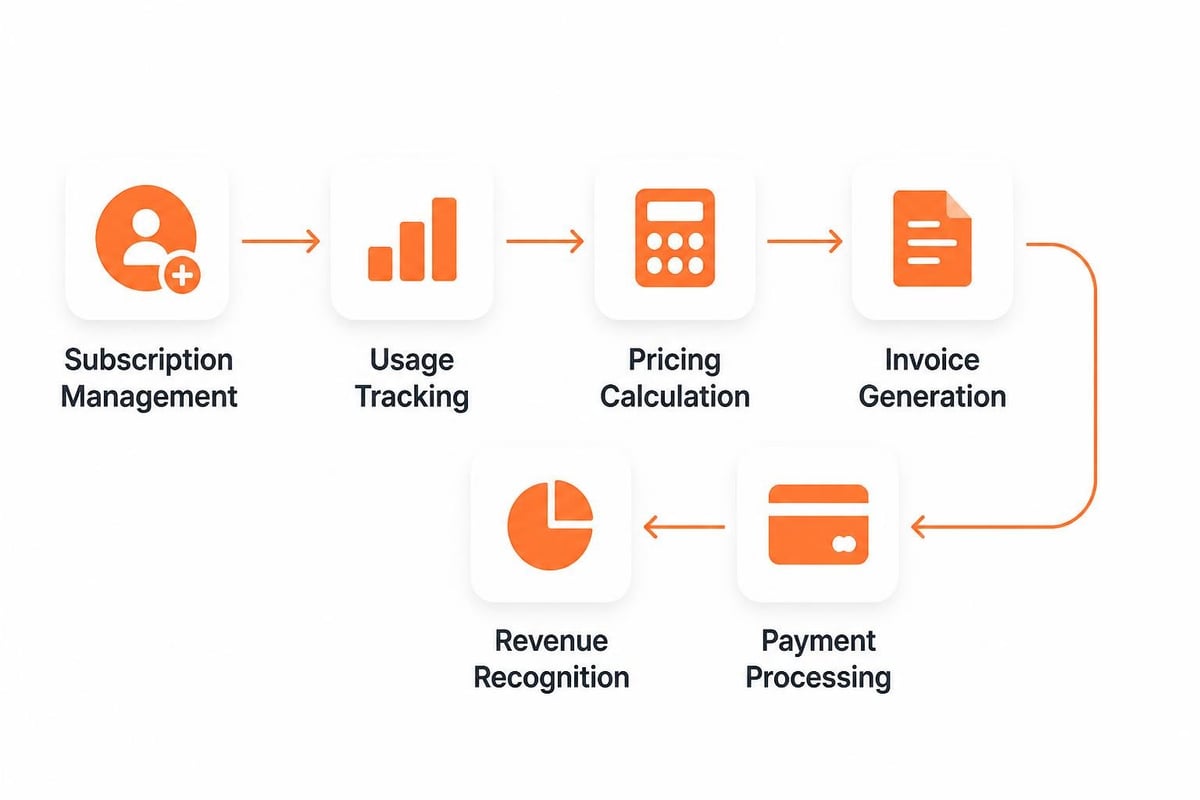
The system maintains a billing schedule that triggers at defined intervals (monthly, annually, or based on usage thresholds). When a billing event occurs, the software queries usage databases, applies pricing rules, generates invoices, and initiates payment collection. Failed payments trigger dunning workflows that automatically retry charges and notify customers.
What Are the Core Features of Software Billing Software?
Effective software billing software includes specific capabilities that address the unique requirements of software companies, particularly those with recurring revenue models.
Subscription Management
Subscription management tracks customer plans, renewal cycles, and contract terms. The system maintains a record of each customer's subscription status, including start date, renewal date, plan type, billing frequency, and payment method. When customers upgrade or downgrade, the software calculates prorated charges and credits automatically.
Usage-Based Billing
Usage-based billing measures consumption of services and applies pricing based on actual utilization. The software collects usage data through API calls, event tracking, or meter readings. Implementing metered billing software requires accurate usage tracking, real-time data collection, and robust API integration to ensure billing accuracy.
| Billing Model | Calculation Method | Common Use Cases |
|---|---|---|
| Flat Rate | Fixed fee per period | Basic SaaS subscriptions |
| Per-User | Price × active users | Collaboration platforms |
| Usage-Based | Consumption × unit price | API calls, storage, processing |
| Tiered | Volume-based pricing | Enterprise software licenses |
| Hybrid | Combination of models | Complex SaaS platforms |
Automated Invoice Generation
Automated invoice generation creates billing documents without manual intervention. The system pulls customer data, itemizes charges, calculates taxes, applies discounts, and formats invoices according to regional requirements. Invoices include detailed line items, payment terms, and compliance information.
Payment Processing Integration
Payment processing integration connects billing software with payment gateways and merchant accounts. The system supports multiple payment methods including credit cards, ACH transfers, wire transfers, and digital wallets. Integration enables automatic charge capture, payment verification, and reconciliation.
Revenue Recognition
Revenue recognition allocates income according to accounting standards such as ASC 606 or IFRS 15. The software tracks deferred revenue, recognizes income over service periods, and generates reports for financial teams. This ensures compliance with generally accepted accounting principles.
How Do You Implement Software Billing Software?
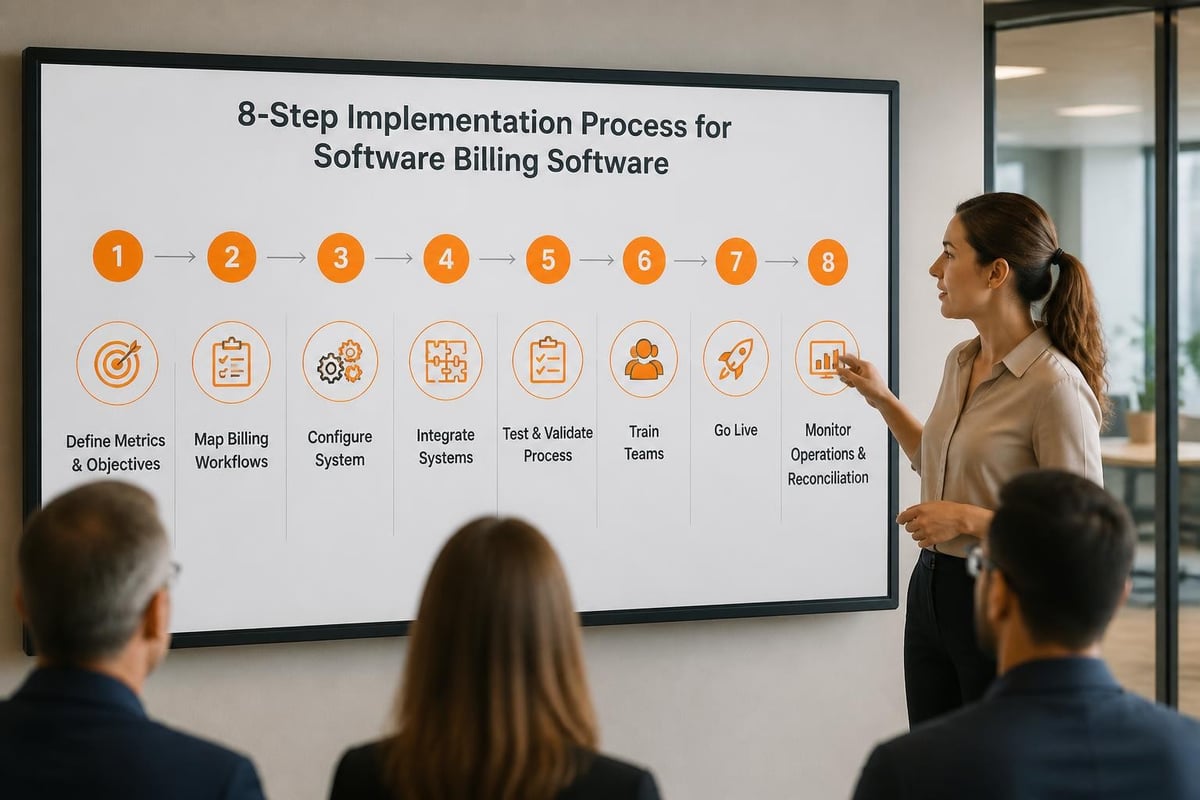
Implementation of software billing software follows a structured process that ensures accurate billing, reliable payment processing, and integration with existing systems.
Step 1: Define billing metrics and pricing structure. Identify what you bill for (users, usage, features), establish pricing tiers, and document calculation rules. Create a pricing matrix that maps products, plans, and add-ons to specific charges.
Step 2: Configure subscription plans and billing cycles. Set up plan templates with billing frequencies, trial periods, and renewal terms. Define upgrade and downgrade paths with proration rules.
Step 3: Integrate payment gateways and merchant accounts. Connect your billing software to payment processors like Stripe, PayPal, or Braintree. Configure supported payment methods and currency options.
Step 4: Implement usage tracking and data collection. Build API endpoints or webhooks that send usage events to the billing system. Establish data validation rules to ensure accuracy.
Step 5: Configure automated workflows and notifications. Set up invoice delivery schedules, payment retry logic, and customer notifications for billing events. Define dunning sequences for failed payments.
Step 6: Test billing scenarios and edge cases. Verify calculations for upgrades, downgrades, credits, refunds, and proration. Test with different customer scenarios and usage patterns.
Step 7: Migrate existing customer data and subscriptions. Transfer customer records, payment methods, and subscription history from legacy systems. Validate data integrity before going live.
Step 8: Monitor billing operations and reconcile payments. Track invoice generation, payment success rates, and revenue recognition. Compare system records with bank deposits and payment gateway reports.
Integration with existing systems requires careful planning. The billing software must connect with CRM systems, accounting platforms, tax calculation services, and analytics tools. When working with a software development company, ensure they understand data flow between systems and can build robust API connections that maintain data consistency.
What Are Common Challenges in Software Billing and How to Solve Them?
Software billing presents specific technical and operational challenges that require systematic solutions.
Proration Calculation Errors
Proration errors occur when customers change plans mid-cycle and the system incorrectly calculates credits or charges. The solution involves implementing precise date-based calculations that account for partial periods, timezone differences, and billing schedule variations. Test proration logic with multiple scenarios including month-end changes and leap years.
Failed Payment Recovery
Failed payments reduce revenue and increase customer churn. Implement automated dunning workflows that retry charges on optimized schedules (typically 3, 5, and 7 days after failure). Send progressive notifications that escalate in urgency. Provide customers with easy ways to update payment methods through self-service portals.
Usage Data Accuracy
Inaccurate usage data leads to billing disputes and revenue leakage. Establish validation rules that check for duplicate events, missing data, and anomalous patterns. Implement idempotency keys to prevent double-counting. Maintain audit logs that track all usage events and their processing status.
Tax Calculation Complexity
Tax requirements vary by jurisdiction and product type. Software billing software must calculate sales tax, VAT, GST, and other levies correctly. Integrate with tax calculation services like Avalara or TaxJar that maintain current tax rates and rules. Configure nexus settings that determine where you have tax obligations.
Revenue Recognition Compliance
Revenue recognition requires matching income with the period when services are delivered. Configure revenue schedules that allocate subscription fees over contract terms. Generate reports that show recognized revenue, deferred revenue, and future obligations. Ensure the system supports ASC 606 and IFRS 15 standards.
Common mistakes include:
- Hardcoding pricing rules instead of using configurable rate cards
- Failing to implement proper error handling for payment gateway failures
- Not maintaining comprehensive audit trails for billing changes
- Ignoring timezone differences in billing schedule calculations
- Overlooking currency conversion for international customers
What Best Practices Optimize Software Billing Operations?
Optimizing software billing operations requires implementing proven practices that improve accuracy, efficiency, and customer satisfaction.
Define Explicit Billing Rules
SaaS billing best practices emphasize the importance of translating pricing into explicit, testable billing rules. Document every scenario including standard charges, credits, refunds, and adjustments. Create decision trees that show how the system handles each billing event.
Automate Recurring Processes
Automation eliminates manual tasks and reduces errors. Best practices for making client billing easy include automating invoice generation, payment collection, and reconciliation. Schedule billing runs during off-peak hours to minimize system load.
Implement Real-Time Usage Tracking
Real-time usage tracking provides accurate billing data and enables immediate response to consumption changes. Configure webhooks that send usage events as they occur rather than batching them. This enables accurate metering and supports usage-based billing models.
Maintain Data Validation Workflows
Data validation prevents billing errors before they reach customers. Implement checks that verify:
- Customer data completeness (name, email, payment method)
- Price integrity (rates match approved pricing)
- Usage data validity (within expected ranges)
- Tax calculation accuracy (correct jurisdictions and rates)
- Invoice totals (line items sum correctly)
Provide Customer Self-Service
Self-service portals reduce support burden and improve customer experience. Enable customers to view invoices, download receipts, update payment methods, change plans, and review usage history. Provide transparent pricing calculators that show estimated charges.
Monitor Key Billing Metrics
Track metrics that indicate billing system health and business performance:
| Metric | Definition | Target |
|---|---|---|
| Invoice Accuracy Rate | Invoices without disputes ÷ total invoices | >98% |
| Payment Success Rate | Successful charges ÷ attempted charges | >95% |
| Days Sales Outstanding | Average time to collect payment | <30 days |
| Churn from Payment Failure | Cancellations due to failed payments | <2% |
| Revenue Leakage | Unbilled usage or missed charges | <1% |
For businesses that need to track service-related billing, integrating billing software with service and maintenance systems enables comprehensive tracking of service contracts, maintenance schedules, and associated charges. This integration ensures that service work is properly billed and revenue is captured for all delivered services.


How Does Custom Software Billing Software Compare to Standard Solutions?
Organizations choose between standard billing platforms and custom software billing software based on specific requirements, complexity, and strategic priorities.
Standard billing platforms offer pre-built functionality for common billing scenarios. These solutions include established integrations with payment gateways, tax services, and accounting systems. They provide faster deployment, lower initial costs, and regular feature updates. However, they may lack flexibility for unique pricing models or complex business rules.
Custom software billing software provides complete control over billing logic, workflows, and integrations. Custom solutions handle specialized requirements such as multi-entity billing, complex proration rules, or industry-specific compliance needs. Development costs are higher, but the system aligns precisely with business processes.
| Aspect | Standard Platform | Custom Solution |
|---|---|---|
| Implementation Time | 2-8 weeks | 3-6 months |
| Initial Cost | $100-$500/month | $50,000-$200,000 |
| Customization | Limited to configuration | Unlimited |
| Integration Complexity | Pre-built connectors | Custom API development |
| Maintenance | Vendor-managed | Internal or partner-managed |
| Scalability | Defined by platform limits | Designed for specific needs |
A mid-sized SaaS company using custom billing software reported 40% reduction in billing errors after implementing logic that handled complex multi-product subscriptions with usage overages and regional pricing variations. The custom system integrated directly with their proprietary usage tracking infrastructure, eliminating data synchronization issues that plagued their previous platform solution.
What Integration Requirements Does Software Billing Software Have?
Software billing software operates as part of a broader technology ecosystem and requires integration with multiple systems to function effectively.
Customer Relationship Management (CRM)
CRM integration synchronizes customer data between sales and billing systems. When sales teams close deals, customer information flows automatically to billing software. The integration maintains account details, contact information, and subscription terms. For organizations using Brytend CRM, billing data can flow back to provide sales teams with revenue metrics and payment status.
Payment Gateways
Payment gateway integration enables charge processing, payment verification, and funds settlement. The billing software sends payment requests to gateways like Stripe, Authorize.net, or PayPal, receives authorization responses, and updates transaction records. Integration supports tokenization for secure payment method storage.
Accounting Systems
Accounting integration transfers financial data to systems like QuickBooks, NetSuite, or Xero. The billing software sends invoice records, payment transactions, and revenue recognition entries. This maintains synchronized financial records and supports month-end close processes.
Tax Calculation Services
Tax service integration provides accurate tax rates for customer locations and product types. The billing software sends transaction details to services like Avalara, receives calculated tax amounts, and includes them on invoices. Integration handles rate updates automatically.
Analytics Platforms
Analytics integration sends billing data to business intelligence tools for reporting and analysis. Best practices for SaaS billing management include maintaining comprehensive reporting on key metrics like monthly recurring revenue (MRR), annual recurring revenue (ARR), and customer lifetime value (CLV).
Usage Data Sources
Usage data integration collects consumption metrics from application servers, APIs, and infrastructure systems. The billing software receives usage events, aggregates them by customer and billing period, and applies pricing rules. Integration must handle high-volume data streams reliably.
What Security and Compliance Requirements Apply to Billing Software?
Software billing software handles sensitive financial data and must meet rigorous security and compliance standards.
Payment Card Industry Data Security Standard (PCI DSS)
PCI DSS compliance is mandatory for systems that store, process, or transmit credit card data. Billing software must implement tokenization to avoid storing card numbers, encrypt data in transit and at rest, maintain access controls, and undergo regular security audits. Most organizations reduce PCI scope by using payment gateways that handle card data directly.
Data Protection Regulations
GDPR, CCPA, and similar regulations govern how billing software collects, stores, and processes customer data. Systems must provide data portability, support deletion requests, maintain consent records, and implement appropriate security controls. Privacy-by-design principles should guide development.
Revenue Recognition Standards
ASC 606 and IFRS 15 define how companies recognize revenue from customer contracts. Billing software must track performance obligations, allocate transaction prices, recognize revenue over service periods, and generate compliant financial reports. The system maintains detailed records of contract modifications and their revenue impact.
Invoice Standards and Electronic Billing
Electronic invoicing standards like eBIS-XML support interoperability between billing systems. The eBIS-XML standard defines structured formats for invoice data exchange, enabling automated processing and integration. Compliance with these standards facilitates business-to-business transactions.
Audit Trail Requirements
Comprehensive audit trails document all billing transactions, system changes, and user actions. The software logs invoice creation, modifications, payment processing, refunds, and credits with timestamps and user identifiers. Immutable logs support financial audits and dispute resolution.
How Do You Select the Right Software Billing Software?
Selecting appropriate software billing software requires evaluating technical capabilities, business fit, and long-term scalability.
Assess billing complexity and volume. Organizations with simple subscription models and low transaction volumes can use standard platforms. Those with complex pricing, high volume, or unique requirements benefit from custom solutions.
Evaluate integration requirements. List all systems that must connect with billing software including CRM, accounting, payment gateways, and internal applications. Verify that solutions support required integrations through APIs or pre-built connectors.
Review pricing model support. Ensure the software handles your pricing structure whether flat-rate, per-user, usage-based, tiered, or hybrid. Test calculation logic with real scenarios. Reviewing the best billing and invoicing software helps identify platforms that support specific billing models.
Consider scalability requirements. Project growth in customer count, transaction volume, and feature complexity. Verify that the solution scales without performance degradation or cost spikes.
Examine reporting capabilities. Review available reports for revenue recognition, aging analysis, payment success rates, and custom metrics. Ensure the system provides data exports for external analysis.
Test payment processing options. Confirm support for required payment methods, currencies, and regional processors. Verify dunning management features and payment retry logic.
Validate compliance features. Check for tax calculation capabilities, revenue recognition reporting, and audit trail functionality. Ensure the system meets industry-specific compliance requirements.
Calculate total cost of ownership. Include subscription fees, transaction costs, implementation expenses, integration development, training, and ongoing maintenance. Compare against expected efficiency gains and revenue protection.
Organizations requiring highly customized billing logic or unique integration patterns should consider custom development. Understanding how to make billing software that transforms financial workflows provides insight into development considerations and architecture decisions.
Software billing software automates complex invoicing processes, reduces errors, and scales with business growth through flexible pricing models and robust integrations. For organizations with unique billing requirements or complex pricing structures, custom solutions provide the control and flexibility needed to support specific business models. Brytend develops custom software billing software tailored to your exact requirements, integrating seamlessly with existing systems and scaling to meet future demands. Contact us to discuss how we can build a billing solution that fits your business.