Custom mobile application development delivers mobile software built specifically for an organization's unique requirements, workflows, and user base rather than using off-the-shelf solutions. In 2026, businesses increasingly require mobile applications that integrate with proprietary systems, enforce specific security protocols, and support specialized operational processes that generic consumer apps cannot address. Understanding the technical, architectural, and strategic considerations enables better planning and execution.
TL;DR:
- Custom mobile application development creates native or cross-platform apps tailored to specific business logic, data models, and integration requirements
- Security, architecture choices (native vs. cross-platform), and backend integration define project complexity and long-term maintainability
- Requirements definition, user research, iterative development, and device testing prevent costly rework and ensure adoption
- DevOps automation, accessibility compliance, and performance monitoring are essential for enterprise-grade mobile applications
- Total cost of ownership includes ongoing maintenance, OS updates, security patches, and feature evolution beyond initial delivery
What Is Custom Mobile Application Development?
Custom mobile application development is the process of designing, building, testing, and deploying mobile software applications that address specific organizational requirements, integrate with existing systems, and support workflows that generic applications cannot fulfill.
Unlike consumer-focused apps downloaded from public app stores, custom mobile applications typically serve internal users (employees, field technicians, sales teams) or specific customer segments with specialized needs. These applications connect to proprietary databases, enforce organization-specific security policies, and implement business rules that reflect years of operational knowledge. The development process begins with requirements analysis, proceeds through architecture and design phases, continues with iterative coding and testing, and concludes with deployment, training, and ongoing support.
When Custom Development Is Necessary
Organizations require custom mobile application development when:
- Existing applications lack critical integration points with ERP, CRM, or legacy systems
- Workflow complexity demands tailored user interfaces and data validation rules
- Security or compliance mandates prohibit third-party data storage or processing
- Competitive advantage depends on proprietary features or analytical capabilities
- Licensing costs for commercial software exceed custom development investment over a three-to-five-year horizon
For businesses managing field service operations, custom mobile apps enable real-time job dispatching, equipment service history lookup, and offline data capture that generic tools cannot replicate. Manufacturing firms use custom apps to track serialized inventory through production and distribution. Healthcare providers build HIPAA-compliant patient intake and documentation applications.
| Scenario | Off-the-Shelf Solution | Custom Development |
|---|---|---|
| Standard CRM workflows | Suitable | Unnecessary complexity |
| Proprietary inspection checklists with conditional logic | Limited flexibility | Required |
| Public consumer app with broad appeal | Ideal | Cost-prohibitive |
| Integration with legacy AS/400 systems | Rarely supported | Fully controllable |
| Annual per-seat fees exceeding $200,000 | Ongoing cost | One-time investment |

How Does the Custom Mobile Application Development Process Work?
The custom mobile application development process follows structured phases that transform business requirements into deployed, maintainable software. Each phase delivers specific artifacts and validation checkpoints.
Discovery and Requirements Phase
The foundation phase establishes scope, success metrics, and technical constraints:
- Stakeholder interviews identify user roles, pain points, and desired outcomes
- Workflow mapping documents current processes and proposed improvements
- Data modeling defines entities, relationships, and integration touchpoints
- Technical assessment evaluates existing infrastructure, APIs, and authentication systems
- Success criteria establish measurable targets (adoption rate, task completion time, error reduction)
Requirements documentation specifies functional behaviors (what the app does), non-functional attributes (performance, security, accessibility), and integration contracts (API endpoints, data formats, authentication protocols). Ambiguous requirements cause 40-60% of project delays and budget overruns.
Architecture and Design Phase
Technical architecture decisions determine long-term maintainability, performance, and development velocity. Android architecture recommendations provide modern patterns for building scalable applications.
Critical architectural choices include:
- Native vs. cross-platform: Native Swift/Kotlin delivers optimal performance and platform-specific features; cross-platform frameworks (React Native, Flutter) enable code sharing but introduce abstraction layers
- Backend architecture: RESTful APIs, GraphQL endpoints, or serverless functions define how mobile clients consume and update data
- Authentication and authorization: OAuth 2.0, SAML, biometric authentication, or custom token schemes control access
- Offline capabilities: Local databases (SQLite, Realm), synchronization logic, and conflict resolution enable operation without connectivity
- State management: Unidirectional data flow, reactive patterns, or traditional MVC architectures control UI updates and data consistency
User interface design follows platform conventions documented in Apple’s Human Interface Guidelines for iOS applications. Consistency with platform patterns reduces learning curves and improves user satisfaction. Wireframes and interactive prototypes validate navigation flows, information hierarchy, and interaction patterns before coding begins.
Development and Testing Phase
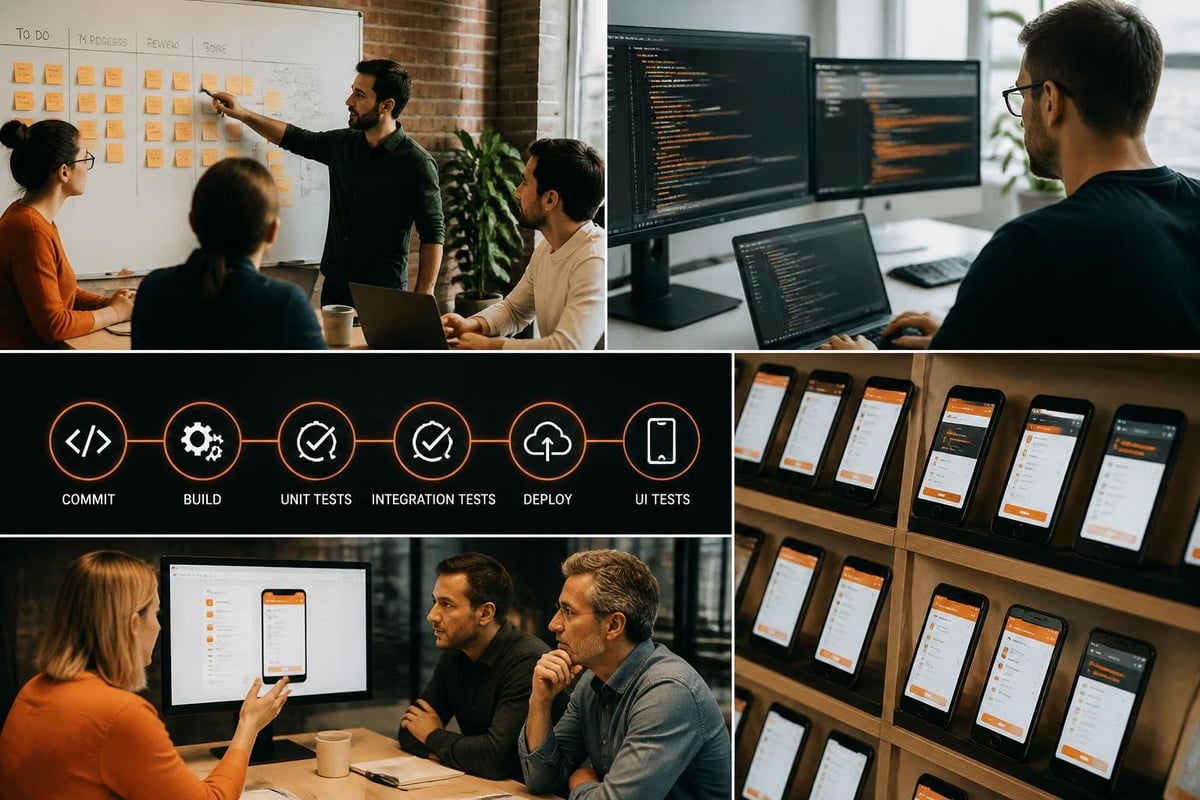
Iterative development delivers working software in two-to-four-week sprints. Each sprint produces potentially deployable increments that stakeholders review and validate.
Development activities include:
- Frontend implementation (UI components, navigation, state management, local data persistence)
- Backend API development (endpoints, business logic, database queries, caching strategies)
- Integration coding (authentication, third-party services, webhook handlers, message queues)
- Automated testing (unit tests, integration tests, end-to-end scenarios covering critical workflows)
- Manual testing (exploratory testing, usability evaluation, accessibility validation on actual devices)
Security testing identifies vulnerabilities documented in the OWASP Mobile Top 10, including insecure data storage, insufficient cryptography, and improper platform usage. Code reviews and static analysis tools detect common errors before they reach production environments.
Deployment and Release Phase
Releasing custom mobile applications involves platform-specific review processes, distribution mechanisms, and rollout strategies.
For iOS applications submitted to the App Store:
- Prepare app metadata (descriptions, screenshots, privacy disclosures)
- Configure app signing certificates and provisioning profiles
- Submit build for review following App Store Review Guidelines
- Address feedback or rejections (average review time: 24-48 hours)
- Release to target audience (public, organizational, or beta test groups)
Enterprise distribution bypasses the App Store for internal applications, using Mobile Device Management (MDM) systems or enterprise certificates. Android applications deploy through Google Play (public or managed Play for enterprises) or direct APK installation for fully private distribution.
Phased rollouts release applications to progressively larger user segments, enabling early detection of deployment issues, performance problems, or usability gaps before full-scale release. Rollback procedures restore previous versions when critical defects appear post-deployment.
What Are the Security Considerations in Custom Mobile Application Development?
Security vulnerabilities in mobile applications expose sensitive data, enable unauthorized access, and create compliance violations. Custom mobile application development must address platform-specific threats and organization-specific risk tolerance.
Data Protection and Encryption
Mobile applications handle data in three states:
- Data at rest: Information stored on the device (databases, files, cached content) requires encryption using platform-provided keychains (iOS) or encrypted storage mechanisms (Android EncryptedSharedPreferences, Room database encryption)
- Data in transit: Network communication must use TLS 1.3 with certificate pinning to prevent man-in-the-middle attacks and eavesdropping
- Data in use: Sensitive information in memory should be cleared after processing; debug logs must exclude confidential data
The OWASP Mobile Application Security Cheat Sheet provides implementation guidance for protecting authentication tokens, implementing proper session management, and validating all input data.
Authentication and Authorization
Secure authentication mechanisms include:
- Multi-factor authentication (MFA): Combining passwords with biometric verification, hardware tokens, or one-time codes
- Biometric authentication: Fingerprint, facial recognition, or iris scanning using platform APIs (FaceID, TouchID, Android BiometricPrompt)
- Certificate-based authentication: Client certificates for high-security environments requiring device-level verification
- Token refresh strategies: Short-lived access tokens with secure refresh token storage and rotation
Authorization logic determines which resources and operations each authenticated user can access. Role-based access control (RBAC) maps user roles to permissions; attribute-based access control (ABAC) evaluates contextual factors (location, time, device posture) for fine-grained decisions.
| Security Control | Implementation Method | Risk Mitigated |
|---|---|---|
| Certificate pinning | Hard-code expected certificate in app bundle | MITM attacks, rogue certificates |
| Root/jailbreak detection | Runtime checks for modified OS | Malware, unauthorized monitoring |
| Code obfuscation | ProGuard (Android), symbol stripping (iOS) | Reverse engineering, IP theft |
| Secure flag for sensitive screens | Prevent screenshots and screen recording | Data leakage through device features |
Compliance and Privacy
Custom mobile applications collecting, processing, or storing personal data must comply with regulations including GDPR (European Union), CCPA (California), HIPAA (healthcare), and industry-specific standards (PCI DSS for payment data).
Compliance requirements affect:
- Data minimization: Collect only data necessary for stated purposes
- User consent: Explicit opt-in for data collection, with granular controls
- Right to deletion: Mechanisms to purge user data upon request
- Data portability: Export capabilities in standard formats
- Breach notification: Procedures and timelines for reporting security incidents
Privacy policies must clearly describe data collection practices, third-party sharing, retention periods, and user rights. App store submissions require privacy declarations detailing data types collected and their purposes.
How Do You Measure ROI from Custom Mobile Application Development?
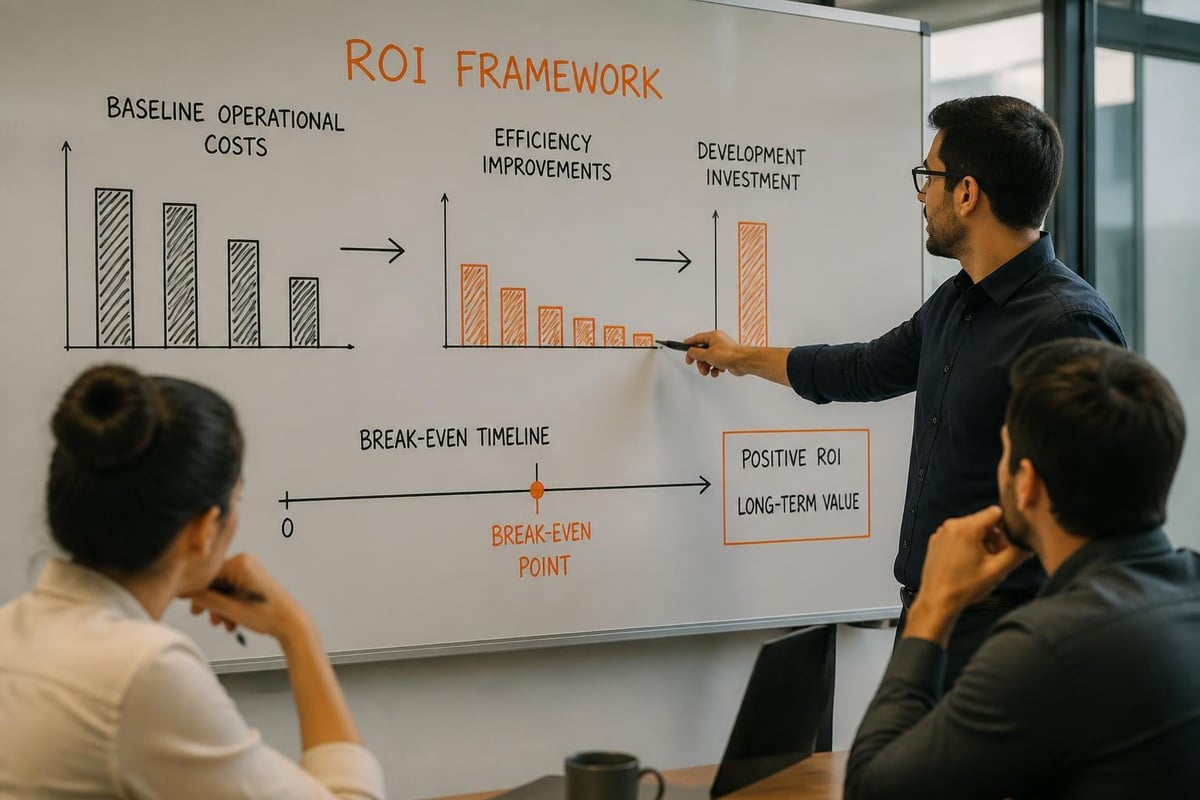
Return on investment (ROI) from custom mobile application development accrues through efficiency gains, error reduction, revenue enablement, and competitive differentiation. Quantifying benefits requires establishing baselines and tracking relevant metrics post-deployment.
Operational Efficiency Metrics
Custom mobile applications reduce time and cost for specific workflows:
- Task completion time: Service technicians completing work orders 35-50% faster with mobile access to equipment history and documentation
- Data entry accuracy: Digital forms with validation rules reducing error rates from 8-12% to under 2%
- Travel and coordination costs: Real-time scheduling and routing optimization cutting unnecessary site visits by 20-30%
- Training time: Intuitive, role-specific interfaces reducing onboarding from weeks to days
Agile development methodologies enable incremental delivery, allowing organizations to realize benefits from early releases while later phases continue development. Calculating efficiency ROI compares labor hours saved (quantity × hourly cost) against development, deployment, and maintenance costs over a three-to-five-year period.
Revenue and Customer Impact
Revenue-focused applications generate measurable financial returns:
- Sales enablement: Mobile quoting tools increasing quote volume and win rates
- Upsell and cross-sell: Context-aware product recommendations during service visits
- Customer self-service: Reducing support call volume while improving satisfaction scores
- Faster invoicing: Real-time billing reducing days sales outstanding (DSO)
Customer satisfaction metrics (Net Promoter Score, Customer Satisfaction Score, retention rates) reflect improvements in service quality, responsiveness, and convenience. Organizations using customer relationship management systems integrate mobile applications to maintain complete interaction histories and enable personalized engagement.
Common ROI Measurement Mistakes
Organizations underestimate ROI when they:
- Ignore opportunity costs of delayed decisions or incomplete information
- Fail to account for reduced customer churn and lifetime value improvements
- Exclude IT infrastructure costs already sunk (servers, databases, authentication systems)
- Overlook employee satisfaction and retention benefits from improved tools
- Compare against the cost of manual processes rather than alternative software solutions
Comprehensive ROI analysis includes quantitative metrics (time saved, revenue gained, costs avoided) and qualitative benefits (competitive positioning, data quality, strategic agility).
What Are the Best Practices for Maintaining Custom Mobile Applications?
Custom mobile application development does not end at deployment. Ongoing maintenance ensures compatibility with evolving operating systems, addresses security vulnerabilities, and incorporates user feedback for continuous improvement.
Operating System Updates and Compatibility
Apple and Google release major OS versions annually, with multiple minor updates throughout the year. Each release introduces new APIs, deprecates outdated methods, and modifies platform behaviors.
Maintenance activities include:
- Compatibility testing: Validating application functionality on beta OS releases before public availability
- API migration: Updating deprecated API calls to recommended alternatives
- UI adaptation: Adjusting layouts and interactions for new screen sizes, display technologies, and input methods
- Permission model changes: Adapting to revised privacy controls and authorization flows
Failure to maintain compatibility results in application crashes, degraded performance, or App Store/Play Store removal. Organizations typically allocate 15-20% of initial development budgets annually for ongoing maintenance and enhancement.
Security Patch Management
Security vulnerabilities emerge continuously in application code, third-party libraries, and platform frameworks. Patch management addresses known vulnerabilities before exploitation.
Security maintenance processes:
- Monitor security advisories for frameworks and dependencies (npm audit, CocoaPods, Gradle dependency check)
- Evaluate vulnerability severity and exploitability in the application's context
- Test patches in staging environments before production deployment
- Deploy critical security updates within 7-14 days of disclosure
- Document remediation in security audit logs and compliance records
Firebase Analytics and crash reporting tools identify runtime errors, performance degradation, and user experience issues requiring attention. Proactive monitoring detects problems before they affect large user populations.
Feature Evolution and User Feedback
Successful custom mobile applications evolve based on user feedback, changing business requirements, and competitive pressures.
Enhancement processes include:
- Usage analytics review: Identifying heavily-used features (invest further) and neglected capabilities (simplify or remove)
- User feedback collection: In-app surveys, support tickets, and stakeholder interviews revealing pain points
- A/B testing: Comparing alternative implementations to optimize conversion, completion rates, or satisfaction
- Roadmap planning: Prioritizing enhancements based on business value, technical dependencies, and resource availability
Structured enterprise software development processes balance new feature requests against technical debt reduction, performance optimization, and security improvements. Neglecting technical debt accelerates maintenance costs and slows feature delivery over time.
How Do You Choose Between Native and Cross-Platform Development?
The decision between native development (Swift for iOS, Kotlin for Android) and cross-platform frameworks (React Native, Flutter) affects development costs, performance, and long-term maintainability. No single approach suits all scenarios.
Native Development Advantages
Native development delivers platform-specific benefits:
- Performance: Direct access to platform APIs and hardware without abstraction layers
- Platform features: Immediate access to new OS capabilities on release day
- Developer ecosystem: Mature tooling, extensive documentation, and large talent pools
- User experience: Platform-native UI components that automatically adapt to OS updates
Organizations with platform-specific requirements (intensive graphics, real-time processing, deep hardware integration) benefit from native development. Applications requiring cutting-edge iOS features (ARKit, Core ML) or Android capabilities (Material Design 3, Jetpack Compose) cannot rely on cross-platform framework support timelines.
Cross-Platform Framework Benefits
Cross-platform frameworks enable code sharing and faster delivery:
- Code reuse: Single codebase deploying to both iOS and Android (typically 60-80% shared code)
- Faster time-to-market: Reduced development effort for dual-platform releases
- Smaller team requirements: Single development team rather than separate iOS and Android specialists
- Consistent behavior: Uniform business logic and fewer platform-specific bugs
Applications with complex business logic but standard UI requirements (forms, lists, detail views) realize significant savings from cross-platform development. Organizations lacking deep mobile expertise may find React Native or Flutter easier to staff using web development skills.
| Evaluation Criterion | Native Development | Cross-Platform Framework |
|---|---|---|
| Performance-critical features (gaming, video processing) | Strongly preferred | Acceptable with native modules |
| Standard business applications (forms, data display) | Optional | Cost-effective |
| Rapid prototyping and MVP development | Slower | Faster |
| Long-term maintenance (5+ years) | Easier (platform support) | Framework longevity risk |
| Team with existing web development skills | Requires mobile training | Leverages existing knowledge |
Hybrid Approaches
Some organizations adopt hybrid strategies, implementing performance-critical modules natively while using cross-platform frameworks for standard features. This approach balances development efficiency with technical requirements but introduces complexity in build systems, testing, and maintenance.
What Are Common Mistakes in Custom Mobile Application Development?
Custom mobile application development projects fail or underperform due to preventable planning, execution, and operational errors. Recognizing common mistakes enables proactive mitigation.
Insufficient User Research and Testing
Development teams frequently:
- Assume they understand user workflows without direct observation or interviews
- Build features based on stakeholder requests rather than validated user needs
- Skip usability testing until late in development when changes are expensive
- Test only on current-year flagship devices rather than the installed base of older models
Nielsen Norman Group research demonstrates that usability testing with just five representative users identifies 85% of interface problems. Organizations that defer user testing until final delivery face costly redesigns or poor adoption.
Neglecting Offline Functionality
Mobile devices operate in environments with intermittent or absent network connectivity. Applications assuming constant connectivity fail during:
- Underground facilities and industrial sites with poor signal penetration
- Remote field locations outside cellular coverage
- International travel with disabled data roaming
- Network outages or server maintenance windows
Offline-capable applications cache critical data locally, queue user actions for later synchronization, and clearly communicate connection status. Synchronization logic handles conflicts when multiple users modify the same data offline.
Inadequate DevOps and Release Automation
Manual build, test, and release processes introduce errors, slow iteration, and prevent rapid response to defects. Mobile DevOps guidance describes automation practices that improve reliability and velocity.
Automated pipelines should:
- Trigger builds on every code commit to version control
- Execute automated test suites (unit, integration, UI automation)
- Run static analysis and security scans
- Deploy to staging environments for acceptance testing
- Package signed releases for app store submission or enterprise distribution
Organizations without automated pipelines experience week-long release cycles versus daily or hourly deployments with full automation.
Ignoring Accessibility Requirements
Applications excluding users with disabilities face legal risks under the Americans with Disabilities Act (ADA) and similar regulations worldwide. W3C mobile accessibility guidance outlines requirements including:
- Screen reader support: Properly labeled UI elements and logical reading order
- Keyboard navigation: All functionality accessible without touch gestures
- Color contrast: Text and controls meeting WCAG 2.1 AA standards (4.5:1 for normal text)
- Adjustable text size: Layouts that accommodate user-specified font sizes
- Alternative input methods: Voice control and switch access compatibility
Accessibility improvements benefit all users, including those in situational disabilities (bright sunlight, noisy environments, divided attention).
Underestimating Ongoing Costs
Initial development represents 60-70% of total cost of ownership over five years. Organizations that budget only for initial delivery cannot sustain:
- Annual OS compatibility updates (10-15% of initial cost)
- Security patches and vulnerability remediation (5-10% annually)
- Feature enhancements and user-requested improvements (15-20% annually)
- Infrastructure costs (servers, databases, third-party services)
- Support and training for evolving user bases
Software companies structure engagements with defined maintenance terms, service level agreements, and enhancement budgets to prevent application deterioration over time.
How Do Custom Mobile Applications Integrate with Enterprise Systems?
Custom mobile application development requires integration with existing enterprise systems to access data, enforce business rules, and maintain operational continuity. Integration architecture determines data freshness, offline capabilities, and system reliability.
API-Based Integration Patterns
RESTful APIs provide standard integration mechanisms:
- Data retrieval: Mobile apps request current information from backend systems (customer records, inventory levels, service histories)
- Transaction submission: Mobile users create orders, complete inspections, or update records through API endpoints
- Real-time notifications: Push notifications and webhooks inform mobile users of relevant events
- File exchange: Document upload, image capture, and PDF generation for reports and records
GraphQL offers an alternative to REST, enabling mobile clients to request precisely the data fields required, reducing bandwidth consumption and improving performance on slow connections.
Authentication and Single Sign-On
Enterprise applications use centralized authentication systems (Active Directory, Okta, Azure AD) rather than application-specific credentials.
Integration approaches include:
- OAuth 2.0 flows: Mobile apps redirect to enterprise identity providers for authentication, receiving tokens for API access
- SAML assertion consumption: Enterprise SSO systems issue SAML tokens that mobile apps exchange for application sessions
- Certificate-based authentication: Device certificates provisioned through MDM systems identify and authenticate users
Token refresh strategies maintain sessions without requiring repeated user authentication while enforcing security policies (expiration, revocation).
Data Synchronization Strategies
Mobile applications operating offline require local data storage and synchronization mechanisms when connectivity returns.
Synchronization patterns include:
- Full synchronization: Download complete datasets on app launch (suitable for small datasets under 10MB)
- Incremental synchronization: Download only changes since last sync using timestamps or change tokens
- Selective synchronization: Download data relevant to the user's role, location, or assignments
- Conflict resolution: Implement last-write-wins, user-prompted resolution, or domain-specific merge logic for simultaneous edits
For organizations managing service documentation, mobile applications must synchronize equipment inspection records, maintenance histories, and certification documents between field technicians and central databases.
Brytend CRM offers mobile-optimized interfaces and API access that custom mobile applications can leverage for customer data, lead management, and interaction tracking. This integration enables field teams to access complete customer contexts while capturing new information in real time.

Message Queue and Event-Driven Architecture
High-volume or asynchronous operations benefit from message queue integration rather than synchronous API calls.
Event-driven patterns include:
- Mobile app publishes events to message queue (Azure Service Bus, AWS SQS, RabbitMQ)
- Backend workers process events asynchronously, performing complex calculations or triggering multi-step workflows
- Completion events notify mobile apps through push notifications or polling
- Failed operations retry automatically with exponential backoff
This architecture prevents mobile app timeouts during long-running operations and enables backend scaling independent of mobile app load.
Custom mobile application development transforms organizational capabilities when executed with clear requirements, robust architecture, and ongoing maintenance. The investment delivers measurable efficiency gains, competitive advantages, and user experiences that off-the-shelf solutions cannot replicate. Successful implementations balance platform-native capabilities, security requirements, and integration complexity against development timelines and total cost of ownership. Brytend specializes in creating custom mobile applications that integrate seamlessly with existing enterprise systems, enforce organization-specific workflows, and evolve alongside changing business requirements to deliver sustained value.