AI workflow automation software is a category of enterprise applications that uses artificial intelligence, machine learning, and natural language processing to automate multi-step business processes with minimal human intervention. These platforms orchestrate tasks, make intelligent routing decisions, process unstructured data, and trigger actions across integrated systems based on learned patterns and predefined logic.
Related: for broader, rule-based process automation across departments, see our workflow automation software guide.
TL;DR:
- AI workflow automation software combines traditional process automation with machine learning to handle complex, variable workflows
- Platforms reduce manual effort by 40-70% while improving accuracy in document processing, routing, and decision-making tasks
- Core capabilities include natural language processing, computer vision, predictive routing, and adaptive learning from historical data
- Implementation requires clear process documentation, quality training data, and integration with existing business systems
- ROI typically appears within 6-12 months through reduced labor costs, faster cycle times, and fewer processing errors
What Is AI Workflow Automation Software and How Does It Work?
AI workflow automation software is a platform that combines rule-based process orchestration with artificial intelligence capabilities to automate end-to-end business workflows. Unlike traditional automation tools that follow rigid if-then logic, ai workflow automation software adapts to variations, learns from outcomes, and handles unstructured inputs like emails, documents, and images.
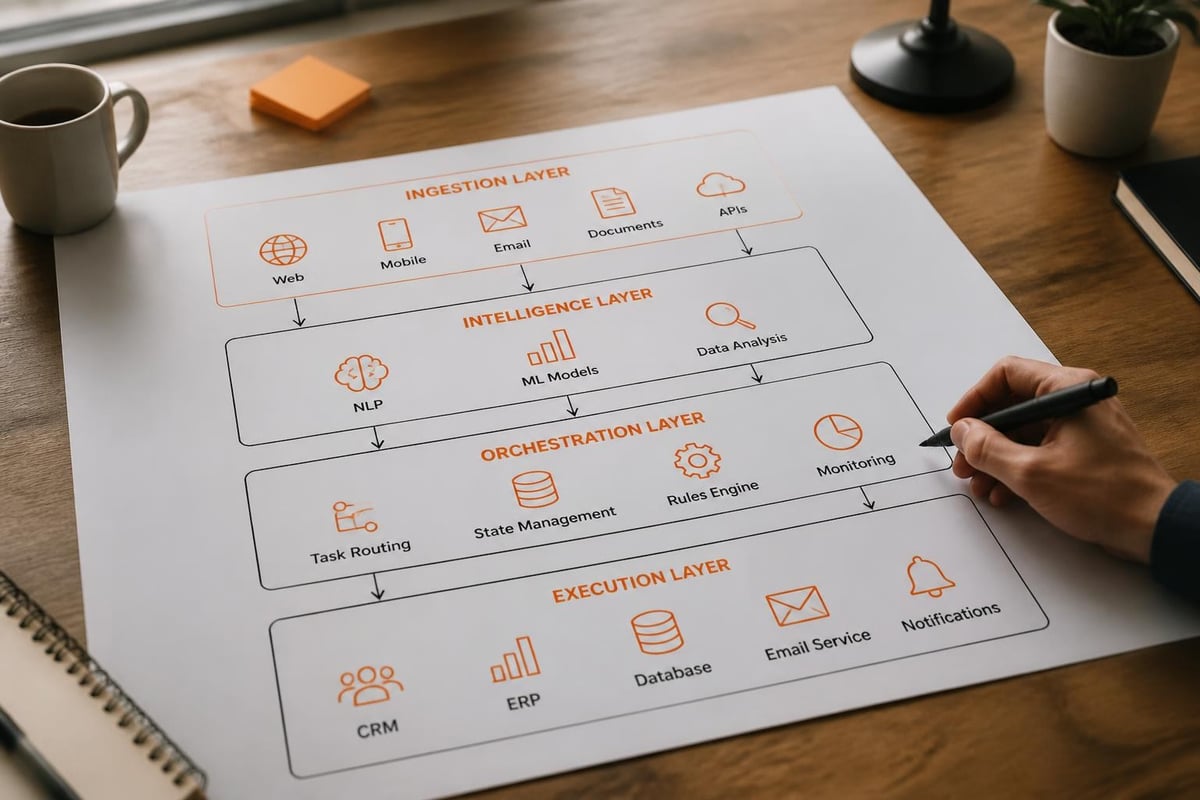
The architecture consists of four integrated layers. The ingestion layer captures data from multiple sources-web forms, email, APIs, file uploads, and IoT sensors. The intelligence layer applies machine learning models to classify, extract, and interpret information using natural language processing, computer vision, and predictive analytics. The orchestration layer manages workflow state, routes tasks to appropriate handlers (human or automated), and enforces business rules. The execution layer triggers actions across connected systems through APIs, webhooks, and robotic process automation (RPA) connectors.
Modern platforms incorporate large language models (LLMs) to understand context, generate responses, and make nuanced decisions that previously required human judgment. For example, an AI-driven CRM system can analyze incoming customer inquiries, classify intent, extract key information, route to the correct department, and even draft preliminary responses-all without manual triage.
Core Components of AI Workflow Automation Platforms
AI workflow automation software integrates multiple technologies into a unified platform. Natural language processing engines parse text from emails, chat, documents, and forms to extract entities, sentiment, and intent. Computer vision models process images and PDFs to recognize text (OCR), classify documents, and extract structured data from invoices, receipts, and forms.
Machine learning models predict outcomes, classify inputs, and optimize routing decisions based on historical patterns. For instance, a support ticket routing model learns which technician resolves specific issue types fastest and automatically assigns new tickets accordingly. The NIST AI Resource Center provides comprehensive guidance on testing and validating these AI components for production use.
- Process orchestration engine: Manages workflow state, dependencies, and branching logic
- Integration framework: Connects to databases, APIs, SaaS applications, and legacy systems
- Business rules engine: Applies conditional logic, compliance checks, and approval hierarchies
- Analytics dashboard: Tracks throughput, bottlenecks, error rates, and model performance
- Version control: Manages workflow definitions, model versions, and rollback capabilities
The platform stores workflow definitions as code, enabling version control, testing, and collaborative development. Teams can deploy updates to production workflows without downtime using canary releases or blue-green deployment patterns described in AWS Step Functions best practices.
What Are the Primary Use Cases for AI Workflow Automation Software?
AI workflow automation software addresses workflows involving high volumes of variable inputs, complex decision trees, and integration across multiple systems. These platforms excel when processes require interpretation of unstructured data, adaptive routing, or predictive decision-making.
Document Processing and Data Extraction
Invoice processing represents a canonical use case. Traditional OCR tools struggle with varying invoice formats, handwritten notes, and multi-language documents. AI workflow automation software combines computer vision with machine learning to extract vendor names, amounts, line items, and payment terms from any invoice format. The system validates extracted data against purchase orders, flags discrepancies for review, and routes approved invoices to accounting systems for payment processing.
Contract review workflows analyze agreements to identify key clauses, obligations, renewal dates, and risk factors. Legal teams receive summarized highlights and risk scores rather than reading every page manually. Recent research on LLMs for constructing machine learning workflows demonstrates how language models can optimize these extraction pipelines.
| Document Type | Manual Time | Automated Time | Accuracy Improvement |
|---|---|---|---|
| Invoices | 8-12 minutes | 30-90 seconds | 95-99% with validation |
| Contracts | 2-4 hours | 5-15 minutes | 92-97% for key terms |
| Forms | 3-6 minutes | 15-45 seconds | 97-99% structured data |
Customer Service and Support Automation
AI workflow automation software orchestrates multi-channel support interactions. When a customer submits a support request via email, chat, or web form, the system classifies the issue type, extracts relevant details (account ID, error codes, symptoms), searches the knowledge base for solutions, and either provides an automated response or routes to the appropriate specialist with full context.
Escalation workflows monitor response times and customer sentiment. If frustration indicators appear in follow-up messages, the system automatically escalates to a senior agent and notifies management. This adaptive routing reduces resolution time by 30-50% compared to static queue-based assignment.
Order Fulfillment and Supply Chain Coordination
Manufacturing and distribution operations use ai workflow automation software to coordinate procurement, production scheduling, quality control, and shipping. When inventory levels trigger reorder points, the system evaluates supplier performance history, current lead times, and pricing to select the optimal vendor, generates purchase orders, and schedules delivery to align with production requirements.
Quality control workflows route products through inspection stages based on risk factors. High-value items or those from new suppliers receive enhanced inspection protocols automatically. The Vertex AI Tabular Workflows documentation provides patterns for building these orchestrated pipelines.

How Does AI Workflow Automation Software Differ from Traditional Process Automation?
Traditional business process management (BPM) and RPA tools automate predefined, repeatable sequences. They execute tasks consistently but cannot adapt to variations or handle ambiguous inputs without explicit programming for each scenario. AI workflow automation software introduces cognitive capabilities that enable handling of exceptions, unstructured data, and dynamic routing.
Rule-Based vs. Adaptive Decision-Making
Legacy automation follows deterministic logic: "if condition A, then action B." Every possible scenario requires explicit programming. AI-enhanced platforms learn decision patterns from historical data and generalize to new situations. A document classification model trained on 1,000 labeled examples can accurately categorize novel documents it has never encountered.
This adaptive capability becomes critical in processes with high variability. Purchase requisition approval workflows, for example, may have hundreds of special cases based on requester department, vendor relationship, commodity type, and amount. Instead of encoding every rule, machine learning models predict the appropriate approver based on patterns in past approvals.
Unstructured Data Processing
Traditional automation requires structured inputs-database records, API responses with defined schemas, or forms with fixed fields. Real business processes involve emails, PDFs, images, audio, and free-text notes. AI workflow automation software extracts structure from these unstructured sources.
An employee onboarding workflow receives resumes in various formats (PDF, Word, LinkedIn URLs), offer letters with non-standard templates, and background check results as PDFs. NLP and vision models extract name, contact information, job title, start date, and clearance status regardless of document format. This extracted data populates HR systems, provisions accounts, and triggers equipment ordering without manual data entry.
Continuous Improvement Through Learning
Static automation degrades as business conditions change. New product categories, regulatory requirements, or process modifications require manual reconfiguration. AI workflow automation software improves through feedback loops. When human reviewers correct classification errors or approve/reject automated decisions, those corrections become training data for model refinement.
A customer feedback survey system that routes responses to appropriate teams learns which keywords and sentiment patterns indicate specific departments should handle the feedback. Over time, routing accuracy increases without explicit rule updates.
What Are the Key Features to Evaluate in AI Workflow Automation Software?
Selecting ai workflow automation software requires evaluating both traditional workflow capabilities and AI-specific functionality. The platform must handle your current automation needs while providing a path to intelligent, adaptive processes.
Natural Language Processing and Understanding
Assess the platform's ability to process text in your business context. Does it understand industry-specific terminology? Can it extract entities relevant to your workflows-account numbers, product SKUs, regulatory citations, or technical specifications? Test with real examples from your operations rather than vendor-provided demos.
NLP capabilities should include:
- Intent classification (determining what action a message requires)
- Named entity recognition (extracting specific data like dates, amounts, names)
- Sentiment analysis (detecting customer satisfaction, urgency, or frustration)
- Summarization (condensing long documents into key points)
- Translation (handling multi-language inputs in global operations)
Platforms using modern transformer-based models generally outperform older keyword-matching approaches. Request accuracy metrics on data similar to yours before committing.
Pre-Built Connectors and Integration Framework
The platform must integrate with your existing technology stack. Evaluate the breadth of pre-built connectors for your ERP, CRM, HRIS, warehouse management, and industry-specific applications. Pre-built connectors reduce implementation time from weeks to days.
For custom integrations, assess the API framework. RESTful APIs with comprehensive documentation enable your development team to build connections to proprietary systems. Webhook support allows external systems to trigger workflows in real-time. The AWS multi-stage AI workflow pattern demonstrates architectural patterns for building secure, scalable integrations.
| Integration Method | Setup Time | Maintenance | Flexibility |
|---|---|---|---|
| Pre-built connector | Hours to days | Low (vendor maintains) | Limited customization |
| API/webhook | Days to weeks | Medium (you maintain) | Full control |
| File-based | Days | High (monitoring required) | Batch processing only |
| Database sync | Weeks | Medium | Real-time possible |
Model Training and Customization Capabilities
Generic models provide baseline functionality but lack domain-specific accuracy. Platforms should support custom model training using your historical data. Evaluate whether you can train models without data science expertise (AutoML capabilities) or if specialized ML skills are required.
Transfer learning capabilities allow starting with pre-trained models and fine-tuning on your specific use cases-reducing training data requirements from thousands to hundreds of examples. Version management for models ensures you can roll back if a new model version performs worse than its predecessor.
Governance, Explainability, and Audit Trails
AI-driven decisions require transparency for compliance, troubleshooting, and continuous improvement. The platform should log which model version made each decision, confidence scores, input data, and the reasoning path. When a claim gets denied or an application routed incorrectly, teams need to understand why.
Explainability features show which input factors most influenced a decision. For a loan approval workflow, the system might indicate that debt-to-income ratio and credit history were primary factors, while employment tenure had minimal impact. This transparency enables bias detection and compliance with emerging AI regulations.
Access controls ensure only authorized users can modify workflows, retrain models, or access sensitive data. Role-based permissions align with your organizational structure. Detailed audit logs track all configuration changes, model updates, and manual overrides for regulatory compliance.
Human-in-the-Loop Workflows
Not every task should be fully automated. The platform must support hybrid workflows where AI handles routine cases and routes exceptions to human experts. Confidence thresholds determine when automation proceeds versus when review is required.
A document classification workflow might automatically process documents with >95% confidence, route 85-95% confidence cases to quick human review, and send <85% confidence items for detailed analysis. This approach balances automation benefits with quality assurance.
Businesses implementing custom software development can design these human-in-the-loop patterns to match their specific risk tolerance and operational requirements. For high-stakes decisions-regulatory compliance, significant financial transactions, safety-critical operations-human verification remains essential even with high AI accuracy.

What Implementation Steps Are Required for AI Workflow Automation Software?
Deploying ai workflow automation software requires structured planning, iterative development, and change management. Rushing implementation without proper preparation leads to poor model performance, user resistance, and failed ROI projections.
Process Discovery and Documentation
Begin by mapping current workflows in detail. Document every step, decision point, data source, and system interaction. Identify manual tasks that consume significant time, repetitive patterns, and bottlenecks where work queues build up.
Shadow workers to observe actual processes versus documented procedures. Deviation between formal policy and real practice is common. The actual process reveals workarounds, exception handling, and tribal knowledge that must be captured in automation logic.
Quantify current performance: cycle time, error rates, labor hours, cost per transaction, and throughput. These baselines enable measuring automation impact post-implementation. For example, if invoice processing currently takes 10 minutes per document with 5% error rate, you can track improvement after automation deployment.
Data Preparation and Model Training
AI models require quality training data. Collect historical examples of the inputs and outputs your workflow processes. For an email classification workflow, gather 500-1,000 emails with correct category labels. For document extraction, compile diverse document samples with accurately marked data fields.
Clean the data by removing duplicates, correcting labeling errors, and ensuring representation of edge cases. Imbalanced datasets-where some categories have far more examples than others-reduce model accuracy. Use oversampling, undersampling, or synthetic data generation to balance training sets.
- Label historical data: Categorize, tag, or annotate examples with correct outputs
- Split datasets: Reserve 70% for training, 15% for validation, 15% for testing
- Train initial models: Use platform AutoML or custom algorithms
- Evaluate performance: Test against held-out data, measuring accuracy, precision, recall
- Iterate and refine: Adjust features, parameters, or training data based on results
- Deploy to staging: Test in non-production environment with real users
- Monitor and retrain: Track performance and update models as data evolves
Research on automating ML model training and deployment provides detailed guidance on operationalizing this lifecycle.
Integration and Testing
Connect the ai workflow automation software to source systems (where inputs originate) and target systems (where actions execute). Configure authentication, API endpoints, data mapping, and error handling for each integration.
Build integrations incrementally. Start with read-only connections to verify data access, then add write operations to execute actions. Test each integration independently before orchestrating end-to-end workflows.
Create test scenarios covering:
- Happy path: Standard cases with complete, valid inputs
- Validation errors: Missing required fields, invalid formats, out-of-range values
- System failures: Downstream API unavailable, timeout conditions, network issues
- Edge cases: Unusual but valid inputs that stress model boundaries
- Security tests: Unauthorized access attempts, injection attacks, data leakage
Automated regression testing ensures future updates don't break existing functionality. The Microsoft orchestration workflow deployment guide describes patterns for managing deployment pipelines.
User Training and Change Management
Even automated workflows require human oversight, exception handling, and continuous improvement input. Train users on when to trust automation, how to review flagged cases, and the process for providing feedback that improves models.
Resistance stems from fear of job loss or skepticism about AI accuracy. Address concerns directly. Emphasize that automation handles repetitive tasks so employees can focus on complex problems requiring judgment. Share performance metrics showing accuracy levels and error reduction.
Pilot with a small team before organization-wide rollout. Gather feedback, refine the interface, and develop internal champions who can advocate for the system. Phased deployment reduces risk and builds confidence.
Monitoring and Continuous Improvement
Post-deployment monitoring tracks both technical performance and business outcomes. Technical metrics include model accuracy, prediction confidence distribution, processing latency, error rates, and system uptime. Business metrics measure cycle time reduction, cost savings, throughput increase, and quality improvements.
Set up alerts for performance degradation. If classification accuracy drops below threshold, investigation may reveal data drift-the input distribution has shifted from what models were trained on. Seasonal business changes, new product lines, or market shifts cause drift. Regular model retraining with recent data maintains accuracy.
Capture user feedback on automated decisions. When humans override or correct automation, those corrections become valuable training data. Implement active learning-prioritizing uncertain cases for human review and using those reviews to improve models.
What Are Common Mistakes When Implementing AI Workflow Automation Software?
Organizations frequently underestimate the preparation required for successful ai workflow automation software deployment. Avoiding these pitfalls accelerates time-to-value and prevents costly rework.
Automating Broken Processes
Automating an inefficient process makes it consistently inefficient at higher speed. Before automation, optimize the workflow. Eliminate unnecessary steps, consolidate approvals, and streamline handoffs. Process reengineering before automation typically doubles ROI compared to automating as-is processes.
Example: A purchasing approval workflow required six sequential approvals for all purchase orders. Analysis revealed three approvals were redundant checks of the same criteria. Redesigning to three parallel approvals (budget verification, vendor compliance, technical specification review) reduced approval time from 8 days to 2 days before adding any automation. Subsequent automation brought it to under 4 hours.
Insufficient or Low-Quality Training Data
Machine learning models are only as good as their training data. Common data quality issues include:
- Insufficient volume: Fewer than 100 examples per category produces unreliable models
- Labeling errors: Inconsistent or incorrect labels teach models wrong patterns
- Bias: Training data that doesn't represent actual population leads to poor generalization
- Outdated examples: Data from 2024 may not reflect 2026 business conditions
Budget time for data collection, cleaning, and labeling. Third-party labeling services can accelerate this process but require clear annotation guidelines to ensure consistency.
Over-Automation Without Human Oversight
Fully automating high-stakes decisions creates risk. Even 99% accuracy means 1 in 100 decisions is wrong. For decisions with significant financial, safety, or regulatory impact, maintain human verification.
Implement confidence thresholds. Automate high-confidence predictions, require human review for medium confidence, and flag low-confidence cases for detailed analysis. This tiered approach delivers automation benefits while managing risk. A service documentation system might auto-approve routine maintenance but require technician review for unusual fault patterns.
Ignoring Model Drift and Performance Degradation
Models trained on historical data gradually lose accuracy as conditions change. Without monitoring and retraining, performance silently degrades. Establish regular retraining schedules (monthly, quarterly) and performance reviews.
Compare current accuracy against baseline metrics. Investigate significant drops. Causes include data drift (input distribution changed), concept drift (the relationship between inputs and outputs changed), or label drift (business rules changed).
Underestimating Integration Complexity
Workflow automation requires data exchange with multiple systems. Legacy applications may lack modern APIs. Databases might be structured in ways that complicate data extraction. Authentication, rate limits, and error handling add complexity.
Allocate 30-40% of implementation time to integration work. Engage IT teams early to identify constraints and plan solutions. For systems without APIs, consider RPA connectors, database views, or middleware platforms.
How Do You Measure ROI for AI Workflow Automation Software?
Quantifying return on investment justifies ai workflow automation software expenditure and guides expansion decisions. Comprehensive measurement includes direct cost savings, efficiency gains, quality improvements, and strategic benefits.
Direct Labor Cost Reduction
Calculate hours saved by automation multiplied by fully loaded labor cost (salary plus benefits). If a process consumes 20 hours per week at $40/hour fully loaded, automation saving 15 hours yields $600 weekly or $31,200 annually.
Include time saved from:
- Manual data entry and copying between systems
- Document classification and routing
- Searching for information across systems
- Repetitive approval workflows
- Error correction and rework
Track actual time savings post-implementation rather than estimated. Workers often redirect saved time to higher-value tasks rather than eliminating positions. This productivity shift still creates business value through increased output or quality.
Error Reduction and Rework Costs
Manual processes generate errors-typos, misclassifications, missed steps, or incorrect routing. Each error requires detection, investigation, and correction. Some errors reach customers, creating service recovery costs and reputation damage.
Measure baseline error rates and costs. If invoice processing has 3% error rate with 500 invoices monthly, that's 15 errors. If each error costs $50 to resolve (investigation, correction, delayed payment), monthly error cost is $750. Automation reducing errors to 0.3% saves $675 monthly ($8,100 annually).
Quality improvements also prevent downstream impacts. Incorrect customer orders require returns, refunds, and replacement shipments-costs far exceeding initial transaction value. Accurate order processing eliminates these cascading expenses.
Cycle Time Improvement and Revenue Impact
Faster processes improve customer experience and can directly impact revenue. Reducing loan application approval from 5 days to 4 hours increases customer satisfaction and reduces abandonment. Faster quote-to-cash cycles improve cash flow and competitive win rates.
Calculate revenue value of cycle time reduction. If 10% of prospects abandon during a 5-day approval wait and automation reduces this to 2%, capturing that 8% represents real revenue. For $1M monthly revenue, that's $80,000 monthly impact.
Implementation Costs and Ongoing Expenses
Total cost of ownership includes:
| Cost Category | Typical Range | Notes |
|---|---|---|
| Software licensing | $10K-$250K annually | Based on users, workflows, transactions |
| Implementation services | $25K-$200K one-time | Professional services, integration, customization |
| Infrastructure | $5K-$50K annually | Cloud hosting, data storage, compute |
| Training data preparation | $10K-$75K one-time | Labeling, cleaning, validation |
| Staff training | $5K-$25K one-time | User training, change management |
| Ongoing maintenance | 15-20% of license cost | Support, updates, model retraining |
Calculate payback period: total implementation cost divided by monthly savings. Typical payback ranges from 8 to 18 months. Three-year ROI of 200-400% is common for well-implemented ai workflow automation software in processes with high volume and complexity.
Strategic Benefits Beyond Direct ROI
Some benefits resist precise quantification but create significant value:
- Scalability: Handle 3x transaction volume without proportional staff increase
- Compliance: Automated audit trails and consistent policy application reduce regulatory risk
- Employee satisfaction: Eliminating tedious tasks improves retention and enables focus on meaningful work
- Data insights: Workflow analytics reveal process bottlenecks and improvement opportunities
- Business agility: Rapid workflow modifications enable faster response to market changes
Document these qualitative benefits alongside financial metrics. They often influence strategic decisions even when ROI alone is marginal.
What Integration Patterns Work Best for AI Workflow Automation Software?
Successful ai workflow automation software implementations require thoughtful integration architecture. The platform must exchange data with source systems, decision support tools, and execution targets while maintaining security, reliability, and performance.
Event-Driven Architecture
Event-driven patterns decouple systems and enable real-time workflow triggering. When a significant state change occurs-new order, customer inquiry, inventory threshold breach-the source system publishes an event. The workflow automation platform subscribes to relevant events and initiates appropriate workflows.
Benefits include reduced polling overhead, near-instant response times, and easier addition of new event consumers without modifying publishers. Message queues (RabbitMQ, Apache Kafka, cloud-native services) provide reliable event delivery with retry logic and dead-letter handling for failed processing.
API-First Integration
RESTful or GraphQL APIs enable synchronous data exchange. The workflow platform calls external APIs to retrieve customer records, validate inventory, or execute transactions. External systems call workflow platform APIs to trigger processes or check status.
API integration requires:
- Authentication and authorization: OAuth 2.0, API keys, mutual TLS
- Rate limiting: Respect provider limits, implement backoff strategies
- Error handling: Distinguish transient failures (retry) from permanent errors (alert)
- Data validation: Schema verification prevents corrupt data propagation
- Versioning: Handle API changes without breaking existing workflows
Document all API dependencies. When third-party providers update APIs, proactive testing prevents production failures. Practices outlined in AWS Step Functions best practices apply across workflow platforms.
Batch File Exchange
For systems without real-time APIs, scheduled batch file transfers provide integration. The workflow platform monitors file drop locations (SFTP, S3 buckets, network shares), processes incoming files, and deposits output files for retrieval.
This approach suits:
- Legacy systems without modern integration capabilities
- High-volume bulk operations where real-time processing adds no value
- Scheduled business processes (nightly reconciliation, weekly reporting)
- Partners or suppliers unwilling to implement API integrations
Drawbacks include delayed processing, file format dependencies, and more complex error recovery. Implement file validation, archival, and retry logic to handle transmission failures.
Database Integration
Direct database connections enable the workflow platform to query and update records. This pattern suits on-premise deployments with shared database infrastructure or cloud environments with secure VPC connectivity.
Use read replicas to avoid performance impact on production databases. Implement row-level locking for updates to prevent race conditions when multiple workflow instances modify the same records. Database integration often complements API approaches-reading from databases for complex queries and writing through APIs to trigger business logic.
AI workflow automation software transforms how modern businesses handle complex, high-volume processes by combining machine learning intelligence with robust orchestration capabilities. The technology delivers measurable ROI through labor savings, error reduction, and cycle time improvements while positioning organizations for scalable growth. Brytend builds custom software solutions that integrate AI workflow automation into your specific operational context, ensuring seamless connection with existing systems, optimal model performance on your data, and user-friendly interfaces that drive adoption and deliver lasting business value.