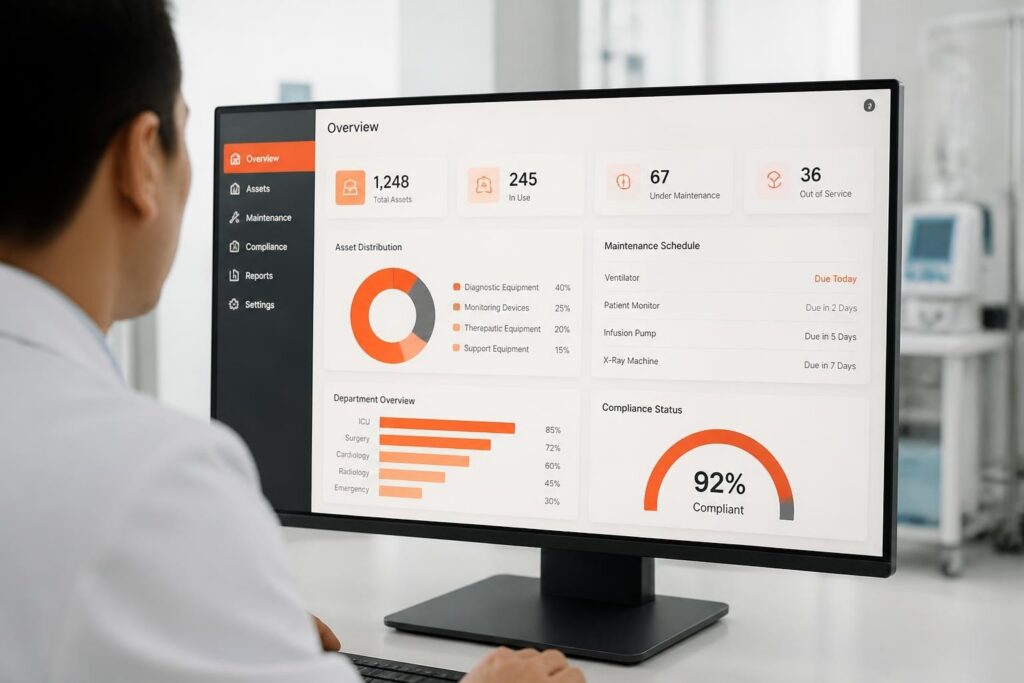
Inventory management software automates the tracking, control, and optimization of stock levels across warehouses, retail locations, and distribution centers. Organizations handling physical goods require accurate, real-time visibility into inventory quantities, locations, and movement to prevent stockouts, reduce carrying costs, and fulfill customer orders efficiently. Manual spreadsheet tracking fails at scale, creating data entry errors, delayed updates, and incomplete audit trails that cost businesses revenue and customer trust.
Want to see this in practice? Brytend warehouse management software tracks products and stock across multiple warehouses, with CSV, XML and API import, reorder levels and price history in any currency.
TL;DR:
- Inventory management software provides real-time tracking of stock levels, locations, and movements through barcode scanning, RFID, and database synchronization
- Core capabilities include automated reordering, multi-location management, lot and serial number tracking, cycle counting, and integration with ERP and accounting systems
- Deployment options range from cloud SaaS platforms to on-premise systems and custom software solutions built for specific operational requirements
- ROI typically derives from reduced carrying costs (15-30%), fewer stockouts (20-40% improvement), and labor savings (30-50% reduction in manual counting time)
- Selection criteria must evaluate integration capabilities, scalability, user permissions, reporting depth, and compliance with industry standards
What Core Features Define Inventory Management Software?
Inventory management software must track item quantities, record transactions, and maintain accurate location data across all storage facilities. The foundation consists of a centralized database that logs every inventory movement-receipts, transfers, adjustments, sales, and returns-with timestamp and user attribution for complete traceability.
Essential Tracking Capabilities
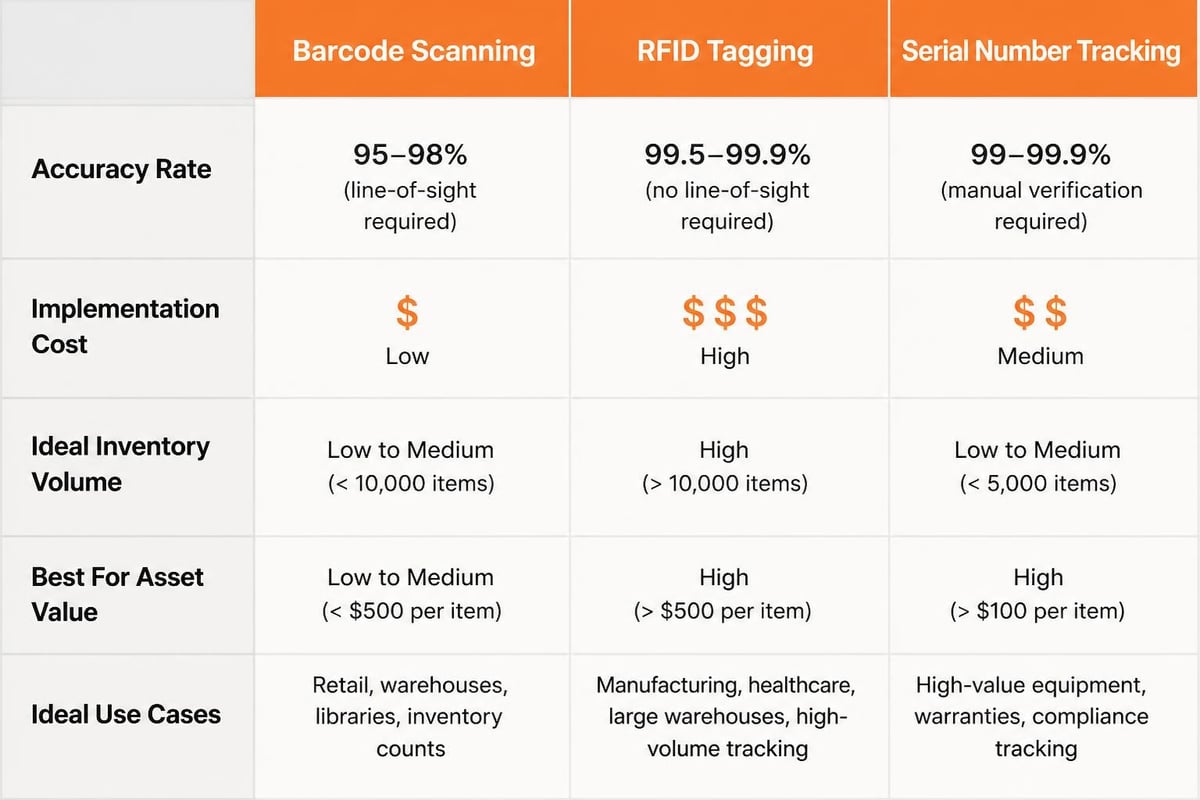
Modern systems support multiple identification methods to ensure accurate data capture:
- Barcode scanning for rapid item lookup and transaction recording
- RFID integration for automated tracking without line-of-sight scanning
- Serial number management for individual asset tracking and warranty administration
- Lot and batch tracking for expiration date management and recall capability
- Bin location assignment for warehouse organization and picking efficiency
The system must maintain perpetual inventory counts, updating quantities immediately when transactions occur rather than waiting for periodic physical counts. This real-time accuracy enables dynamic reorder point calculations and prevents allocation of unavailable stock.
Transaction Processing and Audit Trails
Every inventory movement creates a permanent record documenting what changed, when it occurred, who initiated the transaction, and the reason code. This audit trail supports compliance requirements, variance investigation, and shrinkage analysis.
| Transaction Type | Required Data Fields | Audit Requirements |
|---|---|---|
| Receipt | PO number, supplier, quantity, inspection status | Receiving signature, timestamp, location |
| Transfer | Origin location, destination, carrier, shipment ID | Sender approval, receiver confirmation |
| Adjustment | Variance quantity, reason code, count method | Manager authorization, supporting documentation |
| Sales allocation | Order number, customer, ship date, picking status | Picker ID, packing verification |
The NIST guidance on asset inventory management emphasizes the importance of accurate asset tracking for both operational efficiency and security compliance.
How Does Inventory Management Software Integrate With Existing Systems?
Integration architecture determines whether inventory management software operates as a standalone system or synchronizes with ERP, accounting, e-commerce, and warehouse management platforms. API connectivity enables automated data exchange, eliminating duplicate entry and ensuring consistency across business systems.
ERP and Accounting System Synchronization
Inventory data flows bidirectionally with financial systems to maintain accurate cost of goods sold, inventory valuation, and general ledger balances. Purchase orders created in the ERP trigger receiving workflows in the inventory system, while completed sales deplete stock and generate revenue recognition entries.
Key integration points include:
- Purchase order receipt matching received quantities against PO line items and updating committed inventory
- Sales order fulfillment allocating available stock, creating pick lists, and recording shipments
- Inventory valuation syncing unit costs for FIFO, LIFO, or weighted average cost calculation
- General ledger posting generating journal entries for inventory receipts, adjustments, and write-offs
- Vendor management sharing supplier performance data and lead time calculations
The integration method affects system reliability and maintenance requirements. REST APIs provide flexible, event-driven synchronization with error handling and retry logic. Database-level integration offers faster performance but creates tight coupling that complicates upgrades. File-based ETL processes work for legacy systems but introduce latency and reconciliation complexity.
E-Commerce and Point-of-Sale Connectivity
Real-time inventory visibility across sales channels prevents overselling and enables accurate delivery promises. When a customer places an online order, the inventory system immediately allocates stock, updates available-to-promise quantities, and triggers picking workflows.
Multi-channel retailers require inventory pooling strategies that balance fulfillment speed against transportation costs. The software must support ship-from-store, drop-ship, and transfer orders while maintaining accurate location-specific counts. Organizations leveraging technology to improve supply chain resilience recognize that inventory visibility across channels reduces safety stock requirements while maintaining service levels.
What Deployment Models Are Available for Inventory Management Software?
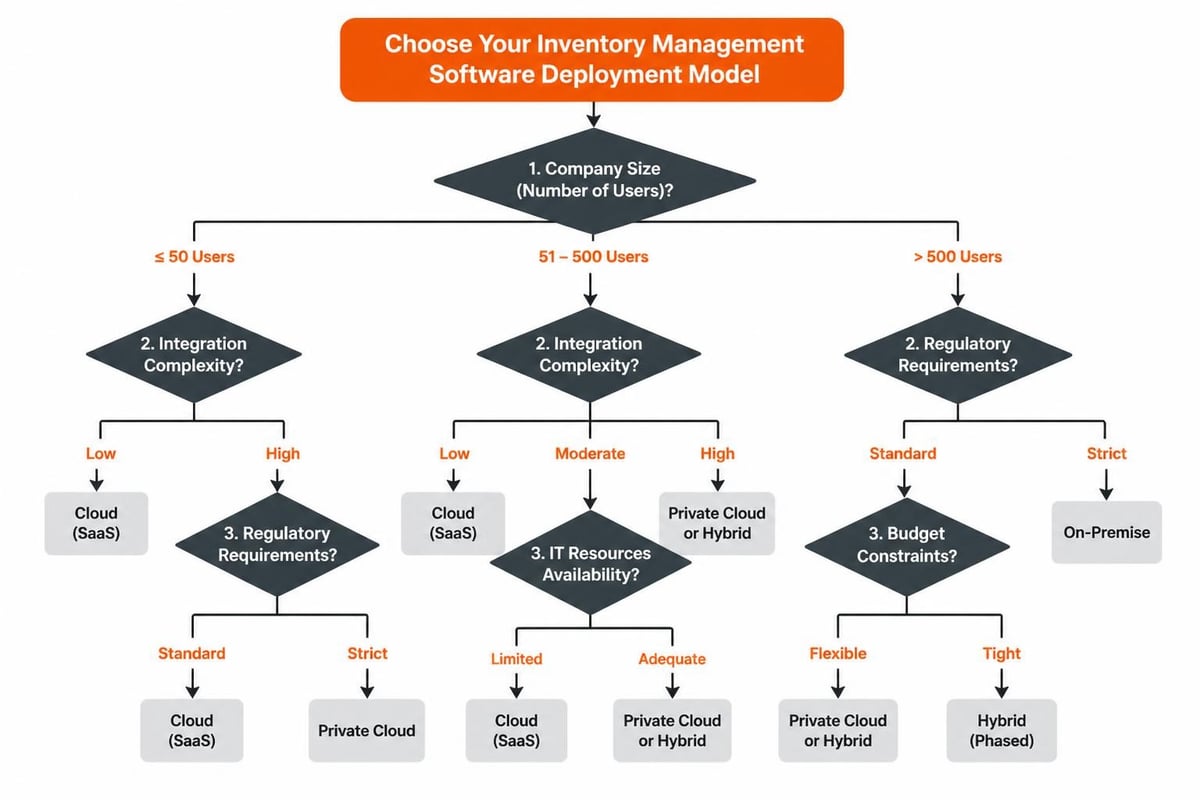
Organizations choose between cloud-hosted SaaS platforms, on-premise installations, and custom-developed solutions based on integration requirements, data sovereignty concerns, and total cost of ownership calculations.
Cloud SaaS Platforms
Software-as-a-Service deployments eliminate infrastructure management while providing automatic updates and scalable capacity. Vendors host the application and database on their infrastructure, typically charging monthly per-user fees. This model accelerates implementation and shifts IT resources from maintenance to optimization.
Advantages:
- Rapid deployment (2-8 weeks typical)
- Predictable monthly costs without capital expenditure
- Automatic updates and security patches
- Built-in disaster recovery and uptime guarantees
- Mobile access from any internet-connected device
Limitations:
- Subscription costs accumulate over time
- Customization restricted to configuration options
- Data residency may not meet regulatory requirements
- Integration flexibility limited to vendor-supported APIs
- Performance dependent on internet connectivity
European businesses with strict data protection requirements often prefer hosting providers like vBoxx, which operates ISO 27001-certified data centers outside US CLOUD Act jurisdiction while maintaining GDPR compliance.
On-Premise and Private Cloud Installations
Organizations with complex integration needs, regulatory constraints, or existing data center infrastructure may deploy software on their own servers. This approach provides complete control over data, customization depth, and system architecture at the cost of higher upfront investment and ongoing IT overhead.
| Consideration | Cloud SaaS | On-Premise | Hybrid Model |
|---|---|---|---|
| Implementation time | 2-8 weeks | 3-6 months | 2-4 months |
| Initial cost | Low (monthly fees) | High (licenses + hardware) | Medium |
| Customization depth | Limited to config | Full code access | API-based extensions |
| IT resources required | Minimal | Dedicated team | Moderate |
| Upgrade control | Vendor-managed | IT-scheduled | Mixed approach |
Custom Software Development
Businesses with unique workflows, specialized industry requirements, or extensive integration needs benefit from purpose-built inventory management software. Custom development enables precise alignment with operational processes without forcing process changes to fit off-the-shelf limitations.
Custom solutions excel when:
- Standard products lack required features for serialized tracking, service history, or compliance reporting
- Integration with proprietary systems or legacy databases is critical
- Industry-specific workflows (pharmaceutical chain of custody, defense serialization) demand specialized functionality
- Data ownership and long-term system control justify development investment
Development timelines range from 3-9 months depending on scope, but the resulting system provides competitive advantage through optimized workflows and differentiated capabilities.
How Do Organizations Calculate ROI From Inventory Management Software?
Return on investment analysis compares quantifiable benefits against implementation costs and ongoing expenses. Typical payback periods range from 6-18 months for mid-market implementations when organizations measure actual cost reductions and efficiency gains.
Quantifiable Cost Reductions
Inventory carrying costs represent 20-30% of inventory value annually, encompassing warehousing, insurance, taxes, obsolescence, and opportunity cost of capital. Improved accuracy and automated reordering reduce safety stock requirements by 15-30% while maintaining or improving service levels.
Labor efficiency improvements:
- Manual counting time reduced by 30-50% through cycle counting and automated tracking
- Order processing time decreased by 40-60% with barcode scanning and pick list optimization
- Receiving and put-away labor cut by 25-35% via automated location assignment
- Physical inventory events reduced from annual/quarterly to exception-based validation
Stockout prevention delivers revenue protection by ensuring product availability when customers order. Each prevented stockout preserves the gross margin on that sale while avoiding customer disappointment and potential relationship damage.
Implementation and Operating Costs
Total cost of ownership includes software licensing or subscription fees, hardware (barcode scanners, mobile devices, RFID infrastructure), implementation services, training, and ongoing support.
SaaS implementation budget (100-500 SKU operation):
- Software subscription: $200-800 per user per month
- Mobile devices and scanners: $5,000-15,000 one-time
- Implementation consulting: $10,000-40,000
- Data migration and validation: $5,000-20,000
- Training and change management: $3,000-10,000
- First-year total: $60,000-180,000 depending on user count and complexity
On-premise deployments shift costs toward upfront licenses ($10,000-100,000+) and server infrastructure while reducing annual subscription expenses. Research on digital transformation ROI demonstrates that inventory visibility improvements deliver measurable financial returns within the first year.
Performance Metrics and KPI Tracking
The software itself enables ROI measurement through built-in reporting on inventory accuracy, turnover rates, and carrying costs. Organizations track baseline metrics before implementation and monitor improvement trajectories.
Key performance indicators:
- Inventory accuracy rate (target: 95%+)
- Inventory turnover ratio (improvement of 20-40% typical)
- Fill rate and perfect order percentage
- Days inventory outstanding
- Obsolete inventory write-offs
- Cycle count variance rates
What Security and Compliance Requirements Apply to Inventory Management Software?
Data security, access control, and regulatory compliance vary by industry but universally require user authentication, permission management, and audit logging capabilities. Organizations handling controlled substances, medical devices, or defense materials face additional chain-of-custody and serialization mandates.
Access Control and User Permissions
Role-based access control (RBAC) restricts system functions and data visibility based on job responsibilities. Warehouse staff require transaction entry capabilities without access to cost data or system configuration. Managers need approval authority for adjustments and transfers. Executives access reporting and analytics without transaction-level permissions.
The permission matrix defines:
- Transaction rights: Which users can receive, transfer, adjust, or sell inventory
- Approval workflows: Required authorization levels for variance corrections or write-offs
- Data visibility: Access to cost information, supplier details, or customer allocation
- Configuration authority: Ability to modify reorder points, create new SKUs, or change location hierarchies
- Reporting access: Who can view inventory valuation, turnover analysis, or shrinkage reports
Multi-factor authentication and session timeout policies protect against unauthorized access, especially for cloud-deployed systems accessible outside corporate networks.
Regulatory Compliance and Standards
Industry-specific regulations impose traceability, recall capability, and documentation requirements that inventory management software must support. The ISO standards framework provides quality management and supply chain guidance applicable across sectors.
Healthcare and pharmaceutical:
- FDA 21 CFR Part 11 electronic records and signatures
- Drug Supply Chain Security Act (DSCSA) serialization and track-and-trace
- Medical device UDI (Unique Device Identification) tracking
- Cold chain temperature monitoring and documentation
Manufacturing and distribution:
- ISO 9001 quality management and lot traceability
- Hazardous materials documentation and SDS access
- Country-of-origin and trade compliance data
- Supplier qualification and audit trail retention
Serialized inventory tracking becomes mandatory when regulations require individual item identification throughout the supply chain. Each unit receives a unique identifier enabling complete history reconstruction from manufacture through end use or disposal.
How Does Serialized Inventory Tracking Differ From Lot-Level Management?
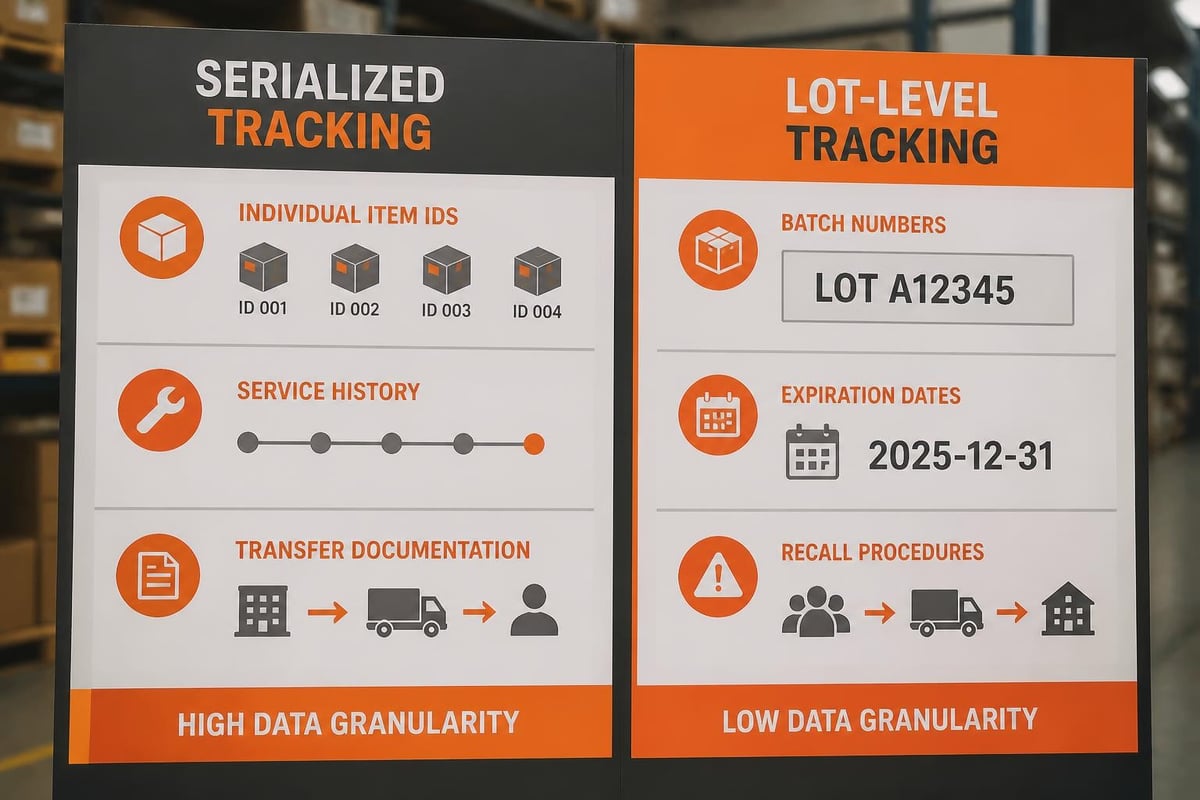
Serialized tracking assigns unique identifiers to individual items, enabling precise history, location, and status monitoring for each unit. Lot-level tracking groups items manufactured or received together, recording data at the batch level rather than per piece.
When Serialization Is Required
High-value assets, regulated products, and items requiring warranty or service tracking demand serialized inventory management. Each unit maintains its own record with purchase date, installation location, service history, and ownership transfer documentation.
Serialization use cases:
- Medical equipment and implantable devices requiring lifetime traceability
- IT assets and licensed software with individual depreciation schedules
- Tools and instruments tracked through calibration and maintenance cycles
- Rental equipment monitored for utilization, location, and maintenance intervals
- Controlled substances with chain-of-custody requirements
Organizations managing equipment that requires ongoing maintenance and service tracking benefit from systems that connect serialized inventory to service scheduling and certification. The Brytend Service Module provides a structured approach to managing service activities, maintenance schedules, and equipment lifecycle documentation for serialized assets.
This integrated approach links each serialized item to its complete service history, upcoming maintenance requirements, and compliance certifications, ensuring nothing falls through scheduling gaps.
Lot and Batch Tracking Implementation
Products manufactured or purchased in groups share common characteristics justifying lot-level management. All units within a lot have identical production dates, expiration dates, and quality test results, allowing efficient recall execution and expiration rotation.
Lot tracking supports:
- FIFO/FEFO enforcement: First-in-first-out or first-expired-first-out picking rules
- Expiration management: Automated alerts for approaching expiration dates
- Recall execution: Immediate identification of affected inventory locations
- Supplier traceability: Connection between quality issues and specific vendor shipments
- Quality hold procedures: Quarantine of suspect lots pending inspection results
The inventory management software must prevent commingling of different lots in the same bin location and enforce lot tracking through all transactions. When a picking operation pulls from inventory, the system assigns specific lot numbers to the order and maintains that association through shipping and invoicing.
What Common Implementation Mistakes Reduce Inventory Management Software Effectiveness?
Implementation failures typically stem from inadequate data preparation, insufficient process documentation, rushed training, and unrealistic timeline expectations. Organizations that treat software deployment as purely technical overlook the change management and workflow optimization required for success.
Data Quality and Migration Issues
Inventory accuracy in the new system cannot exceed the quality of migrated data. Organizations discovering 60-70% accuracy in legacy spreadsheets cannot magically achieve 95%+ accuracy through software deployment alone. A physical inventory count and reconciliation must precede data migration.
Pre-implementation data cleanup:
- Conduct wall-to-wall physical count and reconcile to existing records
- Consolidate duplicate SKU numbers and resolve naming inconsistencies
- Validate unit of measure definitions and conversion factors
- Update supplier lead times and minimum order quantities
- Photograph items lacking clear visual identification
- Document locations using standardized naming conventions
Migration errors compound when organizations rush from old to new systems without validation checkpoints. Staged migration with parallel operation allows error detection before decommissioning legacy tracking methods.
Process Documentation and Workflow Mapping
Software configuration should reflect optimized workflows, not digitized inefficiencies. Organizations that automate existing manual processes without redesign miss opportunities for improvement and create systems that perpetuate bottlenecks.
Required workflow documentation:
| Process Area | Documentation Needed | Common Gaps |
|---|---|---|
| Receiving | Inspection steps, quality holds, put-away rules | Unclear rejection procedures |
| Transfers | Authorization requirements, carrier selection, transit visibility | Missing receiving confirmation |
| Adjustments | Approval thresholds, count verification, variance investigation | Inadequate reason codes |
| Sales allocation | Picking prioritization, substitution rules, backorder handling | No partial shipment policy |
Change management must address resistance from warehouse staff comfortable with manual methods. Demonstrating efficiency gains during pilot testing and providing adequate practice time reduces pushback during rollout.
Integration Testing and Performance Validation
Organizations underestimate the complexity of synchronizing inventory data with ERP, accounting, and e-commerce systems. Integration testing must verify not only successful data exchange but also error handling, retry logic, and reconciliation procedures when systems temporarily disconnect.
Performance testing under realistic transaction volumes prevents post-launch slowdowns. A system that performs adequately with 50 concurrent users during training may struggle when 200 warehouse staff simultaneously process receipts during peak season.
How Do Organizations Select the Right Inventory Management Software?
Selection methodology balances functional requirements, technical capabilities, vendor viability, and total cost of ownership. A structured evaluation process with weighted criteria and hands-on testing reduces the risk of misalignment between software capabilities and operational needs.
Requirements Definition and Prioritization
Cross-functional teams representing warehouse operations, purchasing, sales, finance, and IT must document current pain points and future requirements. Distinguishing between must-have features and nice-to-have enhancements prevents feature creep and scope expansion.
Critical selection criteria:
- Barcode and RFID support matching existing or planned hardware investments
- Multi-location management if operating distributed warehouses or retail locations
- Lot and serial tracking depth aligned with regulatory and warranty requirements
- Integration capabilities including pre-built connectors for existing ERP and accounting systems
- Reporting and analytics providing inventory valuation, turnover analysis, and ABC classification
- Mobile functionality enabling transactions from warehouse floor without desktop access
- User permission granularity supporting role-based access control requirements
- Scalability accommodating projected SKU growth and transaction volume increases
The IEEE inventory management research provides technical perspectives on optimization algorithms, forecasting methods, and emerging approaches worth considering during evaluation.
Vendor Evaluation and Reference Checking
Vendor financial stability, customer satisfaction, and product roadmap commitment affect long-term success. Software abandoned by its vendor leaves organizations with unsupported systems facing integration breakage and security vulnerabilities.
Due diligence includes:
- Reference calls with 3-5 current customers in similar industries and company sizes
- Financial health assessment through credit reports or public financial statements
- Product roadmap review and historical feature delivery cadence
- Support response time commitments and escalation procedures
- Data portability and system ownership terms in contract language
- Implementation methodology and project management approach
Proof of Concept and Hands-On Testing
Vendors demonstrate capabilities using generic demo data that may not reflect actual operational complexity. Proof of concept testing with representative SKUs, typical transaction volumes, and actual integration endpoints reveals performance and usability issues before contract commitment.
Testing scenarios should include:
- Receiving a shipment with partial quantities and quality holds
- Processing transfers between locations with carrier tracking
- Executing cycle counts with variance investigation and adjustment approval
- Picking and shipping orders with lot number assignment and bill of lading generation
- Running month-end inventory valuation reports with cost reconciliation
For organizations with highly specialized requirements, custom software development may provide better alignment than configuring commercial products. Brytend specializes in building tailored inventory management solutions that integrate seamlessly with existing systems while supporting unique workflows and compliance needs.
Inventory management software transforms operational efficiency through real-time visibility, automated reordering, and comprehensive traceability while reducing carrying costs and stockout risks. The right system aligns with your specific workflows, integration requirements, and compliance mandates rather than forcing process changes to fit generic software limitations. Brytend develops custom inventory management solutions designed around your operational needs, connecting serialized tracking, service management, and business systems into cohesive platforms that scale with your organization-contact us to discuss how tailored software can address your unique inventory challenges.