
Barcode inventory management is a system that uses printed or digital barcode labels and scanner hardware to track, locate, and manage physical assets through automated data capture. Each item receives a unique identifier encoded in a barcode that links to a centralized database record containing specifications, location, service history, and transaction data. Scanning replaces manual entry, reducing errors and accelerating stock counts, receiving, transfers, and audits. In 2026, organizations across manufacturing, distribution, healthcare, and field service rely on barcode inventory management to maintain accurate real-time visibility into serialized equipment, spare parts, and consumables.
TL;DR
- Barcode inventory management replaces manual entry with scanners that read unique item codes linked to a database.
- Each scan updates location, quantity, service status, or custody in real time, creating a complete audit trail.
- Common implementations include receiving verification, cycle counts, stock transfers, service tracking, and compliance documentation.
- Benefits include higher accuracy (99%+), faster transactions, serialized traceability, and automated reorder triggers.
- Success requires consistent labeling protocols, scanner hardware selection, database integration, and staff training on workflows.
What Is Barcode Inventory Management?
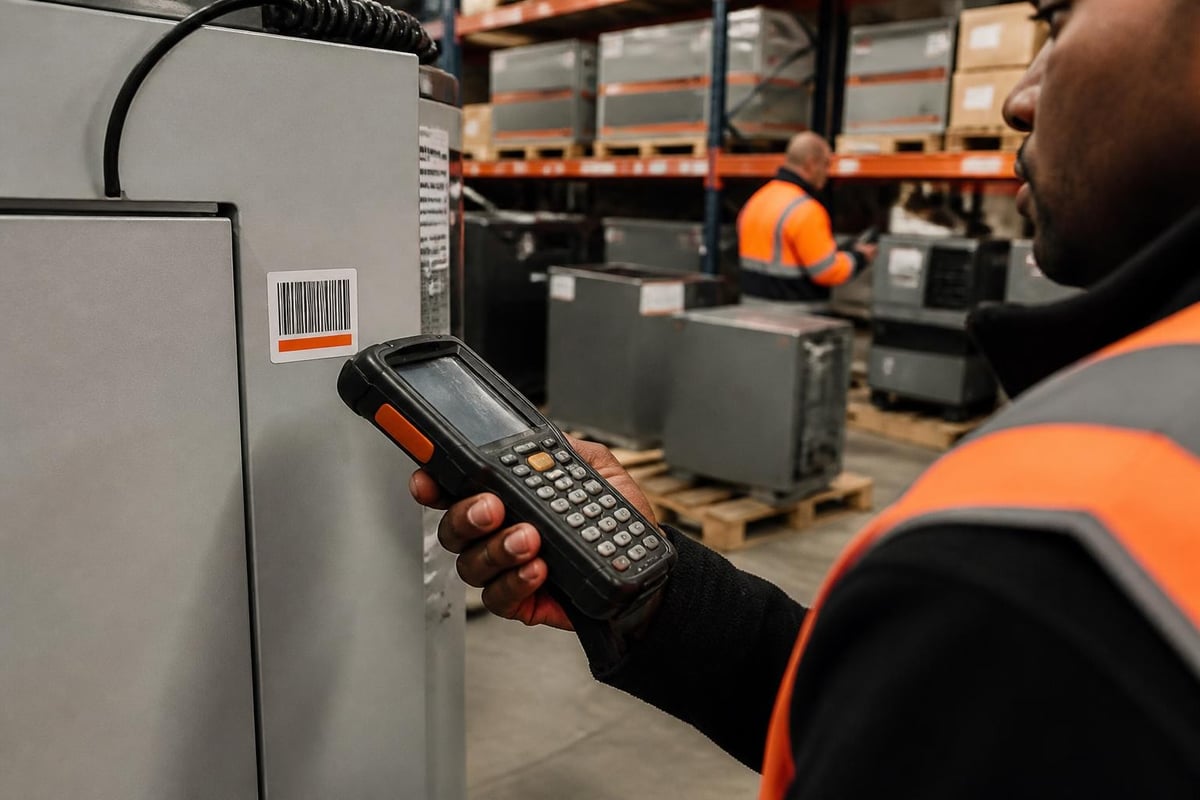
Barcode inventory management is a method of tracking and controlling stock using machine-readable symbols printed on or attached to physical items. A barcode encodes data (such as a SKU, serial number, or asset ID) in a pattern of parallel lines (1D) or a matrix of squares (2D, including QR codes). Scanners use optical sensors to decode this pattern and transmit the data to inventory software, which updates the item's status, location, or transaction record.
The system consists of three core components working together:
- Labels or tags: Physical barcode stickers, engraved plates, or printed labels affixed to assets, bins, or locations.
- Scanners: Handheld, fixed-mount, or smartphone-based devices that capture barcode data.
- Software database: A centralized application that stores item records, processes scans, and generates reports or triggers workflows.
When an operator scans a barcode, the software instantly retrieves the associated record and updates fields such as quantity on hand, last movement timestamp, assigned technician, or next service due date. This automation eliminates transcription errors and provides real-time accuracy across distributed locations.
How Does Barcode Inventory Management Work in Practice?
Barcode inventory management operates through a series of scan-triggered transactions that update centralized records. Each workflow step follows the same pattern: scan an item or location barcode, confirm or enter additional data (such as quantity or condition), and submit the transaction to the database. The software applies business rules, updates inventory balances, and logs the event for audit purposes.
Receiving and Inbound Verification
When stock arrives, operators scan the supplier packing slip barcode or manually enter the purchase order number. They then scan each item barcode to verify identity and quantity against the order. The system flags discrepancies-missing items, wrong SKUs, or damage codes-and prompts corrective action before finalizing the receipt. This process creates a timestamped record of what entered inventory, who received it, and where it was initially placed.
Stock Transfers and Location Updates
Moving items between warehouses, job sites, or technician vans requires scanning both the item and the destination location barcode. The software updates the item's current location field and logs the transfer with a timestamp and user ID. For serialized assets, this creates a custody chain showing every movement from receiving through deployment to return or disposal.
Cycle Counts and Audits
Operators walk aisles or zones with mobile scanners, scanning location barcodes followed by all items in that bin or shelf. The software compares scanned quantities to expected balances and highlights variances. Managers investigate discrepancies-misplaced stock, unreported consumption, or data entry errors-and adjust records to match physical reality. Compliance monitoring software often triggers scheduled cycle counts to meet regulatory requirements for inventory accuracy.
Service and Maintenance Tracking
For equipment requiring periodic servicing, operators scan the asset barcode at service milestones-inspection, repair, calibration, or parts replacement. The system updates the service history, logs parts consumed, calculates the next due date, and generates a service certificate. This workflow ensures compliance with manufacturer warranties and regulatory inspection schedules.
The Brytend Service Module combines barcode scanning with service tracking to manage serialized equipment across its full lifecycle. Technicians scan asset barcodes to pull up maintenance history, log work performed, attach photos, and record parts used-all from a mobile device in the field. Automated reminders trigger based on usage hours or calendar intervals, and service certificates are generated instantly to document compliance for audits or customer reporting.

What Are the Key Benefits of Barcode Inventory Management?
Barcode inventory management delivers measurable improvements in accuracy, speed, and traceability compared to manual methods. Organizations that implement barcode systems report error rate reductions from 1-3% (manual entry) to below 0.1% (scanned data), according to industry benchmarks. Speed gains are equally significant: scanning an item takes 1-2 seconds versus 5-10 seconds for manual lookup and typing.
Primary operational benefits include:
- Accuracy and error reduction: Scanning eliminates misread handwriting, transposed digits, and wrong SKU selection.
- Real-time visibility: Each scan updates the database immediately, providing current stock levels and locations across all sites.
- Faster transactions: Receiving, picking, and counting operations complete in a fraction of the time required for manual processes.
- Serialized traceability: Unique barcodes link each physical item to its complete history-purchase date, service records, warranty status, and usage data.
- Automated reorder triggers: Software monitors inventory levels by SKU and generates purchase requisitions when stock falls below defined thresholds.
- Audit trail and compliance: Every scan creates a timestamped log entry showing who handled which item when, supporting regulatory audits and internal controls.
| Manual Inventory Methods | Barcode Inventory Management |
|---|---|
| 1-3% data entry error rate | <0.1% scan error rate |
| 5-10 seconds per item transaction | 1-2 seconds per scan |
| End-of-day batch updates | Real-time database updates |
| Limited item history visibility | Complete lifecycle traceability |
| Manual count sheets prone to loss | Digital audit logs preserved indefinitely |
| Difficult to enforce location discipline | Location scans enforce bin accuracy |
Beyond efficiency, barcode systems enable strategic capabilities such as predictive maintenance (tracking equipment runtime to schedule service before failure), just-in-time replenishment (ordering parts based on actual consumption rates), and usage-based billing (charging customers for consumables based on scanned withdrawals).
What Equipment and Software Do You Need for Barcode Inventory Management?
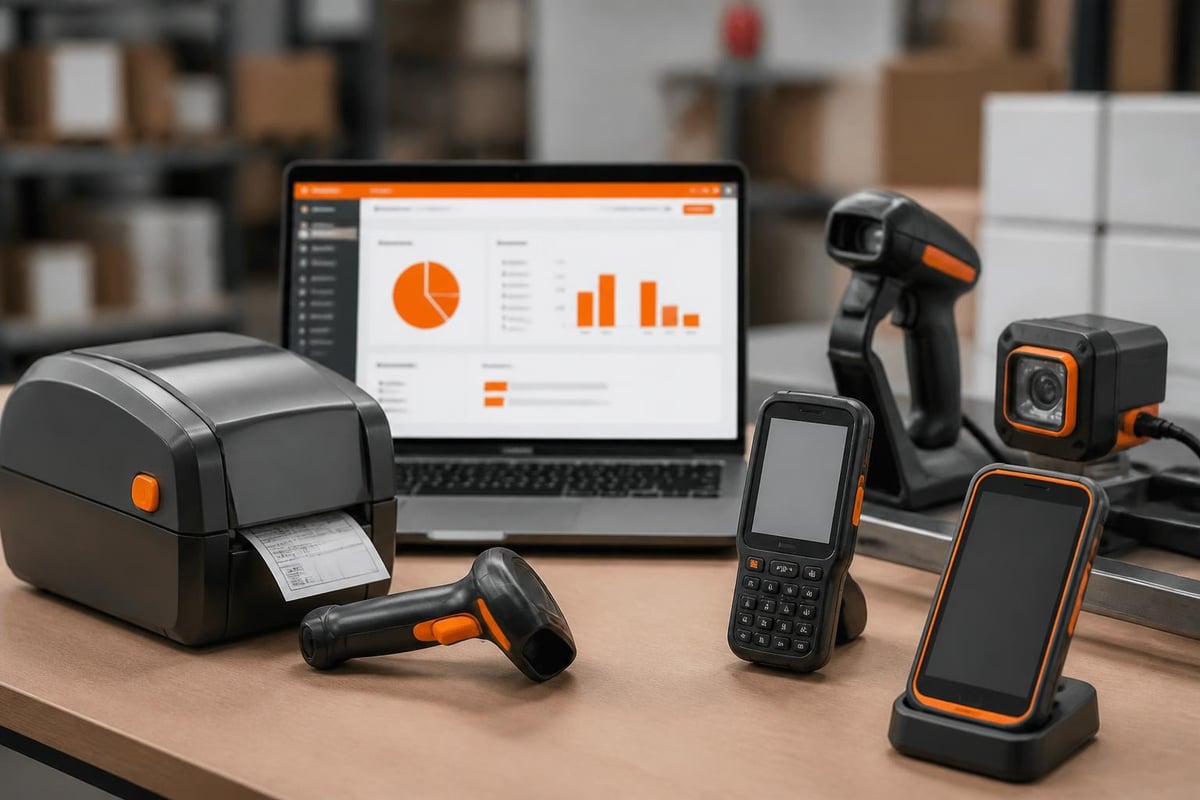
Implementing barcode inventory management requires hardware to create and read labels, plus software to store and process scanned data. Equipment choices depend on environment (warehouse, field service, harsh industrial), scan volume, and existing systems. Most deployments combine several device types to cover different workflows.
Barcode Label Types and Printers
1D barcodes (UPC, Code 39, Code 128) encode alphanumeric strings in variable-width bars. They store limited data but scan reliably at distance and work with basic scanners. 2D barcodes (QR codes, Data Matrix) encode larger datasets in a compact square matrix, enabling embedded URLs, serial numbers, and specifications in a single symbol.
Thermal transfer printers produce durable labels for industrial assets exposed to heat, chemicals, or UV. Direct thermal printers work for short-term warehouse labels. Laser engraving or metal tags provide permanent identification for high-value equipment. Research on mobile-centric laboratory inventory management demonstrates that even smartphone cameras can reliably capture 2D barcodes without dedicated scanner hardware, reducing deployment costs.
Scanner Hardware Options
- Handheld laser or imager scanners: Wired or Bluetooth devices that decode 1D and 2D codes at ranges up to several feet. Rugged models withstand drops and moisture.
- Mobile computers: Android or iOS devices with integrated barcode scanners, touchscreen displays, and wireless connectivity for real-time database access.
- Fixed-mount scanners: Installed at conveyor lines or dock doors to automatically scan passing items without operator intervention.
- Ring scanners: Wearable Bluetooth scanners worn on the finger, leaving both hands free for picking or packing.
Inventory Software and Integration
The software layer stores item master data (SKU, description, specifications), transaction history (receipts, issues, transfers), and location hierarchy (warehouses, zones, bins). Key features for barcode-driven workflows include:
- Scan validation: Real-time checks that scanned codes match expected formats, flag duplicates, and enforce required fields.
- Mobile-optimized interfaces: Forms designed for small screens and touch input, minimizing keystrokes per transaction.
- Offline capability: Local data caching so scans continue when network connectivity drops, syncing when restored.
- API integrations: Bidirectional data exchange with ERP, purchasing, work order, and accounting systems.
Organizations often integrate barcode inventory management with workflow automation software to trigger downstream actions-generating purchase orders when stock falls below reorder points, notifying technicians when parts arrive for pending jobs, or updating customer portals when rental equipment ships.
How Do You Implement Barcode Inventory Management Successfully?
Successful barcode inventory management deployment follows a structured process: define item hierarchies and labeling standards, select compatible hardware and software, label existing stock, configure workflows, train users, and continuously improve based on performance metrics.
Define Item Hierarchies and Labeling Standards
Establish a consistent numbering scheme that supports your tracking requirements. Serialized assets (pumps, generators, test equipment) require unique identifiers linking to service records and warranties. Bulk consumables (fasteners, fluids) may share a common SKU with quantity tracking at the bin level. Location barcodes identify physical storage positions-building, aisle, rack, shelf, bin-enabling location-based audits and directed putaway.
Document labeling standards specifying barcode type (1D or 2D), size, placement on the item, and durability requirements. Standardization ensures scanners read codes reliably and operators know where to find labels.
Configure Workflows and Business Rules
Map each inventory transaction to a barcode workflow. For example, a receiving workflow might require scanning the purchase order barcode, then each item barcode, then the destination bin barcode before the system accepts the receipt. Define mandatory fields (condition code, lot number), validation rules (reject duplicate serial numbers), and triggers (send email when high-priority parts arrive).
Test workflows with pilot users to identify bottlenecks, unclear prompts, or missing data fields before full rollout. Adjust screen sequences and validation logic based on operator feedback.
Label and Baseline Existing Inventory
Physical inventory counting provides the baseline for a new barcode system. Teams systematically label every item with its barcode, scan it to create the initial database record, and confirm the starting location and quantity. This labor-intensive step establishes accurate data before go-live. Phased rollouts label high-value or fast-moving items first, deferring slow-moving stock to later phases.
Train Users and Enforce Discipline
Operator adoption determines success. Training must cover not just how to scan but why barcode discipline matters: skipping scans creates inaccurate records that undermine reorder calculations, service scheduling, and financial reporting. Supervisors should monitor compliance during the first weeks, coaching users who forget to scan transfers or location updates.
Dashboard metrics-scans per day, transaction error rates, cycle count variances-highlight training gaps and process deviations. AI workflow automation software can detect anomalies (sudden inventory drops, frequent location changes) and alert managers to investigate.
What Are Common Mistakes to Avoid in Barcode Inventory Management?
Even well-designed barcode inventory management systems fail when organizations underestimate data quality requirements, skip location discipline, or neglect scanner maintenance. Avoiding these pitfalls requires proactive governance and continuous improvement.
Top implementation mistakes include:
- Inconsistent labeling: Mixing barcode formats, placing labels in hard-to-scan locations, or using low-quality printers that fade quickly leads to scan failures and manual workarounds.
- Skipping location scanning: Operators who scan items but not destination bins create phantom stock-inventory records show items on hand but no one knows where they are physically located.
- Poor data hygiene: Duplicate serial numbers, missing descriptions, or inactive SKUs cluttering the database slow searches and cause operator confusion.
- Inadequate scanner provisioning: Too few scanners force sharing or manual entry, defeating the speed advantage and frustrating users.
- Ignoring process exceptions: Systems designed only for "happy path" scenarios (perfect receipts, no damage, instant connectivity) fail when reality intrudes. Workflows need paths for damaged goods, partial receipts, and offline scanning.
- Neglecting hardware maintenance: Dirty scanner lenses, dead batteries, and cracked screens reduce read rates and slow operations. Scheduled cleaning and battery replacement prevent downtime.
Organizations should establish periodic audits comparing physical counts to barcode records, investigating variances, and retraining users who repeatedly skip scans. Deloitte’s research on retail technology trends highlights that technology alone does not improve accuracy-disciplined process adherence does.
How Does Barcode Inventory Management Support Compliance and Traceability?
Barcode inventory management creates auditable records that prove regulatory compliance, warranty fulfillment, and quality control. Each scan captures who accessed which item when, building a complete custody chain from receipt through deployment to disposal. This traceability is critical for industries facing strict record-keeping requirements.
Regulatory Audit Trails
Regulations governing pharmaceuticals, medical devices, aerospace parts, and food products mandate lot traceability-the ability to identify every item's origin, handling, and final destination. Barcode systems log each transaction with timestamps and user IDs, producing reports that show an item's complete journey. Auditors can verify that expired items were removed from stock, recalled lots were quarantined, and temperature-sensitive products stayed within safe ranges (when integrated with sensor data).
Compliance risk software often integrates barcode scanning to automate inspection checklists, log corrective actions, and trigger alerts when equipment requires recertification before use.
Service History and Warranty Management
Serialized equipment barcode records link to service logs documenting every inspection, repair, and parts replacement. This history proves warranty compliance when manufacturers require periodic servicing to maintain coverage. It also supports predictive maintenance by analyzing failure patterns across similar assets.
Field service teams scan equipment barcodes to pull up maintenance schedules, view parts inventories, and update work orders. Equipment tracking software combines barcode scanning with GPS location to monitor high-value assets across customer sites, construction zones, or rental fleets.
Chain of Custody for Critical Items
High-value or controlled items (test equipment, hazardous materials, forensic samples) require documented custody chains. Barcode check-in/check-out workflows record who took possession, when, and for what purpose. Unauthorized access attempts-scanning an item without proper credentials-trigger alerts and log security events.
| Compliance Requirement | Barcode Inventory Management Support |
|---|---|
| Lot traceability | Scan logs link lot numbers to receipts, transfers, and final consumption |
| Expiration enforcement | Software blocks issuing expired items based on scanned dates |
| Periodic inspection schedules | Service scans trigger next-due calculations and reminders |
| Warranty documentation | Service history proves compliance with manufacturer requirements |
| Controlled substance tracking | Check-out/check-in scans create custody chain |
| Recall response | Lot number queries identify affected items and their current locations |
Research on autonomous warehouse systems explores hybrid approaches combining barcode scanning with RFID tags and vision systems to automate compliance checks, reducing reliance on manual operator discipline.
What Integration Options Exist for Barcode Inventory Management?
Barcode inventory management delivers maximum value when integrated with enterprise systems that consume or contribute inventory data. APIs, webhooks, and middleware platforms enable bidirectional data flow between barcode software and ERP, purchasing, work order, and customer relationship systems.
Common integration patterns include:
- ERP synchronization: Barcode transactions update ERP inventory balances, triggering material requirements planning (MRP) and cost accounting updates. Purchase orders created in ERP generate barcode receiving workflows.
- Work order systems: Technicians scan parts consumed during service calls, automatically deducting inventory and adding line items to invoices. Completed work orders update asset service histories.
- Purchasing automation: When scanned inventory levels fall below reorder points, the system creates purchase requisitions or sends orders directly to approved suppliers via EDI.
- Customer portals: Rental or consignment inventory systems scan assets when shipped to customers, updating portal dashboards with serial numbers, quantities, and return-by dates.
- Financial systems: Inventory movements trigger journal entries in accounting software, maintaining perpetual inventory valuation and cost of goods sold calculations.
Custom software developers build middleware layers that normalize data formats, apply business logic, and route transactions between systems. Brytend specializes in designing integration architectures that connect barcode scanning workflows with existing enterprise platforms, ensuring data consistency and eliminating duplicate entry.
How Do You Measure ROI and Performance in Barcode Inventory Management?
Quantifying barcode inventory management impact requires tracking metrics before and after implementation. Baseline measurements of manual processes provide comparison points for accuracy, speed, labor hours, and stockout frequency.
Key performance indicators include:
- Inventory accuracy percentage: (Items counted correctly / total items counted) × 100. Target 99%+ with barcode systems versus 95-97% manual.
- Transactions per hour: Number of receiving, picking, or transfer transactions completed per labor hour. Barcode systems typically double throughput.
- Cycle count time reduction: Hours required to count a defined zone or SKU set. Reductions of 50-70% are common.
- Stockout frequency: Number of instances where needed items show available in system but cannot be located physically. Barcode location scanning eliminates phantom stock.
- Carrying cost reduction: Lower safety stock requirements (because higher confidence in accuracy) reduce capital tied up in inventory.
- Labor cost per transaction: Total labor hours for inventory operations divided by transaction volume. Automation reduces cost per unit.
Organizations calculate ROI by comparing implementation costs (hardware, software licenses, labeling, training) against annual savings from reduced labor, fewer stockouts, lower carrying costs, and improved service level agreements. Payback periods typically range from 6-18 months depending on transaction volume and current error rates.
Advanced analytics track scanner utilization (identifying underused devices), error-prone workflows (frequent corrections or voids), and operator productivity (scans per shift). Continuous improvement teams use these insights to refine layouts, retrain users, and update validation rules.
Barcode inventory management transforms asset tracking from error-prone manual logging into a fast, accurate, and auditable process that supports compliance, service tracking, and operational efficiency. Organizations implementing barcode systems gain real-time visibility, eliminate phantom stock, and build the data foundation for predictive maintenance and automated replenishment. Brytend develops custom barcode inventory solutions integrated with existing workflows, scanners, and enterprise systems, delivering tailored functionality that matches your specific tracking requirements. Contact our team to design a barcode system that scales with your operations.