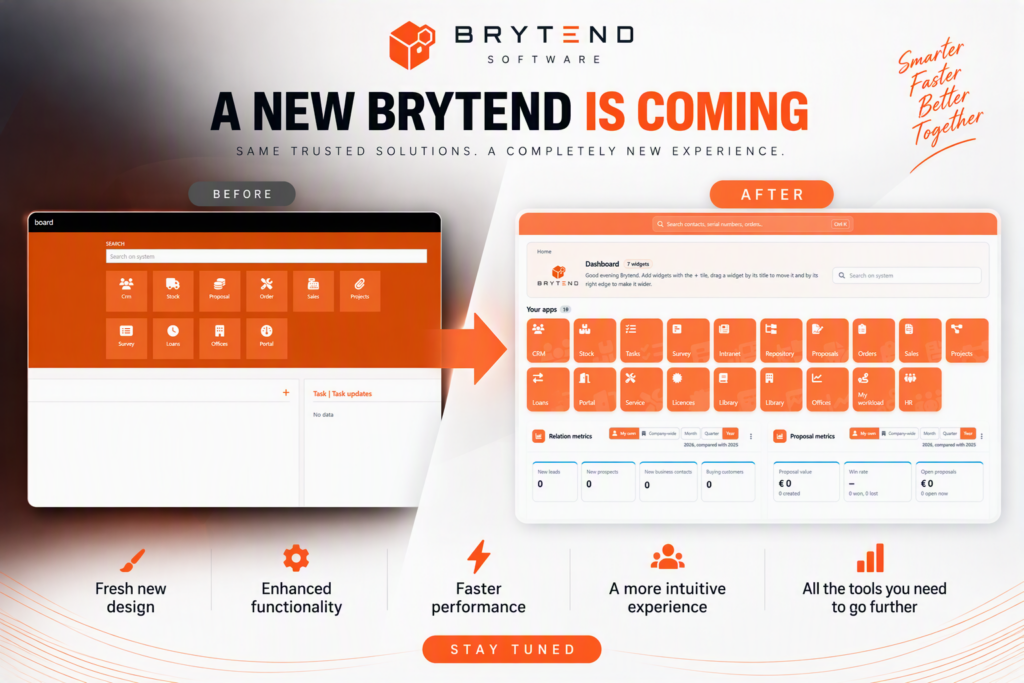
Work order management software tracks maintenance requests, assigns tasks to technicians, schedules field service activities, and documents completed work in a centralized system. Organizations use these platforms to replace paper-based or spreadsheet workflows with automated processes that ensure every asset repair, preventive maintenance task, and compliance inspection is recorded, traceable, and auditable. The software captures serialized asset details, labor hours, parts consumption, and sign-offs, creating a complete history for regulatory reporting and performance analysis.
TL;DR
- Work order management software automates the creation, assignment, scheduling, and closure of maintenance and service tasks.
- Serialized asset tracking links each work order to specific equipment, building a complete service history for compliance and lifecycle analysis.
- Mobile field access enables technicians to view instructions, update status, capture photos, and record parts usage in real time.
- Integration with CMMS, ERP, and inventory systems ensures parts availability, cost tracking, and seamless data flow across departments.
- Automated workflows, priority routing, and real-time dashboards reduce manual errors, improve first-time fix rates, and accelerate response times.
Work order management software is a digital platform that creates, tracks, assigns, schedules, and closes maintenance and service tasks while capturing asset data, labor hours, parts usage, and completion records in a centralized database.
What Is Work Order Management Software and How Does It Function?
Work order management software digitizes the end-to-end lifecycle of maintenance requests and service tasks. When an asset fails or a preventive maintenance schedule triggers, the system generates a work order with detailed instructions, priority level, required parts, and assigned technician. The platform routes the work order based on skill set, location, and availability, then tracks progress through mobile devices until closure.
Modern platforms integrate with enterprise asset management systems to pull equipment histories, warranty details, and maintenance protocols. Each work order captures:
- Asset serial number and location
- Failure symptoms or scheduled task description
- Priority and urgency level
- Assigned technician or crew
- Required parts and tools
- Estimated and actual labor hours
- Photos, checklists, and sign-offs
- Completion date and verification status
The system updates asset records automatically, logs downtime, and generates audit trails for compliance reporting. Organizations that rely on inspection management software can link inspection findings directly to corrective work orders, ensuring issues identified during audits trigger immediate maintenance actions.

Core Capabilities of Work Order Platforms
Work order management software provides five fundamental capabilities that distinguish it from generic task management tools:
- Asset linkage: Every work order ties to a specific serialized asset, building a complete maintenance history.
- Mobile execution: Technicians access instructions, update status, and capture data in the field without returning to a desktop.
- Parts and inventory integration: The system checks stock levels, reserves parts, and updates inventory as technicians consume materials.
- Scheduling and dispatch: Automated routing assigns work based on priority, skills, and location, optimizing technician utilization.
- Compliance documentation: Digital checklists, sign-offs, and timestamps create audit-ready records for regulatory inspections.
Organizations using workflow automation software often extend work order systems with approval chains, escalation rules, and conditional routing to enforce corporate policies and service-level agreements.
Why Do Organizations Replace Manual Work Order Processes?
Manual work order processes rely on paper forms, phone calls, and spreadsheets to track maintenance requests. Technicians receive handwritten instructions, carry printed checklists, and return completed paperwork to supervisors who manually enter data into filing cabinets or disconnected databases. This approach introduces delays, errors, and gaps in asset history.
Common failures of manual workflows include:
- Lost or illegible paper forms that erase maintenance records
- Delayed communication between requesters, dispatchers, and technicians
- Incomplete parts documentation that prevents accurate cost tracking
- Missed preventive maintenance due to static calendar reminders
- Inability to prioritize emergency repairs over routine tasks
- Lack of real-time visibility into technician workload and location
- Fragmented asset histories scattered across filing cabinets and personal notes
Work order management software eliminates these inefficiencies by automating data capture, enforcing required fields, and synchronizing information in real time. When a technician closes a work order on a mobile device, the platform updates asset records, adjusts parts inventory, calculates labor costs, and triggers the next scheduled maintenance task without manual intervention.
Organizations managing complex service operations often pair work order systems with compliance monitoring software to ensure every maintenance activity aligns with regulatory standards and internal quality protocols.
| Manual Process | Automated Work Order System |
|---|---|
| Paper forms delivered by hand | Digital creation and instant dispatch |
| Phone calls to locate technicians | GPS-enabled mobile access and real-time status |
| Static file cabinets for asset records | Centralized database with complete history |
| Manual parts counting and reordering | Automated inventory deduction and reorder triggers |
| Delayed compliance reporting | Real-time audit trails and scheduled reports |
How Does Work Order Management Software Support Preventive Maintenance?
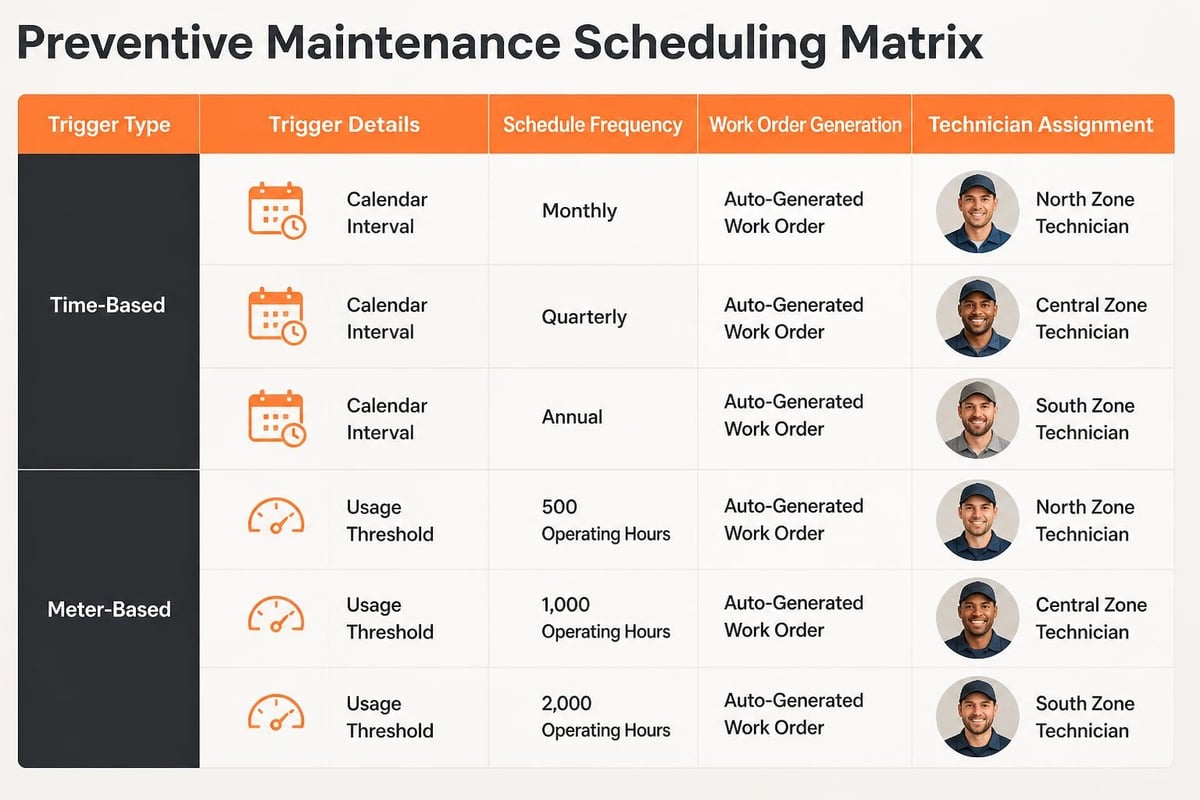
Preventive maintenance reduces unplanned downtime and extends asset life by scheduling regular inspections, lubrication, calibration, and component replacement before failures occur. Work order management software automates preventive maintenance by generating recurring work orders based on time intervals, usage meters, or condition triggers.
The system stores maintenance protocols for each asset type, including task checklists, required parts, estimated labor hours, and safety procedures. When a trigger condition is met-such as 90 days since last service or 10,000 operating hours-the platform automatically creates a work order, assigns it to a qualified technician, and reserves necessary parts. Microsoft Dynamics 365 demonstrates this pattern by linking asset calendars to work order generation workflows.
Steps to Implement Automated Preventive Maintenance
- Define maintenance protocols: Document task checklists, part numbers, and labor estimates for each asset type.
- Set trigger conditions: Establish time-based intervals (weekly, monthly, quarterly) or meter-based thresholds (hours, cycles, mileage).
- Configure auto-generation rules: Link protocols to asset records and specify lead time before work orders are created.
- Assign default technicians or crews: Route work orders to qualified personnel based on skill set and geographic zone.
- Enable mobile checklists: Provide technicians with step-by-step instructions, photos, and signature capture for compliance verification.
- Review completion data: Analyze actual versus estimated labor, parts usage, and frequency to refine protocols.
Organizations that track serialized inventory across multiple locations benefit from work order systems that support multi-site scheduling and centralized reporting. The Brytend Service Module offers a structured approach to managing serialized assets, automating service reminders, and generating service certificates for regulatory compliance. By linking each asset to its full maintenance history, teams can predict failures, optimize parts stocking, and demonstrate due diligence during audits.
What Metrics and Analytics Do Work Order Systems Provide?
Work order management software captures structured data at every stage of the maintenance lifecycle, enabling organizations to measure performance, identify trends, and optimize resource allocation. Real-time dashboards display key performance indicators (KPIs) that inform operational decisions and strategic planning.
Essential work order metrics include:
- Mean time to repair (MTTR): Average duration from work order creation to completion, indicating technician efficiency and parts availability.
- First-time fix rate: Percentage of work orders resolved on the first visit, reflecting diagnostic accuracy and preparation quality.
- Planned vs. unplanned maintenance ratio: Balance between scheduled preventive tasks and reactive emergency repairs, revealing asset reliability.
- Work order backlog: Number of open requests by priority level, highlighting resource constraints and staffing needs.
- Technician utilization: Percentage of available hours spent on billable work orders versus travel, training, and administrative tasks.
- Parts consumption by asset: Inventory usage patterns that inform stocking levels and supplier contracts.
- Compliance completion rate: Percentage of regulatory or safety work orders completed on time with required documentation.
Advanced platforms integrate with business intelligence tools to visualize trends over time, compare performance across facilities, and forecast maintenance budgets. NIST research on maintenance work order analysis provides guidance on data capture standards and terminology that improve cross-system reporting and benchmarking.
| Metric | Definition | Business Impact |
|---|---|---|
| Mean Time to Repair (MTTR) | Average hours from work order open to close | Lower MTTR reduces downtime costs and improves asset availability |
| First-Time Fix Rate | % of work orders resolved on first visit | Higher rate reduces repeat trips, labor costs, and customer frustration |
| Preventive vs. Reactive Ratio | Proportion of scheduled vs. emergency work | Higher preventive ratio extends asset life and lowers total cost of ownership |
| Schedule Compliance | % of preventive tasks completed on time | On-time completion prevents failures and satisfies regulatory requirements |
Organizations focused on software asset management can apply similar metrics to track software license compliance, update cycles, and help desk request resolution.
How Do Work Order Systems Integrate with CMMS and ERP Platforms?
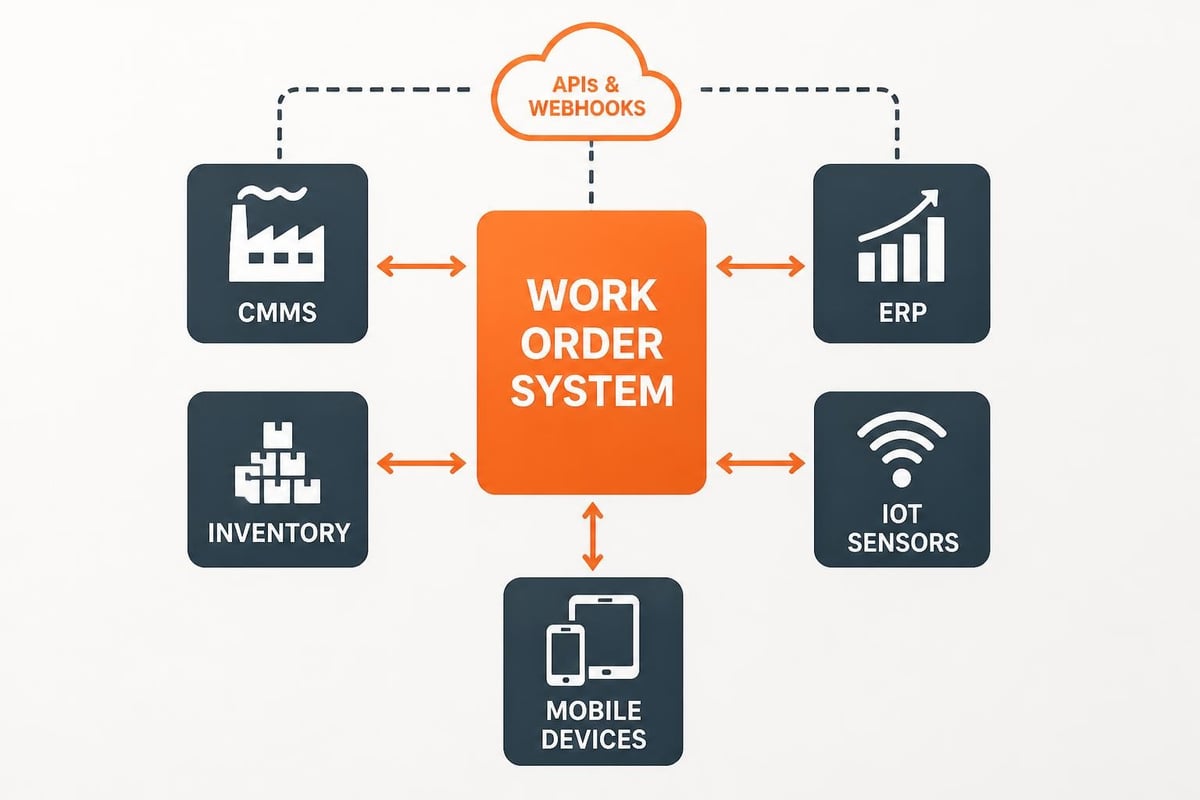
Work order management software rarely operates in isolation. Organizations integrate these platforms with computerized maintenance management systems (CMMS), enterprise resource planning (ERP) systems, and inventory management databases to create seamless data flows across departments.
Key integration patterns include:
- CMMS linkage: Work order platforms pull asset registers, maintenance protocols, and historical failure data from CMMS systems, then push completed work orders back to update asset records and trigger predictive analytics.
- ERP synchronization: Financial modules in ERP systems receive labor hours, parts consumption, and vendor invoices from work orders to calculate maintenance costs, update general ledgers, and manage budgets.
- Inventory management: Work order systems check parts availability, reserve stock for scheduled tasks, and trigger purchase orders when inventory falls below reorder thresholds.
- IoT sensor feeds: Asset sensors monitoring temperature, vibration, or pressure send condition data to work order platforms, which automatically generate work orders when thresholds are exceeded.
- Mobile device integration: Technicians use smartphones and tablets to scan asset barcodes, capture photos, record GPS locations, and collect electronic signatures without re-entering data.
Oracle documentation on integrating asset management with maintenance management describes API patterns and data exchange protocols that enable real-time synchronization between work orders, parts catalogs, and financial systems.
Organizations requiring multi-system orchestration often develop custom software solutions that connect legacy equipment, proprietary databases, and industry-specific compliance platforms through unified data models and event-driven architectures.
API and Webhook Capabilities
Modern work order management software exposes RESTful APIs and webhook endpoints that enable external systems to create, update, and query work orders programmatically. Common API use cases include:
- Automated work order creation: IoT platforms post sensor alerts directly to the work order system without manual entry.
- Real-time status updates: Mobile apps push completion data, triggering downstream processes like invoice generation or customer notifications.
- Bi-directional parts sync: ERP systems query work order requirements to adjust procurement forecasts and update work orders when parts arrive.
- Reporting and analytics: Business intelligence tools extract work order data for custom dashboards and executive reports.
Organizations with specialized workflows benefit from working with development teams that understand both the technical APIs and the operational requirements. Brytend’s expertise in custom integrations ensures work order data flows accurately between asset tracking, compliance monitoring, and customer relationship management platforms.
What Are Common Mistakes When Selecting Work Order Management Software?
Organizations often underestimate the complexity of work order workflows and select platforms that lack critical capabilities or require extensive customization. These mistakes delay implementation, frustrate technicians, and fail to deliver expected ROI.
Frequent selection errors include:
- Ignoring mobile requirements: Choosing desktop-centric platforms that force technicians to complete paperwork after returning to the office.
- Overlooking asset serialization: Implementing systems that track generic equipment categories instead of individual serialized assets with unique histories.
- Neglecting offline functionality: Selecting cloud-only tools that fail when technicians work in areas without cellular coverage.
- Underestimating integration needs: Purchasing standalone work order tools that cannot exchange data with existing CMMS, ERP, or inventory systems.
- Skipping compliance workflows: Deploying generic task managers that lack required fields, audit trails, and signature capture for regulatory documentation.
- Failing to plan for reporting: Choosing platforms with limited export capabilities or inflexible dashboards that cannot answer critical business questions.
Forrester’s evaluation of collaborative work management tools highlights the importance of vendor selection criteria that align with operational priorities, industry regulations, and long-term scalability requirements.
Organizations should pilot work order software with a small group of technicians, test mobile functionality in actual field conditions, and verify integration patterns with sample data before committing to enterprise-wide deployment. Custom development may be necessary when off-the-shelf platforms cannot accommodate unique asset types, compliance standards, or legacy system constraints.
How Does Work Order Management Software Support Regulatory Compliance?
Regulated industries-including healthcare, aerospace, energy, and food production-must demonstrate that assets are maintained according to manufacturer specifications, industry standards, and government regulations. Work order management software provides the documentation, audit trails, and reporting capabilities required to satisfy inspectors and certification bodies.
Compliance-critical features include:
- Required field enforcement: The system prevents work order closure until technicians complete mandatory checklists, capture photos, and collect signatures.
- Timestamp and GPS logging: Every action-creation, assignment, start, pause, completion-is recorded with user ID, timestamp, and location to prove when and where work occurred.
- Document attachment: Technicians upload calibration certificates, safety data sheets, and vendor documentation directly to work orders for centralized access.
- Scheduled audits and inspections: The platform auto-generates work orders for periodic compliance checks and tracks overdue items with escalating alerts.
- Role-based access control: Permissions ensure only qualified personnel can close work orders, approve deviations, or modify asset records.
- Audit-ready reporting: Pre-built templates export work order histories in formats required by regulatory agencies, including FDA 21 CFR Part 11, ISO 9001, and OSHA recordkeeping standards.
EPA guidance on asset management fundamentals emphasizes the role of work order systems in life-cycle planning, preventive maintenance, and regulatory compliance for public infrastructure assets.
Organizations managing complex compliance requirements often combine work order platforms with dedicated compliance risk software that tracks policy exceptions, manages corrective action plans, and aggregates data across multiple regulatory frameworks.
What Is the ROI of Implementing Work Order Management Software?
Return on investment for work order management software derives from reduced downtime, lower labor costs, improved parts efficiency, and faster compliance response. Organizations measure ROI by comparing pre- and post-implementation metrics across operational and financial dimensions.
Quantifiable ROI drivers include:
| ROI Factor | Manual Baseline | Automated Improvement |
|---|---|---|
| Work order completion time | 6-8 hours average | 3-4 hours average (50% reduction) |
| First-time fix rate | 60-70% | 85-95% (improved preparation and parts availability) |
| Preventive maintenance completion | 50-60% on schedule | 90-95% on schedule (automated triggers) |
| Parts inventory carrying cost | 15-20% excess stock | 5-10% excess stock (demand visibility) |
| Compliance audit preparation | 40-80 hours per audit | 2-4 hours per audit (instant report generation) |
A mid-sized manufacturing facility with 200 assets and 4,000 annual work orders typically achieves payback within 6-12 months through:
- Reduced technician travel: GPS-enabled dispatch optimizes routing, saving 10-15% of drive time.
- Lower emergency repair costs: Preventive maintenance prevents 30-40% of unplanned breakdowns.
- Decreased parts waste: Accurate usage tracking eliminates over-ordering and obsolete stock.
- Faster invoice processing: Automated labor and parts data reduces billing cycle from 30 days to 5 days.
Organizations should track baseline metrics-MTTR, work order backlog, parts stockouts, compliance violations-for 90 days before implementation, then measure improvements quarterly for the first year. ServiceNow’s enterprise asset management documentation provides examples of how work order workflows reduce costs and improve service delivery in IT infrastructure and facilities management.
Custom software development enables organizations to tailor ROI calculations to industry-specific factors such as equipment criticality, regulatory penalties, and customer service agreements. Teams experienced in building workflow automation solutions can model ROI scenarios before committing to platform selection or development.
How Do Mobile Capabilities Enhance Work Order Execution?
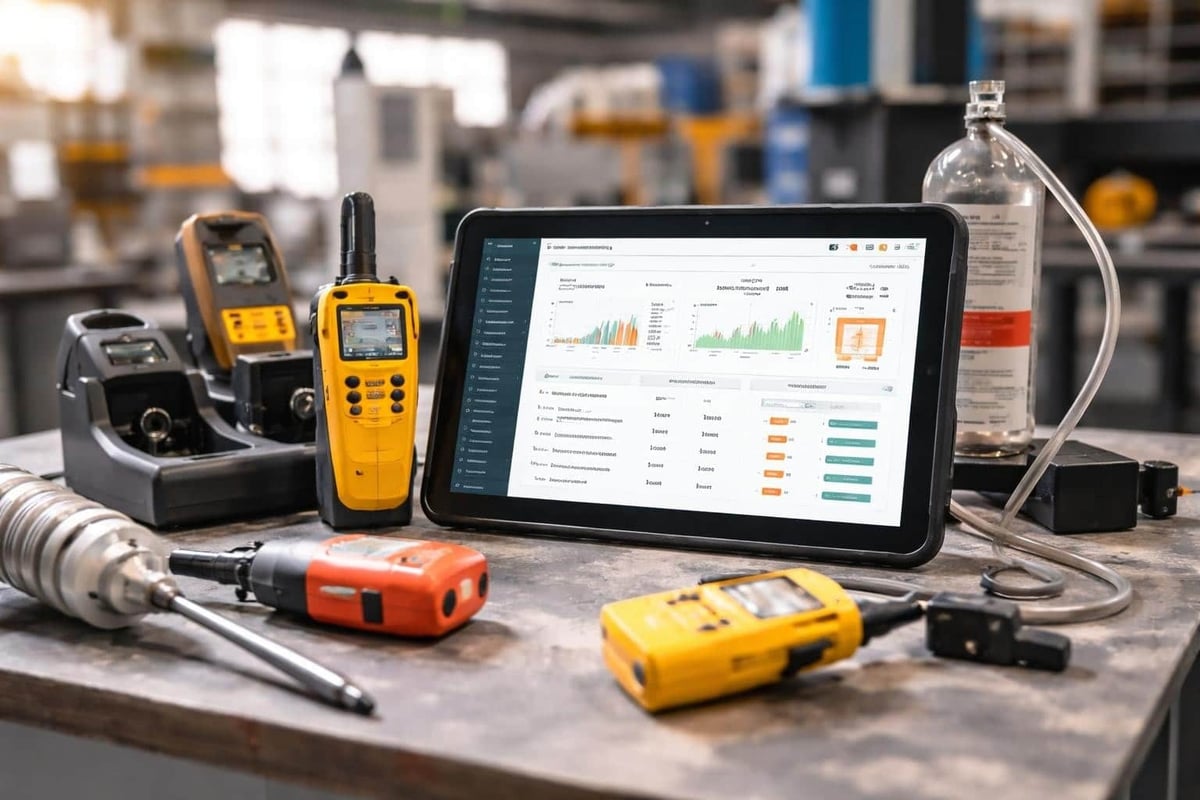
Mobile access transforms work order execution by providing technicians with real-time information, data capture tools, and communication channels in the field. Instead of relying on printed instructions and manual notes, technicians view asset histories, update work order status, and request parts from smartphones or rugged tablets.
Essential mobile work order features include:
- Barcode and QR code scanning: Technicians scan asset tags to pull up maintenance histories, verify correct equipment, and prevent cross-contamination.
- Photo and video capture: Visual documentation of pre-work conditions, completed tasks, and discovered defects supports quality assurance and dispute resolution.
- Digital checklists and forms: Step-by-step instructions with mandatory sign-offs ensure consistency and completeness across all technicians.
- Offline mode: Work orders, asset data, and checklists remain accessible without cellular coverage, with automatic synchronization when connectivity returns.
- GPS location tracking: Dispatchers view technician locations in real time, optimize routing, and provide accurate arrival estimates to customers.
- Parts lookup and ordering: Technicians search inventory, check availability, and request transfers or purchases without returning to the shop.
- Signature capture: Customers and supervisors approve completed work electronically, creating legally binding records without paper forms.
Organizations deploying mobile work order solutions should prioritize platforms with native iOS and Android apps that function reliably on both consumer devices and industrial-grade hardware. The software must handle poor connectivity, extreme temperatures, and physical impacts common in field service environments.
Integration with existing systems ensures mobile data flows seamlessly into asset records, inventory databases, and financial platforms. Custom development teams can build mobile-first work order interfaces that match specific operational workflows, regulatory requirements, and branding standards. Brytend’s mobile app development expertise enables organizations to create tailored field service applications that integrate with enterprise systems while providing offline resilience and intuitive user experiences.
Work order management software replaces manual maintenance processes with automated workflows that improve technician efficiency, asset reliability, and compliance documentation. Organizations that implement these systems reduce downtime, optimize parts inventory, and create audit-ready records that satisfy regulatory requirements. Whether standardizing preventive maintenance schedules, tracking serialized equipment histories, or enabling mobile field execution, the right platform aligns operational practices with strategic asset management goals. Brytend develops custom work order solutions that integrate with existing CMMS, ERP, and compliance systems, ensuring data flows seamlessly across your technology stack while meeting industry-specific requirements.