Workflow automation software executes business processes without human intervention by triggering actions based on predefined rules, moving data between systems, and routing tasks to the appropriate people or applications. Organizations use these platforms to eliminate repetitive manual work, reduce errors, and enforce consistent process execution across departments.
Related: for automation built specifically around AI-driven decisioning rather than fixed rules, see our AI workflow automation software guide.
TL;DR:
- Workflow automation software connects applications, triggers actions based on rules, and routes work without manual intervention
- Platforms range from no-code builders to enterprise orchestration systems with AI capabilities and complex decision logic
- Implementation requires process mapping, system integration, governance policies, and continuous monitoring to prevent failures
- ROI typically comes from labor savings, error reduction, faster cycle times, and improved compliance documentation
- Security, data privacy, and change management are critical considerations when deploying automation at scale
Workflow automation software is a platform that digitizes and executes business processes by connecting applications, enforcing business rules, and automatically routing data and tasks between systems and people.
What Is Workflow Automation Software and How Does It Work?
Workflow automation software digitizes manual processes by defining a sequence of steps, conditions, and actions that execute automatically when triggered. The platform monitors specified events (form submission, file upload, database change, scheduled time) and initiates workflows without human action.
The core mechanism involves three components: triggers, logic, and actions. Triggers detect when a workflow should start. Logic evaluates conditions and determines which path the workflow follows. Actions perform operations such as sending notifications, updating records, generating documents, or calling external APIs.
Modern workflow automation platforms operate through visual builders where users drag and drop elements to construct process flows. Each workflow contains nodes representing different operations connected by directional arrows showing execution sequence. Conditional branches enable different actions based on data values, user roles, or external system responses.

Key Components of Workflow Automation Platforms
Trigger mechanisms initiate workflows based on specific events:
- Time-based triggers (daily reports, monthly invoice generation, quarterly reviews)
- Data-based triggers (new record created, field value changed, threshold exceeded)
- User-based triggers (form submission, button click, approval request)
- System-based triggers (file uploaded, email received, API webhook)
Integration layer connects workflow automation software to existing business systems through:
- Pre-built connectors for common applications (CRM, ERP, email, databases)
- RESTful API calls for custom integrations
- File transfer protocols (FTP, SFTP) for legacy systems
- Database connections (SQL, NoSQL) for direct data access
Execution engine processes workflow logic and manages:
- Sequential execution of steps in defined order
- Parallel execution of independent branches simultaneously
- Error handling and retry mechanisms for failed operations
- Transaction management to ensure data consistency
Monitoring and logging capabilities track:
- Workflow execution history and completion status
- Error logs with failure reasons and affected records
- Performance metrics (execution time, throughput, bottlenecks)
- Audit trails for compliance documentation
Organizations implementing customer relationship management systems frequently use workflow automation to route leads, trigger follow-up sequences, and update deal stages automatically.
What Are the Different Types of Workflow Automation Software?
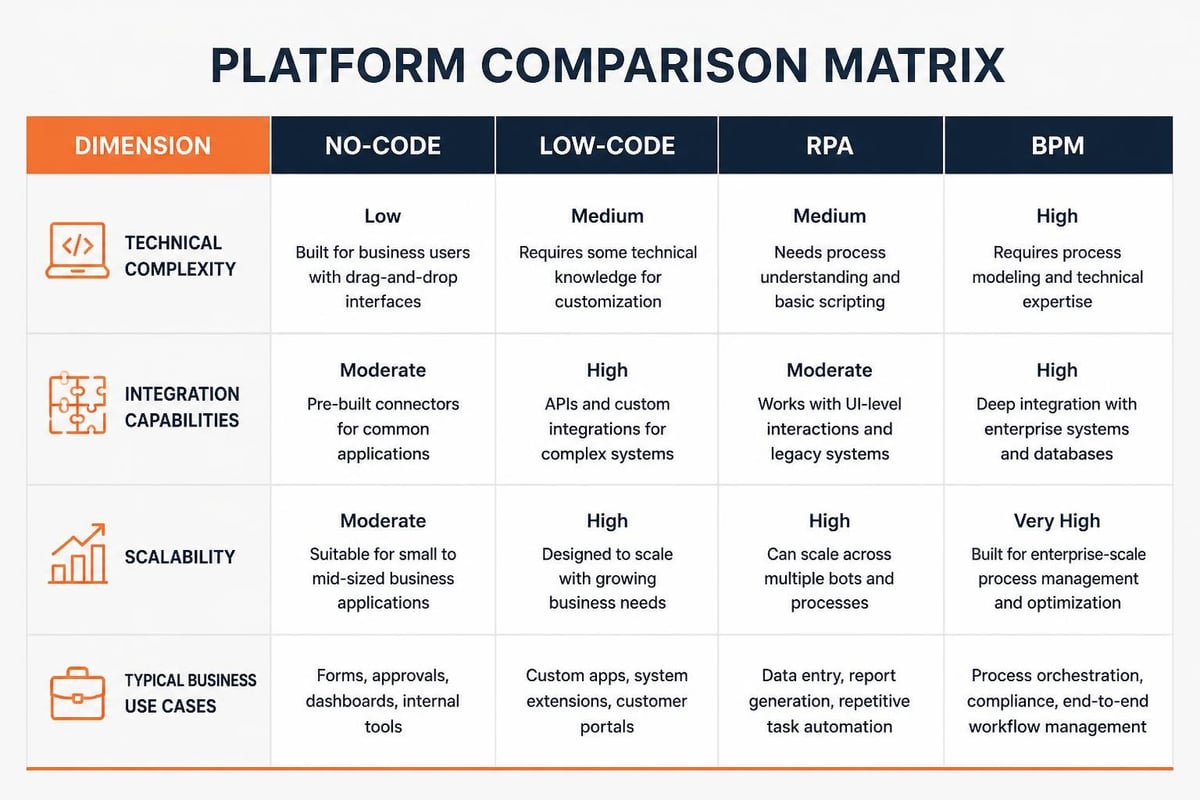
Workflow automation software spans multiple categories based on technical complexity, target users, and deployment models. Understanding these distinctions helps organizations select platforms matching their technical capabilities and automation requirements.
| Platform Type | Technical Skill Required | Typical Use Cases | Integration Depth |
|---|---|---|---|
| No-code builders | None (visual interface) | Form routing, approval workflows, notification sequences | Pre-built connectors only |
| Low-code platforms | Basic scripting | Department processes, data synchronization, report automation | Connectors + custom code |
| Robotic Process Automation (RPA) | Medium (UI mapping) | Desktop application automation, legacy system integration | Screen scraping + API |
| Enterprise orchestration | High (development skills) | Cross-system processes, complex decision logic, transaction management | Full API + database access |
No-Code and Low-Code Platforms
No-code workflow automation software enables business users to build processes through drag-and-drop interfaces without programming knowledge. These platforms offer:
- Visual workflow designers with pre-configured action templates
- Form builders for data collection and process initiation
- Approval routing with configurable escalation rules
- Email and notification templates with dynamic field insertion
- Basic conditional logic (if/then rules, field comparisons)
Low-code platforms extend no-code capabilities by allowing custom code insertion for complex operations. Users can write JavaScript, Python, or platform-specific scripts within workflow nodes to perform calculations, transform data formats, or implement business logic not available in standard actions.
Microsoft Power Automate exemplifies this category, providing extensive pre-built connectors while supporting custom workflow processes for specialized requirements.
Robotic Process Automation (RPA)
RPA software automates tasks in desktop applications by recording user interactions and replaying them programmatically. Unlike API-based workflow automation software, RPA bots interact with application user interfaces just as humans do-clicking buttons, entering text, reading screen elements, and navigating between windows.
RPA platforms suit scenarios where:
- Applications lack APIs or integration capabilities
- Legacy systems require modernization without code changes
- Desktop applications perform repetitive data entry tasks
- Multiple disconnected systems need coordination
RPA workflow structure:
- Bot captures user interactions during training mode
- Platform generates automation script from recorded actions
- Scheduler triggers bot execution at specified times or events
- Bot logs into applications using credential vault
- Bot executes programmed actions and captures output
- Error handling redirects failed tasks to human queues
Organizations must consider testing and verification methods when deploying RPA to ensure bots handle exceptions correctly and maintain accuracy as underlying applications change.
Enterprise Business Process Management (BPM)
Enterprise BPM platforms manage complex workflows spanning multiple departments, systems, and decision points. These solutions provide:
- Process modeling notation (BPMN 2.0) for standardized documentation
- State machine capabilities for multi-stage approval chains
- Human task management with work queues and assignment rules
- Service orchestration coordinating microservices and APIs
- Business rule engines separating logic from workflow structure
- Process mining and analytics identifying bottlenecks and optimization opportunities
BPM platforms typically require development resources for implementation but offer superior scalability, compliance controls, and process governance compared to simpler workflow automation software.
How Do You Implement Workflow Automation Software Successfully?
Successful implementation follows a structured methodology beginning with process discovery and ending with continuous optimization. Organizations that skip planning phases experience higher failure rates, user resistance, and abandoned automation projects.
Phase 1: Process Discovery and Documentation
Identify automation candidates by evaluating processes against criteria:
- High transaction volume (performed more than 10 times daily)
- Rule-based decision making with clear conditions
- Multiple system touchpoints requiring manual data transfer
- Time-sensitive operations where delays cause business impact
- Error-prone tasks with quality or compliance risks
Document current state by mapping existing workflows:
- List all process steps in sequential order
- Identify decision points and conditional branches
- Document data inputs, outputs, and transformations
- Note system interactions and manual handoffs
- Measure current cycle time and error rates
- Calculate labor hours consumed by the process
Prioritize processes using ROI scoring methodology:
- Frequency × time saved per execution = total hours recovered
- Error rate × cost per error = quality improvement value
- Compliance risk × penalty exposure = risk mitigation benefit
- Implementation complexity (inverse) = feasibility factor
Organizations should start with high-value, low-complexity workflows to build confidence and demonstrate results before tackling enterprise-wide process transformation.
Phase 2: Platform Selection and Integration Planning
Evaluate workflow automation software based on technical and organizational requirements:
| Evaluation Criteria | Assessment Questions |
|---|---|
| Integration capabilities | Does the platform connect to all required systems? Are pre-built connectors available or custom API work needed? |
| Scalability | Can the platform handle peak transaction volumes? Does it support enterprise-wide deployment? |
| Governance features | Does it provide role-based access, approval workflows, and audit logging? |
| Development approach | Can business users build workflows or are developers required? |
| Deployment model | Cloud-hosted, on-premises, or hybrid architecture? |
| Total cost of ownership | Licensing, implementation, training, maintenance, and integration costs? |
Design integration architecture by mapping data flows:
- Identify source systems providing input data
- Define target systems receiving output data
- Determine data transformation requirements (format conversion, field mapping, calculation)
- Specify synchronization frequency (real-time, batch, scheduled)
- Plan error handling for failed integrations (retry logic, fallback procedures, alert routing)
Microsoft provides comprehensive guidance on establishing automation governance through Center of Excellence frameworks that ensure consistent implementation standards.
Phase 3: Workflow Design and Configuration
Build workflow logic following design principles:
- Start with trigger configuration specifying when workflows execute
- Add data validation steps rejecting incomplete or invalid inputs
- Insert conditional branches handling different scenarios
- Configure actions performing operations (create records, send emails, update databases)
- Implement error handling with notification and recovery procedures
- Add logging steps capturing execution details for troubleshooting
Test workflows before production deployment:
- Unit testing of individual workflow steps
- Integration testing of system connections and data flow
- User acceptance testing with representative data samples
- Performance testing under expected transaction volumes
- Failure testing simulating error conditions and recovery
Teams developing custom software solutions often build workflow automation capabilities directly into applications to ensure seamless integration with business-specific logic.
Phase 4: User Training and Change Management
Prepare users through structured training covering:
- How automated workflows change their daily responsibilities
- What manual steps are eliminated versus enhanced
- How to initiate workflows and monitor status
- What to do when workflows fail or produce unexpected results
- How to request modifications or report issues
Address resistance by communicating benefits specific to each role:
- Individual contributors: time savings, reduced repetitive work, focus on higher-value tasks
- Managers: improved visibility, consistent process execution, better capacity planning
- Executives: cost reduction, scalability, compliance documentation, faster cycle times
Establish support procedures including:
- Clear escalation paths for workflow failures
- Documentation library with process guides and troubleshooting steps
- Regular review meetings to identify optimization opportunities
- Feedback channels for user suggestions and issue reporting
Phase 5: Monitoring and Continuous Improvement
Track performance metrics measuring automation effectiveness:
- Workflow completion rate (successful executions ÷ total attempts)
- Average execution time compared to manual baseline
- Error rate and common failure patterns
- User satisfaction scores from feedback surveys
- Cost savings from eliminated manual labor
Optimize workflows based on performance data:
- Analyze execution logs identifying bottlenecks and delays
- Review error patterns indicating integration or logic problems
- Gather user feedback on pain points and enhancement requests
- Benchmark against industry standards for similar processes
- Implement incremental improvements and measure impact
Organizations using digital service forms can automate workflow triggers when customers submit requests, routing work to appropriate teams without manual intervention.
What Security and Compliance Considerations Apply to Workflow Automation?
Workflow automation software accesses sensitive business data, connects to critical systems, and makes decisions affecting customers and operations. Organizations must address security vulnerabilities, data privacy requirements, and regulatory compliance obligations before deploying automation at scale.
Authentication and Access Control
Implement role-based permissions controlling:
- Who can create, modify, or delete workflows
- Which workflows users can execute manually
- What data fields workflows can read or update
- Which system integrations workflows may access
Secure credential storage through:
- Centralized credential vaults encrypting sensitive authentication data
- Service accounts with minimum required permissions for each integration
- Regular credential rotation on defined schedules
- Multi-factor authentication for administrative access
- API key management with expiration and revocation capabilities
Audit all automation activities by logging:
- Workflow executions with timestamp, initiator, and affected records
- Configuration changes with before/after values and change author
- Permission modifications and access grants
- Failed authentication attempts and blocked access
- Data export operations and external system calls
Data Privacy and Regulatory Compliance
Workflow automation software processing personal data must comply with privacy regulations including GDPR, CCPA, and sector-specific requirements. The European Data Protection Board provides authoritative guidance on automated decision-making affecting individuals.
Key compliance requirements:
- Purpose limitation: workflows process data only for specified, legitimate purposes
- Data minimization: workflows access only necessary fields for their function
- Transparency: individuals understand when automation affects them
- Right to explanation: organizations can explain automated decisions
- Human oversight: critical decisions include human review checkpoints
Implement privacy safeguards:
- Data retention policies automatically deleting workflow logs after defined periods
- Encryption of data in transit and at rest
- Geographic restrictions keeping data within required jurisdictions
- Consent verification before processing personal information
- Anonymization or pseudonymization where full identification unnecessary
Security Vulnerabilities in Automated Workflows
Workflow automation software introduces attack vectors that manual processes don't face. The OWASP project on automated threats documents risks including credential stuffing, scalping, and denial of service amplified by automation.
Common security risks:
| Vulnerability | Description | Mitigation |
|---|---|---|
| Excessive permissions | Workflows granted broader access than required | Apply principle of least privilege; review permissions quarterly |
| Credential exposure | API keys or passwords stored in workflow code | Use credential vaults; never hard-code credentials |
| Injection attacks | User inputs passed to database queries without sanitization | Validate and sanitize all external inputs |
| Infinite loops | Poorly designed triggers creating recursive execution | Implement circuit breakers and execution limits |
| Data leakage | Sensitive information logged or transmitted insecurely | Encrypt logs; mask sensitive fields; use secure protocols |
Security best practices:
- Regular vulnerability assessments of workflow automation software and connected systems
- Penetration testing simulating attacks on automated processes
- Rate limiting preventing workflows from overwhelming target systems
- Sandboxing isolating workflow execution from production environments during testing
- Incident response procedures for compromised automation accounts
Organizations should review security configurations during managed service engagements to ensure automation doesn't introduce vulnerabilities.

What ROI Can Organizations Expect from Workflow Automation Software?
Return on investment from workflow automation software comes from multiple sources: direct labor savings, error reduction, faster cycle times, improved compliance, and enhanced customer experience. Quantifying these benefits requires measuring baseline performance before automation and tracking improvements after implementation.
Calculating Direct Labor Savings
Methodology for quantifying time savings:
- Measure current process duration from initiation to completion
- Count monthly execution volume
- Calculate total monthly hours (duration × volume)
- Determine percentage of work automated (typically 60-90% of manual effort)
- Multiply total hours × automation percentage × hourly labor cost
Example calculation:
- Invoice processing: 25 minutes per invoice manually
- Monthly volume: 800 invoices
- Total manual hours: 333 hours (800 × 25 ÷ 60)
- Automation eliminates: 85% of manual work
- Hours saved: 283 hours per month
- Annual savings at $45/hour: $152,820
Error Reduction and Quality Improvement
Manual data entry, calculation, and transfer operations generate errors. Workflow automation software eliminates transcription mistakes, formula errors, and routing failures.
Error cost components:
- Correction labor (time to identify and fix errors)
- Customer impact (refunds, credits, relationship damage)
- Compliance penalties (fines, corrective action costs)
- Rework expenses (repeating failed processes)
Organizations typically measure error rates as defects per thousand opportunities (DPMO). Manual processes averaging 2-5% error rates often achieve below 0.1% with properly configured workflow automation software.
Cycle Time Acceleration
Automation eliminates delays between process steps, reducing total cycle time from hours or days to minutes.
Time reduction sources:
- Instant routing vs. manual task assignment (eliminate hours of queue time)
- Immediate data transfer vs. batch file exports (eliminate daily sync delays)
- Automated approvals vs. email chains (reduce approval cycles from days to hours)
- Parallel processing vs. sequential handoffs (execute independent tasks simultaneously)
Faster cycle times deliver business value through:
- Improved customer satisfaction from faster response times
- Reduced working capital from shorter cash conversion cycles
- Increased capacity enabling higher transaction volumes without additional staff
- Competitive advantage from shorter lead times
Compliance and Audit Benefits
Workflow automation software creates complete audit trails documenting process execution, decision logic, data changes, and responsible parties.
Compliance value drivers:
- Reduced audit preparation time from automated evidence collection
- Lower compliance violation risk from consistent policy enforcement
- Faster regulatory reporting from automated data aggregation
- Improved dispute resolution from detailed transaction histories
Organizations in regulated industries (healthcare, financial services, manufacturing) often justify automation investments primarily through compliance benefits rather than labor savings.
Total Cost of Ownership Considerations
Implementation and operational costs include:
- Platform licensing (per-user, per-workflow, or enterprise subscriptions)
- Integration development (custom connectors, API configuration)
- Training and change management expenses
- Ongoing maintenance (workflow updates, connector maintenance)
- Infrastructure costs (servers, databases, network capacity)
ROI calculation formula:
Annual Benefits = Labor Savings + Error Reduction + Compliance Value + Productivity Gains
Annual Costs = Licensing + Integration + Training + Maintenance + Infrastructure
ROI = (Annual Benefits - Annual Costs) ÷ Annual Costs × 100
Payback Period = Total Implementation Cost ÷ (Monthly Benefits - Monthly Costs)
Most organizations achieve ROI within 6-18 months for departmental workflow automation and 12-36 months for enterprise-wide implementations.
Forrester research demonstrates how process orchestration drives innovation beyond cost savings, enabling organizations to adapt processes continuously as business requirements evolve.
What Common Mistakes Should Organizations Avoid When Implementing Workflow Automation?
Implementation failures typically result from inadequate planning, poor change management, or technical mistakes during workflow design. Understanding these patterns helps organizations avoid costly delays and abandoned projects.
Automating Broken Processes
Organizations often automate existing workflows without questioning whether current processes represent best practices. Automating inefficient or unnecessary steps simply makes bad processes faster.
Correct approach:
- Map current state identifying all process steps
- Challenge each step asking why it exists and what value it delivers
- Eliminate unnecessary steps (redundant approvals, duplicate data entry)
- Simplify remaining steps (consolidate similar tasks, remove manual workarounds)
- Optimize sequence (parallel execution, faster routing logic)
- Automate the improved process
Process redesign before automation typically delivers 30-50% additional efficiency gains beyond what automation alone achieves.
Insufficient Testing and Error Handling
Production workflow failures damage user confidence and create emergency support burdens. Many organizations deploy workflows after minimal testing, discovering edge cases and error conditions only after live deployment.
Comprehensive testing requirements:
- Positive path testing (successful execution with valid data)
- Negative testing (invalid inputs, missing data, constraint violations)
- Boundary testing (minimum values, maximum values, limits)
- Integration testing (all connected systems, authentication, data format)
- Volume testing (peak loads, concurrent executions)
- Failure testing (network interruptions, timeout conditions, system unavailability)
Error handling design:
- Graceful degradation continuing partial workflow execution when non-critical steps fail
- Automatic retry with exponential backoff for transient failures
- Human task assignment routing failed items to manual queues
- Detailed error messages enabling troubleshooting without platform access
- Alert escalation notifying support teams of repeated failures
Ignoring the Human Element
Workflow automation software changes job responsibilities, sometimes eliminating positions. Organizations underestimating change management face user resistance, workarounds, and passive sabotage.
Change management best practices:
- Involve affected users in process design and workflow testing
- Communicate clearly about how automation changes roles (eliminating repetitive work, not eliminating people)
- Provide alternative responsibilities utilizing freed capacity
- Train users thoroughly before go-live
- Celebrate early wins demonstrating tangible benefits
- Address concerns transparently through regular feedback sessions
Poor Integration Architecture
Workflow automation software connecting to dozens of systems becomes fragile when integration failures cascade across dependent processes.
Integration resilience strategies:
- Circuit breakers stopping workflows when upstream systems fail rather than queueing thousands of failed attempts
- Idempotent operations ensuring repeated execution of the same action (due to retries) doesn't create duplicate records
- Asynchronous processing decoupling workflow execution from integration response times
- Dead letter queues capturing failed messages for later reprocessing
- Health monitoring continuously verifying integration connectivity
Organizations building custom software solutions can design applications with automation-friendly APIs reducing integration complexity.
Lack of Governance and Standards
As workflow automation software adoption grows, organizations without governance frameworks accumulate technical debt through inconsistent implementation patterns, duplicate workflows, and unmanaged platform sprawl.
Governance framework components:
- Naming conventions for workflows, variables, and integration connectors
- Development standards (error handling patterns, logging requirements, documentation)
- Approval processes for new workflow deployment to production
- Code review procedures ensuring quality and maintainability
- Platform ownership clarifying support responsibilities
- Regular audits identifying unused, redundant, or risky workflows
The Brytend Service Module demonstrates how structured automation can streamline repetitive service operations while maintaining consistency across distributed teams. By automating service reminders, certificate generation, and maintenance scheduling, organizations eliminate manual coordination while ensuring every asset receives proper attention.

How Is Artificial Intelligence Transforming Workflow Automation Software?
Modern workflow automation software increasingly incorporates artificial intelligence to handle unstructured data, make predictive decisions, and optimize process execution. AI capabilities extend automation beyond simple rule-based workflows into domains requiring judgment, pattern recognition, and continuous learning.
Intelligent Document Processing
Traditional workflow automation software requires structured data inputs (form fields, database records, API responses). AI-powered platforms extract information from unstructured documents including emails, PDFs, scanned images, and handwritten forms.
Document processing capabilities:
- Optical character recognition (OCR) converting images to machine-readable text
- Natural language processing extracting entities (names, dates, amounts, product codes)
- Document classification routing attachments to appropriate workflows
- Confidence scoring flagging uncertain extractions for human review
- Learning from corrections improving accuracy over time
Implementation example:
- Customer emails arrive containing order requests in free-text format
- AI extracts customer ID, product codes, quantities, and delivery addresses
- Workflow automation software validates extracted data against inventory systems
- High-confidence extractions create orders automatically
- Low-confidence extractions route to human review queue
- Human corrections train AI model improving future accuracy
Predictive Workflow Routing
AI models analyze historical workflow data to predict optimal routing decisions, processing times, and resource allocation.
Predictive capabilities:
- Complexity scoring estimating which tasks require specialist expertise vs. general processing
- Workload balancing distributing tasks to minimize queue backlogs
- Deadline prediction calculating expected completion times based on current conditions
- Exception detection identifying unusual patterns requiring management attention
- Next-best-action recommendations suggesting process optimizations
Organizations using CRM tools can implement predictive lead scoring that automatically prioritizes follow-up workflows based on conversion probability.
Process Mining and Optimization
Process mining tools analyze system logs and user activity to discover actual workflow execution patterns, often revealing deviations from designed processes.
Process mining outputs:
- Visual process maps showing all execution paths and variations
- Bottleneck identification pinpointing delays and capacity constraints
- Conformance checking highlighting deviations from standard procedures
- Root cause analysis explaining performance variations
- Optimization recommendations suggesting process improvements
Workflow automation software integrated with process mining creates continuous improvement loops where analytics identify optimization opportunities and automation implements changes.
Conversational Interfaces and Chatbots
AI-powered chatbots enable users to initiate workflows, check status, and request changes through natural language conversations rather than form interfaces.
Conversational automation use cases:
- Employee requests (vacation approval, equipment orders, IT support tickets) initiated through chat
- Customer self-service (order status, returns, appointment scheduling) without human agents
- Approval routing where managers respond to workflow requests via messaging apps
- Status updates proactively notifying users about workflow progress
Technical components:
- Natural language understanding interpreting user intent from conversational input
- Dialog management maintaining conversation context across multiple messages
- Integration layer connecting chatbot to workflow automation software
- Response generation creating human-readable status updates and confirmations
Autonomous Decision-Making Considerations
As AI capabilities advance, workflow automation software can make decisions previously requiring human judgment. Organizations must carefully consider where autonomous decision-making is appropriate and where human oversight remains necessary.
Decision delegation framework:
| Decision Type | Automation Approach | Human Role |
|---|---|---|
| Routine operational | Fully automated with monitoring | Exception handling only |
| Standard with variations | Automated within confidence thresholds | Review low-confidence cases |
| Complex judgment-based | AI recommendations with approval | Review and approve/override |
| Strategic or ethical | AI analysis for decision support | Final decision authority |
Regulatory frameworks increasingly require transparency and accountability for automated decisions, particularly those affecting individuals. Organizations must document decision logic, maintain audit trails, and provide mechanisms for appeals and corrections.
Workflow automation software transforms manual processes into efficient, consistent, and scalable operations by eliminating repetitive tasks and enforcing business rules across connected systems. Organizations that follow structured implementation methodologies, address security and compliance requirements, and maintain governance frameworks achieve measurable ROI while positioning themselves for continuous process improvement. Brytend specializes in developing custom automation solutions that integrate seamlessly with your existing systems, ensuring workflows match your specific business requirements rather than forcing processes into generic platform constraints.