Software servicing is the ongoing work of keeping software correct, secure and usable after it goes live. It covers fixing defects, applying patches, adapting to new requirements and improving performance, and it is the same activity most references call software maintenance. For companies that service gas detectors, SCBA sets or rental equipment, software servicing also keeps calibration records, certificates and invoices accurate enough to stand up in an audit.
Software servicing is the set of planned and reactive changes made to released software to keep it fit for its purpose.
What is software servicing?
Software servicing is the continued correction, protection and adaptation of an application after its first release. It starts the day a system goes into production and ends only when the system is retired.
The work falls into a few repeatable activities:
- Defect repair: fixing errors found in daily use.
- Security patching: closing vulnerabilities in the application and the components it depends on.
- Adaptation: changing the software when regulations, integrations, devices or hosting platforms change.
- Improvement: adjusting workflows, reports and performance based on how people actually use the system.
- Documentation and records: logging what changed, why, who approved it and how it was tested.
The term should not be confused with a software service in the sense of software as a service (SaaS), where a vendor hosts an application and charges a subscription. Software servicing describes an activity. SaaS describes a delivery model. A SaaS product still needs servicing, and the vendor performs it on behalf of every customer.
What are the four types of software maintenance?
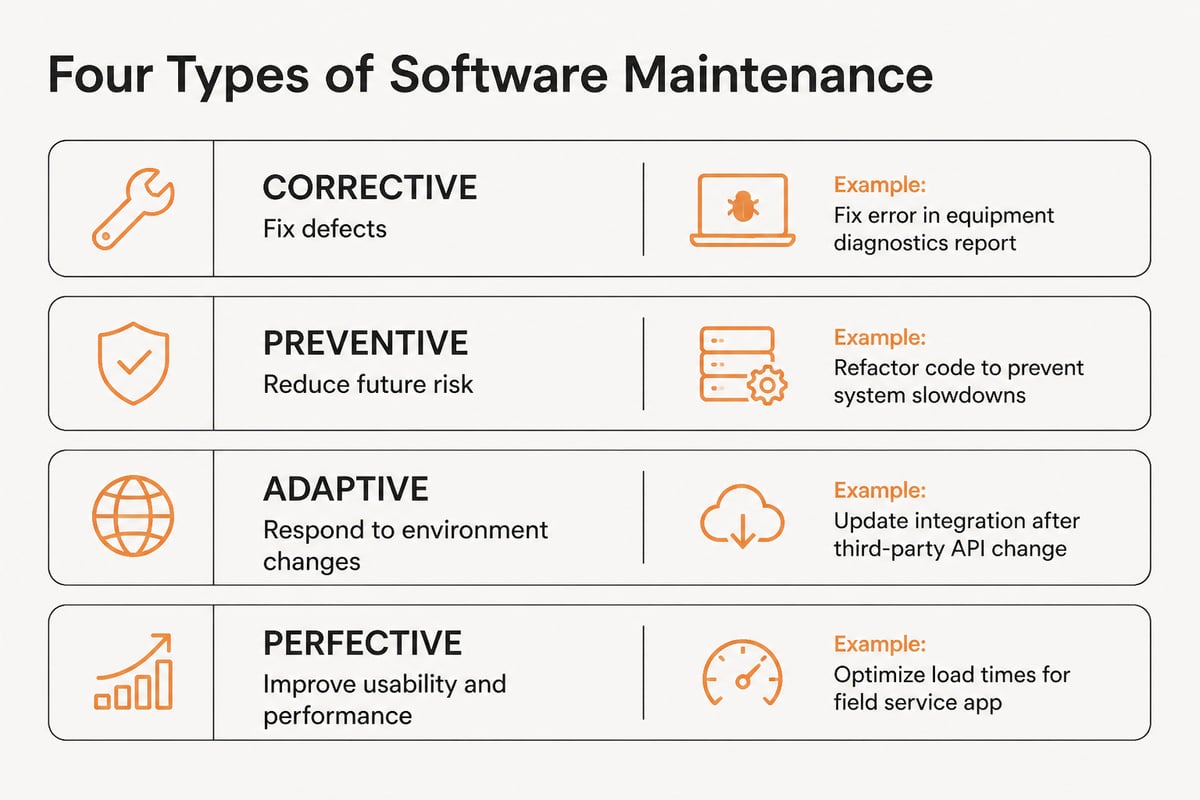
The four types of software maintenance are corrective, preventive, adaptive and perfective. Each answers a different trigger for changing the software.
| Type | Trigger | Example in a service business |
|---|---|---|
| Corrective | A defect is found | A calibration certificate prints the wrong due date |
| Preventive | A risk is identified before it fails | Refactoring a reminder job that slows down as the device list grows |
| Adaptive | The environment changes | Updating an e-invoice format or an operating system version |
| Perfective | Users need better behavior | Adding a gas test limit check that blocks an unsafe clearance |
Most teams spend their time on a mix of all four. Corrective work is the most visible because users report it. Preventive and adaptive work is easier to postpone and tends to cost more when it finally becomes urgent.
Why does software servicing matter for equipment service companies?
Software servicing matters because service, rental and distribution businesses depend on records that must stay accurate for years. A certificate, a stock movement or an invoice that cannot be traced back to a source is a liability in an audit, a dispute or a customer complaint.
Three pressures make this concrete.
Security. Unpatched software is a common entry point for attackers. The Cybersecurity and Infrastructure Security Agency advises installing relevant patches as soon as possible, enabling automatic updates when available, and retiring end-of-life products, as described in its guidance on patches and software updates. CISA also recommends that manufacturers clearly communicate product support periods at the time of sale and provide security updates throughout that period, according to its Product Security Bad Practices document. When you buy or build business software, ask what support period applies and who applies the patches.
Compliance. Calibration labs and safety-equipment servicers answer to their customers' auditors. The software has to preserve service history, test results and approvals without gaps. A change that silently alters a stored value breaks that chain.
Operations. Quoting, renting, servicing and invoicing the same equipment means one defect can ripple across several departments. Distributors and manufacturers that sell across warehouses and webshops face the same effect when a stock sync fails.
How does the software servicing process work?
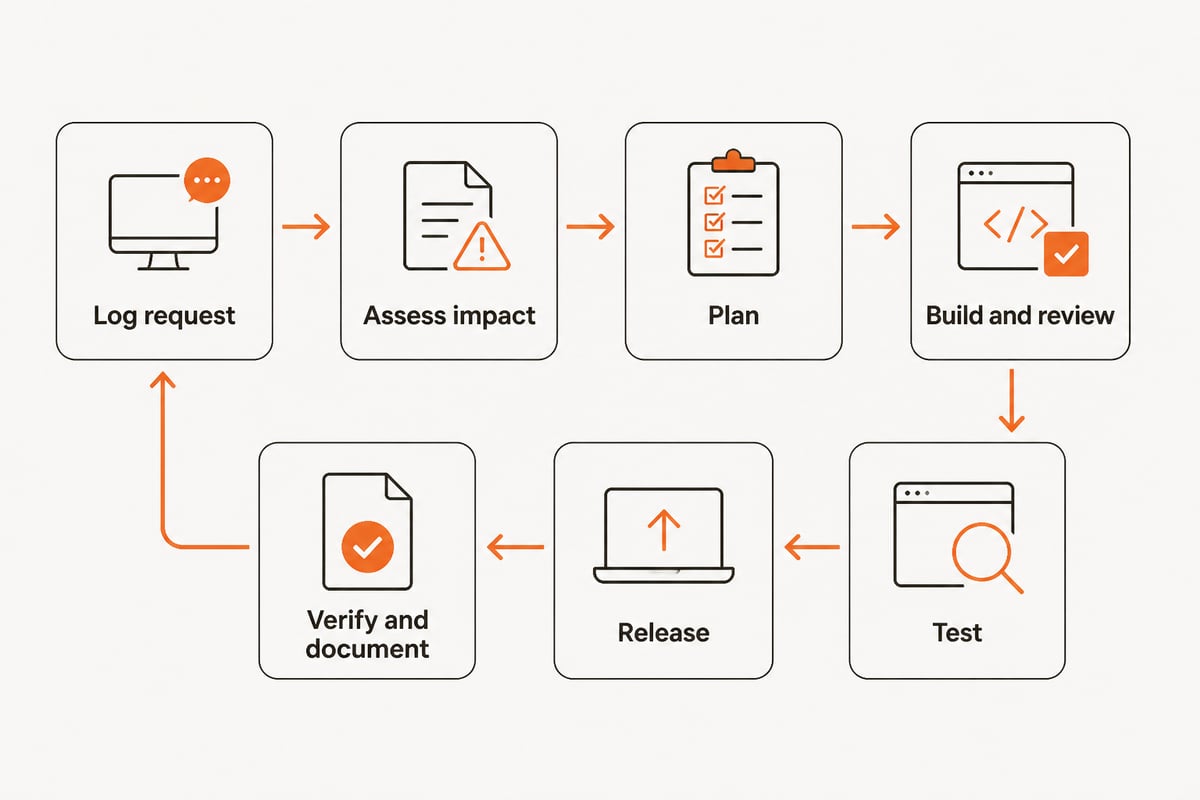
The software servicing process is a repeatable cycle of intake, assessment, change, verification and release. Each step produces a record, so every change can be explained later.
- Log the request. Capture defects, security notices and change requests in one queue with an owner and a priority.
- Assess impact. Identify which modules, integrations, data and users the change touches, and whether it affects regulated records.
- Plan and schedule. Group low-risk changes into regular releases and handle urgent security fixes outside the normal cycle.
- Build and review. Make the change in a development environment and have a second person review it.
- Test. Run regression tests against existing behavior, plus checks on any calculation or compliance rule the change could affect.
- Release. Deploy during a low-activity window, with a rollback plan and a clear notice to users.
- Verify and document. Confirm the change in production, then record what changed, who approved it and which tests passed.
The National Institute of Standards and Technology reflects this emphasis on traceable change. NIST's SP 800-53 Rev. 5.2.0, finalized on August 27, 2025, adds or revises safeguards related to software updates, patch deployment, testing, integrity validation and root-cause analysis, as covered in its announcement of the revised control catalog. Root-cause analysis is the step teams most often drop under time pressure, and it is the one that prevents the same defect from returning.
What does software servicing look like in a gas detection service company?
In a gas detection service company, software servicing is mostly about protecting calibration data, certificates and reminders while the system changes around them. A realistic example shows how the cycle runs.
A service company calibrates and bump-tests fixed and portable gas detectors for industrial customers. A customer's auditor notices that a certificate shows a calibration gas cylinder whose expiry date had passed on the test date. The company runs the process like this:
- Intake: the service manager logs the finding as a corrective request and marks it as affecting regulated records.
- Impact assessment: the developer finds that the certificate template pulls the cylinder reference but does not compare expiry dates with the test date.
- Change: a validation rule is added so a test cannot be saved against an expired cylinder without an approved override.
- Test: the team runs the rule against old and new test records and confirms that existing certificates are not altered.
- Release: the change goes out after hours, and technicians get a short note explaining the new warning.
- Review of past data: a report lists earlier tests that used cylinders near or past expiry, so the manager can contact affected customers.
- Documentation: the request, the test results and the approval stay linked to the release record.
The same pattern applies to SCBA servicing, where inspection checklists, pressure test results and mask fit records must stay linked to the right serial numbers. Software that registers each asset with a unique identity makes this easier, because the history of any item can be pulled from one place. The Brytend Service Module lets you register serialized inventory, add custom services, automate service reminders and generate service certificates, which gives the servicing team a structured record to protect when changes are released.

Brytend's platform can also check gas tests against your own limits, so any change to those rules belongs in the servicing process described above. Calibration-specific records are covered in more depth on the page about calibration management software, and the wider sector context is on the page for a quality control gas detection company.
How much does software servicing cost?
The cost of software servicing depends on the size of the system, the number of integrations, the release frequency and how much regulated data it holds. No single average applies across businesses, and any specific percentage quoted without a named source should be treated with caution.
What drives the cost is predictable:
- System size and age. Larger, older codebases take more time to change safely.
- Integrations. Each connection to accounting, e-invoicing, webshops or warehouse scanners needs testing when either side changes.
- Compliance load. Systems that hold calibration, safety or financial records need more testing and documentation per change.
- Deferred work. Skipped updates and unpatched components make later changes larger and riskier.
- Support expectations. Response times, coverage hours and the number of users all affect the effort.
A practical way to budget is to separate three items: routine servicing, such as patches and small fixes; planned improvement, such as new reports or workflow changes; and a reserve for urgent security or regulatory changes. Review the split each year and compare it with the actual request log. For a quote on your own system, contact the team through the Brytend contact page or check Brytend pricing.

How can a business choose between custom and off-the-shelf servicing?
A business should choose based on who controls the change schedule, who holds the data and how many separate systems must stay in step. With off-the-shelf software the vendor decides what changes and when. With custom software your requirements decide, and the servicing agreement defines the response.
Questions to ask before signing any servicing arrangement:
- Which support period applies, and what happens after it ends?
- How quickly are security fixes applied, and at whose cost?
- Who holds the data, where is it hosted and how can it be exported?
- Are changes tested against regulated records before release?
- Is every change logged with a reason, an approver and a source document?
- How many disconnected tools must be updated together?
The last point matters for companies running separate systems for quotes, rentals, service and invoicing. Each system has its own update cycle, and the integrations between them become a servicing task of their own. A single platform that shares customers, devices, documents and data across modules reduces that surface. Brytend offers e-invoicing ready for Peppol BIS Billing 3.0, and its inventory side can record stock changes with a reason, a user and a source document, which gives distributors and manufacturers a clearer audit trail through each release. For related background, see the pages on inventory control and rental management.
FAQ
What is a software service?
A software service is an application delivered over the internet by a provider, usually under a subscription, often called software as a service. It is different from software servicing, which is the maintenance work done on any application after release.
Can software servicing be done by the original developer only?
No. Any qualified team can do it, but the original developer or vendor usually knows the architecture and history best. Clear documentation and a change log make it possible to hand servicing to another team without losing context.
How often should business software be serviced?
Routine servicing should follow a regular release schedule, often monthly or quarterly, while security fixes should be applied as soon as they are available and tested. The right rhythm depends on the system's risk, integrations and the regulated records it holds.
Start by listing every system that holds your calibration, service, rental or stock records and note who patches each one and when it was last updated. If that list shows disconnected tools, ask Brytend how a single platform could take over servicing for them, and Brytend offers a way to see it in practice: you can start a free trial and check your own workflows before committing.