A customer CRM is software that stores every customer, contact, deal, service job and conversation in one shared record so each team works from the same facts. For service, rental and distribution companies, it replaces scattered spreadsheets and inboxes with a single history per customer that links to the equipment, orders and documents behind it.
A customer CRM is a customer relationship management system that records and organizes all interactions between a company and its customers.
What is a customer CRM and what does it store?
A customer CRM stores contact details, communication history, sales opportunities, service issues and campaign activity in one searchable database. Salesforce describes CRM as technology for managing a company's interactions with current and potential customers, and notes that a system can centralize contact details, sales opportunities, service issues and marketing campaigns for access across a company.
In practice, the core record types are:
- Accounts: the company, its sites, billing details and agreed terms.
- Contacts: the people at each account, with roles and preferred channels.
- Opportunities: quotes and deals with a stage, value and owner.
- Activities: calls, emails, visits and tasks tied to an account.
- Cases or jobs: service requests, complaints and work orders.
- Documents: contracts, certificates, reports and invoices.
Salesforce's overview of core CRM system functions lists the same basics: maintaining customer details, tracking interactions, managing accounts and supporting team communication.
A generic CRM stops at that list. For a company that services customer equipment, the customer record is only half of the picture. The other half is the equipment: which detector, cylinder or breathing apparatus belongs to which customer, when it was last calibrated, and which certificate proves it.
How does a customer CRM work?
A customer CRM works by capturing data from every touchpoint, attaching it to one customer record, and exposing that record to sales, service and finance. Salesforce states that CRM software can bring together customer data from multiple points in the buyer journey and give teams a shared view of customer information.
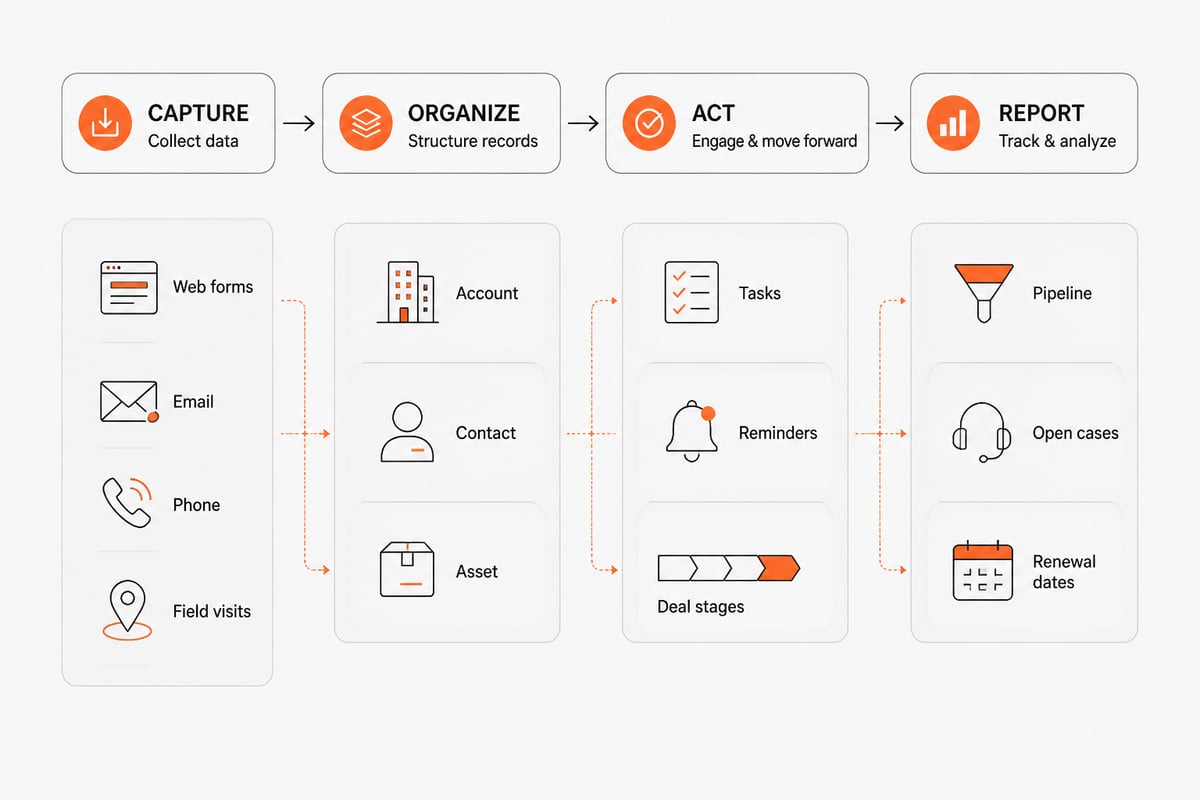
The data flow follows four stages:
- Capture. Web forms, email, phone notes and field visits create or update records.
- Organize. The system links each entry to an account, contact and, where relevant, a specific asset.
- Act. Rules assign tasks, send reminders, flag overdue follow-ups and move deals between stages.
- Report. Dashboards show pipeline, response times, open cases and renewal dates.
Salesforce's Trailhead introduction explains that CRM data is organized into objects and records. The same model applies to any custom build: the quality of the structure decides how useful the reports are later.
What types of customer CRM systems exist?
Customer CRM systems fall into three common types: operational, analytical and collaborative. Each type targets a different job, and most real systems combine them. A company rarely buys one type alone, because lead routing, reporting and shared job history all draw on the same customer record.
| Type | Main job | Typical example |
|---|---|---|
| Operational | Automates sales, service and marketing workflows | Lead routing, quote follow-up, service ticket assignment |
| Analytical | Turns customer data into reports and forecasts | Revenue by customer segment, churn risk, renewal pipeline |
| Collaborative | Shares customer information between teams and partners | Sales and workshop seeing the same job history |
Deployment is a second axis. Off-the-shelf SaaS CRMs are fast to start and fit standard sales processes. Custom or modular CRMs fit processes that standard tools handle poorly, such as recurring inspections, rental returns or compliance records. The choice depends on how much of your daily work is outside a normal sales pipeline. A distributor that mainly sells catalog items to repeat buyers can run on a standard SaaS tool. A calibration lab that must prove the status of every customer device needs fields, documents and due dates that a generic pipeline does not provide, so a modular or custom build is the better fit.
Why do equipment service and distribution companies need a customer CRM?
Equipment service, rental and distribution companies need a customer CRM because their revenue depends on repeat work tied to specific assets, and a plain contact list cannot track that. A calibration lab, a rental company and a distributor each need to answer the same question quickly: what do we know about this customer, and what is due next?
Typical problems a customer CRM solves for these businesses:
- Quotes live in one tool, work orders in another, and invoices in a third, so no one sees the full account.
- Service intervals are tracked in spreadsheets, and renewals are missed.
- Sales cannot see open service cases before calling a customer.
- Audit requests for calibration records take hours because documents sit in separate folders.
- Webshop orders and warehouse stock do not match the customer's purchase history.
Salesforce reports aggregated outcomes from its customers in its 2026 Success Metrics Global Highlights, including a 35% increase in sales revenue and a 33% increase in customer satisfaction. These are vendor-reported figures across its own customer base, so treat them as directional rather than a promise for any single deployment. The operational point stands independent of the numbers: shared customer data shortens response time and reduces missed follow-ups.
How does a customer CRM handle equipment service work?
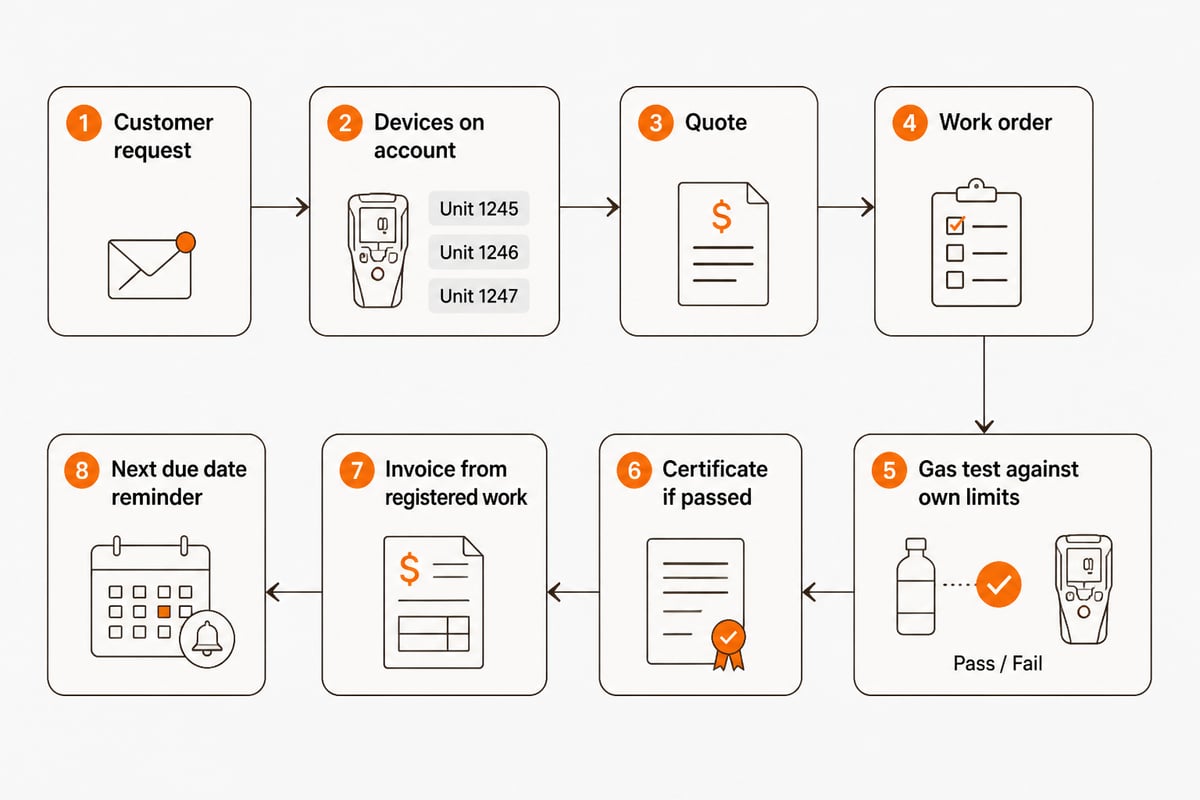
A customer CRM handles equipment service work by linking each customer account to the devices it owns, the jobs performed on them and the documents produced. The following workflow shows a realistic example for a gas detection service company.
Example: calibrating a customer's fixed and portable detectors
- A customer contacts the company for an annual calibration. The request creates a case on the customer's account.
- The account manager opens the customer record and sees every registered detector, the last calibration date and any open quotes.
- A quote is built from the device list and sent from the same record. Acceptance converts it into a work order.
- The technician receives the job, records the gas tests against the company's own limits and attaches the result to each device.
- The system issues a certificate only for devices that passed. A failed unit triggers a repair quote on the same account.
- Invoicing draws on the registered work, so nothing is retyped. The next due date is set automatically and a reminder is scheduled.
- When the customer's auditor asks for records, the full history is exported from one place.
Brytend CRM is built around this account-plus-asset model. It includes AI-driven lead forms and questionnaires that fit the way a team already works, and it sits on one platform where customers, devices, documents and data are shared across every module. Gas tests are checked against your own limits, and results are recorded against each device. Invoices are built from the work you already registered, and the platform is ready for Peppol BIS Billing 3.0 e-invoicing.

How do you choose and implement a customer CRM?
You choose a customer CRM by listing the records your business must keep, then testing whether each candidate links them without manual re-entry. Implementation works best in short stages rather than one large rollout.
Selection checklist:
- Can one customer record show quotes, jobs, devices, invoices and documents?
- Does stock or inventory data connect to the customer's orders? See how inventory control and customer orders fit together.
- Are changes traceable? Brytend records every stock change with a reason, a user and a source document, and corrections above a limit need approval.
- Can service forms, field jobs and inspections run on the same data? Review field service management software and service inspections.
- Do hosting and certification meet your customers' requirements? Brytend is ISO 9001 and ISO 27001 certified, with EU hosting and your data staying yours.
- Is there a way to measure satisfaction after each job? Look at customer feedback survey software.
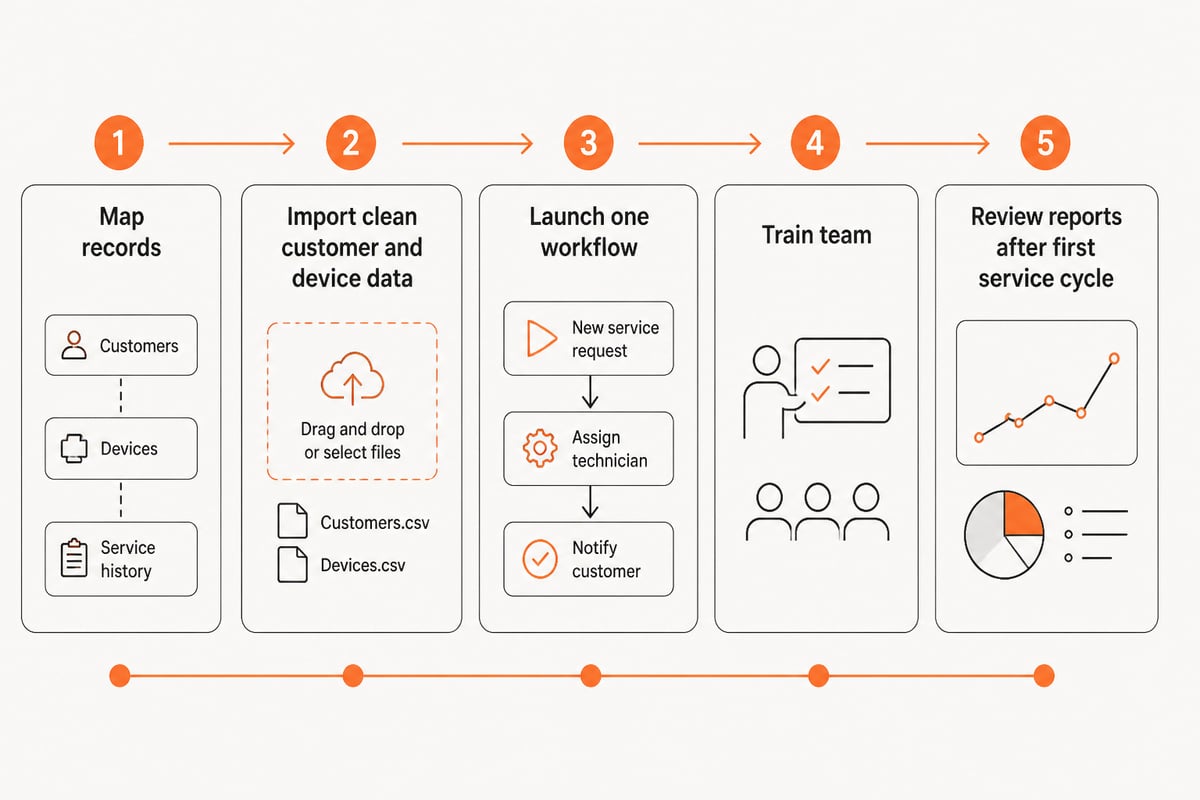
Implementation steps:
- Map the customer, asset and document types you handle today.
- Clean and import customer and device lists before anything else.
- Start with one workflow, such as quoting or annual service renewals.
- Train the team on that workflow, then add the next one.
- Review reports after the first full service cycle and adjust fields.
For companies whose processes do not fit a standard product, CRM software development services cover building a system around your own workflow. Teams that only need a ready module can look at the CRM product first.
What are the core principles of a customer CRM?
The core principles of a customer CRM are one shared record per customer, consistent data entry, defined ownership, measured follow-up and continuous improvement. These are working rules, not slogans.
- One record. Every team reads and writes the same customer file, so no one works from a private copy. If sales keeps quotes in a personal spreadsheet, service cannot see what was promised.
- Consistent data. Required fields, naming rules and device identifiers stop duplicates and gaps. A serial number entered three different ways produces three devices and a broken service history.
- Clear ownership. Each account, deal and case has a named owner and a due date. A case with no owner is the one that goes unanswered.
- Measured follow-up. Response times, overdue renewals and open cases are reported, not estimated. A weekly list of renewals due in the next 30 days turns a reminder into a routine.
- Review and adjust. Fields, stages and reports change as the business changes. Fields nobody fills in should be removed, and recurring questions should become reports.
These rules matter more for service companies than for pure sales teams, because a missed renewal or an unrecorded calibration has both revenue and compliance cost.
FAQ
Are CRM and BPO the same?
No. A CRM is software that manages customer data and interactions, while business process outsourcing (BPO) is a service where an outside company runs a business function, such as a call center. A BPO provider may use a CRM, and a company may hand customer support to a BPO firm while keeping its own CRM as the record of customers. The two are different things: one is a tool, the other is a service contract.
Is a spreadsheet enough as a customer CRM?
A spreadsheet works for a small, stable customer list but breaks down once several people edit it and records must link to devices, jobs and documents. It has no reminders, access control or audit trail, which service companies with compliance duties need. Typical warning signs are duplicate customer rows, renewal dates found only by scrolling, and certificates stored in folders that no one can match to a customer quickly.
Can a customer CRM replace separate service, inventory and invoicing tools?
It can when the CRM is part of one platform that shares customers, devices, documents and data across modules. In that setup, a quote, a work order, a stock movement and an invoice all reference the same customer record instead of being re-entered in separate systems. A CRM that stands alone, with no link to stock or invoicing, will still need those tools next to it, and the re-entry problem remains.
Start by listing the five record types you reconcile by hand today, such as customers, devices, quotes, certificates and invoices, because that list defines what your CRM must connect. Brytend builds this kind of connected system, and Brytend CRM gives service, rental and distribution teams one account view tied to equipment and compliance records. To see it with your own customer and device data, Brytend offers a way to start free trial and test the workflow before you commit.