Development company software refers to the integrated suite of tools, platforms, and applications that software development teams use to design, build, test, deploy, and maintain custom software solutions for clients. These systems include integrated development environments (IDEs), version control systems, project management platforms, testing frameworks, collaboration tools, and deployment automation software. Modern development companies rely on these tools to standardize workflows, maintain code quality, track project progress, and deliver scalable solutions that meet specific client requirements.
TL;DR:
- Development company software encompasses IDEs, version control, project management, testing tools, and deployment platforms used to build custom solutions
- Essential categories include code editors, collaboration platforms, CI/CD pipelines, database management systems, and monitoring tools
- Selecting the right software stack depends on project methodology, team size, technology requirements, and client needs
- Best practices include version control standards, automated testing, code reviews, documentation protocols, and continuous integration
- Integration between tools reduces context switching and improves team productivity by 30-40% in typical workflows
What Is Development Company Software?
Development company software is a structured collection of applications and platforms that enable software development teams to execute the complete software development lifecycle from requirements gathering through production deployment. This software includes both technical tools (compilers, debuggers, frameworks) and organizational systems (project trackers, communication platforms, documentation repositories).
The primary components span multiple categories:
- Code development tools: IDEs, text editors, code generators, and syntax validators
- Version control systems: Git-based platforms like GitHub, GitLab, and Bitbucket for source code management
- Project management platforms: Task tracking, sprint planning, and timeline visualization tools
- Testing frameworks: Unit testing, integration testing, and end-to-end testing automation
- Deployment systems: Containerization, orchestration, and continuous delivery pipelines
- Monitoring solutions: Performance tracking, error logging, and uptime monitoring
Development companies select their software stack based on software development methodologies they follow, whether Agile, Waterfall, DevOps, or hybrid approaches. Each methodology influences tool selection and integration patterns.
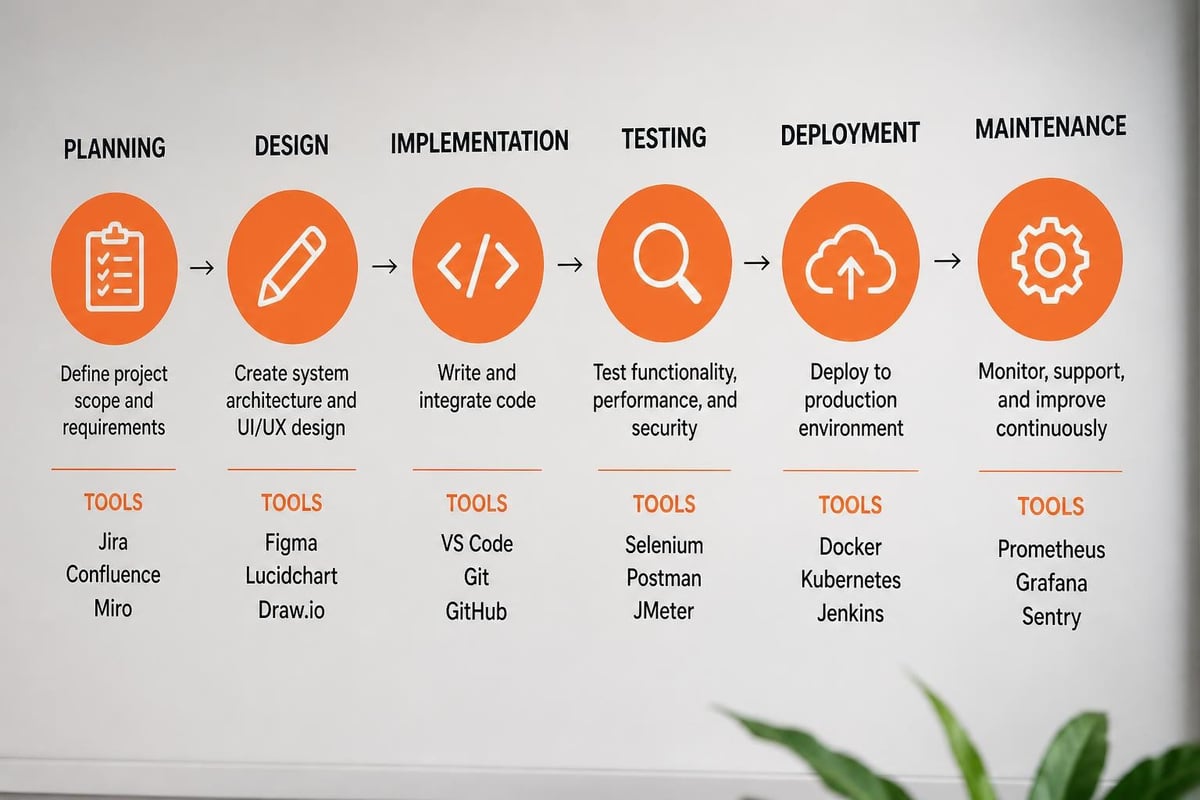
Core Tool Categories for Development Teams
Modern development teams structure their toolchain around specific workflow stages. The selection process prioritizes compatibility, scalability, and team expertise.
| Tool Category | Primary Function | Common Examples | Integration Priority |
|---|---|---|---|
| Version Control | Source code tracking | Git, SVN, Mercurial | Critical |
| Project Management | Task coordination | Jira, Asana, Linear | High |
| CI/CD Pipeline | Automated deployment | Jenkins, CircleCI, GitHub Actions | Critical |
| Testing Framework | Quality assurance | Jest, Selenium, Pytest | High |
| Documentation | Knowledge management | Confluence, Notion, GitBook | Medium |
| Communication | Team collaboration | Slack, Microsoft Teams | High |
How Do Development Companies Choose Software Tools?
Development companies evaluate software tools through a systematic assessment process that examines technical requirements, team capabilities, budget constraints, and long-term scalability. The selection process begins with identifying specific workflow pain points and desired outcomes.
Key evaluation criteria include:
- Technical compatibility: Integration with existing systems, API availability, supported languages and frameworks
- Team proficiency: Learning curve, available training resources, community support
- Scalability requirements: User limits, performance at scale, enterprise features
- Cost structure: Licensing models, per-user pricing, open-source alternatives
- Security compliance: Data encryption, access controls, audit logging, certification standards
- Vendor reliability: Company stability, update frequency, customer support quality
The best practices for custom software development emphasize tool selection that supports both current project needs and future growth trajectories.
Technology Stack Alignment
Development company software must align with the technology stack delivered to clients. A team specializing in React and Node.js requires different tools than one focused on .NET and Azure services.
Front-end development teams typically use:
- Code editors: Visual Studio Code, WebStorm, Sublime Text
- Build tools: Webpack, Vite, Rollup
- Testing: Jest, React Testing Library, Cypress
- Design integration: Figma, Sketch, Abstract
Back-end development teams prioritize:
- IDEs: IntelliJ IDEA, PyCharm, Visual Studio
- API testing: Postman, Insomnia, Thunder Client
- Database tools: DataGrip, pgAdmin, MongoDB Compass
- Performance profiling: New Relic, DataDog, Application Insights
What Are the Essential Features in Development Company Software?
Essential features in development company software enable teams to maintain code quality, track project progress, collaborate effectively, and deliver solutions on schedule. These features directly impact productivity, error rates, and client satisfaction.
Version control and branching: All development company software stacks require robust version control with branching strategies, merge conflict resolution, and commit history tracking. Teams use feature branches, release branches, and hotfix workflows to maintain code stability.
Automated testing integration: Testing frameworks must integrate with the development environment and CI/CD pipeline. Unit tests run on every commit, integration tests execute on pull requests, and end-to-end tests validate release candidates.
Code review workflows: Pull request systems with inline commenting, approval requirements, and automated checks ensure code quality. Teams typically require one or two approvals before merging to protected branches.
Project tracking and sprint management: Development teams need visibility into task status, sprint velocity, burndown charts, and resource allocation. Agile teams track story points, while Kanban teams monitor work-in-progress limits.
Customer relationship tools help development companies manage client communications and requirements. Brytend CRM provides AI-driven lead forms and customizable questionnaires that integrate directly into development workflows, ensuring client requirements are captured accurately and tracked throughout the project lifecycle.


Collaboration and Communication Features
Real-time collaboration features reduce context switching and improve team coordination. Modern development company software includes:
- Integrated messaging: Direct messages, channel-based discussions, threaded conversations
- Screen sharing: Live code collaboration, pair programming support, design reviews
- Documentation wikis: Searchable knowledge bases, API documentation, onboarding guides
- Activity feeds: Real-time updates on code commits, pull requests, deployments, and issues
How to Implement Development Company Software Successfully?
Successful implementation of development company software follows a structured rollout process that minimizes disruption while establishing new workflows. The implementation phase typically spans 4-12 weeks depending on team size and tool complexity.
Step 1: Conduct workflow audit: Document current processes, identify bottlenecks, measure baseline metrics (deployment frequency, bug resolution time, project delivery rates).
Step 2: Define requirements: Create detailed specifications for required features, integration needs, user roles, and success criteria. Include both technical and organizational requirements.
Step 3: Select pilot team: Choose 3-5 experienced developers to test the new software stack. Pilot teams should represent different specializations (front-end, back-end, DevOps).
Step 4: Configure integrations: Set up connections between version control, project management, CI/CD tools, and communication platforms. Establish automated workflows for common tasks.
Step 5: Create documentation: Develop setup guides, workflow standards, best practices documents, and troubleshooting resources. Include code examples and configuration templates.
Step 6: Train team members: Conduct hands-on training sessions, create video tutorials, assign mentors to support adoption. Schedule follow-up sessions to address questions.
Step 7: Monitor and optimize: Track usage metrics, gather feedback, identify friction points, and adjust configurations. Measure improvement in deployment frequency and bug resolution time.
Key software development methodologies influence implementation timelines and training requirements. Agile teams require sprint planning tools, while DevOps teams prioritize automation and monitoring.
Common Implementation Challenges
Development teams encounter predictable obstacles when adopting new software tools:
| Challenge | Impact | Mitigation Strategy |
|---|---|---|
| Resistance to change | 30-40% slower adoption | Involve team in selection, demonstrate clear benefits |
| Integration complexity | Delayed rollout by 2-4 weeks | Start with core tools, add integrations incrementally |
| Learning curve | Temporary productivity drop | Provide dedicated training time, assign mentors |
| Data migration | Lost historical data | Plan migration early, validate data completeness |
| License costs | Budget overruns | Negotiate volume pricing, consider open-source alternatives |
What Are the Best Practices for Development Company Software Management?
Best practices for managing development company software ensure consistent workflows, maintain security standards, and optimize team productivity. These practices apply across all tool categories and team sizes.
Establish version control standards: Define branching strategies, commit message formats, and merge requirements. Require descriptive commit messages that reference task IDs. Protect main branches with required reviews and status checks.
Implement automated testing: Configure CI/CD pipelines to run tests on every commit. Set coverage thresholds (typically 70-80% for unit tests). Block merges when tests fail or coverage drops.
Enforce code review processes: Require at least one approval before merging. Use review checklists covering functionality, security, performance, and documentation. Set maximum review turnaround times (24-48 hours).
Maintain documentation standards: Document all APIs, architectural decisions, deployment procedures, and troubleshooting guides. Update documentation as part of feature development, not as an afterthought.
Monitor system performance: Track build times, test execution duration, deployment frequency, and error rates. Set alerts for anomalies and investigate degradation patterns.
Following custom software development tips for 2026 helps teams stay current with evolving best practices and emerging tools.
Security and Access Control
Development company software requires robust security measures to protect client code and sensitive data:
- Role-based access control (RBAC): Define roles (developer, lead, manager, client) with specific permissions for repositories, deployment environments, and sensitive configurations
- Two-factor authentication (2FA): Require 2FA for all team members accessing code repositories and production systems
- Secrets management: Store API keys, database credentials, and certificates in secure vaults (HashiCorp Vault, AWS Secrets Manager)
- Audit logging: Track all access to sensitive resources, code changes, and deployment activities
- Regular security reviews: Scan dependencies for vulnerabilities, update libraries quarterly, rotate credentials every 90 days
How Does Development Company Software Improve Project Outcomes?
Development company software improves project outcomes by standardizing workflows, reducing manual errors, increasing transparency, and enabling data-driven decisions. Quantifiable improvements appear across multiple metrics.
Teams using integrated development company software achieve:
- 35-50% faster deployment cycles: Automated CI/CD pipelines eliminate manual build and deployment steps
- 40-60% reduction in critical bugs: Automated testing catches regressions before production
- 25-35% improved on-time delivery: Project tracking provides early warning of delays
- 20-30% higher team productivity: Reduced context switching and automated routine tasks
- 50-70% faster onboarding: Standardized tools and documentation reduce new developer ramp-up time
Manual vs. Automated Development Workflows
| Aspect | Manual Workflow | Automated Workflow |
|---|---|---|
| Build time | 15-30 minutes per build | 3-5 minutes automated |
| Testing coverage | 40-60% (time constraints) | 75-85% (automated suite) |
| Deployment frequency | Weekly or bi-weekly | Multiple times daily |
| Error detection | Post-deployment | Pre-merge validation |
| Documentation | Inconsistent, outdated | Generated, version-controlled |
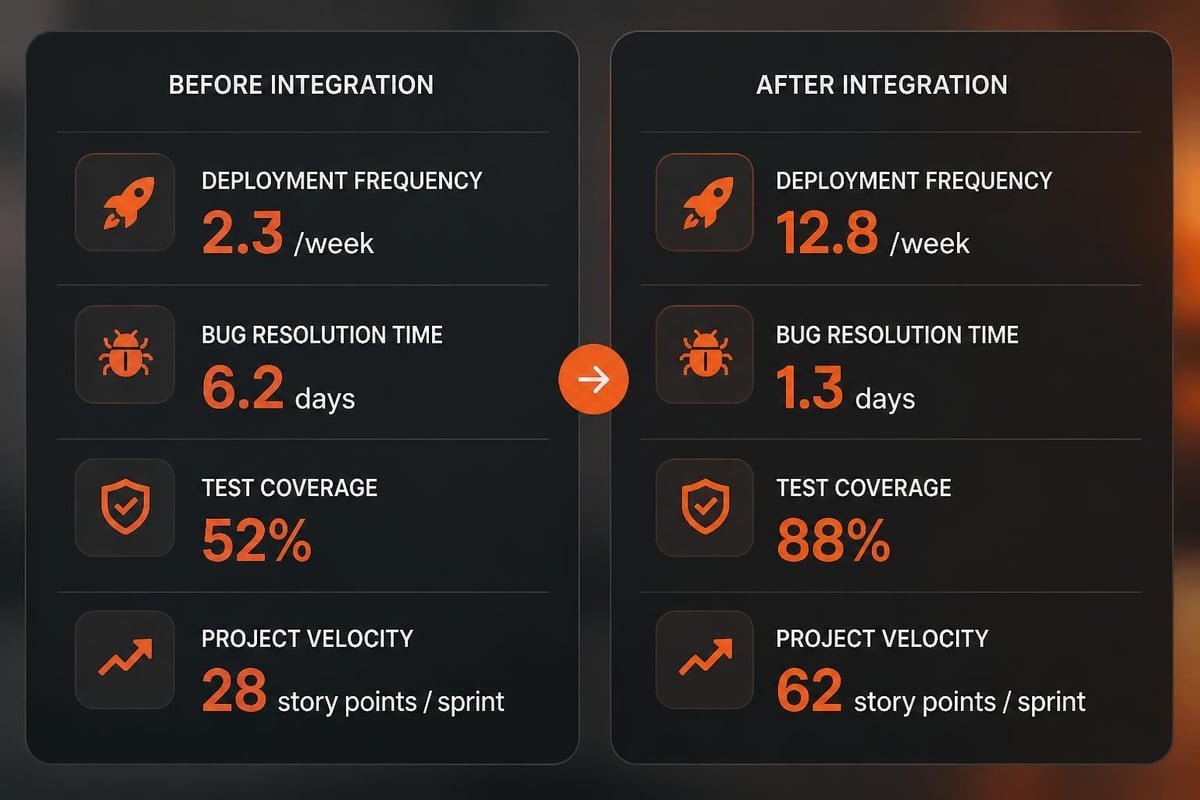
Real-World Implementation Example
A mid-sized development company with 25 developers implemented an integrated software stack over 8 weeks in 2025. The team replaced disconnected tools with GitHub Enterprise for version control, Jira for project management, Jenkins for CI/CD, and Slack for communication.
Initial metrics (baseline):
- Deployment frequency: 1-2 times per week
- Average bug resolution time: 4-5 days
- Test coverage: 52%
- On-time project delivery: 68%
After 6 months with integrated tools:
- Deployment frequency: 8-12 times per week
- Average bug resolution time: 1-2 days
- Test coverage: 81%
- On-time project delivery: 87%
The team reduced context switching by connecting Jira issues to GitHub pull requests and automated deployment notifications in Slack channels. Code review time decreased from 2-3 days to 8-12 hours due to automated testing and clear approval workflows.
What Tools Are Essential for Modern Development Companies?
Modern development companies require a core set of tools that support the complete software development lifecycle. These essential tools form the foundation of productive development workflows.
Integrated Development Environment (IDE): Visual Studio Code, IntelliJ IDEA, or PyCharm provide code completion, debugging, refactoring, and integrated terminal access. IDEs reduce syntax errors and improve code navigation.
Version Control System: Git-based platforms (GitHub, GitLab, Bitbucket) enable distributed development, branch management, and collaboration. Version control is non-negotiable for professional development teams.
Project Management Platform: Jira, Linear, or Azure DevOps track tasks, sprints, and project timelines. These tools provide visibility into team capacity and project health.
CI/CD Pipeline: Jenkins, CircleCI, GitHub Actions, or GitLab CI automate builds, tests, and deployments. Continuous integration catches integration issues within hours instead of days.
Communication Platform: Slack, Microsoft Teams, or Discord facilitate real-time collaboration, reducing email overhead and improving response times.
Testing Framework: Language-specific frameworks (Jest for JavaScript, JUnit for Java, Pytest for Python) enable automated testing at unit, integration, and end-to-end levels.
Best practices outlined by industry experts emphasize selecting tools that integrate seamlessly and support team collaboration patterns.
Specialized Tools by Development Focus
Development companies often require specialized tools based on their technical focus:
Web development: Browser DevTools, Lighthouse, Webpack, npm/yarn package managers, Postman for API testing
Mobile development: Xcode, Android Studio, React Native Debugger, Firebase Test Lab, TestFlight
Cloud development: AWS CLI, Azure Portal, Terraform, Kubernetes, Docker Desktop
Database development: DataGrip, SQL Server Management Studio, Robo 3T, DBeaver
How to Optimize Development Company Software for Team Growth?
Optimizing development company software for team growth requires proactive planning around scalability, onboarding efficiency, and workflow standardization. Growing teams face challenges around tool licensing, process consistency, and knowledge transfer.
Scale licensing proactively: Purchase licenses in blocks before reaching capacity limits. Negotiate volume discounts at 10, 25, and 50 user tiers. Budget for 20% headcount growth annually.
Standardize onboarding workflows: Create automated onboarding checklists that provision tool access, assign training modules, and set up development environments. New developers should commit code within 2-3 days.
Implement role-based templates: Configure project templates for common project types (web applications, mobile apps, APIs). Templates include pre-configured build scripts, testing frameworks, and deployment pipelines.
Establish knowledge repositories: Maintain searchable wikis with architectural decisions, coding standards, troubleshooting guides, and API documentation. Require documentation updates with each feature release.
Monitor tool usage metrics: Track active users, feature adoption, build times, and deployment frequency. Identify underutilized tools and consolidate where possible.
Create feedback loops: Conduct quarterly tool reviews with development teams. Gather input on pain points, missing features, and integration needs. Prioritize improvements based on impact and effort.
Following comprehensive software development methodologies helps teams select processes that scale with organizational growth.
Common Mistakes in Tool Management
Development companies commonly make these mistakes when managing their software stack:
- Over-tooling: Adopting too many specialized tools creates fragmentation and increases context switching
- Inadequate training: Assuming developers will learn tools independently leads to inconsistent usage patterns
- Ignoring integrations: Selecting best-of-breed tools without considering integration complexity
- Neglecting updates: Delaying software updates creates security vulnerabilities and compatibility issues
- Skipping documentation: Failing to document configurations and workflows impedes troubleshooting and onboarding
- Insufficient access control: Granting excessive permissions increases security risk and accidental configuration changes
What Metrics Measure Development Company Software Effectiveness?
Effective development company software demonstrably improves measurable outcomes across productivity, quality, and delivery speed. Teams should track specific metrics before and after tool implementations.
Primary productivity metrics:
- Deployment frequency: Number of successful deployments per week or month
- Lead time for changes: Time from commit to production deployment
- Change failure rate: Percentage of deployments causing production issues
- Mean time to recovery (MTTR): Average time to restore service after incidents
- Code review turnaround: Hours or days from pull request creation to merge
Secondary quality metrics:
- Test coverage percentage across unit, integration, and end-to-end tests
- Bug escape rate (production bugs per 1000 lines of code)
- Code complexity scores (cyclomatic complexity, technical debt)
- Documentation completeness (percentage of APIs with current documentation)
- Security vulnerability count in dependencies
Team efficiency metrics:
- Developer satisfaction scores (quarterly surveys)
- Onboarding time for new team members
- Context switching frequency (tool changes per hour)
- Meeting time reduction (automated status updates)
- Knowledge sharing velocity (documentation updates per sprint)
Expert guidance on custom software development recommends establishing baseline metrics before implementing new tools and measuring improvements quarterly.
Setting Realistic Performance Targets
Development teams should set achievable targets based on industry benchmarks and current performance:
| Metric | Typical Baseline | Target Improvement | Elite Performance |
|---|---|---|---|
| Deployment frequency | 1-2 per week | 5-10 per week | Multiple per day |
| Lead time for changes | 1-4 weeks | 1-7 days | Less than 1 day |
| Change failure rate | 15-30% | 5-15% | 0-5% |
| MTTR | 1-4 hours | Less than 1 hour | Less than 15 minutes |
| Test coverage | 40-60% | 70-80% | 80-90% |
Selecting and implementing the right development company software directly impacts project success, team productivity, and client satisfaction. The combination of integrated tools, standardized workflows, and continuous optimization enables development teams to deliver high-quality custom solutions efficiently. Brytend specializes in building custom software solutions using industry-leading development practices and integrated toolchains, providing clients with scalable applications backed by ongoing support and maintenance expertise.