TL;DR:
- Task management software centralizes work assignments, deadlines, and dependencies across technical teams and projects.
- Core functionality includes task creation, assignment, priority setting, status tracking, and workflow automation.
- Selection criteria include integration capability, customization depth, access controls, and reporting granularity.
- Enterprise implementations require role-based permissions, API connectivity, and audit trail functionality.
- Effective deployment depends on standardized naming conventions, clear ownership rules, and measurable completion criteria.
Task management software is a digital platform that enables teams to create, assign, track, and complete work items through centralized interfaces and automated workflows.
Organizations using task management software reduce project completion time by standardizing how work moves through defined stages. Technical teams benefit from dependency mapping, resource allocation visibility, and automated status updates that eliminate manual coordination overhead. The difference between spreadsheet-based tracking and dedicated task management software becomes apparent when managing serialized inventory updates, compliance documentation workflows, or multi-phase development cycles.
What Is Task Management Software
Task management software provides structured systems for organizing work assignments with defined owners, deadlines, and completion criteria. The platform records each task's current state, priority level, assigned personnel, and relationship to other work items.
Core components include task databases, assignment mechanisms, status tracking interfaces, and notification systems. Users create tasks by entering descriptions, setting due dates, attaching files, and linking dependencies. The software maintains complete audit trails showing who created, modified, or completed each task and when those actions occurred.
Essential functionality includes:
- Task creation with custom fields for project codes, equipment serial numbers, or compliance categories
- Assignment rules that route work based on skill sets, availability, or geographic location
- Priority classification using numeric scales, color coding, or urgency matrices
- Dependency mapping that prevents tasks from starting before prerequisites complete
- Time tracking that records actual hours against estimates
- Attachment storage for specifications, images, or approval documents
Modern task management software operates as centralized databases accessible through web browsers, mobile applications, and API connections. Teams working across office locations, manufacturing facilities, or field sites access identical task information in real time. TechRadar’s 2026 review of task management apps highlights how cloud-based platforms have standardized cross-location collaboration.

Task management software differs from project management platforms by focusing on individual work items rather than comprehensive project plans. A project management system might track overall timeline, budget, and resource allocation, while task management software handles the granular work assignments that comprise project execution. Many organizations use both types of systems with API integrations transferring data between platforms.
How Does Task Management Software Improve Team Coordination
Task management software eliminates coordination gaps by making work assignments, deadlines, and progress visible to all authorized personnel. Teams stop relying on email chains, verbal updates, or individual memory to track who owns which deliverables.
The platform answers coordination questions automatically. Team members see their assigned tasks without asking managers. Project leads identify bottlenecks by filtering for overdue items or tasks blocked by dependencies. Executives monitor completion rates across departments without requesting status reports.
Coordination improvements manifest through:
- Centralized assignment visibility – Every team member accesses a single interface showing their current workload, upcoming deadlines, and priority rankings
- Automated status propagation – Task completions trigger notifications to dependent task owners and update project dashboards without manual reporting
- Dependency enforcement – Systems prevent work from starting prematurely by blocking tasks until prerequisites reach specified completion states
- Workload balancing – Managers view task distribution across team members and reassign work to prevent overallocation
- Communication threading – Discussion threads attached to specific tasks maintain context and eliminate scattered email conversations
Consider a custom software development team managing client projects. When a developer completes code for a feature, the task management software automatically notifies the quality assurance engineer assigned to the testing task. The QA engineer receives the notification with links to specifications, test cases, and the completed code repository. Testing cannot begin until development reaches "complete" status, enforced by dependency rules in the software.
Service maintenance workflows demonstrate coordination benefits clearly. A technician completes an equipment inspection and logs findings in the task management software. The system automatically creates follow-up tasks for parts ordering, assigns them to procurement personnel, and sets due dates based on maintenance windows. Procurement staff receive notifications with equipment serial numbers, required parts specifications, and installation deadlines. No manual handoff communication occurs.
| Manual Coordination | Software-Based Coordination |
|---|---|
| Email or verbal task assignments | Digital assignment with audit trail |
| Individual deadline tracking | Centralized calendar with alerts |
| Status meetings for updates | Real-time dashboard visibility |
| Manual dependency checking | Automated blocking rules |
| Scattered file attachments | Centralized document storage |
Zapier’s analysis of task management software emphasizes how automation reduces coordination overhead by up to 60% in technical teams.
What Features Should Custom Development Teams Prioritize
Custom software development teams require task management software with granular tracking, code repository integration, and flexible workflow customization. Standard features prove insufficient when managing complex technical dependencies, varying client requirements, and iterative development cycles.
Critical features for development teams:
- Integration with version control systems – Tasks link directly to Git commits, pull requests, and branches, maintaining traceability between requirements and code changes
- Custom field definitions – Teams add fields for client names, project codes, technology stacks, environment designations, or compliance frameworks specific to each engagement
- API access for automation – Development teams build custom integrations that create tasks from monitoring alerts, client form submissions, or deployment pipeline failures
- Granular permission controls – Different access levels for internal developers, contractors, client stakeholders, and management prevent unauthorized task modification
- Time tracking with billing codes – Developers log hours against tasks with project codes and activity types that flow into invoicing systems
- Template libraries – Standardized task sets for common workflows like "new client onboarding" or "security audit response" ensure consistency
Development workflows span multiple stages with distinct ownership. A feature request moves from requirements gathering (business analyst) to design (UX designer) to implementation (developer) to testing (QA engineer) to deployment (DevOps engineer) to client acceptance. Task management software must support these handoffs with status transitions that trigger reassignment and notifications.
Brytend's development teams benefit from task management systems that track deliverables across web development, mobile applications, and cloud infrastructure projects simultaneously. The software maintains separate task boards for each client engagement while providing consolidated views of developer workloads across all active projects. This visibility enables resource allocation decisions based on actual capacity rather than estimates.

Sprint planning in agile development requires task estimation, velocity tracking, and burndown reporting. The task management software stores story points or hour estimates for each task, calculates team velocity from completed sprints, and generates burndown charts showing remaining work against sprint timelines. Teams adjust commitments based on data-driven capacity analysis rather than optimistic projections.
Integration Requirements
Custom development teams operate within ecosystems of specialized tools. Task management software must exchange data with code repositories, continuous integration pipelines, communication platforms, and client relationship management systems.
Standard integrations include GitHub, GitLab, Bitbucket, Jira, Slack, Microsoft Teams, and email systems. API availability enables custom integrations with proprietary systems, client platforms, or industry-specific tools. Webhook support allows real-time data synchronization rather than scheduled batch updates.
Security and compliance requirements in software development demand task management platforms with encryption, role-based access controls, and comprehensive audit logging. When managing client data or regulated applications, teams need systems that document every task modification, access event, and data export for compliance verification.
How to Select Task Management Software for Technical Operations
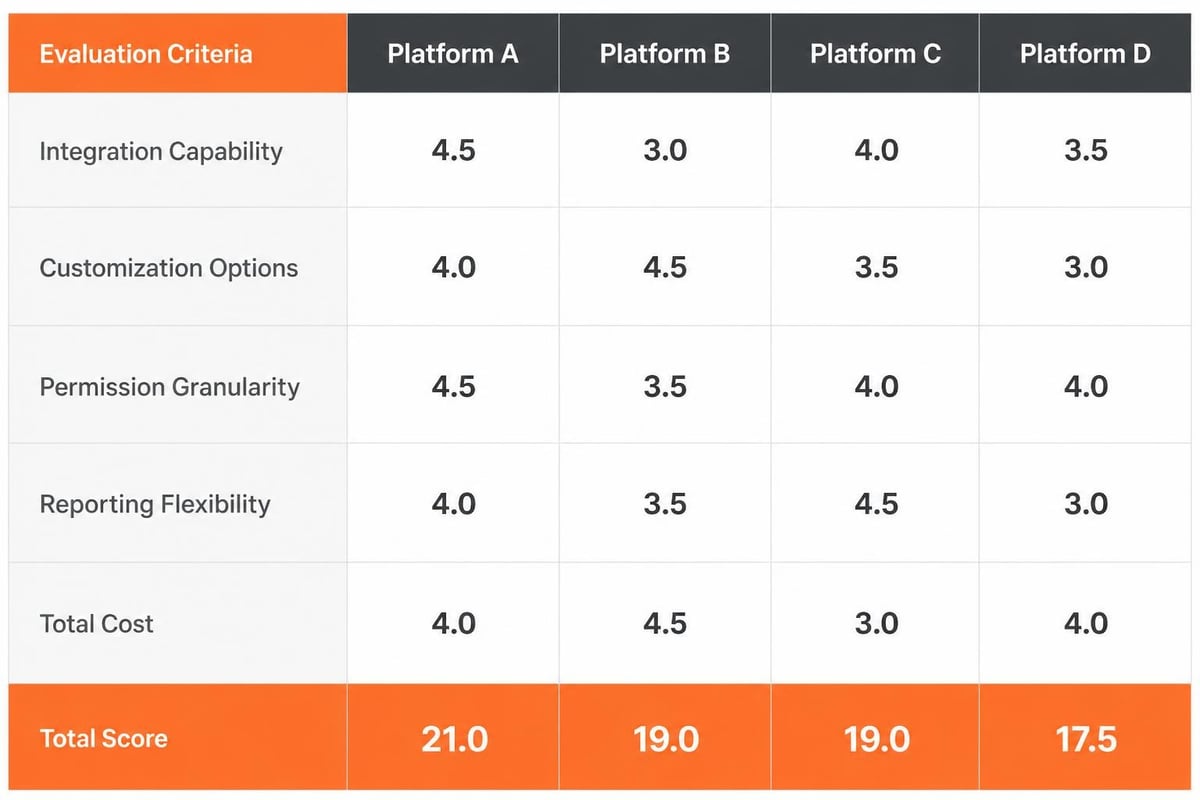
Selecting task management software requires evaluating functional requirements, technical compatibility, scalability limits, and total cost of ownership. ClickUp’s selection framework provides decision criteria based on team size and workflow complexity.
Selection process steps:
- Document current workflows – Map how tasks currently move through your organization, identifying handoff points, approval requirements, and reporting needs
- Define mandatory capabilities – List features that must exist versus nice-to-have functionality, including integrations, customization depth, and security requirements
- Establish user requirements – Determine how many users need access, what roles they perform, and what permissions each role requires
- Assess technical constraints – Identify integration requirements, data residency rules, authentication methods, and infrastructure compatibility
- Calculate total cost – Include licensing fees, implementation services, training costs, integration development, and ongoing administration overhead
- Conduct pilot testing – Deploy the software with a representative team subset for 30-60 days to validate functionality under real conditions
- Evaluate vendor stability – Research vendor financial health, product roadmap, customer retention rates, and support responsiveness
Technical teams should prioritize platforms offering robust APIs, extensive customization options, and self-hosted deployment alternatives. Cloud-based solutions provide faster deployment but may conflict with data sovereignty requirements or security policies. On-premises installations offer complete control but increase infrastructure and maintenance responsibilities.
Scalability analysis prevents costly migrations as organizations grow. The software must handle increasing user counts, task volumes, and integration complexity without performance degradation. Systems that operate efficiently with 50 tasks often fail when managing 50,000 tasks with complex dependencies and frequent status updates.
Common selection mistakes:
- Choosing software based on interface aesthetics rather than functional depth
- Underestimating integration complexity and development effort
- Failing to involve actual end users in evaluation and testing
- Ignoring data migration requirements from existing systems
- Selecting enterprise platforms for small teams or vice versa
- Overlooking mobile application functionality for field personnel
Kissflow’s enterprise selection guide emphasizes organizational adoption as the critical success factor. Software with superior features fails if users resist adoption due to complexity or workflow misalignment.
German businesses managing compliance-sensitive data often select platforms like leitzcloud by vBoxx, which provides DSGVO-compliant cloud infrastructure hosted in ISO 27001 certified German data centers. The LC-Connect component integrates email, calendar, tasks, and video meetings within a single platform, eliminating the need for multiple disconnected systems.
What Challenges Affect Task Management Software Implementation
Implementation challenges stem from inadequate planning, insufficient training, incomplete data migration, and resistance to workflow changes. Organizations frequently underestimate the effort required to transition from existing systems to new platforms.
Data migration presents immediate obstacles. Existing tasks, attachments, comments, and status histories must transfer to the new system with preserved relationships and metadata. Manual data entry for hundreds or thousands of tasks creates errors and consumes excessive time. Automated migration scripts require development effort and thorough testing to prevent data loss.
Implementation challenges include:
- User adoption resistance – Team members continue using familiar tools like spreadsheets or email instead of the new platform
- Inconsistent data entry – Users create tasks with varying detail levels, incomplete fields, or non-standard terminology
- Permission misconfiguration – Incorrect access controls expose sensitive client information or prevent legitimate users from accessing required tasks
- Integration failures – API connections to existing systems break due to version mismatches, authentication issues, or data format incompatibilities
- Performance problems – Large task databases with complex dependencies cause slow loading, timeout errors, or system crashes
- Reporting gaps – Standard reports don't match organizational needs, requiring custom report development
Training depth determines adoption success. Surface-level overviews covering basic task creation prove insufficient for technical teams. Training must address advanced features like custom fields, automation rules, API usage, and reporting creation. Role-specific training ensures each user type understands relevant functionality without information overload.
Governance structures prevent the chaos that emerges without standards. Organizations must define naming conventions, required fields, status values, priority definitions, and approval workflows before deployment. A technical team creating tasks labeled "fix bug," "bug fix," and "resolve issue" fragments reporting and prevents accurate status tracking.
Change management addresses the human factors that derail software implementations. Stakeholders need clear explanations of why the new system provides value, how it improves their specific workflows, and what support exists during the transition. Implementation teams that focus solely on technical configuration while ignoring user concerns experience high failure rates.
Optimization Strategies
Post-implementation optimization transforms basic task tracking into strategic workflow management. Organizations should monitor adoption metrics, gather user feedback, and continuously refine configurations.
Automation rules eliminate repetitive manual actions. When a development task reaches "code complete" status, the software automatically creates linked testing tasks, assigns them to QA engineers, populates test case checklists, and sets due dates based on sprint timelines. These automation rules reduce coordination overhead and prevent tasks from stalling between workflow stages.
Custom dashboards provide role-specific views of task data. Developers see their assigned tasks filtered by priority and due date. Project managers view completion percentages across active projects. Executives monitor overdue task counts by department. Each role accesses relevant information without navigating irrelevant data.
Regular audit reviews identify process deviations and improvement opportunities. Monthly analysis of overdue tasks reveals bottlenecks, under-resourced areas, or unrealistic deadline setting. Task completion velocity trends indicate whether team capacity estimates match reality.
Why Task Management Software Matters for Service Workflows
Service maintenance operations require task management software that handles recurring schedules, equipment tracking, compliance documentation, and technician dispatch. Standard project-focused platforms lack the specialized functionality service organizations need.
Service workflows differ fundamentally from project work. Projects have defined endpoints, while service operations continue indefinitely with recurring maintenance cycles. Equipment requires scheduled inspections regardless of whether issues exist. Compliance frameworks mandate documentation proving maintenance occurred on schedule with specified procedures.
Task management software designed for service operations integrates with asset databases containing equipment serial numbers, installation locations, warranty expiration dates, and maintenance histories. When creating a maintenance task, the software pre-populates equipment specifications, links to previous service records, and attaches relevant technical documentation.
Service-specific requirements:
- Recurring task generation based on calendar schedules or runtime hours
- Mobile interfaces for technicians working at equipment locations without desk access
- Offline functionality when network connectivity is unavailable at remote sites
- Photo and signature capture for visual documentation and approval verification
- Parts inventory integration showing available components and triggering reorder workflows
- Certification tracking ensuring only qualified technicians receive specialized assignments
A manufacturing facility using task management software for equipment maintenance generates tasks automatically based on machine runtime hours. When a CNC machine reaches 500 operating hours, the software creates an inspection task, assigns it to a certified technician, attaches the maintenance checklist, and schedules it for the next maintenance window. The technician completes the checklist on a mobile device, photographs the equipment condition, and captures supervisor signatures. The completed task updates the equipment service history and triggers parts reordering if components need replacement.
The Linux Foundation’s analysis of task management tools discusses how open-source platforms support customization for specialized workflows like service operations.
Compliance reporting in regulated industries depends on complete task documentation. Auditors verify that maintenance occurred as scheduled with qualified personnel following approved procedures. Task management software provides timestamped records showing who performed each maintenance activity, what procedures they followed, what they documented, and when the work completed. This audit trail demonstrates compliance without manual log compilation.
How AI Integration Is Changing Task Management
Artificial intelligence functionality in task management software automates assignment decisions, predicts completion times, identifies resource constraints, and generates progress summaries. Recent academic research on AI in project management explores how agentic AI will transform task coordination and execution monitoring.
AI-powered task management software analyzes historical completion data to predict how long similar tasks will require. When a developer estimates a feature implementation at 8 hours, the AI compares against similar features the same developer completed previously. If historical data shows an average of 12 hours for comparable work, the system flags the estimate as potentially optimistic.
AI-driven capabilities:
- Automatic priority ranking – Machine learning models assign priority scores based on task urgency, business impact, dependency chains, and resource availability
- Smart assignment recommendations – AI suggests optimal task assignments by analyzing team member skills, current workload, historical performance, and availability
-
- Deadline prediction – Algorithms forecast realistic completion dates using historical velocity data, dependency analysis, and resource constraints
- Bottleneck detection – Pattern recognition identifies workflow stages where tasks consistently stall or take longer than expected
- Natural language task creation – Users describe tasks conversationally, and AI extracts structured data including assignees, deadlines, and priorities
Predictive resource allocation uses AI to forecast capacity shortages before they impact deadlines. The software analyzes current task assignments, estimated completion times, and planned project starts to identify periods when team capacity falls short of commitments. Managers receive alerts weeks in advance, enabling proactive hiring, contractor engagement, or timeline adjustments.
Risk assessment models evaluate task dependencies, complexity indicators, and team experience levels to calculate completion probability. High-risk tasks flagged by AI receive additional scrutiny during planning and closer monitoring during execution. This proactive risk management prevents surprises that derail project schedules.
Automated status summarization generates progress reports by analyzing task completion percentages, recent activity patterns, and upcoming deadlines. Instead of managers manually compiling status reports, the AI produces summaries highlighting accomplishments, blockers, and upcoming milestones. These AI-generated summaries maintain consistency and reduce administrative overhead.
What Security and Access Controls Task Management Software Requires
Task management software handling client projects, proprietary development work, or compliance-sensitive operations requires enterprise-grade security controls and granular permission management.
Role-based access control (RBAC) defines what actions each user type can perform. Developers create and update tasks within assigned projects but cannot modify billing rates or delete completed work. Project managers assign tasks, adjust deadlines, and generate reports but lack access to other clients' projects. Administrators configure system settings, manage user accounts, and access all data for audit purposes.
Essential security controls:
- Multi-factor authentication preventing unauthorized access even with compromised passwords
- Encryption for data in transit and at rest protecting information during transmission and storage
- IP address restrictions limiting access to approved networks or geographic regions
- Session timeout policies forcing re-authentication after inactivity periods
- Audit logging recording every user action with timestamps and source identification
- Data export controls preventing bulk downloads by unauthorized personnel
Client data segregation becomes critical in custom development environments managing multiple customer engagements. Task management software must enforce strict boundaries preventing users assigned to Client A from viewing any information related to Client B. Permission inheritance rules automatically apply project-level restrictions to all tasks, subtasks, comments, and attachments within that project scope.
Compliance frameworks like GDPR, HIPAA, or SOC 2 impose specific data handling requirements. Task management software must support data residency controls specifying where information is stored geographically, data retention policies automating deletion after specified periods, and consent tracking documenting user permissions for data processing.
Integration security extends beyond the task management platform itself. API connections to code repositories, communication systems, and client platforms require secure authentication, encrypted data transfer, and scope-limited permissions. A compromised integration could expose sensitive project information or enable unauthorized system access.
Backup and disaster recovery capabilities protect against data loss from system failures, cyberattacks, or operational errors. Automated daily backups with tested restoration procedures ensure task data remains recoverable. Organizations should verify backup completeness and practice restoration workflows before actual need arises.
Task management software transforms coordination overhead into automated workflows, providing visibility and control across technical operations. The selection process demands careful evaluation of integration capabilities, customization depth, and security controls aligned with organizational requirements. When existing platforms lack necessary features or workflow flexibility, custom solutions provide tailored functionality supporting unique operational needs. Brytend develops specialized task management systems integrated with existing infrastructure, offering ongoing support to ensure smooth operation and continuous optimization as requirements evolve.