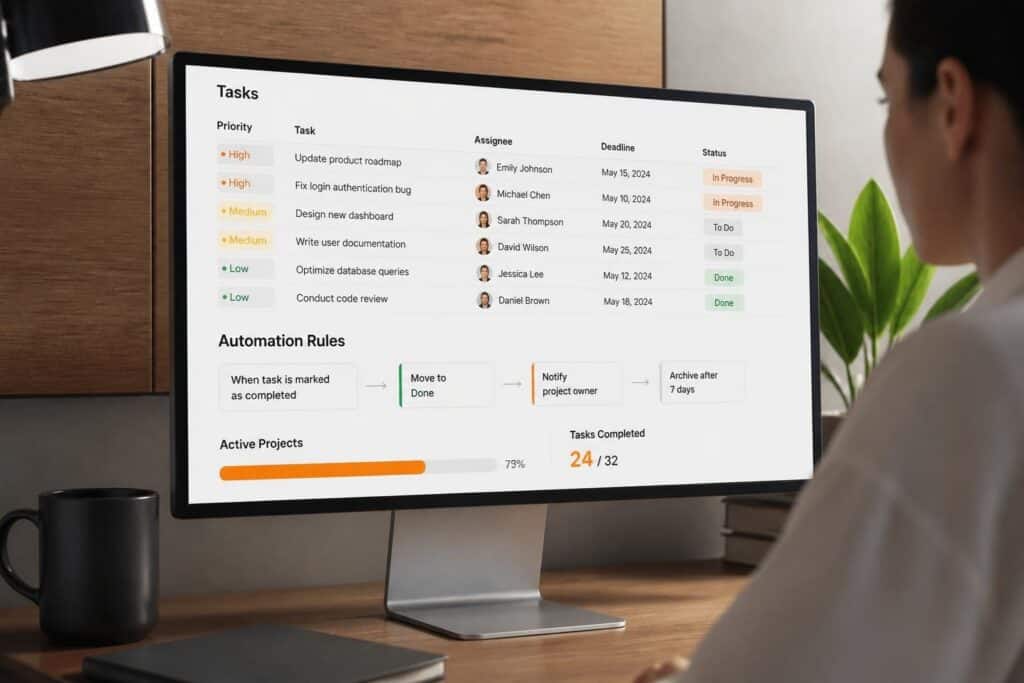
Task tracking tools are software applications that organize, assign, monitor, and report on discrete work units across teams, enabling visibility into task status, ownership, dependencies, and completion timelines. These systems serve as the operational backbone for software development teams managing concurrent projects, feature releases, bug fixes, and client deliverables.
TL;DR
- Task tracking tools provide centralized visibility into who is working on what, current status, and blockers across all active work
- Core capabilities include task creation, assignment, status workflows, priority management, dependency mapping, and progress reporting
- Effective implementation requires standardized task structures, clear ownership rules, integration with existing systems, and consistent team adoption
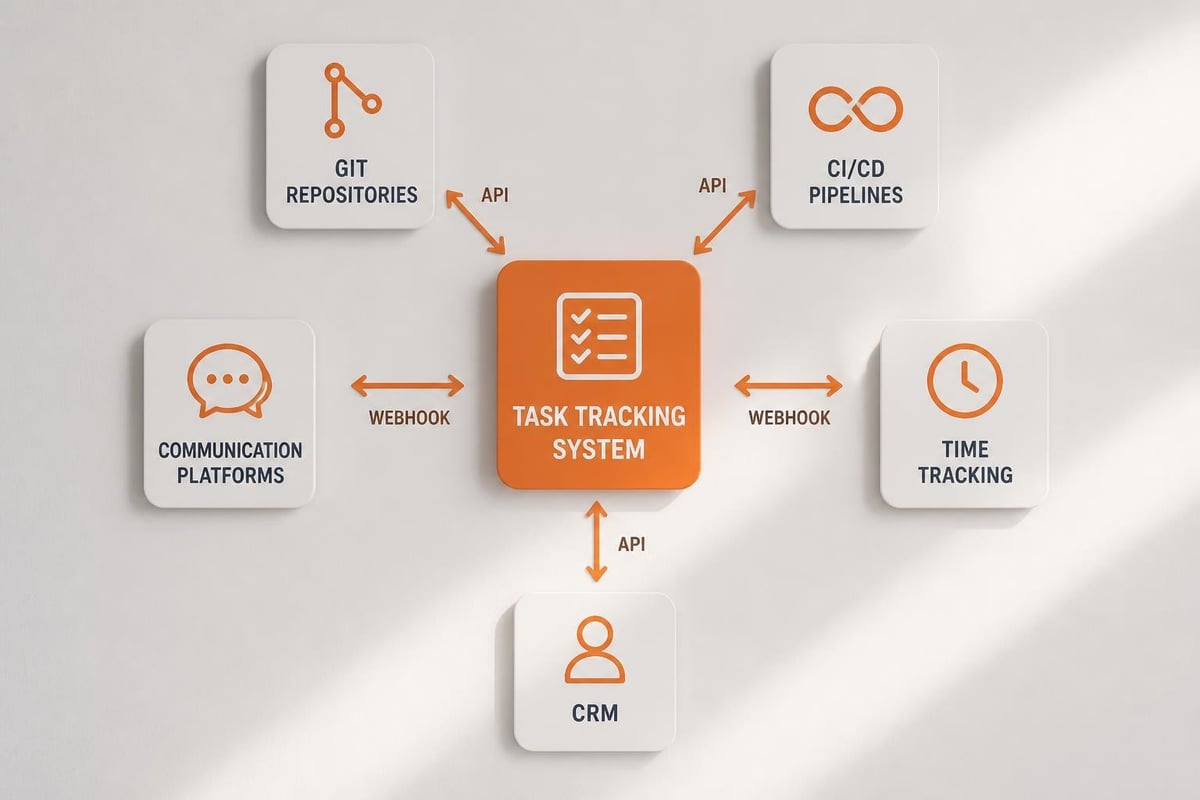
- Modern tools integrate with version control, CI/CD pipelines, communication platforms, and time tracking systems for unified workflows
- Selection criteria include customization depth, API availability, reporting capabilities, user interface design, and total cost of ownership
What Are Task Tracking Tools and How Do They Function
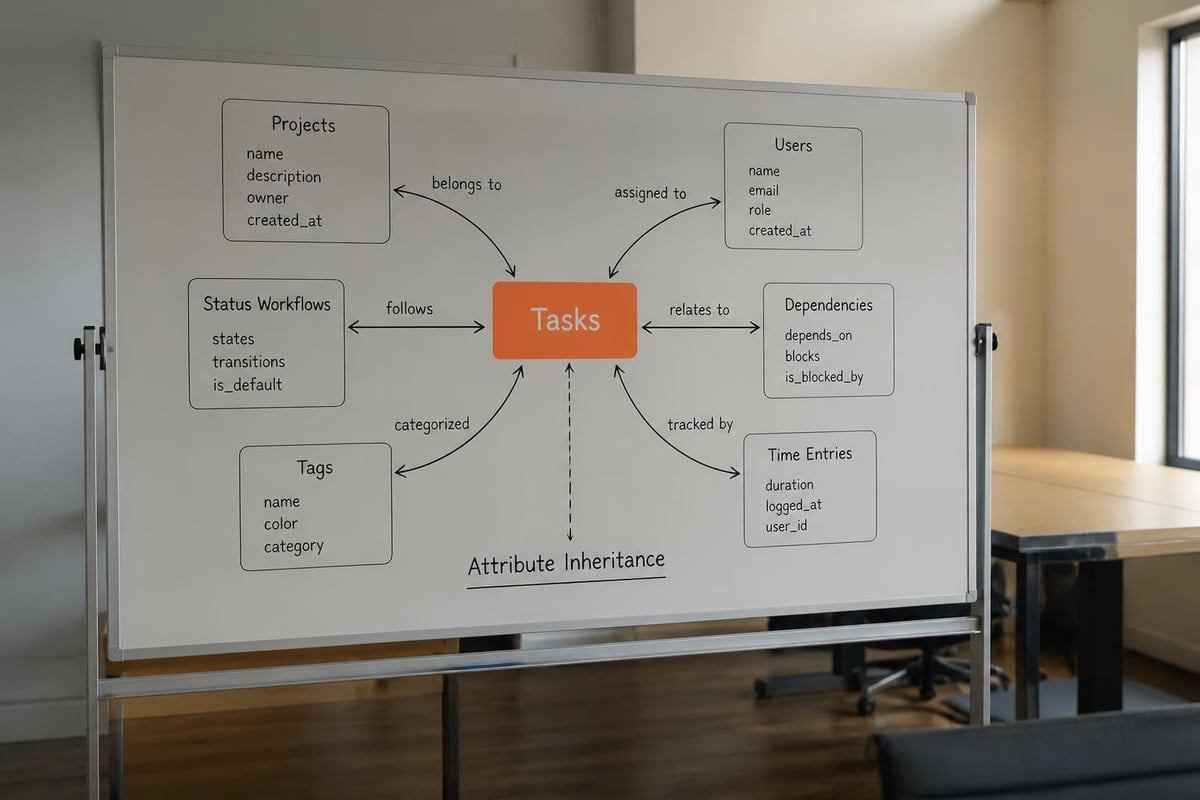
Task tracking tools digitize and centralize work management by converting abstract assignments into structured, trackable units with defined attributes, owners, and lifecycles. A task represents a single unit of work with specific properties: title, description, assignee, status, priority, due date, tags, and relationships to other tasks or projects.
These tools operate through several core mechanisms:
- Task creation workflows that capture work requests from multiple sources (manual entry, email, API calls, webhooks)
- Assignment logic that routes tasks to specific individuals or teams based on rules, availability, or manual selection
- Status progression through predefined workflow stages (backlog, in progress, review, done)
- Notification systems that alert stakeholders when tasks change state, approach deadlines, or require input
- Search and filter capabilities enabling users to locate specific tasks or view subsets based on criteria
- Reporting engines that aggregate task data into dashboards, burndown charts, velocity metrics, and completion forecasts
The fundamental data model stores tasks in databases with relational links to users, projects, tags, comments, and attachments. Most systems support hierarchical structures where large initiatives decompose into smaller tasks or subtasks. Taskwarrior’s philosophy emphasizes low-friction task capture and methodology agnosticism, allowing teams to adapt tools to existing processes rather than forcing process change.
Essential Components of Task Tracking Systems
Every functional task tracking implementation contains specific components that work together to manage work visibility and flow.
| Component | Function | Implementation Example |
|---|---|---|
| Task repository | Central storage for all task records | PostgreSQL database with task table, indexed by status and assignee |
| User interface | Access point for viewing and updating tasks | Web application, mobile app, command-line interface |
| Workflow engine | Manages state transitions and validation rules | State machine preventing "done" tasks from reverting to "in progress" |
| Permission system | Controls who can create, view, edit, or delete tasks | Role-based access with project-level and task-level granularity |
| Integration layer | Connects to external systems via API | REST API endpoints for creating tasks from support tickets |
| Notification service | Delivers alerts about task changes | Email, Slack, or in-app notifications triggered by status updates |
The integration layer deserves particular attention in software development contexts. Research on chatbot-mediated task management demonstrates how conversational interfaces can reduce friction in task creation and updates, particularly within team communication channels where work discussions naturally occur.
How to Evaluate and Select Task Tracking Tools
Evaluation begins with defining specific requirements based on team size, project complexity, existing toolchain, and workflow constraints. The selection process follows a structured approach to identify the best-fit solution.
Step 1: Document current workflow and pain points
Map existing task management processes, identifying where work gets lost, duplicated, or delayed. Quantify specific problems: "15% of tasks miss deadlines due to unclear ownership" or "developers spend 45 minutes daily searching for task details across email, chat, and spreadsheets."
Step 2: Define mandatory versus optional capabilities
Separate requirements into must-have features (without which the tool fails) and nice-to-have enhancements. Mandatory items typically include multi-user access, custom workflows, API availability, and data export. Optional features might include Gantt charts, time tracking integration, or mobile apps.
Step 3: Establish technical integration requirements
Identify systems that must exchange data with the task tracker: version control (Git), continuous integration servers (Jenkins, GitHub Actions), communication platforms (Slack, Microsoft Teams), and customer relationship management systems.
Organizations managing client work often need tight CRM integration. Brytend CRM connects client requests directly to development tasks through its workflow-integrated questionnaire system, eliminating manual task creation for common service requests and ensuring client context travels with each work item.

Step 4: Evaluate vendor options against criteria matrix
Create a scoring matrix weighing factors like:
- Customization depth (custom fields, workflows, automation rules)
- API completeness (read/write access, webhook support, rate limits)
- Reporting flexibility (custom dashboards, data export formats, scheduled reports)
- User experience (interface clarity, mobile access, keyboard shortcuts)
- Total cost of ownership (licensing, implementation, training, ongoing administration)
- Vendor stability (company longevity, update frequency, user community size)
Step 5: Conduct proof-of-concept testing
Select 2-3 finalists and run 2-4 week trials with actual team members performing real work. Measure task creation time, update frequency, search effectiveness, and user satisfaction. Track integration reliability and data synchronization accuracy.
Key Differentiators Between Tool Categories
The Atlassian guide to task management tools highlights significant variation across categories, from simple to-do lists to comprehensive project management platforms.
Standalone task trackers focus exclusively on task management with minimal project context. These tools excel at personal productivity and small team coordination but lack resource management, budget tracking, or portfolio-level visibility.
Integrated project management platforms embed task tracking within broader project contexts, connecting tasks to timelines, budgets, resources, and deliverables. These systems support complex dependencies, critical path analysis, and multi-project resource allocation.
Issue tracking systems originated in software development, optimized for bug reports, feature requests, and technical work items. They emphasize version control integration, code review workflows, and release management.
Specialized domain tools target specific industries or use cases, incorporating terminology, workflows, and reporting structures aligned to particular contexts. Examples include construction punch lists, manufacturing work orders, or healthcare task assignments.
What Implementation Steps Ensure Successful Adoption
Implementation success depends on systematic configuration, consistent data entry standards, and sustained user adoption. Rushed deployments without clear structure create confusion and abandonment.
Configuration and Setup Phase
1. Define task types and standard fields
Establish categories that reflect actual work: Feature, Bug, Technical Debt, Documentation, Research. Specify required fields for each type and acceptable values for dropdown fields.
2. Design status workflows
Map the actual progression of work from request to completion. A typical software development workflow includes: Backlog → Ready → In Progress → Code Review → Testing → Done. Add transitions for blocked states and rejection paths.
3. Configure permissions and roles
Assign capabilities based on responsibility levels. Developers create and update tasks; project managers reassign and reprioritize; clients view assigned tasks but cannot delete.
4. Build integration connections
Establish bidirectional sync with critical systems. Configure GitHub integration to automatically update task status when pull requests merge. Set up Slack notifications for high-priority task assignments.
5. Import historical data
Migrate existing tasks from spreadsheets, emails, or previous systems. Clean data before import, standardizing formats and removing duplicates. Preserve creation dates and assignment history where possible.

User Training and Adoption Strategies
Training must cover both mechanical operation (how to create tasks) and conceptual understanding (when to create tasks versus when to comment on existing ones).
Effective training approaches include:
- Role-specific sessions tailored to how each user type interacts with the system
- Workflow walkthroughs demonstrating complete task lifecycles from creation to closure
- Integration demonstrations showing how task updates trigger actions in connected systems
- Common scenario practice using realistic examples from actual project work
- Quick reference guides providing step-by-step instructions for frequent operations
Adoption monitoring tracks metrics like daily active users, tasks created per team member, average time to first status update, and percentage of tasks with complete metadata. Low engagement signals need for additional training or workflow simplification.
Why Task Tracking Tools Improve Development Team Performance
Performance improvements stem from reduced coordination overhead, increased work visibility, and data-driven process optimization. Quantifiable benefits appear across multiple dimensions.
Coordination efficiency gains occur when task assignments eliminate ambiguity about ownership. Instead of asking "who's handling the database migration," team members check the task tracker. This reduces interruptions, meeting time, and duplicated effort. Teams report 20-30% reductions in coordination overhead after implementing structured task tracking.
Work visibility improvements surface bottlenecks, overallocated individuals, and aging tasks before they become critical problems. Managers identify developers carrying 15 active tasks while others have 3, enabling rebalancing. Sprint burndown charts reveal when teams consistently overcommit, informing more accurate planning.
Progress transparency satisfies stakeholder needs for status updates without constant developer interruption. Clients access dashboards showing their requested features moving through development stages. Product managers view completion velocity to forecast release timelines.
Knowledge capture occurs through task descriptions, comments, and linked documentation. Research on task-driven skill identification demonstrates how task metadata helps match work to developer expertise while building organizational knowledge about required skills for specific task types.
Process optimization data emerges from aggregated task metrics. Average time-in-status reveals where work stalls. Reopened task rates indicate quality issues. Task age distributions show work-in-progress accumulation.
| Metric | What It Reveals | Action Threshold |
|---|---|---|
| Average cycle time | How long tasks take from start to finish | >10 days for standard features |
| Time in "blocked" status | External dependency delays | >3 days per task |
| Tasks per developer | Workload distribution | >2x variation between team members |
| Reopened task rate | Quality or requirement clarity issues | >15% of completed tasks |
| Overdue task percentage | Planning accuracy or capacity problems | >20% of active tasks |
Common Performance Bottlenecks in Task Tracking
Despite benefits, poorly implemented task tracking creates new problems that offset gains.
Excessive task granularity generates administrative burden exceeding coordination value. Creating separate tasks for "write function," "write unit test," and "document function" produces three updates, three notifications, and three status checks for 30 minutes of work.
Inadequate task detail forces developers to seek clarification before starting work. Tasks reading "fix login bug" without reproduction steps, expected behavior, or environment details waste time and delay resolution.
Status update neglect renders dashboards meaningless when developers forget to update task status. Work completes but tasks remain "in progress," creating false bottleneck signals and inaccurate velocity calculations.
Notification overload from misconfigured alerts trains users to ignore all notifications, including critical ones. Receiving 50 task update emails daily desensitizes teams to actual urgent items.
How to Integrate Task Tracking with Development Workflows
Integration connects task tracking to actual development activities, creating unified workflows where task updates happen automatically as developers work.
Version Control Integration Patterns
Modern development relies on Git for source control. Linking commits, branches, and pull requests to tasks provides traceability and enables automation.
Branch naming conventions embed task identifiers: feature/TASK-1234-user-authentication links the branch to task 1234. Repository webhooks notify the task tracker when branches are created, enabling automatic status transitions to "In Progress."
Commit message parsing extracts task references from commit messages using standard formats: TASK-1234: Implement password reset email template. The task tracker displays these commits in the task timeline, showing code changes associated with each work item.
Pull request automation transitions tasks to "Review" status when pull requests open and "Testing" when they merge to development branches. Closed pull requests without merge can automatically reopen tasks or flag them for investigation.
Release tracking associates tasks with version releases by examining which commits appear in release branches. This enables automatic release note generation listing all completed tasks.
Continuous Integration and Deployment Connections
CI/CD pipelines execute automated tests and deployments triggered by code changes. Connecting these pipelines to task tracking provides deployment visibility and quality metrics.
Successful build completion for task-related branches can post build status and test results as task comments. Failed builds automatically add "Needs Fix" labels and reassign tasks to original developers. Deployment systems update task status to "Deployed to Staging" or "Deployed to Production" based on which environment received the release, giving stakeholders real-time deployment visibility without manual updates.
Insights from The Linux Foundation on open-source task management demonstrate how transparent, automated workflows reduce process friction in distributed development teams.
Communication Platform Integration
Development teams communicate constantly through Slack, Microsoft Teams, or similar platforms. Integrating task tracking into these channels reduces context switching and improves response time.
Task creation from messages allows converting discussions into trackable work items without leaving the chat interface. A message reading "we need to update the API documentation" becomes a task via a button click or slash command.
Inline task views display task summaries when task IDs appear in messages. Typing "TASK-1234" automatically expands to show current status, assignee, and priority without opening the task tracker.
Status update commands enable quick task modifications through chat: /task TASK-1234 status done marks the task complete and notifies stakeholders.
Scheduled digests post daily or weekly summaries of task activity, upcoming deadlines, and newly assigned work to relevant team channels.
What Challenges Affect Task Tracking Tool Success
Implementation challenges fall into technical, organizational, and behavioral categories. Anticipating these obstacles enables proactive mitigation.
Technical Integration Complexity
Connecting task tracking tools to existing systems requires API understanding, authentication configuration, data mapping, and error handling. Organizations with custom-built internal systems face particular challenges when vendors provide limited API documentation or restrictive rate limits.
Authentication complications arise when integrating systems use different identity providers. Single sign-on configuration requires coordination between IT security teams and application administrators. Token expiration and refresh mechanisms must be robust to prevent integration failures.
Data synchronization conflicts occur when the same information exists in multiple systems with different update patterns. A task assignee changed in the task tracker while simultaneously updated in a CRM creates a conflict requiring resolution rules.
Webhook reliability issues emerge when receiving systems experience downtime or respond slowly. Failed webhook deliveries need retry logic and error logging to prevent lost updates.
Organizational Process Resistance
Teams accustomed to informal coordination resist structured task tracking as unnecessary overhead. Common objections include "we're small enough to just talk to each other" or "tracking tasks takes more time than doing the work."
Resistance decreases when teams experience direct benefits: faster onboarding of new members through documented task history, reduced meeting time from self-service status visibility, or improved project predictability from velocity data.
Process documentation gaps undermine adoption when teams lack clear guidance on when to create tasks, how granular they should be, or who assigns them. Written standards with examples resolve ambiguity.
Inconsistent enforcement occurs when some team members meticulously track tasks while others ignore the system entirely. Management must model desired behavior and address non-compliance directly.
Common Implementation Mistakes
Several mistakes repeatedly appear in failed task tracking implementations:
- Over-customization creating complex workflows that confuse users and require extensive training
- Insufficient initial task backlog launching with empty systems that provide no immediate value
- Premature process changes redesigning workflows simultaneously with tool introduction
- Inadequate permission planning granting excessive access that enables accidental deletions or inappropriate modifications
- Missing success metrics preventing objective assessment of whether the implementation achieves goals
How to Optimize Task Tracking for Maximum Value
Optimization begins after initial adoption stabilizes, focusing on workflow refinement, automation expansion, and advanced feature utilization.
Workflow Refinement Based on Data
Task tracking systems accumulate data revealing process inefficiencies. Regular analysis identifies optimization opportunities.
Status distribution analysis shows where work accumulates. If 40% of tasks sit in "Waiting for Review," the bottleneck is reviewer capacity or assignment logic. Solutions include adding reviewers, implementing round-robin assignment, or establishing review time limits.
Cycle time trending reveals whether processes improve or degrade over time. Increasing average cycle time signals growing complexity, technical debt accumulation, or inadequate capacity.
Task age monitoring identifies stagnant work that needs attention or cancellation. Tasks open for 90+ days with no recent activity should be reviewed for continued relevance.
Automation Opportunities
Manual task updates consume time and create inconsistency. Automation reduces overhead while improving data accuracy.
Automatic labeling applies tags based on task content analysis. Tasks mentioning "database" or "SQL" receive the "backend" label. Those referencing specific client names get tagged accordingly.
Priority escalation increases task priority automatically as deadlines approach or age exceeds thresholds. Tasks within 3 days of deadline shift to "Urgent" priority.
Assignment rules route new tasks based on workload balancing, skill matching, or round-robin distribution. Tasks requiring specific expertise automatically assign to developers with matching skill tags.
Status synchronization updates multiple related tasks when parent tasks change state. Closing an epic automatically marks all child tasks complete if they're finished.
Advanced Reporting and Analytics
Basic dashboards show current status. Advanced analytics predict future performance and identify subtle patterns.
Velocity forecasting uses historical completion rates to project when current workload will finish. Teams averaging 25 story points per week with 150 points remaining see a 6-week forecast.
Developer performance comparison (when used carefully) identifies training needs or overload situations. Consistently low completion rates may indicate skill gaps, excessive interruptions, or unclear task descriptions.
Client satisfaction correlation links task attributes to customer feedback scores. Analysis might reveal that tasks completed within 5 days of request correlate with 90% satisfaction while those taking 15+ days score 60%.
Technical debt tracking monitors tasks categorized as refactoring, cleanup, or architecture improvement. Declining percentage of development time on technical debt predicts future quality issues.
| Analysis Type | Data Required | Output | Use Case |
|---|---|---|---|
| Bottleneck identification | Time-in-status by stage | Stage with highest average time | Workflow optimization |
| Skill gap analysis | Task type, assignee, completion time | Slower completion for specific skills | Training program planning |
| Estimation accuracy | Estimated hours, actual hours | Ratio of estimate to actual | Improving planning accuracy |
| Customer impact assessment | Task priority, client tag, completion time | High-priority delay frequency | Client communication triggers |
Case Example: Reducing Deployment Lead Time
A 12-developer software team tracked tasks in a basic tool without integrations. Tasks moved manually between "Development," "Testing," and "Done" states. Average deployment lead time (code commit to production) measured 8 days.
They implemented automated status transitions through Git and CI/CD integration. Pull request creation moved tasks to "Code Review." Merge to the main branch triggered "Testing" status. Successful staging deployment updated status to "Staging." Production deployment marked tasks "Done."
After three months, average deployment lead time decreased to 4.5 days. Developers stopped manually updating task status, reducing administrative time by 15 minutes daily per person. Project managers gained real-time deployment visibility, reducing status meeting frequency from three weekly to one.
The key insight: automation value compounds when multiple integrations work together, creating seamless workflows where task updates happen as natural byproducts of development activities rather than separate administrative tasks.
Comparing Manual versus Automated Task Tracking Approaches
Organizations often begin with manual spreadsheet tracking before adopting dedicated tools. Understanding differences guides migration planning.
Manual spreadsheet tracking requires individuals to record tasks, update status, and maintain data integrity through discipline. Advantages include zero software cost, infinite customization, and no vendor dependency. Disadvantages encompass no automated notifications, limited concurrent editing, weak permission controls, difficult integration with other systems, and manual report generation.
Automated tool-based tracking centralizes data in purpose-built systems with access controls, notification engines, and integration capabilities. Benefits include real-time collaboration, automated workflows, sophisticated filtering and search, built-in reporting, and audit trails. Drawbacks involve licensing costs, learning curves, vendor lock-in risk, and customization limitations.
The transition point typically occurs when manual tracking overhead exceeds tool costs and learning investment, usually around 8-10 team members or 100+ active tasks.
Task tracking tools provide essential structure for software development teams managing complex, concurrent work across clients and projects. Successful implementation requires systematic tool selection aligned to workflow requirements, careful configuration establishing clear data standards, robust integration connecting task tracking to actual development activities, and sustained attention to adoption metrics and process optimization. Brytend helps organizations design and implement custom task tracking solutions integrated with their unique development workflows, CRM systems, and client communication channels, ensuring task visibility supports both internal coordination and client transparency without creating excessive administrative overhead.