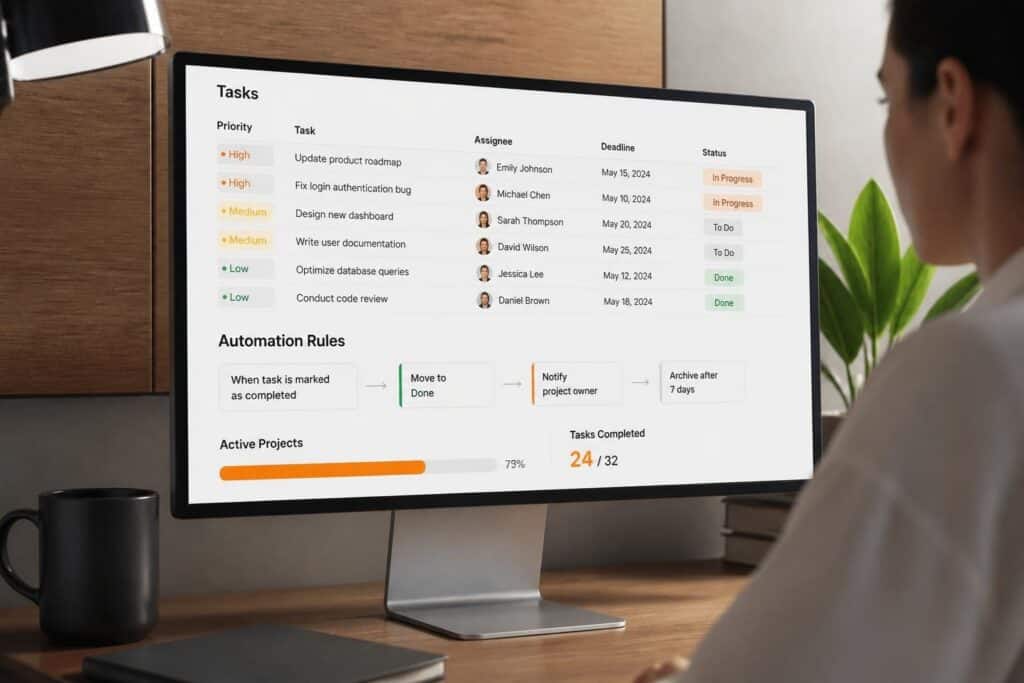
A tasks management app is a digital platform that enables individuals and teams to create, organize, assign, track, and complete work items within a structured system. These applications provide centralized visibility into project workflows, automate routine task operations, and facilitate collaboration across distributed teams. For custom software development teams and enterprise organizations, a tasks management app serves as the operational backbone for coordinating complex projects with multiple dependencies.
TL;DR
- A tasks management app centralizes task creation, assignment, tracking, and completion in a single platform with real-time visibility
- Core features include task hierarchies, priority systems, deadline tracking, automated notifications, and team collaboration tools
- Implementation requires defining task taxonomies, establishing workflows, configuring user roles, and integrating with existing systems
- Effective task management reduces project delays by 30-40% through improved coordination and accountability
- Custom-built solutions offer deeper integration with industry-specific workflows compared to generic off-the-shelf applications
What Is a Tasks Management App and How Does It Function?
A tasks management app functions as a digital command center where work items are captured, categorized, delegated, and tracked through completion. The system maintains a persistent database of tasks with associated metadata including assignees, due dates, priority levels, dependencies, status indicators, and attached resources.
Core functionality revolves around task lifecycle management. When a task enters the system, it receives unique identification, classification tags, and routing information. The application applies business rules to determine assignment logic, notification triggers, and escalation pathways. As work progresses, status updates flow through the system, triggering automated actions and updating dependent tasks.

Modern tasks management apps operate on relational database architectures that link tasks to projects, clients, resources, and organizational hierarchies. This relational structure enables complex queries, roll-up reporting, and cross-project resource allocation analysis. API integrations extend functionality by connecting task data with calendar systems, communication platforms, time tracking tools, and business intelligence dashboards.
Essential Components of Task Management Architecture
Every functional tasks management app includes specific structural elements:
- Task entity schema defining required and optional fields for each work item
- User role matrix controlling permissions for task creation, assignment, modification, and deletion
- Workflow engine enforcing state transitions and approval processes
- Notification system sending alerts based on triggers and user preferences
- Search and filter mechanisms enabling rapid task retrieval across multiple criteria
- Reporting module aggregating task data into actionable insights
The data model determines system flexibility. Rigid schemas limit customization but ensure consistency. Flexible schemas accommodate diverse workflows but require governance to prevent data quality degradation.
Why Do Organizations Need a Tasks Management App?
Organizations implement tasks management apps to address coordination failures that emerge as teams scale beyond direct communication capacity. When project complexity exceeds individual memory capacity and team size prevents ad-hoc coordination, systematic task tracking becomes essential.
Without centralized task management, organizations experience predictable failure patterns. Tasks fall through communication gaps between departments. Duplicate efforts waste resources when multiple team members unknowingly work on identical problems. Priority conflicts emerge when individuals lack visibility into organizational objectives. Dependencies cause cascading delays when upstream task completion doesn't trigger downstream work initiation.
A tasks management app eliminates these failure modes through three mechanisms:
- Centralized task registry creating a single source of truth for all organizational work
- Automated workflow enforcement ensuring tasks follow defined processes without manual oversight
- Real-time status visibility enabling proactive intervention before delays compound
The quantifiable benefits appear in cycle time reduction, resource utilization improvement, and error rate decrease. Teams using structured task management complete projects 25-35% faster than teams relying on email and spreadsheets. This efficiency gain stems from reduced coordination overhead and faster context switching.
Specific Use Cases in Software Development
Custom software development teams face unique task management challenges. A single project involves hundreds of interdependent tasks across requirements analysis, architecture design, implementation, testing, deployment, and maintenance phases.
For Brytend's development teams, a tasks management app tracks serialized inventory of software components, manages service requests for deployed applications, and coordinates multi-client project portfolios. The system links code commits to specific tasks, enabling traceability from client requirements through delivered functionality.
How Do You Choose the Right Tasks Management App?
Selection criteria depend on organizational context, technical requirements, and workflow complexity. The decision framework evaluates five dimensions: feature completeness, integration capability, customization flexibility, scalability limits, and total cost of ownership.
| Evaluation Criterion | Generic SaaS Apps | Custom-Built Solutions |
|---|---|---|
| Implementation Speed | 1-2 weeks | 8-16 weeks |
| Workflow Customization | Limited templates | Unlimited flexibility |
| Integration Depth | API-dependent | Native database access |
| Per-User Cost | $8-25/month | Fixed development cost |
| Industry-Specific Features | Generic only | Fully tailored |
Best practices for task management emphasize selecting systems that match your team's actual workflows rather than forcing workflows to match software limitations.
Feature Requirements Analysis
Begin by documenting current task management processes. Map how tasks currently move through your organization from initial request through completion. Identify bottlenecks, approval stages, notification requirements, and reporting needs.
Required features typically include:
- Task hierarchies supporting projects, sub-projects, task groups, and individual tasks
- Custom field definitions capturing industry-specific metadata beyond standard task attributes
- Conditional workflows routing tasks based on type, value, client, or other criteria
- Resource capacity planning preventing over-allocation across concurrent projects
- Time tracking integration linking effort to specific tasks for billing and analysis
- Mobile accessibility enabling field teams to update task status in real-time
When evaluating the best to-do list apps, test each system against real workflow scenarios from your organization. Generic feature lists don't reveal how systems perform under actual usage patterns.
What Are the Implementation Steps for a Tasks Management App?
Implementation follows a structured sequence from requirements definition through deployment and adoption. Rushing implementation without proper planning creates technical debt and user resistance that undermine long-term value.
Phase 1: Requirements and Architecture Design
Define task taxonomy by cataloging all work types your organization manages. For software development firms, this includes development tasks, bug reports, client support requests, internal infrastructure tasks, and administrative items. Each category requires different metadata fields, workflows, and reporting structures.
Document current state workflows by interviewing stakeholders across departments. Map task flow from creation through completion, identifying handoffs, approval gates, and exception handling. These workflows become configuration specifications for the tasks management app.
Design user role matrix defining who can create, view, modify, assign, and delete different task types. Role-based access control prevents unauthorized modifications while enabling appropriate visibility.
Phase 2: System Configuration and Integration
Configure the tasks management app according to documented requirements. Create task templates for common work types. Define custom fields capturing industry-specific information. Build workflow rules automating routing and notifications.
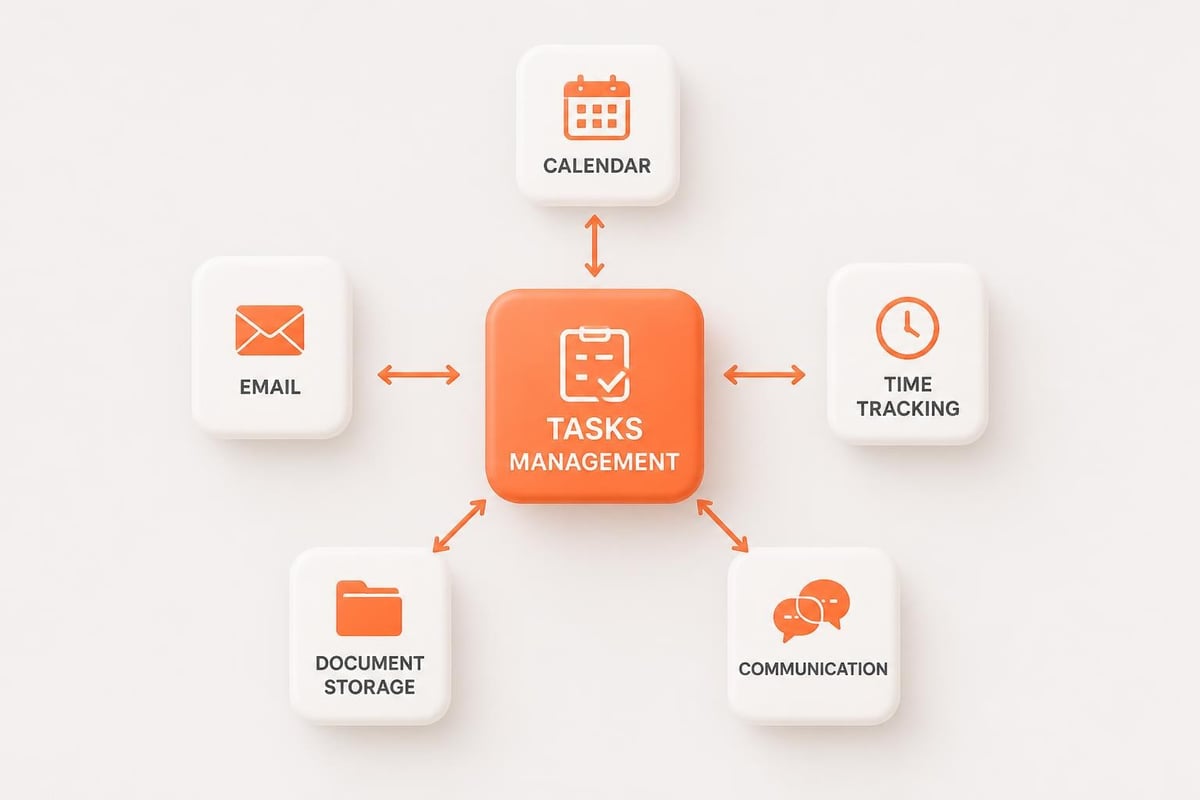
Integration with existing systems enables data flow without manual duplication. Essential integrations include:
- Calendar systems for deadline synchronization and resource scheduling
- Email platforms for notification delivery and task creation from email
- Time tracking tools for effort capture against specific tasks
- Document management systems for attaching specifications, designs, and deliverables
- Communication platforms for task-related discussions and updates
- Business intelligence tools for advanced analytics and executive dashboards
API quality determines integration depth. REST APIs with comprehensive documentation enable robust integrations. Limited APIs force workarounds that create maintenance burden.
Phase 3: Data Migration and Testing
Migrate existing task data from legacy systems. Export tasks from spreadsheets, email threads, and previous software into standardized format. Map legacy fields to new schema. Validate data integrity before cutover.
Conduct user acceptance testing with representative workflows. Test task creation, assignment, status updates, notifications, and reporting. Verify integrations function correctly under realistic load. Identify configuration issues before organization-wide deployment.
Phase 4: Training and Rollout
Develop role-specific training covering relevant functionality. Task creators need different training than assignees or managers. Focus training on actual workflows rather than comprehensive feature tours.
Phased rollout reduces risk compared to immediate organization-wide deployment. Start with a single team or project as pilot. Collect feedback, refine configuration, and address issues before expanding to additional teams.
How Do You Optimize Task Management for Maximum Productivity?
Optimization occurs through continuous refinement of task structure, workflow automation, and reporting visibility. Initial implementation establishes basic functionality. Ongoing optimization drives sustained productivity improvement.
Task Structuring Best Practices
Effective task definition follows the SMART framework: Specific, Measurable, Assignable, Realistic, Time-bound. Vague tasks like "improve system performance" lack actionable clarity. Specific tasks like "reduce database query response time to under 200ms for customer search function" provide clear completion criteria.
Break large initiatives into task hierarchies with three levels maximum. Projects decompose into task groups. Task groups contain individual tasks completable by one person in 2-8 hours. This granularity enables accurate progress tracking without excessive administrative overhead.
Apply consistent naming conventions for instant task recognition. Prefix task names with category codes, project identifiers, or priority indicators. Consistent structure enables efficient filtering and searching across large task databases.
Automation Configuration
Automate repetitive task management operations to reduce manual overhead. Common automation opportunities include:
- Recurring task creation for scheduled maintenance, compliance checks, and routine operations
- Status-based notifications alerting assignees when tasks enter their queue
- Dependency-triggered assignment automatically assigning downstream tasks when upstream tasks complete
- Escalation workflows notifying managers when tasks remain incomplete past deadlines
- Cross-system synchronization updating related records in CRM, ERP, or billing systems
Optimizing task management through automation reduces coordination time by 40-60%, freeing team capacity for value-adding work.
For organizations managing client services, custom automation connects task completion to service certificates, maintenance records, and compliance documentation. The Brytend Service Module demonstrates this integration by linking service tasks to serialized equipment inventory, automating service reminders based on task completion dates, and generating certificates when inspection tasks finish.

Reporting and Analytics Implementation
Configure dashboards providing role-appropriate visibility into task status. Team members need personal task queues sorted by priority and deadline. Project managers need project-level rollups showing completion percentage, resource allocation, and schedule variance. Executives need portfolio views highlighting risks, bottlenecks, and resource constraints.
Effective task metrics include:
| Metric | Definition | Target Range |
|---|---|---|
| Cycle Time | Duration from task creation to completion | 2-5 days for standard tasks |
| Completion Rate | Percentage of tasks finished by original deadline | >85% |
| Assignment Balance | Standard deviation of task count across team members | <15% of mean |
| Aging Analysis | Count of tasks by time since creation | <10% older than 14 days |
Track metrics over time to identify trends. Increasing cycle time signals capacity constraints or process bottlenecks. Declining completion rates indicate unrealistic deadline setting or scope creep. Unbalanced assignment distribution causes burnout and quality issues.
What Are Common Challenges in Task Management Implementation?
Implementation failures typically stem from four root causes: inadequate user adoption, poor data quality, insufficient customization, and integration gaps. Recognizing these challenges enables proactive mitigation.
User Adoption Resistance
Teams resist new systems when perceived costs exceed perceived benefits. If task entry requires more effort than previous methods without delivering visible value, users revert to familiar tools. Email task management feels effortless compared to structured task creation forms.
Overcome adoption resistance by minimizing entry friction and maximizing immediate value. Enable email-to-task creation so users continue working in familiar tools. Configure mobile apps for field updates without requiring laptop access. Display personalized dashboards showing exactly what each user needs to accomplish today.
Demonstrate value through quick wins. Show how task automation eliminated repetitive status meetings. Quantify time saved through reduced email searching. Highlight how visibility prevented missed deadlines on high-priority projects.
Data Quality Degradation
Task management systems accumulate garbage data without active governance. Abandoned tasks never closed. Duplicate tasks created for identical work. Inconsistent categorization preventing meaningful reporting. Outdated assignments to departed employees.
Implement data quality controls through validation rules, mandatory fields, and periodic cleanup. Require priority assignment on task creation. Limit status values to defined list preventing freeform entry. Schedule quarterly reviews identifying stale tasks for archival or deletion.
Automated data quality monitoring flags anomalies for human review. Tasks open longer than 90 days. Tasks assigned to inactive users. Tasks without required metadata fields. Proactive identification prevents data rot from undermining system value.
Workflow Misalignment
Generic task management templates rarely match organizational reality. Forcing actual workflows into inappropriate software structures creates friction, workarounds, and eventual abandonment.
Custom software development projects involve substantially different workflows than manufacturing operations or professional services. A task management system designed for one context fails in another without significant customization.
Case example: A software development firm implemented a popular tasks management app designed for marketing teams. The system lacked fields for technical specifications, code branch references, or testing status. Developers created workarounds using comments and custom tags, but reporting became impossible and adoption declined. After migrating to a custom task management solution aligned with software development workflows, the team achieved 90% adoption and 35% faster sprint completion.
How Does Task Management Scale Across Growing Organizations?
Scalability challenges emerge as organizations grow from single teams to multiple departments, from one location to distributed operations, and from simple projects to complex multi-client portfolios. A tasks management app that functions well for 10 users often breaks down at 100 users without architectural adaptation.
Organizational Hierarchy Management
Small teams manage tasks in flat structures where everyone sees everything. Growing organizations require hierarchical visibility controls. Department managers see their team's tasks but not peer departments. Project managers see project-specific tasks across departments. Executives see high-level summaries without operational detail.
Implement role-based filtering and departmental task segregation. Configure permission matrices controlling who can view, create, and modify tasks based on organizational position and project involvement. Balance visibility needs against information overload.
Multi-Project Resource Allocation
Single-project focus simplifies task management. Multi-project environments create resource contention and priority conflicts. Team members receive task assignments from multiple projects simultaneously, each project manager assuming full resource availability.
Resource capacity planning features prevent over-allocation. The system tracks total assigned hours across all projects, flagging when assignments exceed available capacity. Project managers see resource availability before making assignments, enabling realistic scheduling.
Task prioritization becomes critical at scale. Implement standardized priority frameworks applied consistently across all projects. Common frameworks include:
- Urgent-Important Matrix categorizing tasks by deadline urgency and business impact
- MoSCoW Method classifying tasks as Must-have, Should-have, Could-have, or Won't-have
- Weighted Scoring assigning numerical priority based on multiple factors like client value, technical dependency, and strategic alignment
Performance Optimization for Large Task Databases
Database performance degrades as task counts reach tens of thousands. Queries slow down. Reports timeout. User interface responsiveness suffers.
Optimize performance through database indexing, archival policies, and query optimization. Index frequently filtered fields like assignee, status, and due date. Archive completed tasks older than 12 months to separate database. Implement pagination limiting query result sets to 100-500 records.
What Integration Capabilities Should a Tasks Management App Provide?
Integration transforms isolated task tracking into a connected productivity ecosystem. Tasks gain context from related systems. Data flows automatically without manual transfer. Insights emerge from cross-system analytics.
API Architecture Requirements
Modern tasks management apps expose RESTful APIs enabling programmatic access to task data. Comprehensive APIs support:
- Task CRUD operations (Create, Read, Update, Delete) via HTTP methods
- Webhook notifications pushing real-time updates to external systems when task status changes
- Batch operations enabling bulk task creation, updates, and queries
- Custom field access exposing organization-specific task metadata
- Authentication and authorization securing API access through OAuth or API keys
API documentation quality determines integration feasibility. Complete documentation includes endpoint specifications, request/response examples, error codes, rate limits, and sample code in multiple languages.
Bidirectional Synchronization
One-way data flow limits integration value. Task creation from email requires bidirectional sync so email replies update task status. Calendar integration requires changes in either system to propagate bidirectionally.
Conflict resolution logic handles simultaneous updates in connected systems. Last-write-wins strategies risk data loss. Merge strategies preserve changes from both systems when possible. User notification strategies flag conflicts requiring manual resolution.
Industry-Specific System Integration
Software development teams require integration with version control systems, continuous integration platforms, and deployment tools. Manufacturing operations need connections to equipment monitoring systems and quality management platforms. Professional services firms integrate with client portals and billing systems.
For custom software development firms like Brytend, tasks management integrates with development infrastructure linking tasks to code commits, pull requests, and deployment pipelines. This traceability connects client requirements through implementation to production deployment, enabling comprehensive project tracking and automated status reporting.
Effective task management requires the right combination of structured processes, appropriate technology, and organizational discipline. Whether implementing a commercial tasks management app or building custom solutions, success depends on aligning system capabilities with actual workflows, maintaining data quality, and continuously optimizing based on usage patterns. Brytend develops custom task management solutions integrated with your existing systems and tailored to your specific workflows, enabling the productivity gains of enterprise task management without the limitations of generic software.