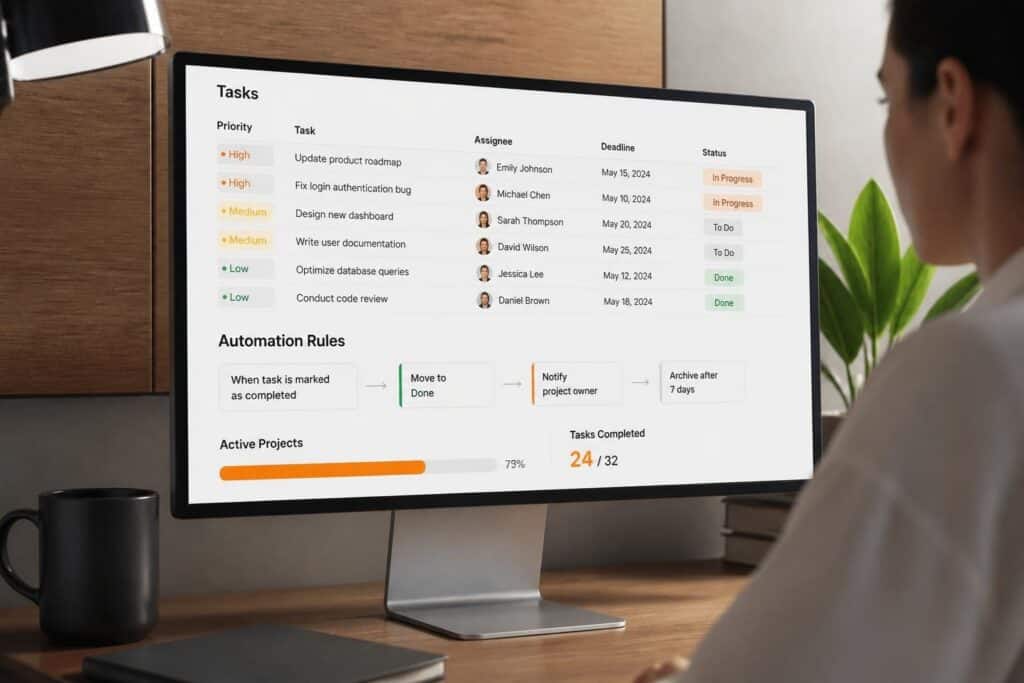
A task management application is a software tool designed to organize, assign, track, and complete work items across individuals and teams. These applications centralize project data, automate notifications, enforce deadlines, and provide visibility into task status and resource allocation. Organizations use task management applications to reduce manual coordination, prevent missed deliverables, and measure productivity across departments.
TL;DR:
- A task management application organizes work items with assignments, deadlines, priorities, and dependencies in a single system
- Features include task creation, status tracking, file attachments, time logging, notifications, and reporting dashboards
- Common use cases: project management, service ticket workflows, compliance audits, equipment maintenance schedules, and software development sprints
- Key benefits: reduced email overhead, faster task completion, accountability tracking, and data-driven resource planning
- Selection criteria: workflow customization, integration capability, user permissions, mobile access, and reporting depth
What Is a Task Management Application?
A task management application is a centralized software platform that creates, organizes, prioritizes, and tracks discrete work units from initiation through completion. The application stores task details including description, assigned owner, due date, priority level, status, dependencies, and attachments. Users create tasks manually or automatically through integrations, then update progress as work advances through defined stages.
Core Components
Every task management application includes several foundational elements that enable basic functionality:
- Task record: Contains title, description, assignee, due date, priority, tags, and custom fields
- Status workflow: Defines stages such as backlog, in progress, review, blocked, and completed
- Assignment system: Links tasks to specific users or teams with ownership and responsibility tracking
- Notification engine: Sends alerts for new assignments, approaching deadlines, status changes, and comments
- Search and filter: Allows users to locate tasks by assignee, date range, project, tag, or custom criteria
- Dashboard views: Displays tasks in list, board, calendar, timeline, or table formats
Technical Architecture
Modern task management applications operate as cloud-based SaaS platforms or self-hosted task management applications deployed on private infrastructure. Cloud platforms offer automatic updates, managed backups, and multi-device synchronization without local IT administration. Self-hosted solutions provide greater data control, customization depth, and compliance with data residency requirements.
The application layer connects to databases storing task records, user profiles, and activity logs. API endpoints enable integrations with email clients, calendars, file storage, time tracking, and business intelligence tools. Real-time synchronization ensures all users view current task status regardless of device or location.

How Does a Task Management Application Improve Workflow Efficiency?
A task management application eliminates manual tracking methods by centralizing work items in a searchable database accessible to all authorized users. This centralization reduces time spent locating task details, determining ownership, or checking status through email threads and spreadsheets.
Automation of Routine Coordination
The application automatically notifies assignees when tasks are created or modified, eliminating manual follow-up messages. Deadline reminders trigger at configured intervals, reducing missed deliverables without manager intervention. When tasks move between workflow stages, the system updates all stakeholders simultaneously and creates an audit trail of changes.
| Manual Method | Application Method | Time Savings |
|---|---|---|
| Email assignment with CC list | Direct task assignment with auto-notification | 5-10 minutes per task |
| Status update meetings | Real-time dashboard review | 2-4 hours weekly |
| Spreadsheet tracking | Automated progress reports | 3-6 hours weekly |
| File attachment emails | Centralized document links | 10-15 minutes per document |
Dependency Management
Task management applications define relationships between work items, blocking dependent tasks until prerequisites complete. This prevents premature work starts and resource waste on tasks awaiting upstream deliverables. The system displays dependency chains visually, helping teams sequence work logically and identify critical path items.
For example, a custom software development project might include these dependencies:
- Requirements gathering (prerequisite for all design tasks)
- Database schema design (blocks API development)
- API endpoint creation (blocks frontend integration)
- Frontend integration (prerequisite for testing)
- Quality assurance testing (blocks deployment)
- Production deployment (final task)
The application prevents developers from starting API work until database design completes, maintaining logical work sequencing without manual checking.
What Features Define Enterprise-Grade Task Management Applications?
Enterprise task management applications extend basic functionality with capabilities required for large-scale operations, compliance requirements, and complex workflows. These features support hundreds or thousands of concurrent users across multiple departments, projects, and locations.
Advanced Permission Systems
Role-based access control restricts task visibility and editing privileges based on user roles, departments, or project membership. Administrators define permission levels such as view-only, edit assigned tasks, edit all tasks, create projects, and system configuration. Field-level permissions hide sensitive data like budget figures or client details from unauthorized users.
A manufacturing organization might configure permissions where:
- Production staff view only their assigned maintenance tasks
- Supervisors view all tasks for their department
- Project managers edit tasks across assigned projects
- Executives access dashboard summaries without task details
- External auditors view completed compliance tasks in read-only mode
Custom Field Architecture
Enterprise applications allow administrators to define custom fields capturing organization-specific data beyond standard task attributes. These fields might include equipment serial numbers, compliance regulation references, client account codes, or certification requirements. Custom fields populate dropdown menus, enable specialized filtering, and feed into targeted reports.
Common custom field types:
- Single-line text: Purchase order numbers, serial numbers, reference codes
- Multi-line text: Detailed technical specifications, audit findings
- Dropdown select: Department, priority category, equipment type
- Date: Installation date, warranty expiration, next service due
- Checkbox: Requires manager approval, client-facing, billable
- Number: Estimated hours, budget allocation, quantity
- User lookup: Secondary assignee, approver, reviewer
Integration Ecosystem
Professional task management applications connect with business systems through APIs, webhooks, and native integrations. Common integration points include email platforms, calendar applications, file storage services, time tracking tools, customer relationship management systems, and accounting software.
A typical integration workflow for service management:
- Customer submits service request through web form
- CRM system creates new task automatically
- Task management application assigns technician based on location and availability
- Technician receives mobile notification with customer details and equipment history
- Completed task triggers invoice generation in accounting system
- Customer receives automated completion notification with service certificate
When paired with a comprehensive platform like the Brytend CRM, organizations gain end-to-end visibility from initial customer contact through task completion and billing. The integration eliminates duplicate data entry and ensures all systems reflect current status.

How Should Organizations Select a Task Management Application?
Organizations evaluate task management applications against operational requirements, technical constraints, and growth projections. The selection process examines workflow alignment, customization capability, integration options, user experience, and total cost of ownership.
Workflow Analysis and Mapping
Begin by documenting current task workflows including task creation triggers, approval requirements, status transitions, and completion criteria. Map these workflows to application capabilities, identifying gaps that require customization or process adjustments. Evaluate whether the application enforces workflow rules or allows ad-hoc modifications.
Critical workflow questions:
- Who creates tasks (users, automated systems, external parties)?
- What approval stages exist before work begins?
- How do tasks move between status categories?
- What completion criteria validate task closure?
- Which stakeholders require notification at each stage?
- How are tasks prioritized when conflicts arise?
Scalability Assessment
Calculate current task volume, user count, and project complexity, then project growth over 3-5 years. Verify the application handles projected volumes without performance degradation or pricing tier changes that significantly increase costs. Test performance with realistic data volumes during evaluation periods.
According to comprehensive analyses of task management applications, feature sets vary significantly across tools, with some optimized for individual productivity and others designed for enterprise-scale project portfolios. Match application capabilities to organizational scale requirements.
Customization Requirements
Determine whether standard application functionality meets needs or if custom fields, workflows, and integrations are necessary. Evaluate customization tools available to administrators versus capabilities requiring vendor professional services. Consider long-term maintenance burden for extensive customizations during platform upgrades.
| Customization Level | Implementation Method | Maintenance Effort |
|---|---|---|
| Color schemes and labels | Built-in settings | Minimal |
| Custom fields | Admin configuration panel | Low |
| Custom workflows | Visual workflow builder | Moderate |
| Custom integrations | API development | High |
| Custom UI modifications | Platform customization tools | High |
| Database schema changes | Vendor professional services | Very high |
What Are Common Implementation Challenges for Task Management Applications?
Organizations encounter predictable obstacles when deploying task management applications, particularly during data migration, user adoption, and workflow standardization phases. Proactive planning mitigates these challenges and accelerates time to productivity.
Data Migration Complexity
Transferring existing task data from spreadsheets, email systems, or legacy applications requires mapping source data fields to target application structure. Inconsistent historical data, missing assignees, and incomplete task details complicate automated migration. Organizations must clean data before migration or accept incomplete historical records.
Migration planning steps:
- Inventory existing data sources: Identify all locations storing task information
- Define data retention policy: Determine which historical tasks require migration versus archival
- Map field relationships: Align source data columns with target application fields
- Validate data quality: Identify and correct missing assignees, invalid dates, duplicate entries
- Execute pilot migration: Test migration process with subset of data
- Perform full migration: Transfer complete dataset with validation checks
- Archive legacy systems: Maintain read-only access to historical systems for reference
User Adoption Resistance
Employees accustomed to email-based task tracking or informal coordination methods resist formal task management applications perceived as bureaucratic overhead. Lack of training on efficient application usage reinforces this resistance. Unclear benefits for individual contributors versus managers reduce compliance with task entry requirements.
Address adoption challenges through:
- Executive sponsorship: Leadership communicates mandatory usage expectations
- Role-specific training: Tailored sessions demonstrating relevant workflows for each user group
- Gradual rollout: Pilot with enthusiastic departments before organization-wide deployment
- Visible quick wins: Highlight early productivity improvements and time savings
- Feedback incorporation: Adjust configurations based on user experience reports
Workflow Standardization Conflicts
Different departments often maintain unique task management approaches reflecting their specific operational needs. Forcing all departments into identical workflows creates friction and workarounds. However, excessive workflow variation prevents cross-departmental visibility and reporting consistency.
Balance standardization with flexibility by defining core workflow elements mandatory across the organization (task assignee, due date, status) while allowing departmental customization of additional fields, priority schemes, and approval processes.

How Do Task Management Applications Support Compliance and Audit Requirements?
Organizations in regulated industries leverage task management applications to document compliance activities, maintain audit trails, and demonstrate adherence to standards. The application creates permanent records of who performed which tasks, when work occurred, and what evidence supports completion.
Audit Trail Capabilities
Every task modification generates a timestamped log entry recording the user, changed field, previous value, and new value. This change history proves when tasks were created, assigned, completed, or modified. Immutable audit logs prevent retroactive alterations that could hide compliance failures.
A compliance workflow for equipment maintenance might include:
- System automatically creates preventive maintenance task based on service schedule
- Supervisor reviews and assigns task to qualified technician
- Technician receives notification and views equipment service history
- Technician completes maintenance and uploads test results as attachments
- Quality reviewer verifies completion against procedure checklist
- System marks task complete and schedules next service interval
- Audit log preserves complete record of each step with timestamps and user IDs
Documentation Centralization
Task management applications store compliance evidence directly within task records, linking procedures, test results, certifications, and approval signatures to specific work items. This eliminates scattered documentation across email inboxes, network drives, and paper files. Auditors access complete compliance records through application search rather than requesting files from multiple departments.
For organizations managing serialized inventory with compliance requirements, integrating task management with a service module provides comprehensive equipment lifecycle tracking. Each asset maintains a complete service history with all associated tasks, documentation, and compliance certificates in one system.
Reporting for Regulatory Submission
Applications generate compliance reports summarizing completed tasks by regulation type, equipment category, or time period. Automated reports reduce manual compilation time and ensure consistent formatting across reporting cycles. Export capabilities provide data in formats required by regulatory agencies.
Standard compliance reports:
- Tasks completed within specified time period grouped by regulation reference
- Overdue compliance tasks by asset, location, or responsible party
- Certification expiration forecast identifying upcoming renewal requirements
- Audit trail extracts for specific assets or task categories
- Exception reports showing tasks completed outside standard procedures
What Optimization Strategies Maximize Task Management Application Value?
Organizations extract greater value from task management applications by continuously refining workflows, leveraging automation capabilities, and analyzing performance metrics. Optimization occurs after initial deployment when usage patterns become clear.
Template Libraries
Create task templates for recurring work types that include pre-populated fields, standard descriptions, typical duration estimates, and default assignees. Templates reduce data entry time, ensure consistent task structure, and capture institutional knowledge about standard procedures.
Template examples across industries:
- Software development: Bug report, feature request, code review, deployment checklist
- Manufacturing: Equipment inspection, preventive maintenance, safety audit, production batch
- Professional services: Client onboarding, project kickoff, deliverable review, invoice processing
- Facilities management: Work order, space allocation, vendor coordination, safety incident
Automation Rules
Configure conditional logic that executes actions when specified triggers occur. Automation eliminates manual task creation, assignments, and status updates for predictable scenarios. Rules operate continuously without user intervention, ensuring consistent process execution.
Common automation patterns:
- Task creation: Generate maintenance task when equipment runtime reaches threshold
- Assignment routing: Assign tasks to specific users based on task category or location
- Status progression: Move task to review status when assignee marks work complete
- Escalation: Reassign overdue tasks to supervisor after grace period expires
- Notification: Alert stakeholders when high-priority tasks are created or modified
- Field updates: Set priority to high when task contains specific keywords
Performance Analytics
Monitor metrics that indicate application effectiveness and identify workflow bottlenecks. Track completion rates, average task duration, overdue percentages, and user activity levels. Compare metrics across departments, project types, or time periods to spot trends and outliers.
| Metric | Calculation | Target Range | Action Threshold |
|---|---|---|---|
| Task completion rate | (Completed tasks / Total tasks) × 100 | >85% | <70% |
| Average time to completion | Sum of (completion date – creation date) / task count | Varies by type | +50% vs baseline |
| Overdue task percentage | (Overdue tasks / Active tasks) × 100 | <10% | >20% |
| User adoption rate | (Active users / Total licensed users) × 100 | >90% | <75% |
| Tasks per project | Total tasks / Total projects | Varies by complexity | Extreme outliers |
According to Wikipedia’s overview of task management, effective task management encompasses the process of managing a task through its lifecycle, including planning, testing, tracking, and reporting. Applications provide the technical framework supporting these activities.
How Do Custom Task Management Applications Address Unique Requirements?
Off-the-shelf task management applications serve general use cases but lack specialized functionality for industries with unique operational demands. Custom task management applications incorporate industry-specific workflows, terminology, regulatory requirements, and integration points not available in commercial products.
Industry-Specific Workflows
Custom applications embed domain expertise directly into task structures and process flows. Field service organizations require location-based task routing, equipment history integration, and parts inventory linkage. Research laboratories need protocol version tracking, sample chain-of-custody, and compliance documentation. Construction firms require trade sequencing, permit tracking, and safety certification verification.
A custom gas detection service application might include:
- Equipment registry: Serialized gas detector inventory with calibration history
- Service tasks: Inspection, calibration, repair, and certification workflows
- Compliance tracking: Regulatory requirement mapping and deadline management
- Certificate generation: Automated service certificate creation with digital signatures
- Customer portal: Client access to equipment status and service history
Deep Integration Capability
Custom applications integrate with proprietary systems and legacy databases that lack APIs for commercial task management tools. Direct database connections, custom middleware, and specialized import/export routines enable data flow between task management and operational systems.
Integration scenarios requiring custom development:
- Bidirectional synchronization with ERP systems for work order management
- Real-time sensor data integration triggering maintenance tasks based on equipment conditions
- Legacy mainframe integration through custom API layers
- Proprietary communication protocol support for industrial equipment
- Custom authentication systems and single sign-on implementations
Specialized Reporting and Analytics
Custom applications generate reports matching organizational terminology, metrics definitions, and presentation formats. Embedded business logic calculates industry-specific KPIs and compliance metrics. Dashboard layouts reflect operational hierarchies and decision-making workflows unique to the organization.
For organizations exploring custom solutions, Brytend develops tailored task management applications that align precisely with operational workflows, integrate with existing systems, and scale with business growth. Our development process captures requirements through collaborative discovery, delivers iterative prototypes for validation, and provides ongoing support as needs evolve.
Task management applications centralize work coordination, automate routine processes, and provide visibility into organizational productivity. The right application aligns with existing workflows while enabling continuous improvement through automation and analytics. Organizations requiring specialized functionality beyond commercial offerings benefit from custom development that addresses unique operational requirements. Brytend specializes in building tailored task management solutions that integrate with your existing systems and support your specific workflows-contact us to discuss how custom software can transform your operations.