Lead generation forms serve as the primary interface between prospects and sales teams, capturing contact information and qualification data through structured digital inputs. Effective forms balance data collection requirements with user experience to maximize conversion rates while gathering actionable intelligence. The design, field configuration, and placement of these forms directly impact lead volume, quality, and cost per acquisition across B2B and B2C channels.
TL;DR:
- Lead generation forms capture contact data and qualification information through strategically designed field configurations
- High-converting forms use 3-7 fields, clear value propositions, and progressive disclosure techniques
- B2B forms require company-specific fields while B2C forms prioritize speed and simplicity
- Technical implementation includes validation rules, CRM integration, and multi-step conditional logic
- Conversion rates vary from 2% to 40% based on form placement, field count, and offer strength
What Is a Lead Generation Form
A lead generation form is a digital interface that collects prospect information through structured input fields in exchange for content, services, or sales contact. The form captures minimum viable data required for sales qualification and follow-up communication. Standard components include name fields, email address, company information, and consent checkboxes that comply with GDPR and CAN-SPAM regulations.
Forms function as data collection instruments with three core objectives: contact capture, lead qualification, and CRM population. Each field represents a conversion barrier that must justify its inclusion through downstream value. B2B forms typically require 5-7 fields including company name, role, and revenue bracket, while B2C forms often limit inputs to 2-3 fields for reduced friction.
Core Components of Effective Forms
Every high-performing lead generation form contains specific structural elements that drive completion rates:
- Value proposition headline that states the benefit in 6-10 words
- Input fields with clear labels and placeholder text
- Privacy compliance through consent checkboxes and policy links
- Submit button with action-oriented copy
- Confirmation message or redirect URL
Technical specifications matter as much as visual design. Form validation should occur in real-time with inline error messages. Mobile responsiveness requires touch-friendly input sizing (minimum 44×44 pixels). Backend integration must map form fields to CRM properties with exact naming conventions to prevent data loss.

How Do Different Form Types Perform
Lead generation form examples vary significantly across use cases, channels, and industries. Performance metrics differ based on form placement, offer type, and audience intent. Inline forms embedded in content average 2-5% conversion, while exit-intent popups convert at 4-8% by capturing abandonment behavior. Dedicated landing page forms achieve 10-40% conversion when traffic is highly targeted.
Multi-step forms increase completion rates by 20-30% compared to single-page forms with identical fields. The psychological effect of progression reduces perceived effort and commits users incrementally. The first step typically requests 1-2 low-commitment fields like email or company name before advancing to detailed qualification inputs.
| Form Type | Average Conversion | Optimal Field Count | Best Use Case |
|---|---|---|---|
| Inline embedded | 2-5% | 3-4 fields | Blog posts, resource pages |
| Exit-intent popup | 4-8% | 2-3 fields | High-value content sites |
| Multi-step | 15-25% | 5-8 total fields | Complex B2B qualification |
| Chatbot form | 8-12% | Progressive disclosure | Interactive consultations |
| Dedicated landing page | 10-40% | 4-6 fields | Paid advertising campaigns |
Chatbot-style forms that mimic conversation patterns show promise in B2B contexts. These interfaces present one question at a time with conditional branching based on responses. A software prospect might first indicate project type, which then determines whether budget or timeline questions appear next.
Industry-Specific Form Variations
Manufacturing and industrial companies require technical specification fields that consumer brands omit. Custom software development firms need project scope, technology stack, and timeline fields to qualify leads properly. Healthcare organizations add HIPAA consent and patient relationship fields. Financial services forms include income brackets and investment timelines.
Form examples from high-converting campaigns demonstrate that context dictates field selection. A machinery parts supplier might request equipment model numbers and maintenance schedules, while a SaaS company asks about current tools and team size.
What Fields Should Lead Forms Include
Field selection determines both conversion rate and lead quality simultaneously. Each additional field reduces completion by an average of 5-10%, but insufficient data creates unqualified leads that waste sales resources. The optimal configuration depends on lead value, sales cycle length, and qualification requirements.
B2B lead generation form examples consistently include these priority fields:
- Full name (often split into first/last for CRM compatibility)
- Business email (with domain validation to prevent personal accounts)
- Company name (with autocomplete for known entities)
- Job title or role (for decision-maker identification)
- Company size or revenue (for qualification scoring)
Optional fields that improve lead quality without severely impacting conversion include phone number (marked optional), industry dropdown, and specific pain point or challenge descriptions. Phone fields should use international format validation and clearly state whether a call will occur.
Progressive Profiling Strategies
Progressive profiling collects additional data over multiple interactions rather than overwhelming prospects in a single form. The system tracks previously submitted information and presents new fields on subsequent downloads or interactions. A prospect who downloaded one whitepaper sees different questions when requesting a demo.
This approach requires sophisticated form logic and CRM integration. The form must query existing contact records, identify known fields, and dynamically populate the interface with new questions. Implementation typically involves marketing automation platforms with smart field capabilities and cookie-based contact recognition.
How Should Forms Be Designed for Conversion
Visual design and user experience directly impact form completion rates. Effective lead generation forms prioritize clarity, reduce cognitive load, and eliminate unnecessary friction. Layout choices influence user perception of effort and trustworthiness.
Design principles for high-converting forms:
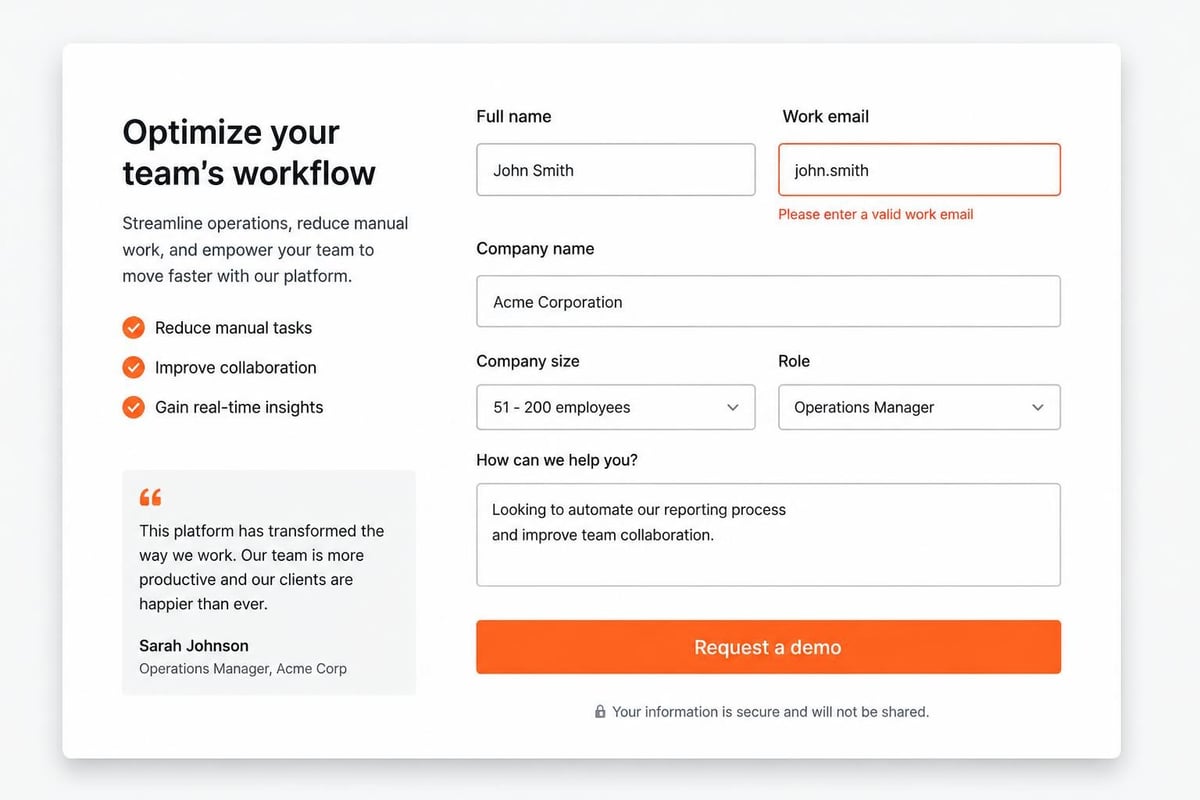
- Single-column layout for linear progression and mobile compatibility
- Adequate white space between fields (minimum 10-15 pixels)
- Clear visual hierarchy with heading size 24-32px and field labels 14-16px
- High-contrast submit buttons using action colors (typically green or orange)
- Inline validation with immediate feedback on input errors
- Logical field ordering from simple to complex inputs
Button copy significantly affects completion. Generic text like "Submit" converts 10-15% worse than specific action phrases. "Get My Free Guide," "Start My Trial," or "Request Demo" create clarity about what happens next. Button size should exceed surrounding elements by 20-30% to establish visual priority.
Trust signals placed near forms increase conversion by addressing security concerns. These include privacy policy links, security badges, testimonial snippets, or client logos. For B2B contexts, industry certifications or compliance statements (ISO, SOC 2) build credibility with enterprise buyers.
What Are Common Lead Form Implementation Mistakes
Technical and strategic errors prevent many forms from achieving their potential conversion rates. These mistakes range from basic usability issues to complex integration failures that corrupt lead data. Identifying and correcting these problems often doubles or triples form performance.
Frequent implementation failures:
- Excessive required fields that request non-essential information upfront
- Unclear value proposition that fails to explain the exchange
- Poor mobile optimization with unresponsive layouts or tiny tap targets
- Missing error messages that leave users confused about validation failures
- Broken CRM integration that loses leads or maps data incorrectly
- No confirmation feedback leaving users uncertain if submission succeeded
- Slow page load times that increase abandonment before form visibility
CRM mapping errors create significant downstream problems. When form field names don't match CRM property names exactly, data populates wrong fields or disappears entirely. A "Company" field might map to "Account Name" in one system but "Organization" in another, requiring precise configuration during integration setup.
Testing and Optimization Requirements
Systematic A/B testing identifies which form variations perform best for specific audiences. Test one variable at a time: field count, button color, headline copy, or form length. Each test requires minimum 100 conversions per variation for statistical significance, meaning low-traffic sites need longer testing periods.
Research on lead generation optimization shows that removing a single field can increase conversions by 10-20%, but the same change might reduce lead quality by 30% if that field provided crucial qualification data. The optimization goal balances quantity and quality based on sales capacity and lead value.
How Do You Integrate Forms with CRM Systems
Form-to-CRM integration enables automatic lead routing, scoring, and nurture sequence enrollment without manual data entry. The technical implementation connects form submission events to CRM contact creation or update actions through APIs, webhooks, or native platform integrations. Proper integration ensures zero data loss and maintains field-level accuracy across systems.
Standard integration workflow follows this sequence:
- User submits form triggering a POST request to the server
- Server validates data checking for completeness and format compliance
- System creates/updates CRM record via API call with mapped field values
- CRM applies lead scoring based on submitted information and behavioral data
- Automation triggers sending confirmation emails and notifying sales reps
- Lead routing executes assigning contacts to appropriate team members
For custom software development projects, integration complexity increases when forms need to capture project-specific details like technology preferences, timeline constraints, or budget ranges. Brytend CRM provides flexible form creation with conditional logic that adapts questions based on previous answers, ensuring developers capture all technical requirements during the initial contact. This customization prevents incomplete project briefings and reduces back-and-forth clarification cycles.

API-based integrations offer maximum flexibility but require development resources. Webhook implementations push form data to specified endpoints in real-time, enabling custom processing logic. Native integrations through platforms like Zapier or Make provide no-code options but may introduce slight delays (1-15 minutes) in lead delivery.
Data Validation and Quality Control
Form validation prevents incomplete or fraudulent submissions from polluting CRM databases. Client-side validation provides immediate feedback using JavaScript, while server-side validation ensures security by re-checking all inputs. Email validation should verify format and domain existence through SMTP checks or API services.
Advanced validation includes:
- Domain blocking to prevent competitor form spam
- Honeypot fields invisible to humans but filled by bots
- Rate limiting to stop automated submission attacks
- CAPTCHA implementation for high-value forms experiencing bot traffic
- Phone number verification through SMS confirmation codes
What Performance Metrics Define Form Success
Lead generation form examples must be evaluated against quantitative metrics that connect form performance to business outcomes. Conversion rate alone provides insufficient insight without lead quality, cost efficiency, and downstream sales metrics. A comprehensive measurement framework tracks forms from impression through closed revenue.
| Metric | Definition | B2B Benchmark | Calculation Method |
|---|---|---|---|
| Form conversion rate | Percentage of visitors who complete the form | 2-10% | (Submissions / Page Views) × 100 |
| Cost per lead | Total spend divided by leads generated | $50-$500 | Total Campaign Cost / Total Leads |
| Lead-to-SQL rate | Percentage becoming sales-qualified | 15-30% | (SQL Count / Lead Count) × 100 |
| Form abandonment rate | Users who start but don't finish | 40-80% | (Form Starts – Submissions) / Form Starts |
| Time to complete | Average duration from first field to submit | 30-90 seconds | Tracked via analytics events |
Field-level analytics reveal which specific inputs cause abandonment. If 40% of users exit at the "Company Revenue" field, that question may be too invasive for early-stage engagement. Removing it or making it optional tests whether the field is worth its conversion cost.
Multi-touch attribution connects form submissions to specific marketing channels and campaigns. A lead might have visited from organic search, returned via social media, and finally converted through a paid search ad. Attribution models (first-touch, last-touch, or linear) assign credit across touchpoints to optimize marketing spend.

What Advanced Form Techniques Improve Results
Sophisticated lead generation form examples employ behavioral triggers, personalization, and conditional logic to maximize both conversions and data quality. These techniques require marketing automation platforms or custom development but deliver measurable performance improvements.
Advanced form strategies:
- Dynamic field population pre-fills known contact data from cookies or URL parameters
- Conditional logic branching shows/hides fields based on previous answers
- Exit-intent triggers display forms when users show abandonment behavior
- Time-delayed popups appear after specific engagement duration (60-90 seconds)
- Scroll-triggered forms activate at specific page depth percentages
- Geo-targeting adapts form fields or offers based on visitor location
Smart forms remember returning visitors and skip previously answered questions, presenting only new fields needed for progressive profiling. This reduces perceived friction while maximizing data collection over time. A prospect who already provided company information only sees product interest and timeline questions on their second interaction.
Case Study: Multi-Step Form Redesign
A manufacturing automation provider replaced their 12-field single-page form with a 3-step progressive form containing identical questions. Step 1 requested email and company name. Step 2 asked about automation challenges and current equipment. Step 3 collected timeline and budget information.
The redesign increased conversion rate from 4.2% to 11.7% (179% improvement) while maintaining lead quality. Sales team feedback confirmed that leads provided more detailed challenge descriptions in the multi-step format. Form abandonment tracking showed 82% of users who completed Step 1 finished the entire sequence.
How Do B2B Forms Differ from B2C Approaches
Lead generation form examples vary substantially between business and consumer contexts due to differences in decision complexity, purchase value, and buyer behavior. B2B forms prioritize qualification and account-based data while B2C forms optimize for speed and volume. These distinctions affect field selection, form length, and integration requirements.
B2B form characteristics:
- Average 5-7 fields including company-specific information
- Job title and role required for decision-maker identification
- Company size, industry, and revenue fields enable account scoring
- Longer acceptable completion times (60-120 seconds)
- Integration with account-based marketing platforms
- Lead routing to specific sales territories or account executives
B2C form characteristics:
- Average 2-4 fields focused on contact information only
- Demographics like age, gender, or location for segmentation
- Faster completion expectations (15-45 seconds)
- Integration with email marketing and e-commerce platforms
- Automated nurture sequences rather than sales handoff
- Higher volume with lower individual lead value
The qualification threshold differs significantly. B2B forms must identify budget authority, purchase timeline, and technical requirements to prevent sales teams from pursuing unqualified prospects. Examples of effective B2B forms consistently include company size or revenue brackets to separate enterprise from small business leads.
Consumer forms emphasize immediate gratification and simplified experiences. A B2C e-commerce brand might only request email address for a discount code, while a B2B software company needs role, company, and use case details to provide relevant pricing information. The sales cycle length justifies the additional friction in business contexts.
What Compliance Requirements Affect Form Design
Legal and regulatory frameworks impose specific requirements on lead generation forms, particularly regarding data privacy, consent, and communication permissions. Non-compliance results in fines, legal liability, and reputational damage. Forms must balance conversion optimization with legal obligations across multiple jurisdictions.
Mandatory compliance elements:
- GDPR consent for EU visitors requiring explicit opt-in checkboxes
- CCPA disclosure for California residents with data use transparency
- CAN-SPAM compliance including physical address and opt-out mechanisms
- CASL requirements for Canadian contacts mandating express consent
- Privacy policy link accessible from all forms
- Data retention disclosure explaining how long information is stored
Pre-checked consent boxes violate GDPR requirements. Users must take affirmative action to agree to data processing and communication. The consent language must clearly explain what communications they'll receive and how data will be used. Vague statements like "I agree to terms and conditions" don't meet legal standards.
Industry-specific regulations add additional layers. Healthcare forms require HIPAA compliance with encrypted data transmission and signed business associate agreements. Financial services must follow GLBA requirements for data protection. Forms collecting payment information need PCI DSS compliance regardless of industry.
Manual vs. Automated Form Management Comparison
| Aspect | Manual Processing | Automated Integration |
|---|---|---|
| Data entry | Sales team manually inputs form data | Automatic CRM population on submission |
| Response time | 24-48 hour delay typical | Instant confirmation and routing |
| Error rate | 15-25% data entry mistakes | <1% errors with proper validation |
| Lead routing | Manual assignment by manager | Automatic based on rules and scoring |
| Scalability | Limited to team capacity | Handles unlimited volume |
| Cost per lead | $15-$30 in labor time | $0.50-$2 in platform fees |
Automated systems eliminate manual data transfer errors that corrupt lead records. A sales rep transcribing a phone number might transpose digits, creating permanent communication barriers. Automated validation ensures format compliance before database entry.
What Testing Protocols Optimize Form Performance
Systematic testing reveals which form variations perform best for specific audiences and offers. Testing methodology determines result validity and implementation confidence. Proper protocols include statistical significance requirements, isolation of variables, and segment-specific analysis.
Essential testing framework:
- Establish baseline metrics for current form performance (minimum 2 weeks of data)
- Identify single test variable (field count, button color, headline, layout)
- Create variation with only the tested element changed
- Split traffic evenly between control and variation (50/50)
- Run until significance (minimum 100 conversions per variation)
- Analyze segment performance by traffic source, device, and audience
- Implement winner and begin next test cycle
Common test variables include form length (5 fields vs. 3 fields), button copy ("Submit" vs. "Get Started"), headline value proposition, privacy badge placement, and field ordering. Each test requires separate implementation to avoid confounding variables that make results uninterpretable.
Mobile vs. desktop performance often reveals significant differences. A form that converts well on desktop might fail on mobile due to input size, keyboard behavior, or screen space limitations. Segment analysis identifies these platform-specific issues requiring separate optimization approaches.
How Do You Reduce Form Abandonment Rates
Form abandonment occurs when users begin entering information but leave before submission. Abandonment rates between 40-80% are typical, representing massive conversion opportunity. Reduction strategies address psychological barriers, technical friction, and trust concerns that prevent completion.
Proven abandonment reduction tactics:
- Reduce total field count by removing non-essential inputs
- Implement autofill support for browser password managers and contact data
- Provide real-time validation feedback before submission attempts
- Use conversational field labels that explain why information is needed
- Add progress indicators for multi-step forms showing completion percentage
- Enable social login options (Google, LinkedIn) for faster completion
- Display trust signals like security badges near submit buttons
Form recovery tools capture partial submissions through email retargeting. When users abandon forms after entering an email address, automated sequences remind them to complete submission with pre-filled data. This technique recovers 10-25% of abandoned forms in B2B contexts.
Technical abandonment factors include slow page load (>3 seconds), mobile usability issues, and validation errors that aren't clearly communicated. Optimization research demonstrates that inline validation reduces abandonment by 20-30% compared to submission-time error messages that frustrate users.
Lead generation form examples demonstrate that conversion optimization requires balancing data collection needs with user experience constraints through systematic testing and technical implementation. Success depends on field selection, design clarity, CRM integration accuracy, and compliance with privacy regulations. The right form configuration varies by industry, audience, and offer value, making continuous optimization essential. Brytend builds custom form solutions integrated with CRM systems that capture qualified leads while maintaining the technical flexibility your business requires for complex workflows and data structures.